Overview
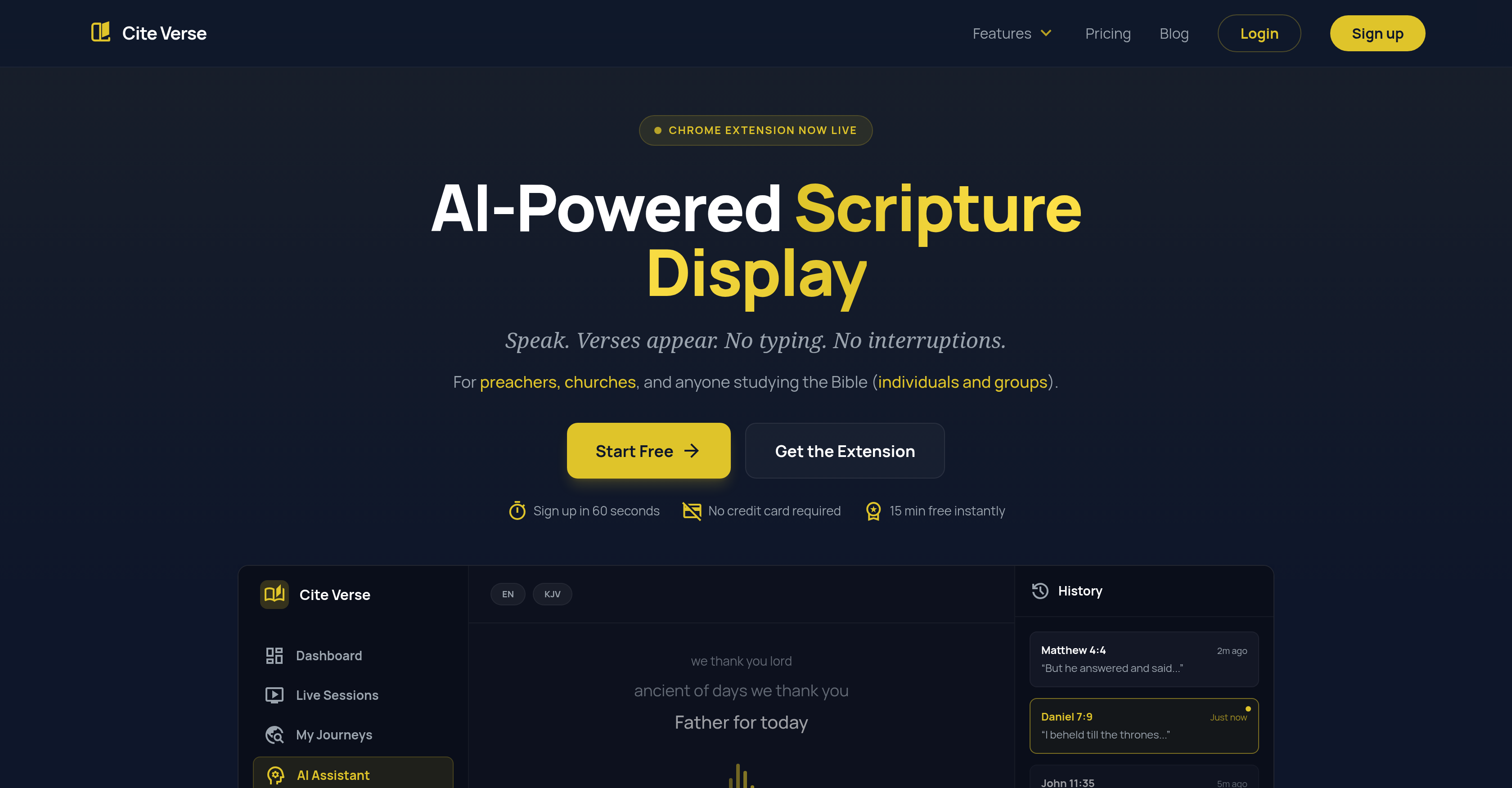
- Deliver sermons without interruption by displaying scripture instantly as you speak, using AI-powered voice recognition for real-time verse detection.
- Engage your entire congregation with professional live presentations, projecting verses on a main screen via the two-screen Presenter Mode.
- Transform any spoken audio into structured study notes automatically, with AI-generated titles, summaries, and exportable transcripts from every session.
- Prepare and study with complete focus using hands-free scripture lookup that eliminates typing during personal study or sermon prep.
- Broadcast and collaborate in real-time during group studies or remote sessions using the Live Sessions feature connected through the Chrome extension.
- Preserve and repurpose your teaching content with auto-saved, exportable Journeys available as PDF, markdown, or social cards.
Pros & Cons
Pros
- Voice recognition for Scripture
- Real-time verse display
- Seamless hands-free lookup
- Presenter Mode for projection
- Projects on multiple screens
- Chrome extension for real-time verses
- Records and saves sermons
- Session broadcasting
- Subscription packages variety
- Intuitive interface
- Easy setup
- Commitment-free start
- Two-screen setup
- Included countdown timer
- Live sermon support
- Personal Bible study enhancement
- Professional presentation support
- Session exporting feature
- Support for team collaboration
- Real-time audio transcription
- Various modes for usage
- Concurrent sessions allowance
- In-app follow-up
- High contrast display
- Automatic sermon curation
- Option for priority support
- Exportable 'Journeys'
Cons
- Subscription-based
- No offline functionality
- Chrome-dependent
- Limited to English language
- No support for other religions
- Exclusively tied to voice recognition
- Problematic with strong accents
- No version control for 'Journeys'
- Limited user interface customization
- Restricted to two-screen setup
Reviews
Rate this tool
Loading reviews...
❓ Frequently Asked Questions
Cite Verse is an AI-powered tool designed to enhance Bible study experiences for individuals, churches, and groups. It uses voice recognition technology to translate spoken scripture references into instantly displayed verses, offering a hands-free Bible lookup mechanism useful for study, worship sessions, and sermon preparation.
Cite Verse utilizes AI and voice recognition technologies to transcribe spoken scripture references and display the corresponding Bible verses instantly. It includes an AI Assistant that actively listens during sermon preparation or study sessions, displaying the mentioned scriptures and thereby eliminating the need for typing.
Voice recognition in Cite Verse plays a pivotal role as the core technology enabling the tool's functionality. It enables automatic transcription and display of spoken scripture references, providing a seamless, hands-free Bible lookup operation which is very useful during Bible study, sermon preparation, or worship sessions.
For sermon preparation, Cite Verse offers many useful features such as an AI-powered scripture display that responds to voice commands, an AI Assistant that listens and instantaneously displays the scripture being referenced, and a Journeys feature that records, curates, and auto-saves sermons for later exporting.
The Presenter Mode in Cite Verse projects verse references spoken during a sermon. It's a powerful tool that aids simultaneous communication on multiple screens effectively. This mode is characterized by its AI voice recognition that displays verses instantly as they are spoken, a high contrast display for maximum readability, and a two-screen setup with controls on the user's device and verses on the projector or TV.
The Chrome extension of Cite Verse is designed to capture any tab's audio and display the spoken verses in real-time. It allows users to connect their audio and follow in the app, thereby enhancing individual or group study experiences.
'Journeys' in Cite Verse are the recorded, curated, and auto-saved sermons which can be later exported by the users. These journeys effectively preserve the sermon content for future reference and use.
Yes, Cite Verse is designed to be used for group and church-wide Bible study sessions. In addition to individual study, it offers packages that cater to larger scales, including entire churches.
The real-time verse display feature in Cite Verse works through AI and voice recognition technology. When users speak a scripture reference, the AI instantly transcribes it and displays the corresponding verse on the screen. This capability also extends to audio captured via the Chrome extension.
Cite Verse operates on a subscription-based model. Users can subscribe to gain access to the AI-powered features and functionalities of Cite Verse.
Yes, Cite Verse offers a variety of package options designed around the user's needs. These range from packages for personal study to larger scales, such as entire churches. The subscription packages differ by available hours and specific features like the Presenter Mode or the number of concurrent sessions.
Cite Verse's interface is characterized by its intuitiveness and user-centered design. It aims to provide an easy setup and a smooth user experience for all users, regardless of technical expertise.
A commitment-free start in Cite Verse means that users can sign up and start using the tool without entering a long-term subscription or providing their credit card details upfront. It allows users to test the product before making a commitment.
The real-time verse display feature in Cite Verse is included to enhance the user's Bible study experience. Enabled by AI and voice recognition technology, it instantly displays sought-after Bible verses in real-time, offering a seamless, hands-free lookup method which is highly convenient for study, sermon preparation, or worship sessions.
The Chrome extension of Cite Verse allows users to capture the audio from any tab and see the verses being referenced in the audio in real-time. It significantly enhances the user's ability to follow and interact with the content, thus increasing their study effectiveness.
Cite Verse supports sermon recording via the 'Journeys' feature, which auto-saves, records, and curates sermons. Users can later review the recorded 'Journeys', helping them recall presented topics or export them for other uses.
Yes, Cite Verse provides broadcasting capabilities through Live Sessions. These allow users to broadcast from the Chrome extension and have the content followed up in the app.
Yes, sermons can be exported from Cite Verse. Using the 'Journeys' feature, users can access recorded and curated sermons and export them for later reference or use.
Yes, Cite Verse does offer a trial period. Upon signup, users can start for free and get 15 minutes to test it live, with no credit card or upfront commitment required.
Cite Verse offers considerable support for worship sessions through several features, including AI-powered scripture display that responds to voice commands and a real-time verse display feature. It also provides the Presenter Mode, which allows for the projection of Bible verses live during sermons, enhancing the collective worship experience.
Cite Verse is an AI-powered tool that translates spoken scripture references into displayed verses instantly. The tool listens to spoken scripture references during biblical study or sermon preparation and displays them. A key feature is its verse detection which displays the verse references mentioned in speech in real time. It also includes a Presenter Mode which projects verse references spoken during talks, ensuring effective communication on multiple screens.
Cite Verse enhances Bible study experiences through its voice recognition technology that translates spoken scripture references into displayed verses instantly. This feature eliminates the need for typing, offering a hands-free Bible lookup mechanism. Its AI Assistant also listens and displays the scripture referenced during study sessions, eliminating interruptions. Cite Verse also has a Chrome extension that captures any tab's audio, allowing users to view verses in real time.
The Voice Recognition feature in Cite Verse utilizes AI technology to listen, recognize, and detect spoken scripture references. It then translates these references into displayed verses on users' screens, allowing them to visualize scripture without requiring manual search or input.
Cite Verse aids in sermon preparation by providing a seamless way for preachers to reference scripture. Through its voice recognition technology, preachers can speak scripture references and they are instantly displayed on-screen. This streamlines sermon preparation, eliminates interruptions and the need for typing, and facilitates hands-free scripture lookup.
The Presenter Mode in Cite Verse allows for live projection of spoken scripture references during a sermon or group study. When a verse reference is spoken, the AI in Presenter Mode recognizes and instantly projects it on to multiple screens. This not only provides visual support to the scripture being spoken but also supports professional presentations, ensuring effective communication.
The Cite Verse Chrome Extension works by capturing a tab's audio and displaying the verses that are spoken in real time. Users can speak scripture verses, and the extension will listen, recognize, and display these verses onscreen. This supports individual study by facilitating hands-free scripture lookup.
The 'Journeys' feature in Cite Verse refers to the tool’s ability to record, curate, and auto-save sermons. This feature allows for the archiving of sermons for future reference or study, with the added functionality for users to export these 'Journeys' according to their needs.
The 'Live Sessions' feature in Cite Verse allows users to broadcast directly from the Chrome Extension. Other users can then follow along on the app, enhancing the real-time teaching or learning experience.
Cite Verse offers three primary subscription packages. The 'Individual' package, for personal study and sermon preparation. The 'Pro' package, which adds additional features like Presenter Mode, two-screen setup, and increased concurrent sessions. The 'Max' package enables church-wide usage with unlimited concurrent sessions and priority support.
Cite Verse offers users a free trial period. Users can sign up and start using Cite Verse for free in the beginning, allowing them to test the service before deciding on a subscription.
'Preacher Mode' is synonymous to the Presenter Mode in Cite Verse. It allows preachers or speakers to simply speak verse references during their sermon and have them displayed live on screen for the congregation to follow along. It supports professional presentations by displaying Bible verses live as the sermon progresses.
With the Two-screen Setup feature in Cite Verse, users have control on one device, while the verse is displayed on another screen such as a projector or a TV. This facilitates smooth running of live sermons or group studies by separating control and presentation screens, thereby ensuring efficient and non-disruptive scripture referencing.
The Countdown Timer in Cite Verse serves as an additional tool for service transitions. It provides a visible countdown for users to manage the timing of their sermons or study sessions more effectively.
Cite Verse benefits team collaboration through features such as Live Sessions and the Presenter Mode. Live Sessions allows users to broadcast directly from the extension, and team members can then follow along on the app. The Presenter Mode projects spoken scripture references live during team or group study, ensuring everyone is on the same page.
The AI-powered scripture display in Cite Verse works by utilizing voice recognition technology. As the user speaks out scripture references, the AI scans and understands these references and instantaneously displays the corresponding scriptures on the screen.
Yes, Cite Verse's AI-powered verse detection identifies verse references spoken in real time and instantly displays the corresponding verse. It focuses on providing a smooth, seamless bible study experience by eliminating the need to manually search for referenced verses.
The Bible Presentation Software used by Cite Verse is a blend of technologies including Artificial Intelligence and Voice Recognition. It allows users to speak out scripture references which are instantly recognized and displayed by the system. The software is implemented through various features of Cite Verse such as the Presenter Mode and Live Sessions.
Information from Cite Verse can be exported through the 'Journeys' feature, which allows users to export their recorded, curated, and auto-saved sermons for future reference or other uses.
Unlimited sessions in Cite Verse refers to the unlimited concurrent sessions provided in the 'Max' subscription package. This feature allows for multiple simultaneous connections or sessions, making it ideal for larger groups, churches or teams.
The Priority Support feature in Cite Verse ensures expedited assistance to users. This feature, included in the 'Max' subscription package, provides users with priority assistance from the support team, ensuring faster response times and solution delivery for any issues or concerns raised by the user.
Pricing
Pricing model
Free Trial
Paid options from
$22.50/month
Billing frequency
Monthly