Overview
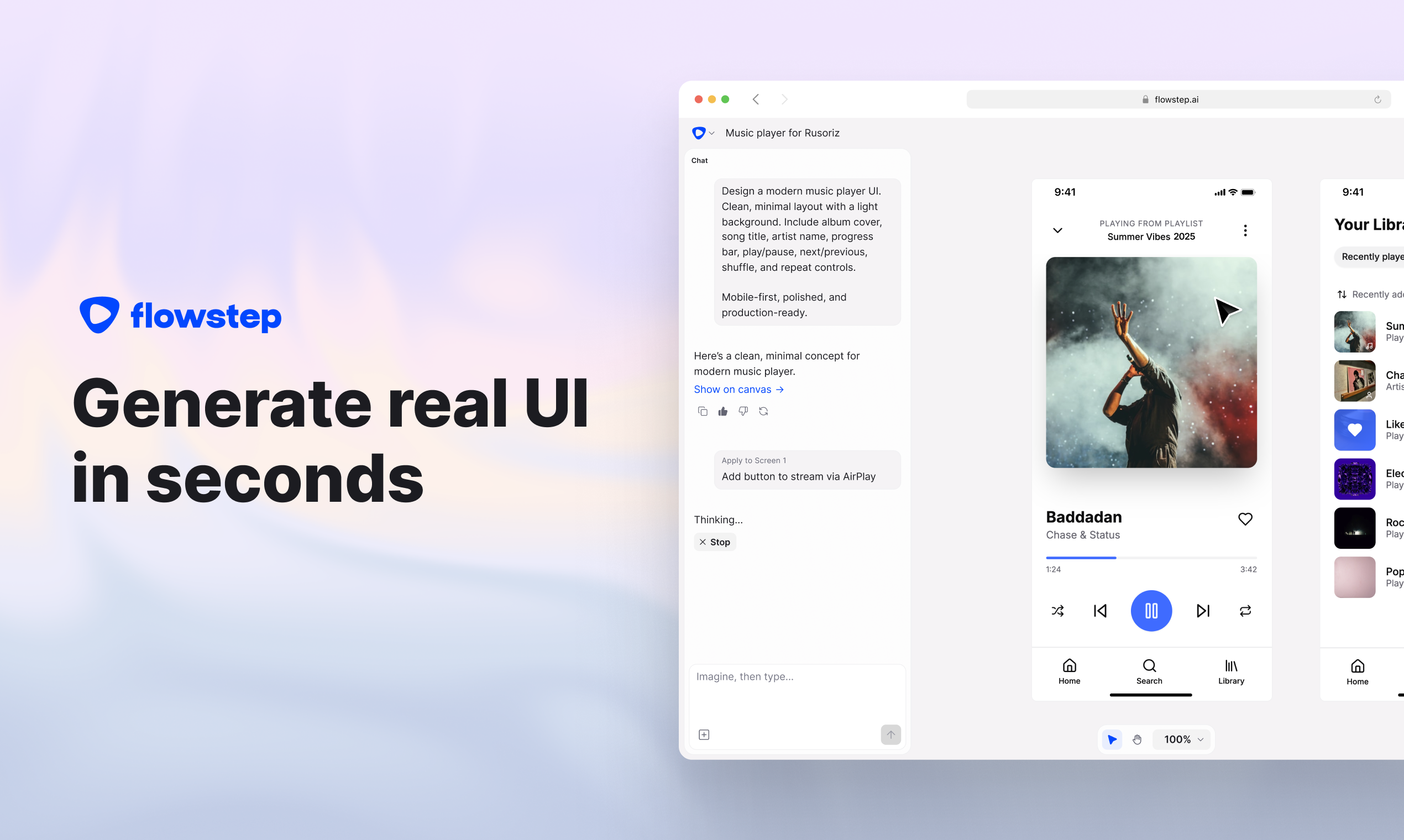
- Transform a text prompt into up to 10 production-ready UI screens in minutes using the Imagination Algorithm, moving from idea to visual design instantly.
- Edit any design element through simple chat commands, refining layouts and components without learning complex design tooling.
- Copy any screen or component directly into Figma with standard keyboard shortcuts (⌘C/⌘V), eliminating the need for plugins or manual recreation.
- Export clean, production-ready code in React, TypeScript, and Tailwind CSS formats, providing engineers with developer-ready components.
- Build complete user experiences by generating diverse, connected screens like login pages, dashboards, and profiles simultaneously on an infinite canvas.
- Incorporate precise context by attaching PRDs, inspiration images, or reference links to guide the AI toward your specific vision.
- Work seamlessly with your team through real-time collaboration, seeing live cursor movement, synced edits, and sharing instant feedback.
- Maintain full data privacy with security measures that ensure your inputs and designs are never used to train AI models.
Pros & Cons
Pros
- Generates UI designs instantly
- Infinite canvas
- No complex design tool knowledge required
- Simultaneous multi-screen generation
- Real-time collaboration
- Design using references
- Copy/paste to Figma
- Designs are in sync with code
- Export code or view in the canvas
- Great for beginners and professionals
Cons
- No offline functionality
- Limited manual edits capability
- Doesn't build the backend functionality
- Can't pre-set theme or design system
- No localization
Reviews
Rate this tool
Loading reviews...
❓ Frequently Asked Questions
Flowstep is an AI-powered design tool that simplifies the creative process by generating user interface designs in seconds. It serves as a platform for collaboration allowing design teams to work together in real-time. It integrates with Figma for easy transference of designs and also provides clean, production-ready code. The tool is designed to help both experienced designers as well as those new to the field.
Flowstep works by using an Imagination Algorithm. Users simply describe what they want, and the algorithm generates the design on the 'infinite canvas'. The tool offers the flexibility for users to manually edit their design or let the AI do it.
The 'infinite canvas' in Flowstep is the design space where the AI brings to life the user's descriptions. Users can describe their desired design and watch it materialize on this 'infinite canvas'.
Users in Flowstep have full control to customize their designs. They can choose to manually edit their design, focusing on their ideas without needing to learn complex tooling.
Flowstep can generate diverse types of screens simultaneously including login screens, dashboards, profile pages, and more. This makes it possible to create full experiences in one go.
With Flowstep, real-time collaboration is made possible. Design teams can work together, see cursors move, keep edits in sync, and share feedback instantly. This promotes seamless coordination and swift execution of design tasks.
In Flowstep, users can attach a PRD to give context, upload an image for inspiration, or paste a link for reference. This provides more customization options and helps generate designs that closely match the user's vision.
Flowstep integrates with Figma in a simple and straightforward manner. Users can simply select any design in Flowstep and copy it directly into their Figma file without the need for any plugin or chrome extension.
Flowstep simplifies the design to code process by offering the option to export clean, production-ready code that engineers can use. This facilitates a smooth transition from design to code stage.
Flowstep supports a variety of coding languages for export. These include React, TypeScript, and Tailwind CSS making it versatile for different coding requirements.
Flowstep is designed to aid both experienced designers who want to streamline their workflow and dreamers who strive for fast product shipping. With its easy-to-use features, it is suitable for users with varying levels of design expertise.
Flowstep takes stringent measures to ensure data privacy. They do not use personal data to train AI models, nor do they allow their LLM providers to do so. Aggregated and anonymized feedback may be used to improve outputs without endangering personal data.
To generate a UI design with Flowstep, simply describe what you want to see. The system's Imagination Algorithm will take your description and generate a corresponding design in seconds on the 'infinite canvas'.
The Imagination Algorithm used by Flowstep is an advanced AI method that generates user interface designs based on user descriptions. This allows users to quickly create designs by simply describing what they want.
Yes, in Flowstep, users can manually edit their designs. Despite the AI-generated design, the tool allows flexibility for users who may wish to tweak or customize their designs further.
Yes, in Flowstep, users can attach a PRD, images, or links as references. These can be useful in providing additional context for the design, offering inspiration, or serving as design benchmarks.
Designs from Flowstep can be incorporated into Figma through a simple copy-paste mechanism. No plugin or chrome extension is needed - users just need to select any design in Flowstep and copy it directly into their Figma file using keyboard shortcuts.
Yes, Flowstep supports real-time collaboration, allowing team members to work together irrespective of their location. This allows for instant feedback sharing, syncing of edits, and simultaneous movement of cursors.
Yes. Flowstep provides clean, production-ready code which is easy to understand and can be directly used by engineers. The tool supports export in React, TypeScript and Tailwind CSS formats.
Flowstep ensures the security of user data through strict security measures. Personal data is not used to train AI models and stringent privacy policies are in place. A detailed Privacy Policy is available for users to review on their website.
Flowstep's Imagination Algorithm creates UI designs based on user descriptions. It brings design ideas into reality on the canvas in seconds, eliminating the need for advanced knowledge of complex design tools.
Yes, with Flowstep, users have full control over their designs. They can manually modify and tweak designs to better align with their idea. No complex tooling knowledge is required.
Yes, Flowstep supports real-time collaboration, allowing design teams to simultaneously work on the platform. It keeps edits in sync and facilitates instant feedback sharing among team members.
Flowstep has robust measures in place to ensure data privacy and security. They abide by stringent protocols to protect user data from unauthorized access.
Flowstep has made it easy to integrate with Figma. Users can select any design in Flowstep and copy it straight into their Figma file without needing any plugin or chrome extension.
Flowstep's platform supports the simultaneous creation of multiple screens like login screens, dashboards, profile pages, and more. It empowers users to craft comprehensive user experiences in one go.
Yes, Flowstep's integration with Figma allows users to directly import designs from Flowstep into their Figma files without the need of any plugin or chrome extension.
Yes, Flowstep enables users to add references to their designs. Users can attach a PRD, upload inspiration images, or paste reference links, providing more context and specific inspiration for their designs.
No special knowledge is required to use Flowstep. All you need to do is describe what you want, and Flowstep handles the design process. No need to delve into complex functionality.
Flowstep supports code export in React, TypeScript, and Tailwind CSS formats.
Yes, you can start using Flowstep for free. However, for additional features and services, you can check their full pricing plans.
Flowstep is designed to serve both experienced designers and dreamers who aim for speedy product shipping. It can benefit anyone in product management, software development, or design who is looking for faster, streamlined design processes.
Flowstep's AI-powered platform enables users to create a variety of user experiences, from login screens to dashboards and profile pages. It empowers users to craft multifaceted UX designs all in one place, making product design more efficient and cohesive.
Yes, Flowstep features real-time editing which allows users to make live changes to their designs. This ensures that they can adjust their designs as per their requirements and review these changes in real time.
Flowstep seamlessly allows for user feedback. The platform's support for real-time collaboration means teams can share feedback instantly, keeping everyone in the loop and ensuring designs meet the desired specifications.
Yes, Flowstep supports generation of diverse screens. Users can create logins, dashboards, profile pages, and much more simultaneously, providing a holistic view of the product.
Incorporating references into designs in Flowstep involves attaching a PRD, uploading inspiration images, or pasting reference links to provide more context and specific inspiration.
Yes, designs created with Flowstep can be made production-ready. The tool exports clean, ready-to-use code in React, TypeScript, and Tailwind CSS formats, ensuring the designs are primed for implementation.
Pricing
Pricing model
Freemium
Paid options from
$15/month
Billing frequency
Monthly
Related Videos
Flowstep AI | The Future of App Wireframing & UI Design! | No-Code UI/UX Tool | AI LedgerX
AI LedgerX•65 views•Sep 10, 2025