
Overview
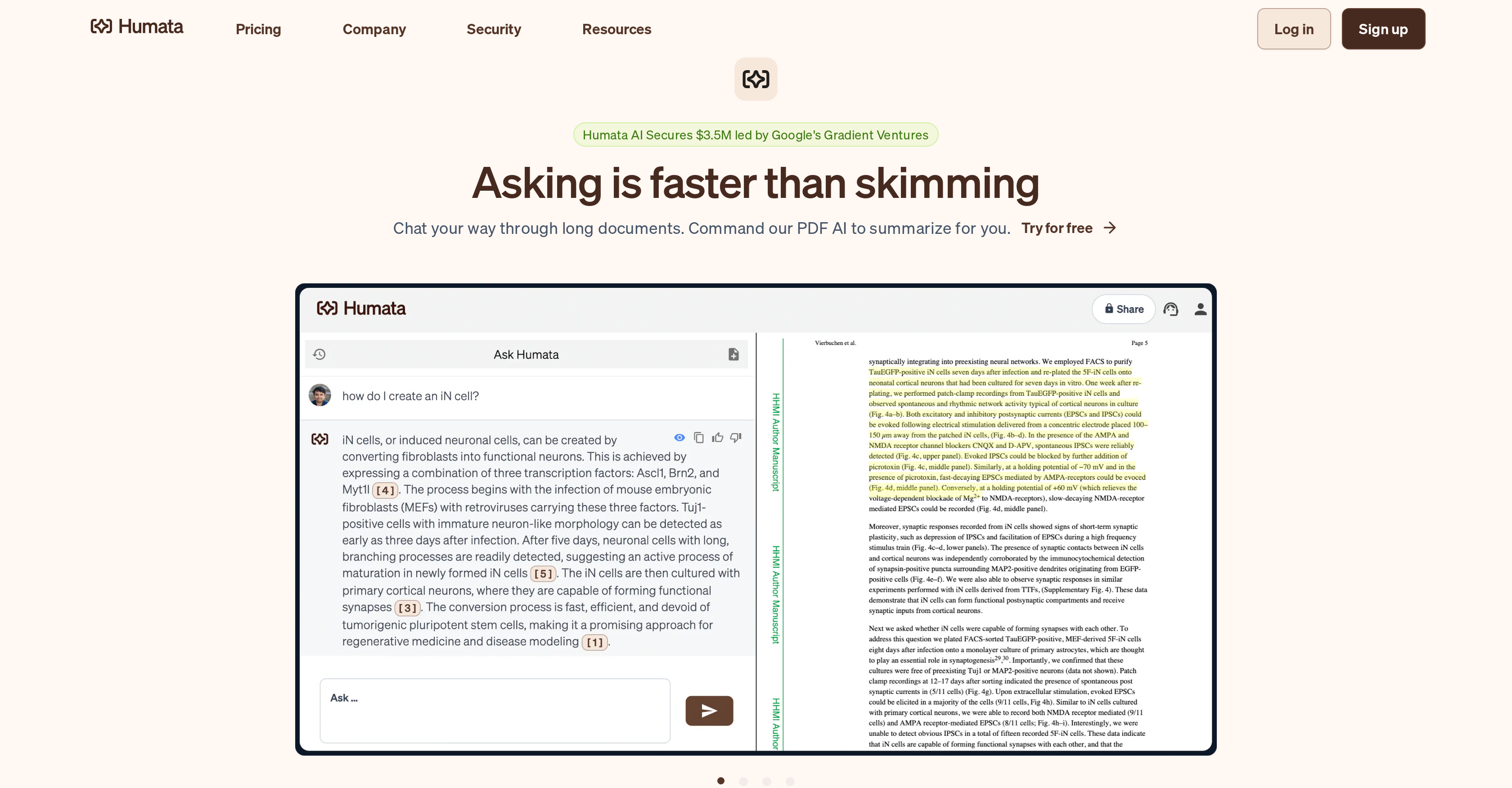
- Understand complex documents 100 times faster with AI-powered summarization and synthesis that distills key points from technical papers and long-form content.
- Get instant, accurate answers to your questions from within your uploaded files using real-time Q&A capabilities that work like ChatGPT for your PDFs.
- Trace every insight back to its source with highlighted citations, ensuring the trustworthiness and verifiability of all extracted data and analysis.
- Create new writing and reports 10 times faster by having the AI automatically generate content based on your existing documents and research files.
- Securely analyze sensitive or siloed documents with enterprise-grade 256-bit encryption and role-based security controls for team collaboration.
- Embed powerful document Q&A directly into your website, allowing visitors to instantly extract answers from your published materials without leaving the page.
- Adjust your subscription plan at any time with flexible pricing that scales from individual students to large teams, ensuring you only pay for what you need.
Pros & Cons
Pros
- File Q&A capabilities
- Instant answers
- 100x faster research
- Summarizes complex documents
- Data extraction from files
- Report creation
- Quick legal document analysis
- Automatically generates new writing
- Free and premium versions
- Embedded into webpages
- Single sign-on
- Technical papers evaluation
- Long-form content analysis
- Document comparison
- Response search
- Citation highlighting
- Role-based security options
- Enterprise-grade encryption
- Various pricing tiers
- Unlimited file uploads
- Cited links in answers
- Unlimited questions
- Webpage embed
- Secured private cloud
- Encrypted at rest
- Department & folder level permissions
- OCR images & scanned text
- Response personalization
- Flexible subscription plan
- Free trial version
- Can modify subscription anytime
- User-friendly interface
- Can handle long technical papers
Cons
- Limited to text documents
- No voice interaction
- No multilingual support
- No offline mode
- Potential privacy issues
- Limited free version
- Usage-based pricing
- Lacks real-time collaboration
- Slow with large files
- Complex setup for non-techies
Reviews
Rate this tool
Loading reviews...
❓ Frequently Asked Questions
Humata's key features include AI insights, data processing, file analysis, document summarization, interactive summarization, chat-based AI, long-form content analysis, technical papers evaluation, web embeddable, answer extraction and single sign-on functionality among others.
Humata uses a high-end AI model, comparable to GPT 4.0, specifically designed for processing and evaluating documents and providing fast, accurate responses.
Humata reads every file you upload and generates responses based on the content of those documents. It can extract valuable data, provide answers to queries, create reports, analyse complex documents and even offer real-time Q&A capabilities.
Humata is highly effective at summarizing documents. Its AI is capable of learning, summarizing, synthesizing, and extracting data, making it possible to understand complex documents up to 100 times faster.
Humata has a multi-tier pricing structure. It includes a free plan with access to basic features, a student plan priced at $1.99 per month, Expert plan for $9.99 monthly for more features and up to 3 users, and the Team plan that costs $49 per user per month and offers more advanced features.
Humata utilizes enterprise-grade 256 bit SHA encryption to secure user files. It offers role-based security options where access to files can be limited per role on the team. It also provides single sign-on functionality with Okta, Google, or SAML.
Yes, Humata can help write papers more efficiently. Its capabilities include the automatic creation of new writing based on an existing file, enabling users to produce papers up to 10 times faster.
Humata enhances traceability of insights by highlighting citations. This feature provides the ability to trace the source of the insights by linking them back to the appropriate sections in the source documents.
Yes, Humata's functionality can be seamlessly embedded into webpages. This feature allows people to easily access the powerful document processing and analysis capabilities of Humata directly from within a website.
Absolutely, Humata can provide insights from siloed documents. It can analyse and extract valuable data from any uploaded file and then answer questions based on that information.
Humata can analyze legal documents rapidly and effectively. Its AI insights tool can extract crucial information, allowing users to compare documents, find specific answers, and generate summaries or reports based on the analysed documents.
Humata is likened to having ChatGPT for PDFs. This means it provides similar interactive, context-aware, and real-time conversation capabilities making it easy for users to ask and get answers about their data.
Yes, Humata does offer a premium version, available at $4.99 per month. This version provides users with added benefits and more advanced features.
Humata's Q&A capabilities allow the user to pose questions related to the uploaded documents and receive instantaneous responses. This allows users to swiftly extract relevant information from their files.
Humata excels in analyzing long-form content. It can swiftly navigate long, complex documents, highlight significant sections, find specific information, and generate useful summaries or comparison reports.
Yes, users can interact with Humata's AI to modify the generated summary until they are satisfied, creating a personalized summary faithful to the user's requirements.
Absolutely, Humata provides single sign-on functionality that keeps user's passwords safe with their team's identity provider. This way, it helps in ensuring seamless access and increased security.
Humata's subscription plans are highly flexible and can be adjusted as per the users' needs. Whether it's for upgrading to fit the needs of a growing team or downgrading as circumstances change, users can modify their subscription at any time.
Humata can process a wide variety of documents. It can handle technical papers, long-form content, and even analyse legal documents quickly and efficiently.
Yes, Humata does offer a free version that allows you to explore the range of functionalities it provides.
Pricing
Pricing model
Freemium
Paid options from
$1.99/month
Billing frequency
Monthly
Related Videos
🗃️ Humata AI - Your Personal AI Assistant for Document Management
IT reviews•1.4K views•Apr 18, 2024