Overview
- Turn meeting recordings into actionable tasks and summaries instantly with AI-generated transcripts and automatic action item extraction.
- Find any document or answer across PDFs, docs, and notes using semantic search that understands the meaning of your query.
- Create and organize tasks using plain English commands, with AI breaking down complex projects into actionable subtasks.
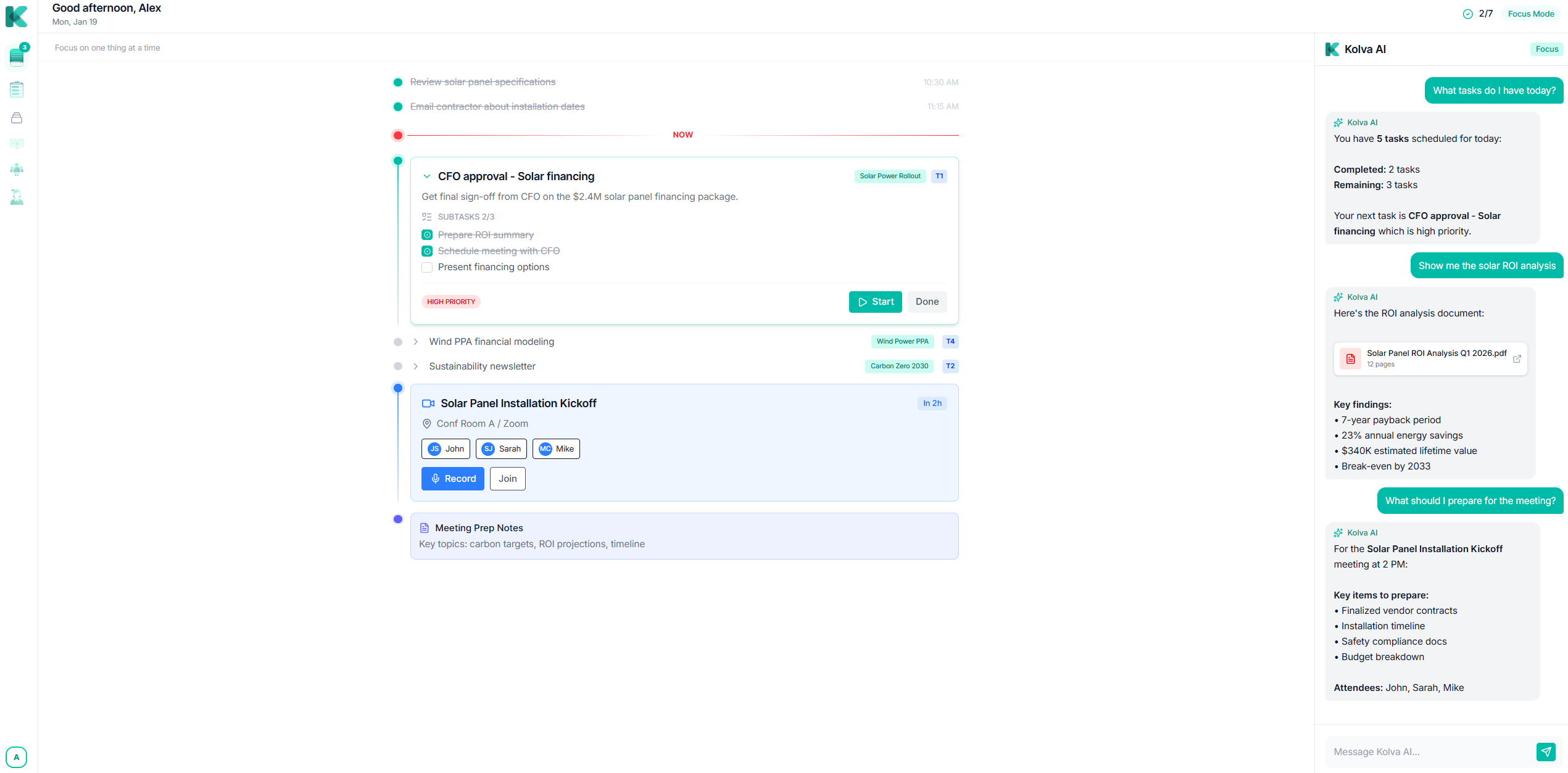
- Plan your day on a unified canvas with Focus Mode, which prioritizes tasks and meetings to help you work on one thing at a time.
- Get a personalized schedule as the AI learns your work patterns and writing style to intelligently arrange and rearrange tasks.
- Pay only for the AI you use with a pay-per-use credit model, keeping core features free and costs transparent.
Pros & Cons
Pros
- Unified workspace
- Intelligent timeline
- Smart task organization
- Summarizes meetings
- Extracts key action items
- Natural Language Search
- Semantic document search
- Conversational Interface
- Pay-per-use pricing
- Task recommendations
- Work pattern recognition
- Task scheduling
- Adaptive learning
- Document upload and organization
- Semantic search across documents
- Natural language interface
- Workflow optimization
- Project breakdown into subtasks
- Commands in plain English
- Fast responses for everyday tasks
- Deep reasoning for complex tasks
- Semantic embeddings for search
- Multi-modal operations
- Detailed implementation steps generation
- Intelligent meeting action item extraction
- Intelligent scheduling
- Learning your writing style
- Learning your work patterns
- Nuanced document analysis
- Intelligent query handling
- Credit card not required
- No subscription required
- Meeting transcription service
- Document search in plain English
- Summarizing complex documents
- Shortcuts for faster work
- Task creation in natural language
Cons
- No subscription but pay-per-use
- Dependent on the internet connection
- Complexity in breaking down tasks
- Inability to understand nuanced language
- May struggle with task prioritization
- Transcription accuracy dependent on audio quality
- Semantic search may miss context
- Document upload and organization potentially slow
Reviews
Rate this tool
Loading reviews...
❓ Frequently Asked Questions
Kolva offers AI-powered task management that allows users to create tasks, search for tasks, and organize them based on user commands. The Task Intelligence feature allows Kolva to manage tasks based on user inputs, responding to natural language commands to generate tasks and manage them according to user needs and preferences.
Tom Lee
🛠️ 1 tool
wrote:Gemini 3 and Claude Hauiki 4.5 are AI models employed by Kolva. Gemini 3 is primarily responsible for task creation, document analysis, meeting summaries, and responding to natural language commands. Claude, on the other hand, handles complex reasoning tasks, analyzes relationships between documents, and can help re-write notes to format them nicley as well as fill in missign information.
Task Intelligence in Kolva works by processing user inputs and managing tasks accordingly. The AI interprets natural language commands to generate and organize tasks per user needs and preferences. It can break down goals into actionable subtasks with estimates based on user command.
Yes, Kolva can organize your documents by allowing you to upload, search, and organize your documents using its Smart Documents feature. It uses AI-powered search to find user documents quickly and efficiently.
Yes, Kolva does offer meeting recording and transcription. It includes a Meeting Recording function that offers AI-generated transcripts and summaries of discussions. This means any recorded meetings can be transcribed and key points summarized by the AI.
Kolva extends its functionality by offering integrations with external services. While specific integrations are not listed explicitly on their website, it does mention email among other tools.
Yes, Kolva is designed to adapt and learn from your work patterns and writing style over time, providing a personalized and efficient user experience.
Tom Lee
🛠️ 1 tool
wrote:Kolva operates on a pay-per-use model. This means you only pay for when you use the AI, with AI operations costing credits. The website lists costs for different AI operations like Meeting AI, Document AI, and AI Queries. Basic features are free. AI operations cost credits from your balance. Users start with a $6 Free AI Credit.
Kolva offers planning tools via its Focus Mode. This mode allows users to plan their day in a unified interface, focusing on one task at a time to improve productivity.
Yes, Kolva offers the capability for users to control it using natural language commands. The system is designed to understand and act on instructions given in plain English, letting users create tasks, search for tasks or documents, and ask for help.
Tom Lee
🛠️ 1 tool
wrote:Email integration is on the roadmap
Intelligent scheduling in Kolva is handled by Claude AI. Based on the users' work patterns and task requirements, Claude AI arranges tasks in an optimal manner, intelligently rearranging schedules where need arises.
Yes, Kolva can summarize and analyze your documents. Using the Document AI, it can analyze, summarize, and semantically embed documents for search. This includes processing PDFs, docs, and notes to find answers and extract key information.
No, there is no subscription required to use Kolva. It operates on a pay-per-use model where users are only charged when they use AI features.
Kolva enhances your productivity by leveraging AI models to manage tasks, transcribe meetings, organize documents, and learn your work patterns and writing style. It offers tools like Focus Mode for planning, AI Command Bar for quick queries, and intelligent scheduling to optimize your time and tasks.
Yes, you can create tasks using Kolva. Through natural language commands, you can describe what you need and Kolva will generate tasks accordingly, including establishing deadlines and adding them to your schedule.
Uploading and organizing documents in Kolva is handled by its Smart Documents feature. Users can upload documents which the system then organizes, and the AI-powered search feature allows efficient retrieval of these documents when required.
'Focus Mode' in Kolva is a planning tool that lets users plan their day in one unified interface. It supports focusing on one task at a time, improving productivity. Details of how it works are not provided on their website.
Claude AI in Kolva is designed to handle complex reasoning tasks. It exhibits deep reasoning skills and nuanced analysis, breaking down projects, analyzing relationships between documents, and assisting with intelligent scheduling.
Claude AI provides document relationship analysis in Kolva. It evaluates the semantic relationships between documents to provide a cohesive, intelligent, context-aware document management system.
Kolva is a cutting-edge Artificial Intelligence (AI) productivity assistant that aids professionals in effectively managing tasks, transcribing meetings, and organizing and searching documents. It uses advanced AI models, Gemini 3 and Claude, to offer intuitive, personalized solutions for task management, meeting transcription, document organization, and search. You pay only for the AI features you use, adopting a pay-per-use model.
Focus Mode in Kolva is a unique feature that helps you plan your day efficiently with an intelligent timeline. It presents your tasks, meetings, and notes in a unified workspace and employs AI to prioritize what matters the most. This empowers you to focus on one thing at a time, ensuring maximized productivity.
Smart Task Management in Kolva is a powerful feature that harnesses AI to manage your tasks. It allows you to create and organize tasks using natural language. By asking Kolva the question like 'What should I work on today?', it gives you intelligent recommendations based on your priorities and deadlines.
Kolva's Meeting Intelligence is an innovative feature that transcribes meetings and generates AI-powered summaries and transcripts. It extracts the key action items from your recorded meetings automatically and these can be effortlessly turned into tasks.
The Document Search feature in Kolva is a sophisticated tool that helps you upload and efficiently organize your documents. The platform enables you to perform a natural language search across your documents. When you query its system with something like 'What was the ROI in the solar analysis?', it provides you with immediate answers and source references.
As a part of Kolva, the AI Assistant is a conversational interface that comprehends your work context. It enables you to create tasks, locate documents, prepare for meetings, and obtain help, all through natural conversation. You just tell it what you need in plain English and it processes your requests.
In the context of Kolva's operations, Gemini and Claude AI have distinct roles. Gemini 3 is a model developed by Google and handles most of the AI operations, including task creation, document analysis, meeting summaries, and natural language commands. Claude, developed by Anthropic, is a fast model used for complex reasoning tasks. It conducts project analysis, examines the relationship between documents, and performs intelligent scheduling.
Kolva implements a pay-per-use pricing model, signifying that there are no subscriptions. All features are available to use for free, but AI operations such as AI transcription, document analysis and natural language querying across your knowledge base cost credits. A minimal cost is associated with each of these AI operations and the users are directly charged on the basis of the number of operations or queries they perform.
Yes, Kolva has an adept capacity to manage project breakdown into subtasks. When you describe a goal, its AI adapts and breaks it down into actionable subtasks providing detailed implementation steps.
Kolva employs advanced AI technology to learn and adapt to your work style over time. It learns your preferences, writing style, and work patterns as it is used more and more. Based on this continuous adaptive learning, Kolva optimally suggests tasks scheduling and improves how it assists you.
In Kolva, you can upload documents in multiple formats for search and organization. These formats include PDFs, docs, and notes among others.
Yes, one of the remarkable offerings of Kolva is its natural language interface. It allows you to interact with it using plain English. For instance, you can handle operations like creation and organization of tasks, document search and meeting preparation through simple commands like 'Create a task', 'Find documents', 'Prepare for meetings', etc.
Semantic Search in Kolva is a smart feature that leverages language understanding to search for relevant information across various document formats like PDFs, docs, and notes. This relational and contextual search offers results based on the meaning and relevance of the search request, regardless of whether the actual phrase appears in the document.
The AI operations in Kolva that require credits are AI transcription, document analysis, and natural language querying across your knowledge base. Meeting transcription, summary generation, and action item extraction are priced per hour. Document analysis, summarization, and semantic embedding for search are charged per document. Natural language questions across your entire knowledge base are charged per query.
Kolva ensures workflow optimization by employing advanced AI to provide solutions tailored to individual work patterns. It provides a unified canvas where you can plan your day with prioritized tasks, meetings, and notes. Additionally, it can break down complex tasks into manageable subtasks, intelligently schedule them based on your individual work pattern, and continuously adapt to your preferences over time.
Yes, there is a free version of Kolva. However, AI operations such as AI transcription, document analysis, and natural language queries across your knowledge base require credits. Kolva offers a pay-per-use model, charging only for the AI features you use.
Kolva's AI technology helps in task scheduling by learning your work patterns. It then suggests optimal task scheduling based on your unique patterns and preferences, thus providing a highly personalized solution.
Yes, Kolva provides AI-generated summaries of your documents. When you ask it to summarize a particular document, it comprehensively analyzes the document, extracts the essential information, and presents it as a clear, concise summary.
Kolva integrates with your emails and other apps such as Claude MCP and more to offer seamless operations across platforms. However, the exact details of how Kolva integrates with specific applications or platforms aren't provided.
As per the data available, Kolva does offer special promotions such as the launch offer, which includes an additional bonus of $2.50 on top of the provided $6 free credits, using the code TAAFT25. This promotional offer, however, ended on February 2 as per the information on their website.
Pricing
Pricing model
Freemium
Paid options from
$0.01/unit
Billing frequency
Pay-as-you-go
Refund policy
No Refunds