
Overview
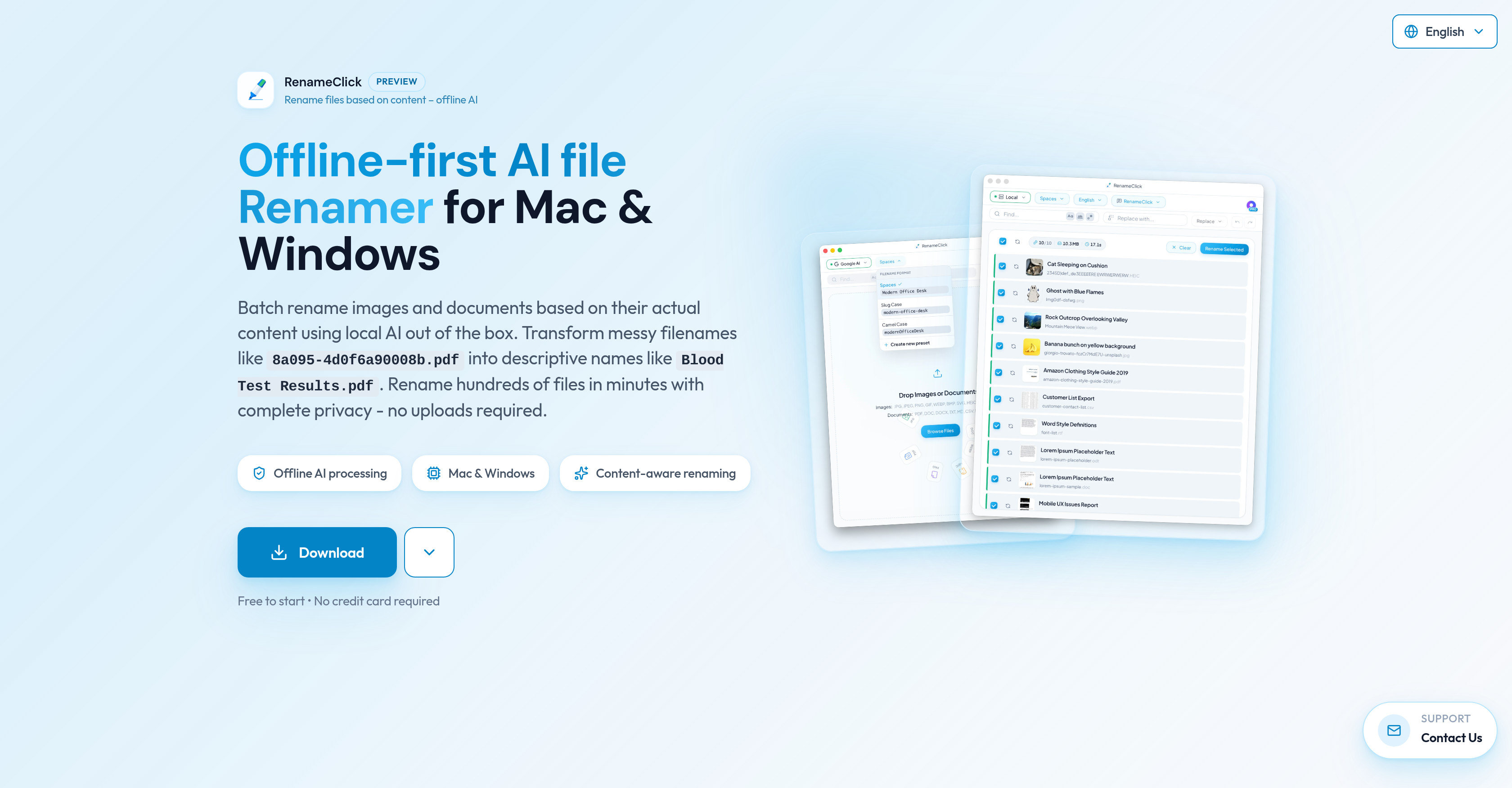
- Instantly find any file by transforming cryptic names into descriptive ones using AI that analyzes your actual file content
- Keep sensitive documents completely private with offline-first processing that runs locally—your files never leave your computer
- Organize hundreds of images and documents in minutes with batch processing for JPG, PNG, PDF, DOCX, and dozens of other formats
- Apply your own naming rules or extract specific data with custom AI prompts that enforce consistent conventions across your workflow
- Rename files directly in Google Drive or iCloud without downloading them first through seamless cloud storage integration
- Generate descriptive names in multiple languages to maintain organized archives for international projects and teams
Pros & Cons
Pros
- Offline functionality
- Data privacy assurance
- Compatible with Mac and Windows
- Recognises common image and document formats
- Multi-language file name support
- Free limited service available
- Upgrade to unlimited file renaming
- Batch renaming feature
- Lifetime updates for Pro users
Cons
- Limited free file renames
- No Linux support
- Large Out of the box local LLM size (~4GB)
- Non-English languages less accurate
- No adult content renaming
- No support for uncommon formats
Reviews
Rate this tool
Loading reviews...
❓ Frequently Asked Questions
RenameClick is an offline AI tool designed to rename files according to their content. Operating in both Mac and Windows environments, RenameClick enables users to transform disorganized filenames into descriptive ones to improve archival and retrieval processes. The AI tool recognizes most common image and document formats and provides a free service with restrictions on the number of files per month, alongside an upgrade option for unlimited renames.
RenameClick uses artificial intelligence to analyze the content of your files and suggest suitable new names. It recognizes most common image and document formats and supports multilingual renaming. The AI is integrated with professional AI providers such as Ollama, LM Studio, OpenAI, and Google AI.
Yes, RenameClick supports the generation of filenames in multiple languages, meaning that non-English filenames can be processed. However, the accuracy and quality of results may vary depending on the language as the AI model is primarily trained on English data.
Yes, RenameClick supports cloud storage integration. This means users can connect to their Google Drive or iCloud accounts and rename files directly without downloading them first.
No, you don't need to upload your files to use RenameClick. The tool works offline and keeps all processing local, which ensures complete privacy. No uploads are required.
RenameClick supports most common image formats (JPG, JPEG, PNG, GIF, WEBP, BMP, SVG, HEIC, HEIF, TIFF, TIF) and document formats (PDF, DOC, DOCX, TXT, MD, CSV, RTF, ODT) used in regular workflows.
Yes, RenameClick offers multi-language support for generated filenames.
Yes, RenameClick is compatible with both Mac and Windows environments.
Yes, there is a limit in the free version of RenameClick. Free users can rename up to 30 files per month.
No, you don't have to be online to rename files with RenameClick. The tool is offline-first, meaning it uses a local AI model to process and rename files, thus it doesn't require an internet connection.
Yes, RenameClick supports PDF files along with a wide array of other document formats. The tool analyzes the content of the PDF and generates more suitable and descriptive filenames based on this analysis.
RenameClick is integrated with other Professional AI providers such as Ollama, LM Studio, OpenAI, and Google AI.
Yes, RenameClick supports the renaming of images. It recognises a wide variety of image formats including but not limited to JPG, JPEG, PNG, GIF, WEBP, BMP, SVG, HEIC, HEIF, TIFF, and TIF.
RenameClick ensures data privacy by operating offline and keeping all file processing local. This means your files do not need to be uploaded anywhere for the renaming process, ensuring that your data remains private and secure.
The file renaming process with RenameClick involves the AI analysing the content of your files to suggest more suitable and descriptive names. This makes it easier to archive and retrieve your files.
Yes, RenameClick does offer unlimited renames but with an upgrade from the free version. The free version lets you rename up to 30 files per month while the upgrade allows for unrestricted renaming.
RenameClick transforms filenames into more descriptive names by using AI to analyse the content of the files. Based on the analysis, suitable and more meaningful names are suggested.
Yes, if your Google Drive is one of your connected cloud providers, you can use RenameClick to rename files directly in Google Drive without having to download the files first.
Yes, similar to Google Drive, you can rename files directly in iCloud using the RenameClick tool without the need to download the files first, given that iCloud is your connected cloud provider.
Yes, there is an option to upgrade for unlimited renames on RenameClick, allowing for unrestricted renaming of files beyond the monthly limit of 30 files set in the free version.
RenameClick supports a range of common image and document formats. In the image category, it supports JPG, JPEG, PNG, GIF, WEBP, BMP, SVG, HEIC, HEIF, TIFF, TIF. For documents, it is compatible with PDF, DOC, DOCX, TXT, MD, CSV, RTF, ODT.
Yes, RenameClick is designed to function effectively in both Mac and Windows environments.
Yes, RenameClick operates offline. It uses local Artificial Intelligence (AI) to rename files which means the files do not need to be uploaded and the renaming process can occur without an internet connection.
Yes, RenameClick supports batch renaming. This feature allows users to rename hundreds of files within minutes.
Yes, RenameClick ensures complete data privacy. Since all the processing happens locally and the files are not required to be uploaded, user's data privacy is maintained.
Yes, RenameClick uses AI to analyze the actual content of the files and then suggests suitable names based on what it understood from the content.
Yes, besides having its own AI, RenameClick is integrated with other AI providers such as Ollama, LM Studio, OpenAI, and Google AI.
Yes, RenameClick suggests names for the files but the users have the freedom to review these suggestions and apply them as per their preference.
Yes, RenameClick provides the potential for its users to directly connect to cloud providers like Google Drive and iCloud. This feature helps in renaming the files directly in the cloud, eliminating the need to download the files first.
Yes, RenameClick can be used for free. However, the free version has restrictions on the number of files that can be renamed per month.
The free version of RenameClick allows users to rename up to 30 files per month. In order to rename more files, users need to upgrade to the pro version.
Yes, RenameClick offers a one-time upgrade option. The Pro plan allows unlimited file renaming with a single payment.
Yes, RenameClick is a versatile tool designed to meet the file-renaming needs of both personal and professional users.
Yes, through its ability to turn disorganized file names into comprehensive and descriptive names, RenameClick can significantly improve the efficiency of your workflow.
RenameClick is capable of renaming hundreds of files within minutes, thereby providing quick file access.
Yes, by transforming messy, non-descriptive filenames into well-organized, content-based descriptive names, RenameClick can help address issues related to file organization.
Yes, RenameClick uses AI to analyze the content of the files and makes suitable name suggestions based on the file content.
Yes, all processing in RenameClick is localized. This means the files never leave your computer, ensuring that your data remains private.
RenameClick offers a simple and clean user interface. Despite its wide range of features, it ensures ease of use.
Pricing
Pricing model
Freemium
Paid options from
$8
Billing frequency
One-time
Refund policy
Case-by-case refunds within 14 days. Free trial available.