Microsoft Clarity
Overview
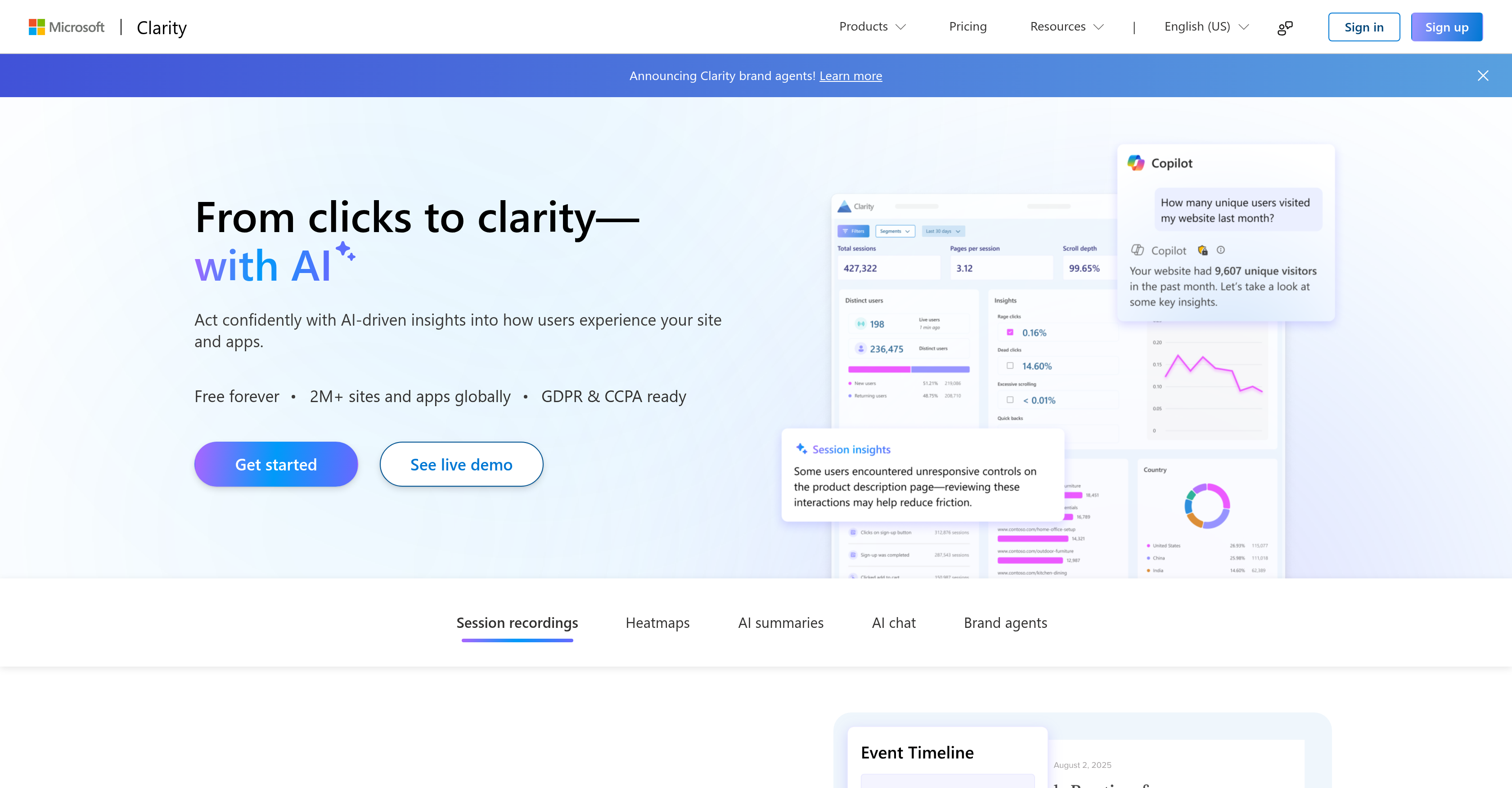
- Watch real visitors navigate your site to instantly pinpoint where they get stuck, using session replays that reveal every click and scroll.
- Visualize exactly what grabs attention and causes drop-offs with heatmaps that show click, scroll, and engagement zones.
- Get immediate, actionable summaries of behavior trends without manual analysis, using AI to highlight what worked and what to fix next.
- Turn complex data questions into instant answers by chatting with an AI that provides data-supported responses and compares results.
- Personalize shopper interactions in real-time to boost sales, using AI Brand Agents that guide users based on their live behavior.
- Build visitor trust and ensure compliance by collecting data with a tool that is ready for GDPR and CCPA regulations.
Pros & Cons
Pros
- Session replays
- Heatmap features
- User journey analysis
- Website dropoff tracking
- Real-time behavioral signals
- Data-supported responses
- GDPR compliance
- CCPA compliance
- Website click tracking
- Scroll tracking
- Interactive insights
- Brand agents
- Customer interaction personalization
- Identifies improvement opportunities
- Free user behaviour analytics
- Trusted globally
- Built-in support
- Behavioral trend highlights
- Website optimization capabilities
- User interaction visualization
- One-click actionable insights
- Clear insights into performance
- Product guidance
- Extensive integration capabilities
- Supports Android, iOS, Flutter
- React Native support
- lightweight Mobile SDK
- Insights from millions of customers
- Tools for interpreting user behavior
- Direct insights about friction points
- Usage doesn't effect bandwidth
- Data privacy assurance
- High customer engagement
- Optimizes shopping experience
- Website benchmarks
- Sales boost through personalization
- Secure data handling
- Minimal performance impact
- Clarity's MCP Server
- Clarity browser extension
Cons
- No mobile app support
- Potential privacy issues
- Confusing interface
- No predictive analytics
- Unclear support options
- Doesn't support multi-language
- No traffic limit considerations
- Cannot export data
- Limited integrations
Reviews
Rate this tool
Loading reviews...
❓ Frequently Asked Questions
Microsoft Clarity is a user behavior analytics tool that enables website and app owners to understand how visitors interact with their platforms. It provides a range of features including session replays, heatmaps, AI summaries, AI chat, and 'Brand Agents'. Microsoft Clarity is designed to reveal user behavior patterns, identify points of struggle, and offer data-driven insights for website or app optimization.
Microsoft Clarity's key features include session replays, which enable users to watch real visitors interact with their website or app, and heatmaps, which illustrate where users click, scroll, and drop off. AI summaries give a rundown of behavior trends across the site, helping users understand what worked and what didn't. An AI chat feature can transform queries into prompt, data-backed responses. 'Brand Agents', an AI assistant, personalizes customer interactions based on real-time behavioral signals. Microsoft Clarity is also GDPR & CCPA ready, ensuring user data safety.
Microsoft Clarity can assist with website optimization via several features. Heatmaps visualize user attention areas, showing where they click, scroll, and drop off, helping understand which elements are engaging on a website. Session replays let owners watch real users interact with the website to identify where users get stuck. AI summaries highlight behavior trends, helping understand what did or didn't work for improvements. Real-time behavioral signals from 'Brand Agents' personalize the shopping experience, potentially boosting sales.
Session replays in Microsoft Clarity are a feature that allows users to watch how real visitors interact with their website or app. They help uncover points where people get stuck, visualize key moments from each user journey, and reveal hidden patterns through AI-powered insights.
Heatmaps in Microsoft Clarity are designed to visualize user attention on a website. They show where users focus, where they click, scroll, and where they drop off. This feature is valuable for understanding which areas or elements of the website engage users the most, helping drive improvements and sparking new ideas.
AI summaries provided by Microsoft Clarity offer clear and actionable takeaways about user behavior on a website. They highlight trends across the website, revealing where users struggle without manually digging through data. AI summaries aid in identifying patterns of what worked, what didn't, and what should be prioritized next for optimization.
The AI chat function in Microsoft Clarity turns user queries into instantaneous, data-backed answers. This feature not only provides prompt responses but also allows users to dive deeper into trends, compare results, and uncover additional insights. It is intended to offer immediate product guidance with built-in support.
Microsoft Clarity personalizes customer interactions through 'Brand Agents'. These AI assistants represent the website's brand and guide shoppers based on real-time behavioral signals captured by Clarity. This enhances the overall shopping experience and possibly drives engagement and sales.
'Brand Agents' in Microsoft Clarity are AI assistants that represent the website's brand and guide shoppers throughout their site journey. They personalize shopper interactions based on real-time behavioral signals. Users can monitor their agent's performance and observe what drives engagement and sales.
Microsoft Clarity analyzes user journeys through the session replay feature. It allows the observation of real users during their interaction with the website, uncovers where they get stuck, and highlights key moments in their journey. This makes it possible to discover hidden patterns and trends with the help of AI-powered insights.
Microsoft Clarity tracks website drop-offs using heatmap features. It visually displays where users scroll, click and where they cease their interaction and leave the website. This helps in identifying elements or sections of the website that may be causing user disengagement or confusion.
Yes, Microsoft Clarity can assist in real-time behavioral analysis. Its 'Brand Agents', an AI-based tool, personalizes shopper interactions based on the real-time behavior of users. This enables the website's team to understand and react to user behavior as it happens, potentially enhancing the shopping experience and increasing conversions.
Data-supported responses in Microsoft Clarity mean that any responses given by the tool, especially in the AI chat function, are backed by the data collected and analyzed by the tool. This ensures that the information provided is not merely assumption-based but drawn from actual user behavior insights.
Yes, Microsoft Clarity is compliant with both General Data Protection Regulation (GDPR) and California Consumer Privacy Act (CCPA). This ensures it meets the required standards regarding user data safety and privacy, building trust with its users about their data security.
Microsoft Clarity ensures data security by being GDPR & CCPA compliant. These regulations enforce rigorous data protection standards ensuring the safe handling and processing of user data. This readiness builds trust with its users about their data safety.
Click tracking works in Microsoft Clarity through its heatmaps feature. Heatmaps visualize which areas of the website users click the most, giving an understanding of which elements are engaging visitors, thus aiding in data-driven decision-making for website optimization.
Yes, Microsoft Clarity can assist in tracing user scroll patterns on your website. Its heatmaps feature visualizes where users scroll and where they stop scrolling or drop off. This can help identify points of interest or disengagement for users, providing vital insights for website optimization.
Microsoft Clarity can indeed help detect patterns in customer behaviors. It uses AI-powered summaries to highlight trends across the website or app, revealing where users struggle. It can also uncover hidden patterns during session replays. These insights can be crucial in optimizing the visitor experience.
Microsoft Clarity creates interactive insights by providing users with AI-powered summaries of website trends, AI chat functionality for data-supported responses, and 'Brand Agents' that personalize user interactions based on real-time behavioral signals. Together, these components provide a deep and interactive view into user behavior.
Yes, Microsoft Clarity is a free tool. This is confirmed on their website which states it's free forever, offering features like heatmaps, session recordings, AI summaries, AI chat, and 'Brand Agents' without any associated cost or limitations on traffic.
Pricing
Pricing model
Free
Paid options from
Free
Related Videos
Introducing Microsoft Clarity
Microsoft Advertising•45.8K views•Jun 6, 2022