
Overview
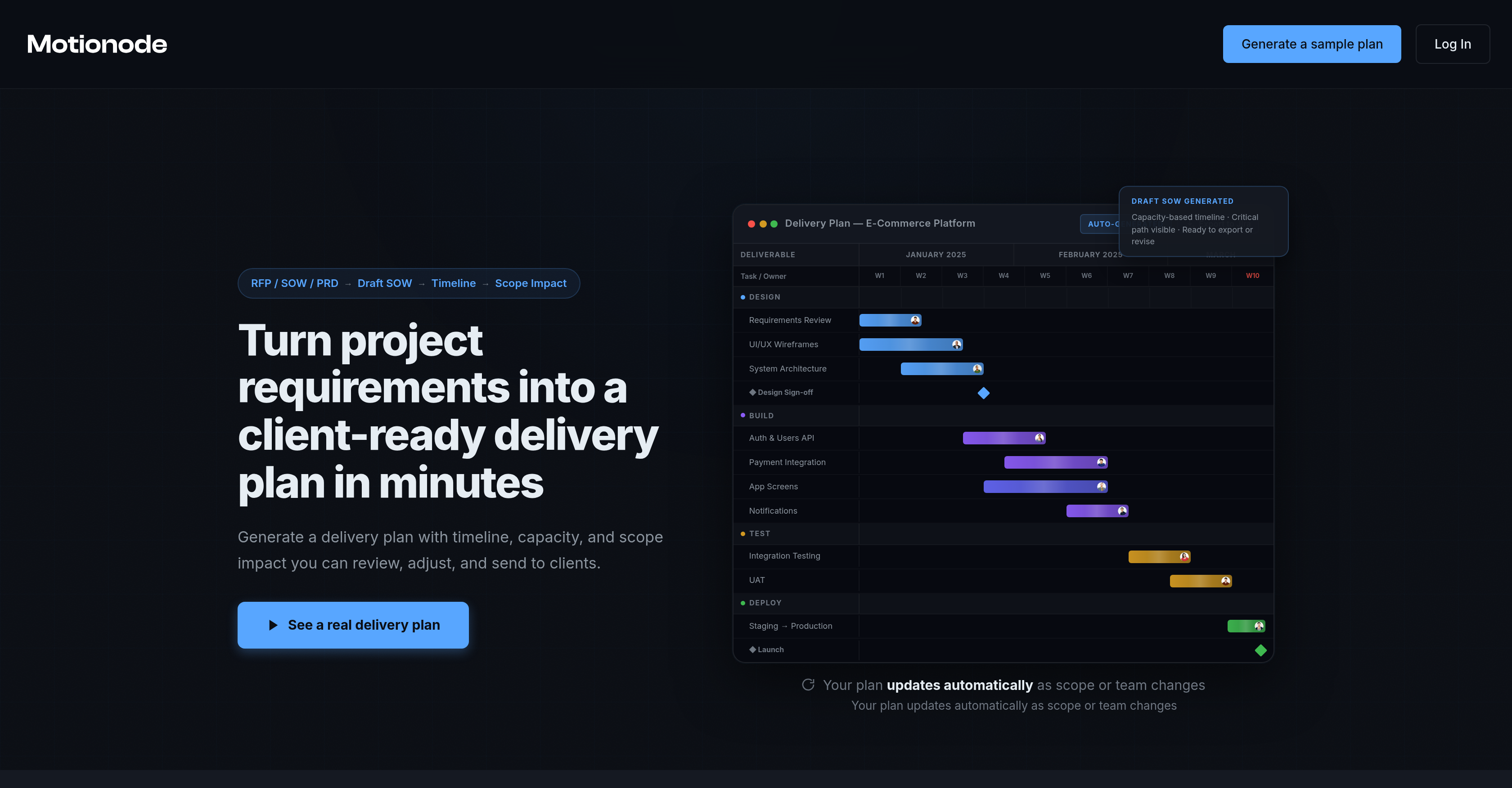
- Win more clients by generating a professional Statement of Work and delivery plan in minutes, not days, using the automated SOW generator.
- Maintain realistic team workloads and prevent burnout with a visual capacity-based timeline that automatically accounts for vacations and priorities.
- Eliminate scope change disputes by instantly seeing the impact of any adjustment on your project timeline and delivery date.
- Keep your plan always current with automatic recalculations for any team or priority shift, removing the need for manual replanning sessions.
- Seamlessly move from planning to execution by exporting your structured plan with deliverables and dependencies directly to Jira, Asana, or Linear.
- Make informed decisions with a real-time project overview that notifies you of timeline, workload, and scope changes as they happen.
Pros & Cons
Pros
- Quick delivery plan creation
- Real-time updates
- Automatically adjusts to changes
- Sow generator
- Gantt chart creation
- Workload timeline
- Generates structured plan
- Assists informed decisions
- Accommodates reality shifts
- Recalculates plans on changes
- Exports to PM tools
- Optimises execution
- Visibility of project dependencies
- Realistic workload optimisation
- Timely project tracking
- Risk management features
- Balances workloads
- Auto-staffing adjustments
- Change management functionality
- Transforms raw project requirements
- Project timeline presentation
- Resistant against weak estimates
- Scope adjustment insights
- Automated manual scoping
- Customised for agencies, freelancers
- Predicts delivery impact
- Updates scope and team
- Notifies workload changes
- Manages directly on platform
- Live plan maintenance
- Plan generation in 3 steps
- Generates comprehensive plan
- Checks unrealistic capacity
- Export as CSV
- Timeline, capacity, scope impact
- Client-ready delivery plans
- Export to Jira/Asana/Linear
- Generates tickets, dependencies
- Fast revisions, quick rebuild
- Real-time scope impact
- Automation of plan updates
- Parallel work planning
- Visualize delivery slowdowns
- Capacity-based delivery planning
- Auto-assign tasks
- Optional internal management
- Export client-ready PDF
- Drift detection in implementation
- Turns idea into proposal
- Faster response to RFPs
Cons
- Limited integrations
- Unclear error handling
- No collaborative features
- Adjustments not real-time
- No multi-project support
- Scope change restraints
- Limited export formats
- No budget management
- Lack of mobile support
- No user roles management
Reviews
Rate this tool
Loading reviews...
❓ Frequently Asked Questions
Motionode's main function is to transform project requirements into a detailed, capacity-based delivery plan. This is essentially to ensure punctual and precise project planning, making it particularly suitable for agencies, freelancers and software teams.
Motionode's Statement of Work (SOW) generator works by creating a structured plan. This happens in three steps: pasting project requirements, generating a draft Statement Of Work and delivery plan, and adjusting the scope based on the impact on delivery.
Yes, Motionode has the capability to create Gantt charts. These charts provide a visual representation of the project timeline, helping team members understand the schedule and sequence of tasks.
The team workload timeline feature in Motionode gives a visual representation of the workload for team members over the duration of the project. This helps to identify potential bottlenecks or underutilized team members, ensuring smooth project operations and effective resource management.
Yes, Motionode can adjust to cope with changes in the team schedule. It has the ability to accommodate reality shifts, such as vacations or staffing adjustments, on the fly. The tool automatically recalculates the plan based on these changes, ensuring robustness and adaptability.
Motionode is designed to generate a delivery plan in a matter of minutes. This quick generation allows users to review, adjust and promptly send the plan to clients.
The delivery plan generated by Motionode includes the project timeline, capacity, scope impact and all other essential details required for a comprehensive project plan. It presents a clear overview of the work and allows for easy adjustments and reviews.
Yes, Motionode updates the plan automatically with any scope or team changes. This ensures the plan is always up-to-date, reducing the chances of slow manual quoting, weak estimates, and scope change disputes.
Motionode assists in managing project risks by maintaining a real-time overview of the project. It notifies users of changes in timelines, workloads and scope, enabling stakeholders to make informed decisions and effectively manage project complexities and risks.
Yes, Motionode can assist in managing changes in team priorities or staffing adjustments. It has a feature that recalculates the plan in response to such reality shifts without requiring manual replanning sessions.
Yes, the completed project plans generated by Motionode can be exported to project management tools like Jira, Asana, Linear or CSV. Alternatively, they can be managed directly on the Motionode platform itself.
Motionode stands out from other project planning tools due to its distinct features like the quick generation of detailed delivery plans, real-time updates with any scope or team changes, and the ability to accommodate reality shifts such as vacations or staffing adjustments. It optimises project execution by integrating responses to changes in scope or team, ensuring realistic workloads and seamless project planning.
Motionode helps in maintaining a work-life balance among team members by creating a realistic workload timeline. It accommodates vacations and priorities, automatically adjusting the project plan to ensure no individual is overburdened, promoting a healthy work-life balance.
Motionode is most suitable for agencies, freelancers and software teams. It is especially beneficial for those who need precise project planning that accommodates frequent changes in scope or team.
Yes, Motionode can indeed be used as a tracking tool for project progress. It notifies users of changes in timelines, workloads, and scope, and keeps an updated track of progress in real-time.
Yes, Motionode offers real-time updates on project progress. It maintains a live overview of the project, notifying stakeholders of any changes in timelines, workloads and scope. These real-time updates ensure stakeholders are always informed and can make timely decisions.
Yes, completed project plans can be managed directly on the Motionode platform. This provides a centralized space to oversee all aspects of project planning and tracking.
Yes, Motionode offers comprehensive support for project timeline adjustments. It can accommodate reality shifts and recalculate the plan according to changes, providing a robust solution for complex project dynamics.
Yes, Motionode can predict and display the impact of scope change. It allows the users to adjust scope or capacity and see the delivery impact instantly, thereby offering insights into how any changes would affect the project timeline and workload.
Motionode presents delivery impact in a clear and structured format. It showcases how any changes would affect the project timeline, workload, and scope, providing stakeholders with the necessary insights to make informed decisions.
Pricing
Pricing model
Freemium
Paid options from
$49
Billing frequency
One-time
Related Videos
How to Create a Request and Build Tickets in Motionode
Motionode•8 views•Jan 16, 2026