Overview
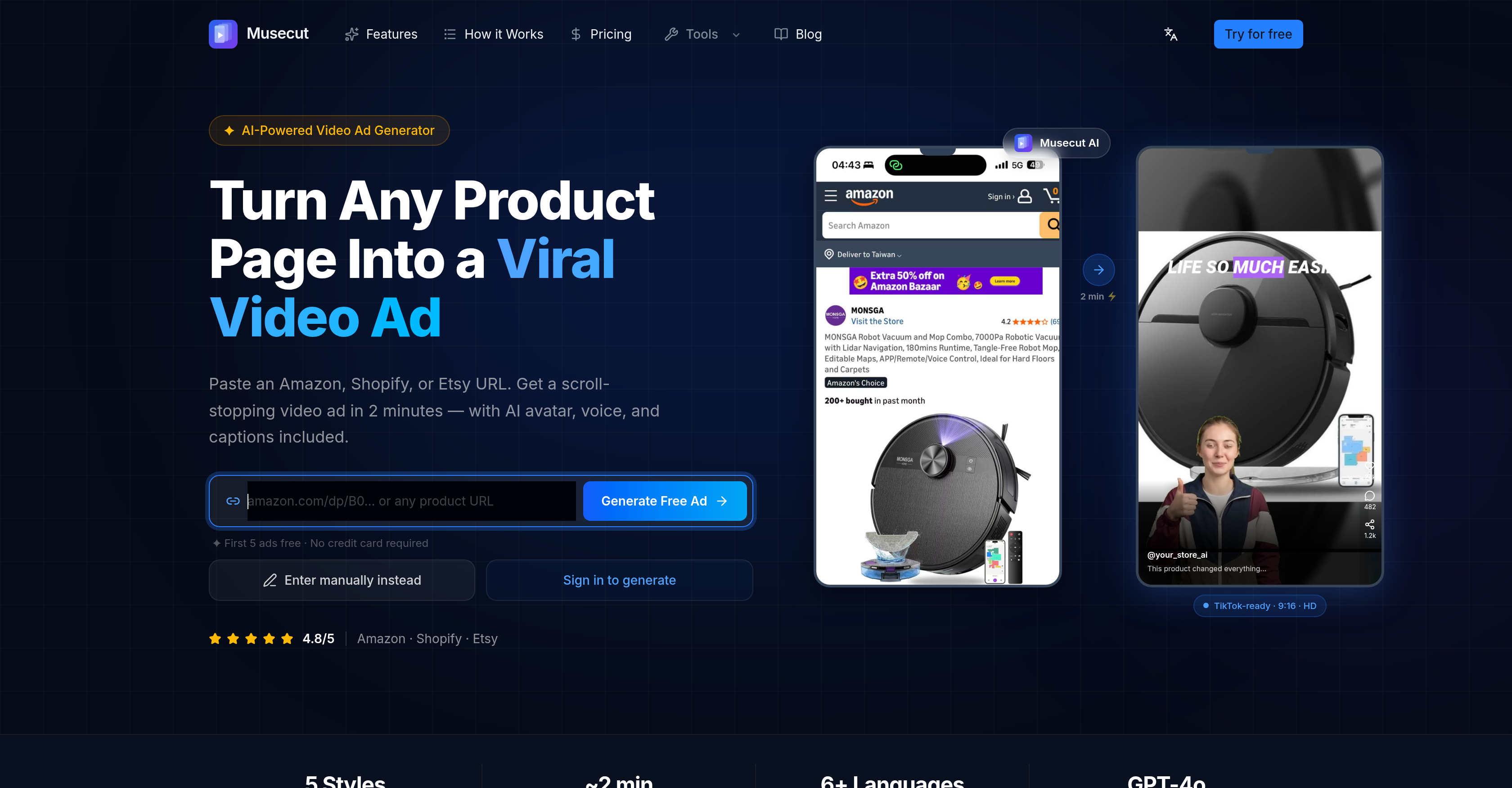
- Launch TikTok and Reels ad campaigns in under 2 minutes by pasting any product URL from Amazon, Shopify, or Etsy
- Match each product to a proven conversion goal with five tailored ad formats: Viral Hook, Problem→Solution, Unboxing, Flash Sale, and Tutorial Demo
- Produce multilingual video ads for global audiences with AI-generated voiceovers and captions in over six languages
- Iterate ad versions instantly without losing work by switching between templates and regenerating only edited script sections
- Maintain full control over branding and messaging by reviewing and editing the AI-generated shot-by-shot script before final export
- Eliminate the need for video editing skills or hiring videographers while producing professional ads with AI avatars and dynamic voiceovers
- Generate multiple ad variations for A/B testing across TikTok, Instagram Reels, and YouTube Shorts without starting from scratch
Pros & Cons
Pros
- Converts URLs into video ads
- Supports Amazon, Shopify, Etsy URLs
- Voiceover and captions included
- Offers five unique ad formats
- Provides user script-editing capability
- Multilingual support
- Automatic script generation
- Conversion optimization tools included
- Does not require editing skills
- Ability to manually enter product details
- Adjustable shot-by-shot script
- Multiple platform compatibility (TikTok, Reels, Shorts)
- Iterative video creation process
- Recognized by various platform sellers
- Six plus voice and subtitle languages
- Four-point-eight user rating
- Hosts user workspaces for iteration
- Offers full version history of edits
- Selective regeneration option to save time
- Various pricing plans for different users
- Trusted brand with real user testimonials
- Automated video editing capabilities
- Quick video generation time
- Editable shot-by-shot scripts
- Enables precise visual control
- Includes auto-captions in videos
- Provides a brand-safe commercial license
- System saves all versions of video
Cons
- Only supports Amazon, Shopify, Etsy
- Limited ad formats
- Manual product details entry
- Requires review and edit
- Few avatar, voice options
- Limited multilingual support
- No free access beyond first five ads
- Subscription-based charges
- No video editing
- Limited customization options
Reviews
Rate this tool
Loading reviews...
❓ Frequently Asked Questions
Musecut supports multiple platforms for the product URLs that can be converted to video ads. These include Amazon, Shopify, and Etsy. It also optimizes the video ads for popular social media platforms such as TikTok, Instagram Reels, and YouTube Shorts.
Musecut, by leveraging its AI capabilities, converts a product URL into dynamic video ads by extracting the product details from the given URL. After the user inputs a product URL, the AI processes the information in minutes and creates a video ad often complemented with an AI avatar, voiceover, and captions. This process is rapid and efficient, producing engaging video content from typical product pages.
Yes, users have the flexibility to manually enter their product details into Musecut. This option complements the URL to Video function and offers a manually curated approach to creating video advertisements.
Musecut offers five ad formats. These are: Viral Hook, ProblemSolution, Unboxing, Flash Sale, and Tutorial Demo. Each of these templates is designed with a specific conversion goal and platform in mind. The formats cater to various advertisement strategies and can be selected according to the product being marketed or the platform it's being advertised on.
The five ad formats in Musecut are created with unique purposes: Viral Hook is designed to grab attention instantly with high-energy introduction. Problem→Solution format uses the PAS (Problem-Agitate-Solve) framework to present a product as a solution to a specific concern. Unboxing gives an authentic first-reaction to a product, building anticipation. Flash Sale format creates an urgency in the viewer to avail of a limited-time offer. Tutorial Demo gives a how-to guide on the use of a product, providing clear value to potential customers.
Yes, after AI generates a shot-by-shot script, Musecut users have the option to review and edit it as they see fit. This feature ensures full user control over the content, users can tweak the language, switch images, tweak visual guidance, and make other alterations prior to finalizing the video ad.
Musecut is a powerful tool for eCommerce marketing. It turns product pages into dynamic video ads that can be shared on various platforms to captivate potential buyers. The speedy AI video creation process, coupled with multiple ad formats tailored for specific conversion goals, allow sellers to diversify their marketing strategies and reach their target audiences efficiently.
Indeed, unique features like an AI-generated avatar, voiceovers and captions are included in Musecut's video ad creation. These elements enhance the feel and delivery of the video ad, making it more engaging and personalized.
A shot-by-shot script in Musecut refers to the AI-generated plan for the video content. It details each scene or 'shot' of the video, including voiceover scripts and visual direction. This script gives users a complete and detailed overview of the video ad, and allows them to make edits in a user-friendly manner.
Musecut supports more than six languages for its voice and subtitles feature. It ensures that the video ads can connect and engage with a multilingual audience.
Musecut is cost-effective in the sense that it substantially reduces the need for an advanced video editing setup or hiring professional videographers and editors. By quickly converting product URLs to engaging video ads with AI, it allows for significant savings of time and money.
Yes, Musecut is designed to be user-friendly, and people without advanced video editing skills can easily use it. The tool handles the entire production pipeline from URL input to final video output, allowing users to create video ads with no video editing skills required.
The average time Musecut takes to generate a video ad is roughly around 2 minutes. This quick turnaround time allows users to produce multiple video ads in a short span of time, enabling rapid and dynamic marketing campaigns.
Yes, Musecut allows you to switch between ad templates freely. Your scripts are saved per format, so you can change the ad format without losing any of your previous work.
Yes, Musecut provides the option to only regenerate the changes made in the script. If users edit a shot in the script, they can regenerate only the altered part, saving time and maintaining efficiency.
The AI Avatar in Musecut acts as an integral part of the video ad creation. It serves as a virtual spokesperson that can greatly enrich the viewing experience. The Avatar, coupled with the AI voiceover, gives a more personalized and engaging feel to the video ads.
Musecut tailors the video ads for various platforms like TikTok, Instagram Reels, and YouTube Shorts. Each ad format is engineered for a specific conversion goal and platform, creating more targeted and effective ads.
Musecut can be effectively used by sellers on platforms such as Amazon, Shopify and Etsy. It is essentially useful for any seller who wishes to turn their product page into a dynamic video ad, irrespective of their platform.
Each ad format offered by Musecut is designed with a specific conversion goal in mind. For example, the Problem→Solution format aims to convert viewers dealing with a specific problem, the Unboxing format builds anticipation and aims to convert viewers interested in the authenticity of the product, while the Flash Sale format drives urgency to purchase due to a limited-time offer.
Within Musecut, users have a high level of control over their content. The AI generates a shot-by-shot script which users review and edit, allowing them to switch images, alter text, and make other changes. This ensures that users maintain full control over their video content throughout the entire process.
Musecut is an AI-powered tool which rapidly converts product pages into dynamic video advertisements. Users input a product page URL, and Musecut generates a video advertisement within minutes. Target platforms include Amazon, Shopify, Etsy and the videos can be complemented with an AI avatar, voiceover, and captions.
Musecut extracts the necessary product data from the URL inputted by the user. It leverages artificial intelligence and pre-designed templates to convert this data into a dynamic video ad. The video ad can be customized to have different ad formats and styles depending on user preferences.
Absolutely, Musecut is designed to alleviate the need for advanced video editing skills. From extracting data from the URLs, choosing ad formats, generating the scripts, to creating and editing the video, all processes are automated and user-friendly. Sellers can easily edit and finalize video content as per their liking.
Musecut is geared towards creating advertisements for multiple platforms such as TikTok, Instagram, YouTube Shorts, Amazon, Shopify, and Etsy. The videos generated by Musecut are designed to be engaging and effective for these platforms.
Musecut offers five different ad formats: Viral Hook, ProblemSolution, Unboxing, Flash Sale, and Tutorial Demo. Each format is designed with a distinctive conversion goal and platform in mind, and users can choose the format that best suits their advertising needs.
Yes, the user can review and edit the AI-generated shot-by-shot script prior to finalizing the video ad. This allows users to maintain a high level of control over the video content and guarantee that the ad aligns with their desired message and branding.
Musecut is designed to create and generate a video ad within a matter of minutes. Depending on factors such as length, complexity, and ad format, the exact time might slightly differ but is on average around 2 minutes.
Musecut's video ads include an AI avatar, voice, captions, and various styles to choose from. The AI constructs a shot-by-shot script. After being refined by the user, this script is expressed in the video through the avatar and voiceover.
Musecut has the capability to create video ads for virtually any product as long as there is a URL associated with the product on Amazon, Shopify, or Etsy. If a product page URL isn't available, users also have an option to manually input their product details.
Yes, Musecut offers AI avatars and voiceovers for the video ads. These elements bring a dynamic and human-like quality to the ads without requiring a physical actor or voiceover artist.
Yes, Musecut provides the option to manually enter product details. This feature makes the tool flexible for users who may not have a typical product page URL or want to customize the information being used in their advertisement.
Musecut supports URL extraction from three major e-commerce platforms: Amazon, Shopify, and Etsy. Users simply paste their product URL and Musecut's AI will extract the relevant information to generate a video ad.
Musecut supports a wide range of languages for captions, making the video ads versatile and engaging for international audiences. The exact number of languages isn't specified, but the reference to 'multilingual support' indicates a broad spectrum.
Yes, each ad format offered by Musecut is designed with a specific conversion goal in mind. Whether it's sparking interest with a Viral Hook, demonstrating usefulness in ProblemSolution, or showing off the product with Unboxing, each format serves a strategic purpose for different advertising needs.
Yes, Musecut does provide users the option to review and edit the video ad before finalizing. This feature ensures that users maintain complete control over the ad's content and delivery, allowing them to perfect their message and branding before it goes live.
Musecut optimizes video ads for conversions by employing AI technology and offering tailored ad formats geared towards enhancing user engagement. The five ad formats provided are each designed to stir user interest and motivate action, while the ability to manually edit and refine ads guarantees effective branding alignment.
Yes, users can regenerate the video ad on Musecut if they're not satisfied with the initial result. Musecut provides a full workspace allowing for script edits, template swapping, and the generation of multiple versions until the user achieves their desired outcome.
Yes, Musecut allows for the same video ad to be replicated across different ad formats. Once a script is generated and saved, it can be applied to different ad templates without any data being lost, providing flexibility and variety for users' ad campaigns.
The AI avatar in Musecut does support multiple languages, aligning with the tool’s multilingual capabilities. This feature increases the global applicability of the ads created with Musecut, making them accessible and engaging to an international audience.
Although Musecut offers the ability to switch between and replicate ads in different formats, there's no mention of the capacity for seamless transitions between formats within the same video. However, through edits and iterations, users have freedom to customize their video ads to fulfill their unique requirements.
Pricing
Pricing model
Free Trial
Paid options from
$19/month
Billing frequency
Monthly
Refund policy
No Refunds