
RowSpeakv1.2.0
Overview
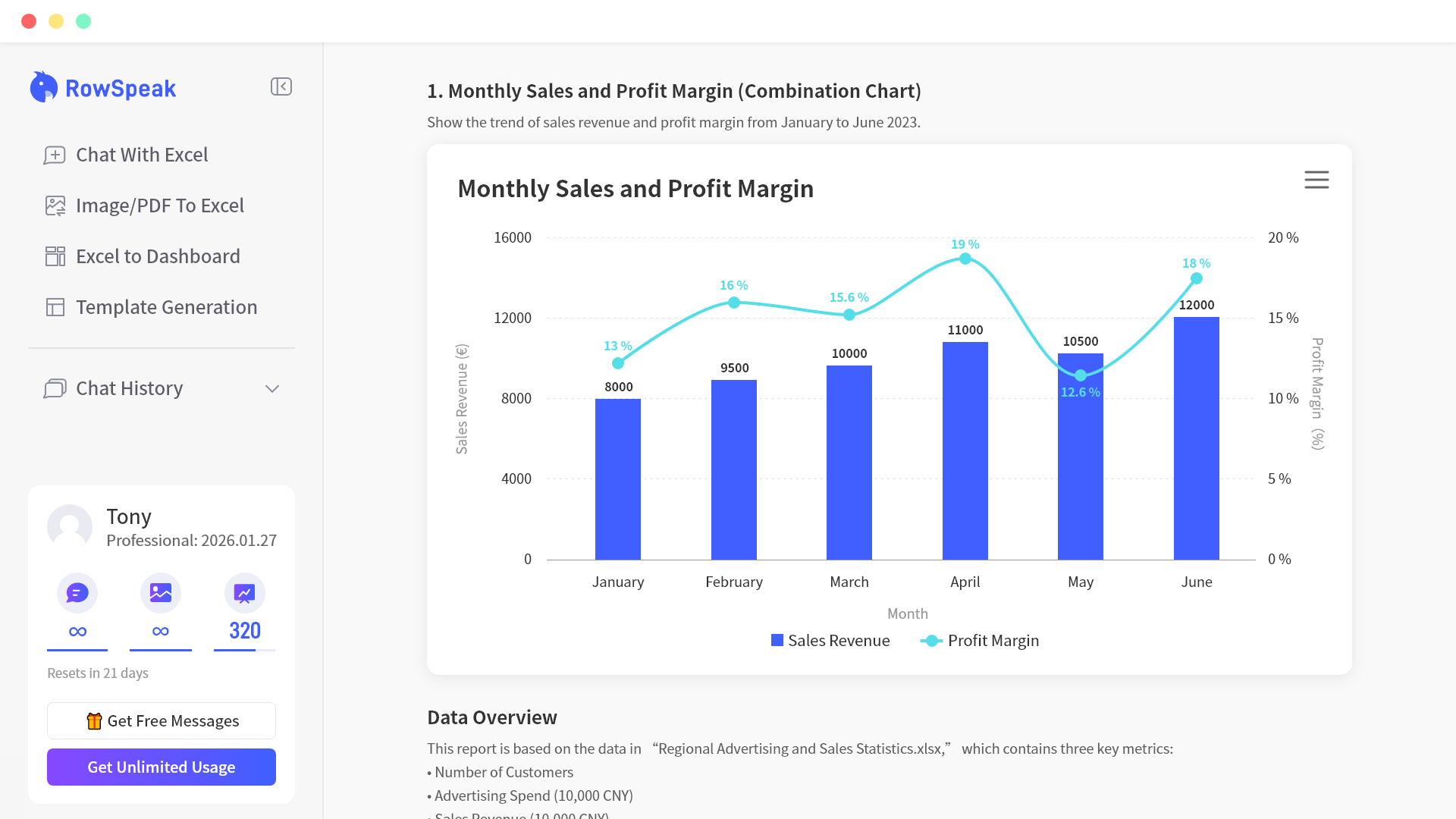
- Get instant answers and charts from your data by simply asking questions like 'calculate monthly sales' using natural language input for data commands.
- Transform raw data into actionable business insights and key performance indicators automatically with AI Business Intelligence that extracts summaries and trends.
- Create professional bar, line, and pie charts in one click with dynamic updates that refresh automatically when your underlying data changes.
- Automate complex and nested Excel formulas without manual coding through natural language description, supported by an extensive function library for various industries.
- Clean and prepare data efficiently with intelligent, automatic data type recognition and customizable cleaning rules tailored to your specific business requirements.
- Identify hidden risks and opportunities by automatically detecting data anomalies and performing multi-dimensional analysis for deeper statistical insights.
- Handle complex workbooks confidently with support for multiple sheets, array formulas, and automated error detection that provides correction suggestions.
Pros & Cons
Pros
- Natural language data commands
- Quick results in charts
- Data-driven insights
- Smart Excel operations
- Instant visualization of data
- Handles multiple sheet files
- Caters for various data types
- Time-efficient chart creation
- Automates repetitive tasks
- Intelligent data type recognition
- Customizable cleaning rules
- Batch processing
- One-click chart generation
- Chart recommendation feature
- Dynamic chart updates
- Trend analysis feature
- Anomaly detection feature
- Multi-dimensional data analysis
- Automated formula generation
- Extensive function library
- Formula error detection
- Provides modification suggestions
- Nested and array formula handling
- Handles complex scenarios
- Supports industry-specific requirements
- Supports user interaction in English
- German, Spanish, French, Japanese
- Portuguese, and Korean
- Real-time business insights
- KPIs and key data summaries
- Instant Excel insights
- Trusted by data professionals
- Customizable chart styles
- Automatic formula generation with natural language
- Intelligent error correction
- Supports .xlsx, and .csv files
- No technical expertise required
- Offers free trial
- Bank-level data security
- Support for on-premises deployment
- Real-time analytics and predictive insights
- Service available worldwide
Cons
- Limited file type support
- Strict chat message limit
- Upload size restrictions
- Charts don't support all styles
- File upload limited per chat
- Mandatory natural language queries
- Strict data cleaning rules
- No team sharing model
- Limited chat history retention
- Localized on-premises deployment unavailable
Reviews
Rate this tool
Loading reviews...
❓ Frequently Asked Questions
Excelmatic is an AI-powered tool created to amplify the usability of Excel data analysis and visualization. It takes in natural language inputs for data commands, making it possible for users to express simple requests like 'calculate monthly sales' and speedily receive results, charts such as bar, line, and pie charts, and data-driven insights.
The AI Spreadsheet Assistant in Excelmatic is designed for smart Excel operations. It aids in handling complex Excel files with various sheets, formulas, and data types and mitigates the challenges in understanding statistical metrics.
Yes, Excelmatic is built to deal with complex Excel files that consist of multiple sheets, formulas, and data types. It offers a helping hand in understanding these intricate elements and efficiently using them.
Yes, Excelmatic includes a feature for batch processing. This allows users to process multiple tables simultaneously, thereby enhancing operational efficiency.
Excelmatic significantly reduces the time spent on creating charts and reports. Through automated functionalities like one-click chart generation and chart recommendation, users can quickly create and update charts, resulting in more time for data interpretation and decision-making.
Excelmatic provides automation for several tasks. This includes automatic detection of formula errors, the generation of formulas using natural language input, dynamic chart updates, and repetitive tasks. In addition, there are built-in functions to automate operations such as data cleaning, which can be customized according to the user's business requirements.
Excelmatic is equipped with an intelligent recognition function that automatically identifies different data types. This maximum precision helps to avoid formatting errors that might occur during Excel operations.
Yes, Excelmatic allows users to set customizable cleaning rules that align with their specific business requirements. This flexibility provides a more effective and tailored approach to data cleaning.
Excelmatic's feature for chart generation stands out due to its simplicity and efficiency. Users can create professional-looking charts such as bar charts, pie charts, and line charts through conversational interaction, with just a single click. Additionally, the charts dynamically refresh when data is updated, providing real-time insights.
AI plays a significant role in Excelmatic by enabling natural language processing, advanced statistical analysis, intelligent recognition of data types, and the transformation of data into actionable business insights. It is also pivotal for automation features such as dynamic chart updates, automated reporting, automated tasks, and automated formula creation.
Excelmatic is equipped with AI Data Analysis for advanced statistical analysis and insights. It can examine data trends, detect abnormal data for risk identification, and support multi-dimensional analysis for deeper insights.
Yes, Excelmatic fully supports natural language inputs for data commands. It even has an advanced feature that generates Excel formulas automatically based on natural language input.
Excelmatic handles complex scenarios like nested formulas and array formulas effectively. Its Intelligent Formula Assistant is designed to automatically detect formula errors and provide modification suggestions, thus efficiently handling intricate formula-related scenarios.
Yes, Excelmatic has a feature for multi-dimensional data analysis. This allows the extraction of insights from multiple perspectives, revealing deeper understanding and patterns that might be missed in a single dimensional analysis.
Yes, Excelmatic is designed to generate Excel formulas automatically with the help of natural language input. This feature presents an easy solution for users who may not be well-acquainted with Excel formulas.
Excelmatic's Intelligent Formula Assistant is built to automatically identify formula errors. It enhances the accuracy and efficiency of data analysis by detecting and alerting the user about any errors in the formula inputs.
Excelmatic provides industry-specific solutions through its extensive function library that covers various industry needs. It makes a wide range of Excel functions easily accessible, aiding multiple industry requirements.
Excelmatic, through its AI Business Intelligence feature, transforms raw data into actionable business insights. It automates the extraction of key performance indicators, indicators, and key data summaries, helping users quickly grasp business dynamics.
Yes, Excelmatic features Anomaly Detection functionality, which automatically identifies anomalies in data. This function enables timely identification of potential risks that may not be immediately discernible through manual analysis.
Excelmatic implements an automatic error detection function that, upon identifying a formula error, provides modification suggestions to the user. This not only rectifies errors but also optimizes formula efficiency, thus improving the accuracy of data analysis.
Pricing
Pricing model
Freemium
Paid options from
$9.90/month
Billing frequency
Monthly
Refund policy
Users can request a full refund within 7 days if they are first-time buyers and have fewer than 10 usage attempts.