
Overview
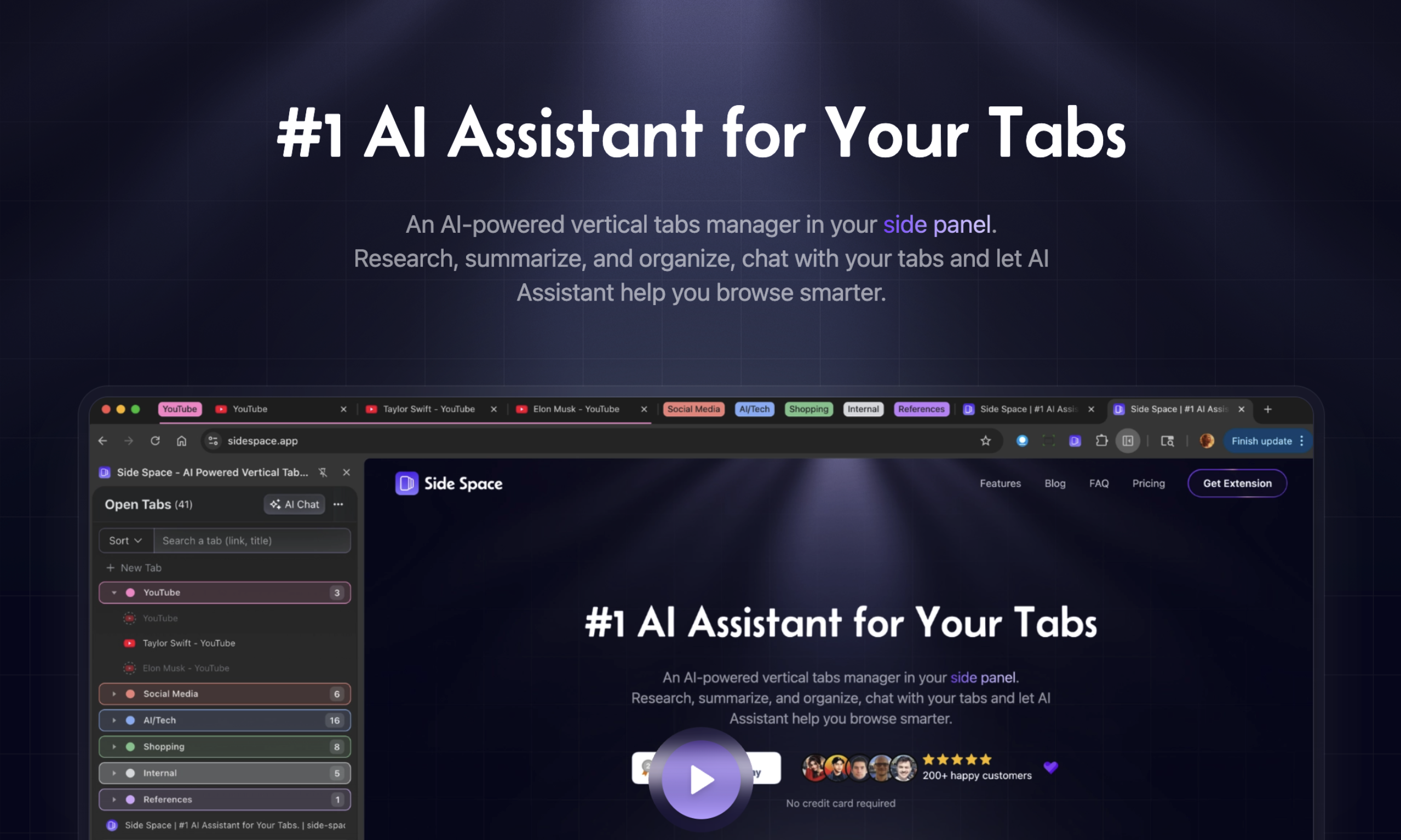
- Instantly see and navigate all open tabs without scrolling horizontally using the vertical tab arrangement in your browser's side panel
- Automatically organize and prioritize tabs based on your actual usage patterns with AI that learns from your behavior
- Summarize lengthy web page content directly within the side panel to quickly extract key information without switching tabs
- Maintain a clutter-free workspace by preventing tab chaos through intelligent vertical organization and management
- Get personalized tab suggestions and arrangements that adapt over time to your unique browsing habits and research workflows
- Chat with your open tabs using the built-in AI Assistant to ask questions and interact with content without leaving your current page
Pros & Cons
Pros
- Vertical management of tabs
- AI Assistant for your Tabs
- Chat with Open Tabs
- Agent mode for browser automation
- Space Management
- Make it yours by theming
- Clarity in tab chaos
- Efficient browsing
- Multi Language supported
- Dark mode
- Pin Tabs
- Search Tabs
- Suspend Tabs
- De-duplicate Tabs
- Space Switcher
- Save/Restore Tab Groups
- Copy all URLs
- Move to New Windows
- Group Guard
- Group Tabs by domain
- Group Tabs by AI
Cons
- Relies on behavior analysis
- Single focus on tabs
- Vertical alignment unfamiliar
- Depends on usage patterns
- Limited customization options
- May disrupt habitual users
- Doesn't support horizontal alignment
- No mentioned cross-browser support
- Requires frequent use adoption
- Potential privacy concerns
Reviews
Rate this tool
Loading reviews...
❓ Frequently Asked Questions
Robert Shaw
🛠️ 1 tool
wrote:An AI-powered vertical tabs manager in your side panel. Research, summarize, and organize, chat with your tabs and let AI Assistant help you browse smarter.
Robert Shaw
🛠️ 1 tool
wrote:Good question, why we need a tab manager that live in your side panel. But when you have used the Vertical tabs in Microsoft Edge browser or the Window Panel in Vivaldi browser, you will understand, because using a side panel to manage tabs is really convenient.
Side Space is a Chrome browser extension created to fill the empty side panel area. It provides tab management capabilities in this previously unused space.
Side Space manages tabs using AI that sequences your tabs vertically as opposed to the traditional horizontal alignment. It observes usage patterns, learns from them, and implements changes to optimize tab handling according to user behavior.
Side Space differentiates from traditional browsers by arranging browser tabs vertically rather than horizontally. Additionally, it uses AI to learn and adapt to user’s interests and preferences, providing a more personalized and efficient browsing experience.
Side Space ensures quick access to tabs by effectively managing and organizing them in a vertical alignment. This arrangement helps users with a visual representation of open tabs and an easy navigation between them.
The significance of AI in Side Space lies in its ability to understand and accommodate user preferences. AI studies the user behavior, learns from observed usage patterns, and suggests changes for optimal tab management, thus delivering a custom and efficient browsing experience.
Side Space accommodates user preferences by observing and analyzing their usage patterns. The AI then learns from these patterns and implements changes, personalising the tab management system according to the user's browsing habits.
When Side Space learns from usage patterns, it means the AI analyses how the user handles their browser tabs, their frequency and pattern of usage. These insights are then used to optimize the tab management system to better cater to the user’s preferences.
Side Space aids in maintaining a clutter-free browsing environment by managing multiple tabs effectively. It organizes the tabs vertically, differentiating from the traditional horizontal alignment and preventing tab chaos, thereby offering a neat and orderly browsing space.
The vertical alignment in Side Space provides a clear representation of all open tabs, facilitating their easy navigation. Users can easily switch between numerous tabs without getting overwhelmed, thus rendering it beneficial for users frequently handling many tabs.
Side Space’s approach to tab management involves vertical alignment of browser tabs and an AI-powered mechanism that understands and adapts to user preferences over time. This aids in better organization, personalisation of the browsing experience, and optimised efficiency.
Side Space analyses user behavior by utilising AI to observe and learn from user’s tab usage patterns. It studies the user's habits, preferences and frequency of usage data to personalise and optimise the browsing experience.
The user-friendly aspect of Side Space is due to its efficient browsing, intuitive navigation, and organized presentation of browser tabs. Its learning algorithms adapt to user behavior, making the tool more personalized and thereby enhancing user experience.
Side Space improves web navigation by organizing browser tabs vertically for easy visibility access. It learns from user behavior to personalize tab handling, ultimately making the browsing experience more intuitive, efficient, and user-tailored.
The learning algorithms in Side Space play a pivotal role in personalising the browsing experience. They observe and learn from user behavior, analyse usage patterns, and implement changes to optimise tab management in accordance to individual's behavior.
Side Space optimises internet usage by incorporating AI to manage multiple tabs efficiently. It observes and learns from user habits, tailors tab management to individual's usage patterns and improves overall browsing efficiency and productivity.
Side Space enhances web browsing experience by offering vertical alignment of tabs for clear visibility and easy navigation. It utilizes AI to learn from user behavior, tailoring the tab management system to personal browsing habits, thereby making browsing more intuitive and user-tailored.
Yes, Side Space adapts over time to individual browsing habits. It uses AI to continuously learn and understands user preferences from their usage patterns. Then it implements these insights to personalize and optimize the tab management system.
Side Space creates a customized web interface by using AI algorithms to understand and adapt to the user’s browsing habits and preferences. This intelligence allows Side Space to provide a tailored and efficient browsing environment.
Yes, Side Space offers an interactive user experience. Utilising AI for tab management, Side Space adapts to user behavior, offering customized browsing, and organizes tabs in a visual, easily-navigable manner, thus actively engaging the user in their browsing experience.
Pricing
Pricing model
Free Trial
Paid options from
$19/year
Billing frequency
Yearly