
Overview
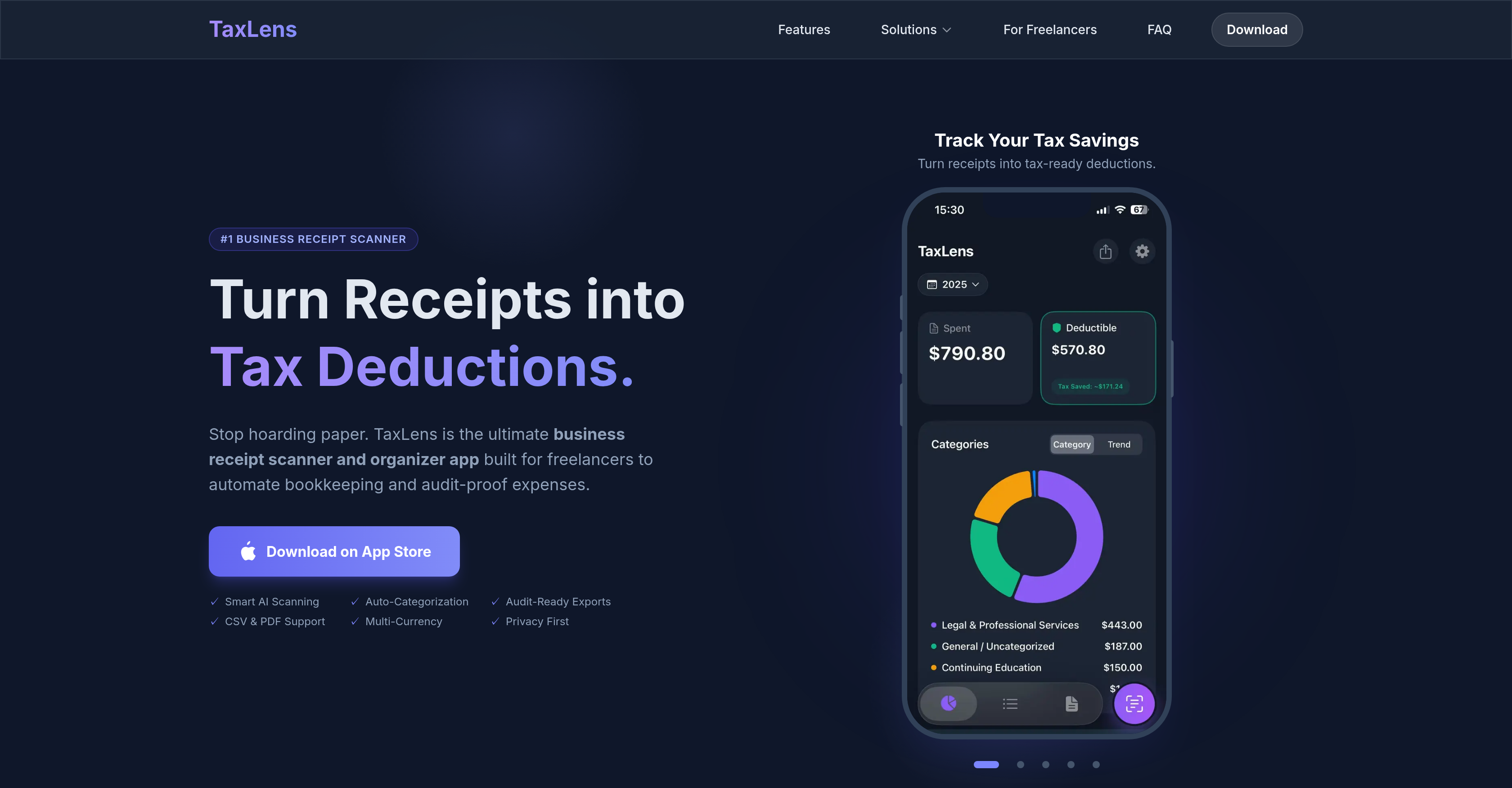
- Eliminate manual receipt data entry with AI that instantly scans and extracts merchant, date, total, and tax details
- Accurately separate business and personal expenses for maximum tax deductions using AI that understands tax rules
- Generate professional, audit-ready PDF reports with attached receipt images to simplify tax season and audits
- Track expenses in over 30 currencies with automatic detection and conversion using historical exchange rates
- Keep all financial data private with local device storage or private iCloud sync—your data is never sold
- Export categorized expenses as CSV files for seamless one-click import into QuickBooks and other accounting software
Pros & Cons
Pros
- Business receipt scanner
- Expense tracking application
- Audit-ready report exports
- Receipt image attachments
- Multi-currency support
- Privacy-focused design
- Receipts into tax deductions
- Historical rate currency conversion
- Seamless QuickBooks integration
- Data stored locally
- Private iCloud sync
- Strong tax compliance focus
- Personal vs business categorization
- CSV, PDF, XLS exports
- Tax-ready categorization
- User-friendly interface
- Affordable expense tracking tool
- Batch scan up to 20 receipts
- Accountant-ready PDF reports
- Tax insights in-app
- Estimate of tax savings
- Professional expense categorization
- Digital receipt vault
- No ads, data not sold
- Auto-categorizes business or personal
- Flags ambiguous items
- Supports paper, digital, and PDF receipts
- No manual data entry required
- Compatible with Excel and other accounting software
- Fraction of the cost of similar tools
- Audit-proof PDF reports
- Data privacy prioritized
- Supports over 30 international currencies
- Automatically converts currencies
- Designed for freelancers and small businesses
- Ideal for digital nomads and professionals who travel
Cons
- Limited to Apple devices
- No support for Android
- Lacks team collaboration features
- No direct integration with QuickBooks
- Relies solely on iCloud for sync
- Missing expense approval workflows
- No real-time exchange rates
- Numeric limits on batch scanning
- Lacks in-app tax calculations
- No offline functionality
Reviews
Rate this tool
Loading reviews...
❓ Frequently Asked Questions
TaxLens leverages AI to automate bookkeeping by using a smart scanning system that scans receipts and automatically categorizes them for tax deductions. It extracts crucial details such as merchant, total, tax, and category, ensuring accuracy and significantly reducing manual entry. It also integrates with accounting software like QuickBooks, allowing for seamless expense export in a CSV format.
Yes, TaxLens can distinguish between personal and business expenses. Using its AI-based auto-categorization feature, it is able to identify the nature of each expense and categorize it appropriately. There are even features designed to flag ambiguous items for review, ensuring accurate classifications.
The audit-ready report feature of TaxLens entails the ability to generate comprehensive and professionally formatted PDF audit packets with attached receipt images. This feature ensures that all business expenses are duly tracked, categorized, and represented in a way that is ready for audit, with all necessary documentation attached.
Yes, TaxLens does support multiple currencies. It has functionality to automatically detect over 30 different currencies and can accurately convert amounts using historical exchange rates. This makes it suitable for those traveling or operating in different countries.
Privacy and data security are pivotal features of TaxLens. It ensures user data privacy by storing all data locally on the user's devices or syncing it via their private iCloud accounts. It also upholds a strict policy of not selling or sharing user data with any third parties.
TaxLens is designed to be compatible with accounting software, particularly QuickBooks. It allows for the seamless export of categorized expenses in a CSV format, which can be easily imported into QuickBooks or any other CSV-compatible accounting software.
TaxLens uses an AI-powered system to automate expense tracking. The system scans and extracts crucial information from receipts, such as merchant, date, totals, and tax, and automatically categorizes each expense into the correct tax deduction category. It also separates business from personal expenses and applies tax rules accordingly.
TaxLens turns paper receipts into tax deductions through its AI-powered smart scanning system. This system scans each receipt, auto-detects the merchant, date, totals, tax, and category, and automatically translates these into organized, categorized tax deductions.
Yes, TaxLens is highly effective at categorizing expenses for tax purposes. It uses a smart AI system to automatically categorize each scanned receipt, ensures an accurate classification of business versus personal expenses, and flags ambiguous items for clearer review.
Features of TaxLens designed specifically for freelancers and small businesses include the AI-powered smart scanning system, auto-categorization functionality, audit-ready report exports, and privacy-focused design. It also offers features like multi-currency support, CSV expense export for compatibility with accounting software like QuickBooks, local data storage, and a private cloud sync feature.
TaxLens supports tax compliance by efficiently tracking every expense detail and accurately categorizing them for tax deductions. Its smart AI technology understands tax rules, differentiates between business and personal expenses, and highlights potential tax write-offs. With its ability to generate audit-ready reports containing comprehensive information and receipt images, it enables users to be fully prepared for any audit process.
TaxLens uses AI to separate business and personal expenses. During the receipt scanning process, it automatically categorizes each expense into its respective bracket - business or personal. This allows for more accurate tax deductions and a hassle-free auditing process.
With TaxLens, you can generate professional PDF audit packets with attached images of the receipts. These audit-ready reports are detailed and properly categorized, making them ideal for tax season. Additionally, you can export expenses in a CSV format for integration with accounting software like QuickBooks.
TaxLens prioritizes data storage and privacy by making sure all user data is securely stored locally on users' devices or synchronized via their private iCloud accounts. This protective approach extends to its strict policy against selling or sharing user data with any third parties.
Yes, TaxLens has a multi-currency support feature. It can automatically detect and accurately convert more than 30 currencies using historical exchange rates. This makes it an ideal tool for users who frequently travel or operate in different countries.
TaxLens assists in creating audit-ready reports by automatically categorizing expenses from scanned receipts. It also generates professional PDF audit packets with receipt images attached. This ensures all required documentation is present and organized, streamlining the audit process.
Yes, TaxLens can differentiate between different types of expenses for tax purposes. It uses AI tax-ready categorization to separate business and personal expenses, accurately categorize each expense into its correct tax deduction category, and flag items that require review.
TaxLens can export expenses in CSV format, making it compatible with QuickBooks and other accounting software that accepts CSV files. It also provides accountant-ready PDF reports that include receipt images for audit readiness, making it a comprehensive tool for expense tracking and reporting.
Yes, TaxLens can automatically categorize receipts after scanning. Its AI-based system can scan and extract key details from receipts and auto-categorize each expense into the correct tax deduction category. It even flags ambiguous items for review to ensure accuracy.
Yes, TaxLens is compatible with QuickBooks and other accounting software. Its capability to export categorized expenses in a CSV format enables easy integration with these applications, reinforcing seamless and comprehensive bookkeeping.
TaxLens is an AI-powered business receipt scanner and expense tracking application that has been designed with freelancers and small businesses in mind. It specializes in turning receipts into tax-ready deductions, scanning receipts, categorizing them for tax purposes, and generating audit-ready reports. It also offers a unique feature to differentiate personal expenses from business ones.
Notable features of TaxLens include an AI-powered smart scanning system that extracts data from receipts, an auto-categorization feature that classifies expenses accurately, audit-ready report exports, receipt image attachments, and a multi-currency support for over 30 different currencies. It offers tax-ready categorization, separating business from personal expenses and flagging items for review. It also creates accountant-ready reports that generate professional PDF audit packets with receipt images.
TaxLens is unique compared to other tools mainly due to its AI-powered scanning and categorization, multi-currency support, and emphasis on data privacy. It specifically distinguishes between personal and business expenses, using AI to categorize and flag items for review. It supports over 30 currencies, auto-converting amounts using historical rates. Data privacy is a top priority, with all data being stored locally or synced via private iCloud accounts without being sold or shared with third parties.
TaxLens leverages AI technology to categorize business and personal expenses. It intelligently differentiates between the two types of expenses, tagging them accordingly. This helps users easily separate their business expenses from personal ones, for accurate tax deductions and compliant bookkeeping.
The AI-powered smart scanning system in TaxLens is designed to automatically extract information from scanned receipts. It can capture details such as the merchant name, total amount, tax, and category in seconds. This eliminates the need for manual data entry and ensures accuracy of information captured from the receipts.
TaxLens aids in generating audit-ready reports by systematically categorizing and recording every expense in detail. It creates professional PDF audit packets with the receipt images and relevant data. Expenses can also be exported in various formats like CSV and PDF for compatibility with different accounting systems.
TaxLens supports over 30 currencies. It can auto-detect these currencies and even convert amounts using historical exchange rates, which is particularly useful for users who travel internationally or operate businesses in different countries.
TaxLens ensures data privacy by storing all data locally on the user's device or syncing via their private iCloud account. It does not sell or share data with third parties. Privacy by design is a fundamental feature of TaxLens.
Yes, TaxLens works seamlessly with accounting software like QuickBooks. It allows users to export categorized expenses in CSV format that can be directly imported into QuickBooks, aiding in efficient and accurate bookkeeping processes.
TaxLens aids in tax compliance by tracking and detailing every expense accurately for tax deductions. It categorizes deductions and separates personal from business expenses in adherence to tax rules. TaxLens also exports comprehensive reports which are audit-ready, thus supporting full compliance with tax regulations.
Yes, TaxLens does offer digital receipt storage. It serves as a secure digital vault for all your receipts. These are stored locally or synced via private iCloud, ensuring safety and easy accessibility of all your receipt details.
TaxLens has a user-friendly interface that enables easy navigation and operation. The intuitive dashboard provides an overview of tax savings and category breakdown, making it easy to understand for users with no prior training or specialized knowledge.
TaxLens converts receipts into tax deductions by smartly extracting the tax component from the scanned receipts. It applies tax rules to categorize and distinguish between business and personal expenses, helping users benefit from applicable tax deductions.
Yes, TaxLens can understand tax rules. It has been designed to interpret and apply tax regulations in categorizing expenses and calculating deductions. This feature helps in ensuring the deductions are accurate and in compliance with tax laws.
TaxLens distinguishes personal expenses from business ones using AI technology. It smartly categorizes each expense into the correct tax deduction category, separate from personal ones. This helps in accurate calculation of potential tax deductions for the user.
To export expenses in CSV format using TaxLens, users just have to choose the 'Export' option and select 'CSV' as the desired format. The system will then automatically prepare a CSV file with all the relevant expense details.
Yes, tax compliance is a main feature of TaxLens. The application is designed to enforce compliance with tax rules in the process of expense tracking and reporting. This significantly assists in audit readiness and the prevention of tax-related issues.
TaxLens supports multiple currencies, over 30 to be exact. It is able to automatically detect these currencies from receipts and convert the amounts using historic exchange rates. Users simply need to scan receipts in any of the supported currencies and the application will do the rest.
TaxLens ensures safe storage of data by keeping all information locally on the user's device or synced via private iCloud account. Although it's not directly stated that the data is encrypted, the emphasis on privacy and data safety suggests robust security measures are in place.
Yes, TaxLens can generate professional PDF audit packets with receipt images. These reports are easy to read and understand for both users and external parties, like auditors or accountants. This feature aids in maintaining transparency and facilitating audits.
Pricing
Pricing model
Freemium
Paid options from
$3.33/month
Billing frequency
Monthly