TeachQuill
Overview
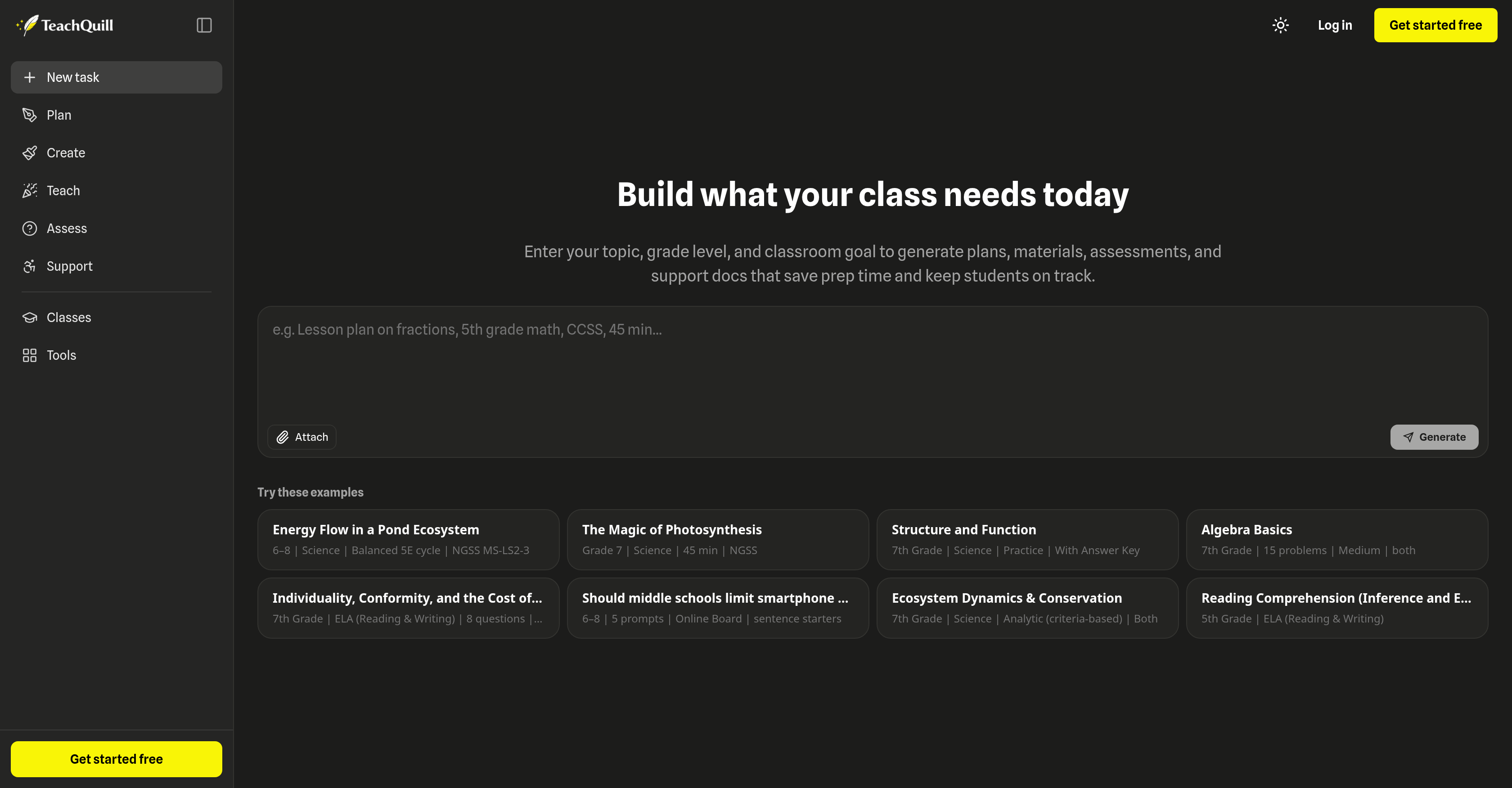
- Create standards-aligned lesson plans in seconds by entering your topic, grade level, and classroom goals
- Generate differentiated worksheets and quizzes that adapt to individual student needs across any subject
- Produce ready-to-use rubrics and AI feedback to streamline student assessment and promote continuous learning
- Build visually engaging materials like flashcards, slides, and graphic organizers to boost student retention
- Develop Individual Education Plans (IEPs) and behavior intervention plans for inclusive, personalized support
- Export finalized teaching resources to PDF or Google Docs for seamless classroom integration
- Cut daily planning and paperwork time so you can focus more on instruction and student interaction
Pros & Cons
Pros
- Creates lesson plans
- Generates quizzes
- Supports creating rubrics
- Provides IEP and SPED support
- Generates class materials
- Generates assessments
- Customize lessons according to grade
- Classroom management support
- Creates customized teaching planners
- Generates differentiated worksheets
- Generates different questions types
- Create visually engaging teaching materials
- Creates specialized support materials
- Efficient parent communication material creation
- Implementation across all grade levels
- Generates curriculum maps
- Creates syllabi
- Generates sub plans
- Generates flashcards
- Generates slides
- Generates graphic organizers
- Generates various game types
- Generates multiple assessment tools
- Creates tailored lesson goals
- Generates social stories
- Produces visual schedules
- Supports differentiation
- Generates 504 school plans
- Generates essay feedback
- Generates rubrics
- Generates daily school plans
- Provides teaching facilitators
- Generates debate topics
- Generates review games
- Generates logic puzzles
- Generates unit plans
- Generates practice quizzes
- Generates exit tickets
- Generates report card comments
- Generates curriculum maps
- Generates class slides
- Generates differentiated instruction
- Generates flashcards
- Generates syllabuses
- Generates study gap analyzers
- Generates choice boards
- Generates math worksheets
- Generates parent emails
- Generates icebreakers
- Generates learning objectives
- Generates behavior charts
Cons
- Lacks offline functionality
- Limited customization options
- Lack of integrations
- No mobile application
- No multi-language support
- No user community for support
- No option for bulk uploads
- Limited file export formats
- Limited subject coverage
- No inbuilt student management system
Reviews
Rate this tool
Loading reviews...
❓ Frequently Asked Questions
TeachQuill is a comprehensive and sophisticated AI-driven platform that is designed to provide increased productivity and support for teachers. The platform aims to reduce planning and paperwork time for educators, allowing them to focus more on teaching and interacting with students. It has an array of features and tools enabling the creation of lesson plans, quizzes, worksheets, rubrics, and facilitating feedback for students. It also provides support materials like IEP goals, behavior intervention plans, and parent communication materials. Its offerings are designed in a user-friendly way, serving educational needs from kindergarten to college across various subjects.
TeachQuill facilitates lesson planning by providing teachers with a variety of tools to create lesson plans that are tailored to the specific needs of their students. Teachers can input the topic, grade level, and classroom goals to generate lesson plans that align with the curriculum and enhance the students' learning experience. Additionally, TeachQuill has features for daily school planning and the creation of specialized teaching planners.
Yes, TeachQuill can assist in creating student assessments. It supports the generation of assessment materials aligned with the set classroom goals. TeachQuill also provides tools to create differentiated worksheets and quizzes. Moreover, it allows for the creation of rubrics, facilitating comprehensive and clear assessment of student performance.
TeachQuill caters to a broad range of grade levels. It serves the educational needs from early elementary or kindergarten all the way through to college. It does this by allowing the input of the specific grade level while creating lesson plans, quizzes, worksheets, and other learning materials.
Yes, TeachQuill can assist with the creation of special education resources. One of its key features is the ability to develop specialized support materials such as Individual Educational Plans (IEP) goals and behavior intervention plans. Thus, making it a versatile tool which supports an inclusive education environment.
Teachers can create a wide range of teaching materials using TeachQuill. This includes but is not limited to lesson plans, worksheets, quizzes, rubrics, and visually engaging teaching materials such as flashcards, slides, and graphic organizers. It also aids the creation of discussion questions with the use of AI generators, along with the ability to generate differentiated materials based on the level of the students.
TeachQuill aids in classroom planning by providing daily school planning functionality as well as tools for creating custom teaching planners. Teacher can input their topic, grade level, and classroom goals to create tailored lesson plans that align with the curriculum and student needs. Additionally, it facilitates the creation of other class materials like worksheets, quizzes and rubrics.
Yes, TeachQuill assists in parent communication efforts. One of the built-in features allows for the development of parent communication materials that can help keep parents updated on classroom activities, student progress, and other relevant information.
Yes, TeachQuill can generate differentiated worksheets and quizzes. With its AI generators, teachers can create various teaching materials, including differentiated worksheets and quizzes. This supports the addressing of individual student needs in heterogeneous classrooms, enhancing accessibility to content across different learning levels.
TeachQuill supports personalized learning by allowing teachers to create customized lesson plans, materials, and assessments that align closely with classroom goals. It also offers differentiation tools, allowing for the creation of various versions of the same educational material, assisting in tailoring instruction to meet specific learner needs.
Yes, TeachQuill can be used to create materials for a broad array of subjects. While creating instructional materials, teachers can specify the subject, ensuring the content is both relevant and curriculum-aligned. This makes TeachQuill a versatile platform that can be utilized across different subjects and disciplines in the educational landscape.
Creating a lesson plan with TeachQuill is a relatively straightforward process. Teachers input their topic, the grade level, and classroom goals, and the AI-powered platform generates a lesson plan that aligns with the curriculum and enhances the learning experience. The AI takes this information and generates a structured output in seconds without the necessity for templates or setup. These lesson plans are editable, amendable and ready for export when needed.
TeachQuill prioritizes ease of use by offering an intuitive interface with well-organized tools and features with simple navigation. The platform allows for easy editing and exporting of all outputs, enabling teachers to comfortably revise their work and maintain it in familiar formats. It also prides itself on providing a smoother workflow that avoids intrusive interruptions, making it user-friendly just as much as it is technologically advanced.
Yes, TeachQuill can assist teachers in creating behavior intervention plans. This serves as an important strategic tool in helping educators manage classroom behavior, while addressing individual behavioral issues and instilling a positive learning environment.
The main features of TeachQuill include AI generators for creating lesson plans, worksheets, quizzes, rubrics, and visually engaging teaching materials. It offers support for the creation of class materials, assessments, IEP goals, and behavior intervention plans. For daily school planning, it provides functionality to create daily and weekly planners. The sophisticated software also allows for easy editing and exporting in various formats.
TeachQuill contributes to productivity by reducing the time teachers spend on planning and paperwork. It offers an array of tools to plan lessons, generate worksheets and quizzes, provide student feedback and more. By utilizing AI to automate these tasks, it allows teachers to focus more on teaching and student interaction and less on administrative tasks.
Yes, TeachQuill does offer features to create visual teaching tools such as flashcards and graphic organizers. These features aim to enhance learning by providing visually engaging materials that can aid in knowledge retention and make complex concepts more understandable for students.
Yes, TeachQuill offers a wide range of tools for classroom resource creation and management. This includes tools for planning lessons, creating worksheets, quizzes, and rubrics, generating discussion questions, and creating visually engaging instructional materials. All these resources can be easily managed via TeachQuill's intuitive and user-friendly interface.
TeachQuill can be used by a wide range of users: K-12 teachers, special education specialists, ESL/ELL instructors, department heads, and college faculty. Beyond just teachers, it provides tools tailored for various educational roles, grade levels, and instructional contexts. Hence, not limited solely to teachers, it can be utilized by anyone involved in the planning and facilitating of instruction in educational institutions.
Yes, TeachQuill can be used to create rubrics and provide student feedback. It has a rubric generator that teachers can use to create assessment rubrics; it also has a feature which allows teachers to generate precise and valuable feedback for students, promoting an environment of continuous learning and development.
TeachQuill increases teacher productivity by seamlessly integrating various aspects of teaching and planning into one platform. It reduces the time spent on planning and paperwork, enabling educators to focus more on teaching. With its suite of tools, teachers can generate lesson plans, worksheets, quizzes, and rubrics quickly and easily. It also offers functionality for daily school planning and creating tailored teaching planners.
Yes, TeachQuill supports all grade levels. Its range of services caters to educators across the educational continuum, from kindergarten to college.
Absolutely. By entering the intended topic, grade level, and classroom goals, educators can create lesson plans and materials that align with the specific curriculum. The materials generated are also standards-aligned, ensuring that the content meets the necessary curriculum requirements.
Yes, TeachQuill does provide tools that help with daily school planning. Teachers can use the platform to create comprehensive teaching schedules, generate lesson and unit plans, and even manage daily resource allocation and usage.
Yes, TeachQuill includes AI generators for creating differentiated worksheets, quizzes, discussion questions, and rubrics. These tools are designed to serve students of varying academic capabilities, allowing for individualized instruction and practice.
Yes, with TeachQuill's suite of tools, educators can easily create visually engaging instructional materials such as flashcards, slides, and graphic organizers. These tools are designed to enhance the learning experience and engagement of students.
Yes, TeachQuill includes tools that can aid in developing specialized support materials such as behavior intervention plans. These features assist educators in managing classroom decorum and providing required support to learners.
TeachQuill prides itself on its ease of use. Despite its sophisticated functionalities and features, the platform is intuitively designed to ensure that any educator, regardless of their tech savviness, can harness its full potential with minimal learning curve.
Yes, TeachQuill provides functionality for creating custom teaching planners. Using these tools, educators can design and organize their teaching schedules, lesson plans, and curriculum mapping according to their specific requirements and preferences.
Indeed. Once the lesson materials are tailored and finalized using TeachQuill, educators can export these materials to numerous formats such as PDF and Google Docs. This flexibility allows teachers to choose a format that best suits their and their students' needs.
Yes, TeachQuill provides a variety of toolsets organized in stages. These include planning tools, creation tools, teaching facilitators, assessment tools, and support tools for individual education plans. Each set of tools is designed to assist teachers throughout different phases of delivering classes and managing student engagement and progress.
TeachQuill provides several assessment tools. This includes a rubric generator, assessment checklist generator, peer assessment generator, and a unique AI feedback generator. Each of these tools is designed to help streamline the assessment process and provide meaningful feedback to students.
Absolutely. Designed with flexibility in mind, TeachQuill can accommodate a diverse range of subjects, effectively catering to almost any teaching environment or curriculum.
Yes, a primary aim of TeachQuill is to reduce preparation time for teachers. By simply inputting the topic, grade level, and classroom goals, teachers can quickly generate lesson plans, instructional materials, assessments, and supporting documents. This automation saves time and allows teachers to focus more on instruction and student interaction.
Yes, the teaching materials generated with TeachQuill can be thoroughly customized. By tweaking the grade level, subject, and specific classroom requirements, educators can produce materials that are tailored to their specific classroom dynamics and needs.
Yes. By inputting information about the grade level, classroom goals, and the subject, the AI in TeachQuill can help you generate materials that are tailored to suit the required standards and guidelines of the curriculum.
Yes, TeachQuill aids in improving classroom management. The platform provides AI assistance for creating behavior intervention plans, daily school planning, and Individual Education Plans (IEPs). These capabilities help promote an organized, efficient, and responsive classroom environment.
Yes, TeachQuill has tools designed to generate Individual Education Plans (IEPs). In addition to this, the platform also provides support for 504 school plans and specialized communication materials, all of which can be integral to providing specialized support for students in need.
Yes, TeachQuill accommodates grade level adjustments in its materials creation. It caters to all grade levels, starting from kindergarten to college, and its suite of tools like the lesson plan and worksheet generators can be adjusted based on the grade level input by the educator.
Pricing
Pricing model
Freemium
Paid options from
$15/month
Billing frequency
Monthly