Video Transcriber AI
Overview
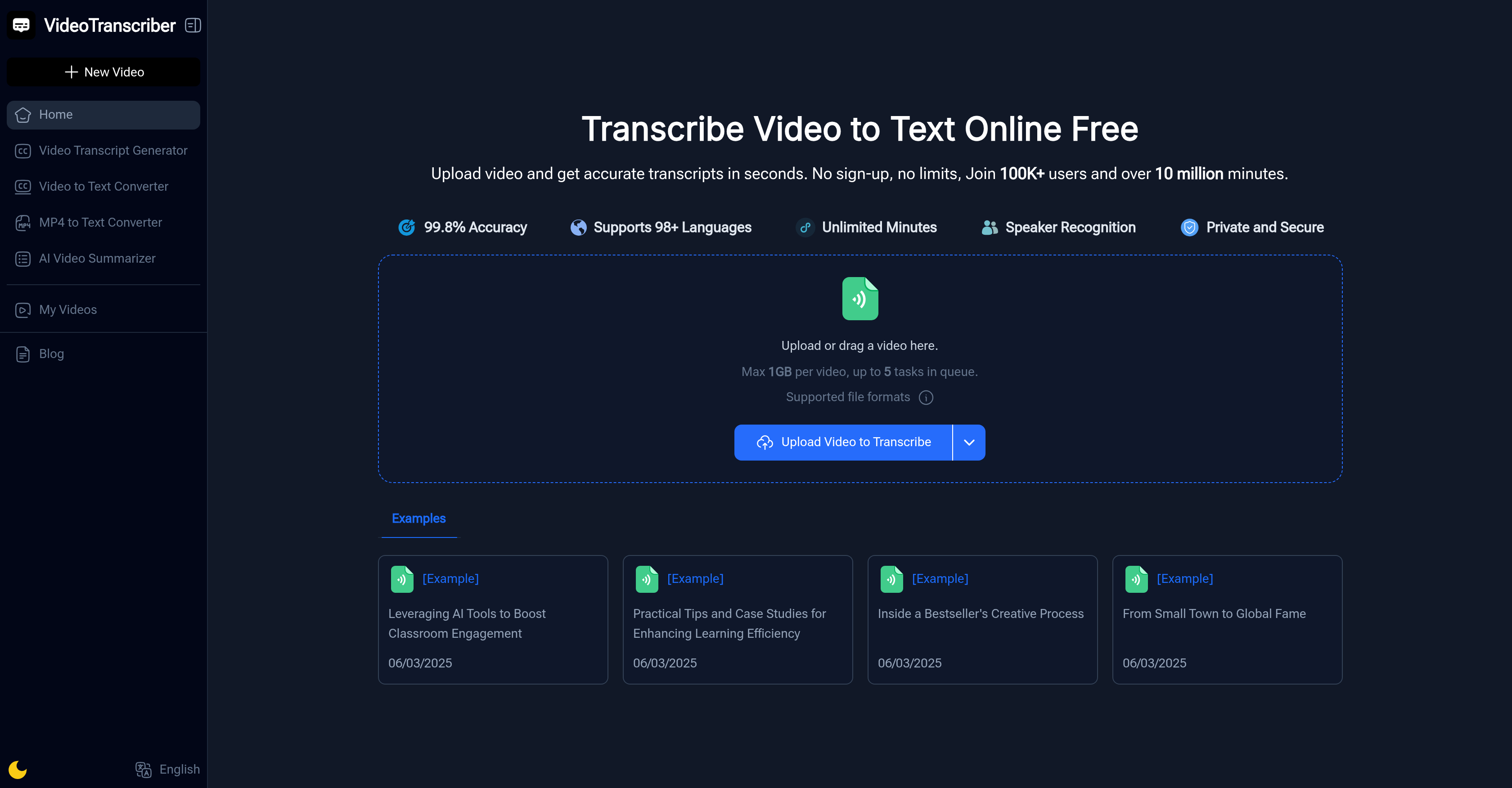
- Get accurate text from any video instantly without creating an account using our free, no-signup web tool
- Transcribe Zoom meetings and YouTube links directly by simply pasting the URL with support for multiple platforms
- Process up to 20 videos simultaneously with bulk transcription for handling multiple files efficiently
- Identify who said what in conversations with automatic speaker recognition that labels each participant
- Choose your preferred balance of speed versus accuracy with customizable transcription modes
- Download, copy or share transcripts immediately after processing for seamless workflow integration
- Generate captions and subtitles for content creation by converting video dialogue into text format
- Transcribe interviews and lectures in multiple languages for academic research and analysis
- Handle large files up to 1GB with unlimited transcription minutes for lengthy recordings
- Maintain complete privacy with secure processing that keeps your video content protected
Pros & Cons
Pros
- Supports multiple file formats
- Labels different speakers
- Multilingual transcription
- No sign-up required
- Unlimited use time
- Works for various roles (students, professionals, content creators)
- Instant copying of transcriptions
- Ability to download transcriptions
- Sharing transcription feature
- Optional transcription accuracy modes
- Supports processing from YouTube
- Processes Zoom recordings
- Generate captions for videos
- Recognized by top organizations
- No download necessary
- Video to text in seconds
- Possibility to choose balance of speed and precision
- Copy, download, or share transcript
- No special tools required
- Turns lectures into study notes
- Suitable for lesson plan creation
- Captures meetings and webinars
- Creates captions for YouTubers
- Converts interviews into text
- Fast and accurate press conference transcription
- User testimonials included
- Supports bulk transcription
- 1GB upload limit
- Transcribes Zoom and other meeting platforms
- Multiple speaker recognition
- Supports English and many other languages
Cons
- No offline functionality
- Possible loss of privacy
- Limited to 1GB file size
- Limited to 5 tasks queue
- Dependent on internet speed
- Claims but unverified 99.8% accuracy
- Audio quality affects accuracy
- Multi-language but limited support
- Requires manual adjustment for accuracy
- No user feedback for improvement
Reviews
Rate this tool
Loading reviews...
❓ Frequently Asked Questions
Video Transcriber AI supports a variety of conventional file formats including MP4, MOV, AVI, and recordings from Zoom or other meeting platforms.
Yes, Video Transcriber AI can efficiently process and transcribe videos from platforms such as YouTube.
To use Video Transcriber AI, you need to first upload the video file from your computer or drag and drop it into the upload box. The system then automatically processes the file, converting spoken words into the accurate text. Once the transcription is ready, you have the option to copy the text to your notes, download it as a file, or share it with teammates.
Yes, Video Transcriber AI offers the capability to recognize and label different speakers within videos. This helps manage conversations and indicates who said what in the transcript.
Yes, Video Transcriber AI is particularly suitable for students and researchers who require quick and accurate transcriptions of lectures, interviews or presentations.
Yes, Video Transcriber AI works efficiently with Zoom recordings, making it a beneficial tool for professionals who need to keep track of discussions from Zoom calls or meetings.
Yes, content creators can utilize Video Transcriber AI to quickly generate captions or transcripts for their videos.
Video Transcriber AI supports multiple languages, offering the flexibility to transcribe in English or any other supported languages.
Video Transcriber AI offers diverse transcription accuracy modes. This allows users to choose the balance of speed and precision that fits best for their needs.
Yes, Video Transcriber AI enables users to instantly copy, download or share the transcripts, according to their requirements.
No, Video Transcriber AI places no restrictions on usage based on time limits, allowing unlimited usage.
No sign-up is necessary to use Video Transcriber AI. You can begin transcribing without creating an account.
Yes, Video Transcriber AI is noteworthy for professional usage. It aids business users in capturing meetings, Zoom calls, and webinars, ensuring that all important points are recorded in text.
You can upload video files of up to 1GB in size on Video Transcriber AI.
Yes, you can queue up to 20 videos at the same time for transcription on Video Transcriber AI.
Yes, with the ability to queue up to 20 videos at one time, Video Transcriber AI supports efficient bulk transcription.
There are no restrictions on the number of minutes for video transcription. Video Transcriber AI allows transcriptions of unlimited minutes.
Yes, Video Transcriber AI ensures privacy and security. All transcriptions are carried out in a secure environment.
Yes, the transcripts from Video Transcriber AI can be used for analysis or citation purposes. Academics and writers can convert interviews or recorded talks into accurate text for these purposes.
Yes, the transcripts generated by Video Transcriber AI provide a useful resource for content creation. For instance, YouTubers, podcasters, and video makers can quickly create captions or scripts for their media.
Video Transcriber AI supports video files up to 1GB.
Video Transcriber AI supports popular formats like MP4, MOV, and AVI, along with recordings from platforms like Zoom.
Yes, Video Transcriber AI supports and can transcribe videos from YouTube links and Zoom recordings.
Yes, Video Transcriber AI recognizes and labels different speakers, making conversations within videos easier to manage.
The target users for Video Transcriber AI are quite varied - students, educators, professionals, content creators, and journalists, among others.
Video Transcriber AI supports English and many other languages, offering broad versatility for transcribing video content.
Video Transcriber AI offers multiple transcription accuracy modes, enabling users to choose their preferred balance of speed and precision.
No, Video Transcriber AI does not restrict video usage by time limits, offering unrestricted access to its users.
Once generated by Video Transcriber AI, the transcripts can be copied, downloaded, or shared with teammates.
Users can customize the balance between transcription speed and accuracy by choosing from the multiple transcription accuracy modes offered by Video Transcriber AI.
Yes, professionals can indeed use Video Transcriber AI for such purposes as it can transcribe discussions from Zoom calls or meetings.
Yes, content creators can use Video Transcriber AI to quickly generate captions for their video content.
Yes, Video Transcriber AI works in your browser, so there's no need to install any specific software to use it.
Definitely, journalists can use Video Transcriber AI to transcribe video interviews or press conferences, making it simpler and quicker to publish accurate stories.
Yes, Video Transcriber AI is free to use, with no need for sign-up or special software.
Video Transcriber AI can handle up to 20 videos in the queue at once, making for efficient bulk transcription.
Yes, researchers can use Video Transcriber AI to convert interviews or recorded talks into an accurate text format, simplifying the process of analysis or citation.
Yes, users can directly download the transcript as a file, once it has been converted by Video Transcriber AI.
To use Video Transcriber AI, upload a video file into the system. The AI will then process the content and transcribe the spoken words into text. You can then opt to recognize different speakers and select your preferred language. Subsequently, you can copy, download, or share the generated transcript.
Pricing
Pricing model
Free
Paid options from
Free