VideoAny Lip Sync AI Online
Overview
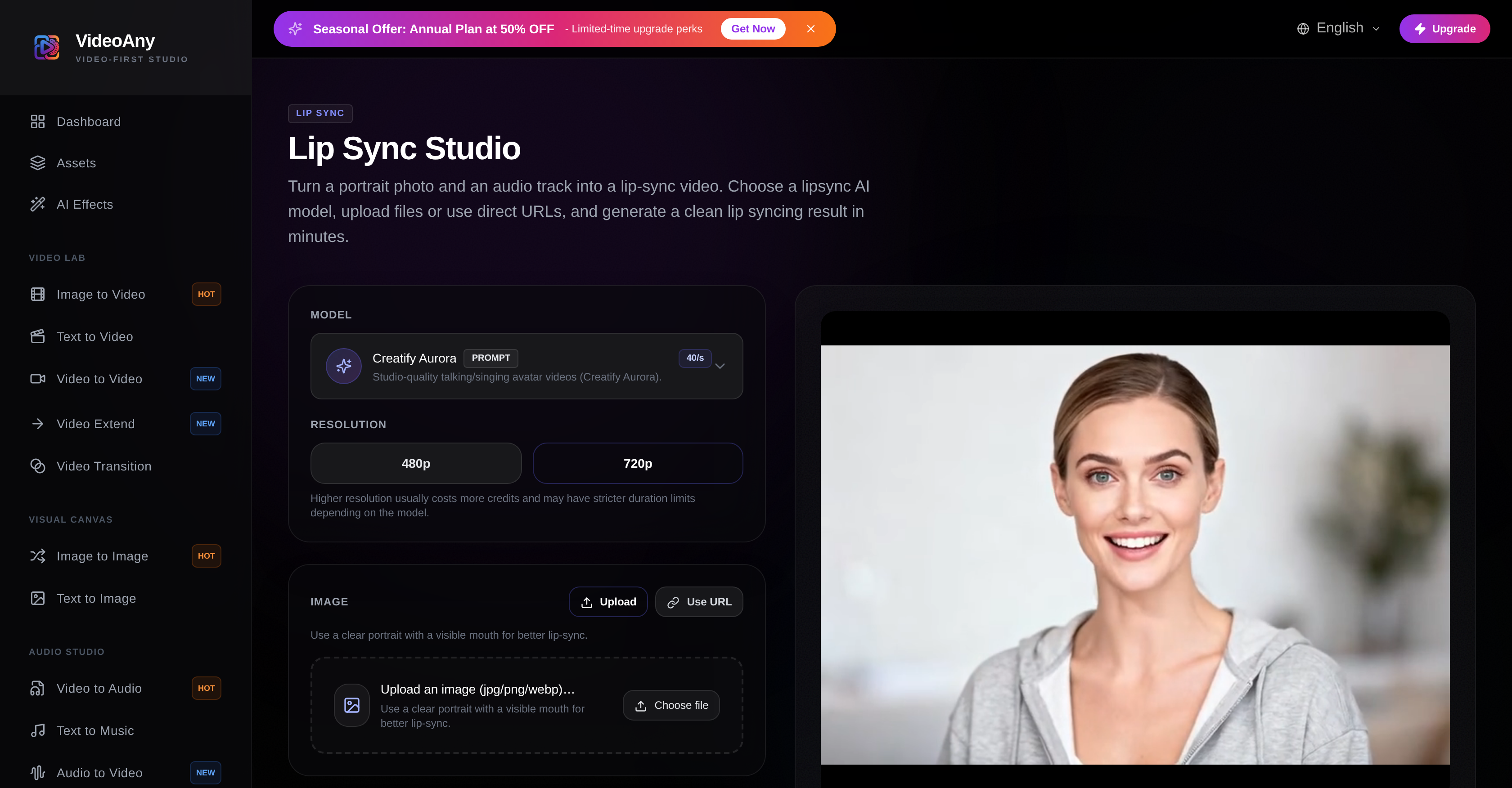
- Turn any portrait photo into a realistic talking video with perfect lip sync using your own audio file or URL.
- Choose between fast, no-prompt generation for quick results or prompt-driven models for studio-quality avatar videos with creative control.
- Validate perfect mouth synchronization before committing by testing with a short audio clip first.
- Improve video stability and sync accuracy by adjusting the output resolution to match your source quality.
- Create professional talking photo clips and voiceover edits without complex video editing software.
Pros & Cons
Pros
- Profile Selection for Sync
- User-driven prompts
- Audio Quality Input
- Visible Mouth Requirement
- High resolution control
- Optimal Usage Tips
- Image and Audio Validation
- Privacy and Rights Compliance
- Upload files via URL
- Direct Image Upload
- Direct Audio Upload
- Noise Reduction Capability
- Adjustable Stability and Sync
- User-guided Scene Control
- Clarity Emphasis for Lip-sync
- Multiple Asset Interpretations
- Option for short clip testing
- Advice on Legal Usage
- Available as Talking Photo Creator
- Implication as Voiceover Editor
Cons
- No free usage
- Resolution changes affect cost
- High-resolution increases resource consumption
- Requires clean, noise-free audio
- Requires high-quality, clear image
- Usage restrictions on content
- Potential Sync mismatches
- Model choice alters workflow
- Limited model options
- Tip-dependent for optimal results
Reviews
Rate this tool
Loading reviews...
❓ Frequently Asked Questions
VideoAny Lip Sync AI Online is a digital tool that allows users to create lip-sync videos from an image and an audio file. It features an interface where users can select different AI models to achieve this, such as Aurora, Fabric, and OmniHuman. It also provides the ability to control the video's resolution. The system interprets intent based on user-driven prompts, and translates it into video assets.
To use VideoAny Lip Sync AI Online, you need an image with a clear, visible mouth and an audio file of clean speech with minimal noise. The image formats supported are jpg, png, and webp while audio files can be in mp3, wav or m4a format.
VideoAny Lip Sync AI Online generates a lip-sync video by using AI models to interpret the user's intent based on the uploaded image and audio file. It takes into account the duration of the audio for synchronization. The AI engine then builds assets and generates a lip-sync video.
VideoAny Lip Sync AI Online offers three AI models: Aurora, Fabric, and OmniHuman. These models aid in the process of creating lip-sync videos from a supplied image and audio file.
Yes, the audio quality significantly affects the output on VideoAny Lip Sync AI Online. For best synchronization of lip movements, it is recommended to use clean speech and minimal noise in the audio file.
For VideoAny Lip Sync AI Online, the image guidelines suggest using a clear portrait with visible mouth movement cues. Images with good lighting and minimal motion blur tend to give more consistent lip-sync results.
VideoAny Lip Sync AI Online handles user-driven prompts by interpreting the intent embedded in them. The AI engine processes these prompts, which then guide the generation of the lip-sync video.
Yes, you can control the resolution of the generated video in VideoAny Lip Sync AI Online. Users can pick between different resolution options based on their requirements.
Using higher resolutions in VideoAny Lip Sync AI Online often involves more resource consumption. Higher resolution videos might cost more credits and may have stricter duration limits depending on the selected AI model.
Yes, with VideoAny Lip Sync AI Online, you can start with a short clip to verify sync accuracy. This test run ensures acceptable sync quality before you proceed to generate a longer video.
VideoAny Lip Sync AI Online restricts use to only lip-sync videos made from content you own or have permission to use. Impersonation is discouraged, and users are urged to comply with local laws and platform policies. Unauthorized images and audio, as well as misleading viewers about who spoke certain lines, is heavily cautioned against.
Yes, VideoAny Lip Sync AI Online can turn a portrait photo into a lip-sync video. You have to upload the portrait photo and an audio track, and the AI will generate a video where the mouth movements match the audio.
VideoAny Lip Sync AI Online processes voice by using the duration of the audio for synchronization purposes. The system's noise reduction capability is implied through the recommendation of using clean speech with minimal background noise for better synchronisation.
Yes, VideoAny Lip Sync AI Online has policies related to content copyright and impersonation. The platform discourages deceptive impersonation and stresses the usage of only authorized images and audio. It also advises against misleading viewers about who said particular lines and urges user compliance with applicable laws and platform policies.
To achieve optimal usage of VideoAny Lip Sync AI Online, consider using high-quality portraits with good lighting and visible mouth for images. For audio, clean speech with minimal background noise is advisable. Also, it's suggested you start with a short clip to verify sync accuracy before producing a longer video.
Yes, it is possible to misuse VideoAny Lip Sync AI Online. The misuse can involve creating lip-sync videos from unauthorized content, engaging in deceptive impersonation, or misleading viewers about who said certain lines.
When uploading audio files on VideoAny Lip Sync AI Online, the audio should be of clean speech with minimal noise for better synchronization. It's further implied that the audio duration impacts the sync process and the resource consumption for generating the lip-sync video.
VideoAny Lip Sync AI Online respects data privacy by storing uploaded files and generating public URLs. However, detailed specifics about its data privacy practices are not explicitly addressed on their website.
Aurora, Fabric, and OmniHuman are AI models used by VideoAny Lip Sync AI Online each with specific strengths. Fabric 1.0 provides a fast, clean lip sync video without prompts. Creatify Aurora offers prompt control over framing/style, making it suitable for creating studio-quality avatar videos. ByteDance OmniHuman v1.5 is used when higher realism and stronger lip syncing are needed.
The process begins when the user uploads an image and an audio file. The tool takes the duration of the audio into account for synchronization. VideoAny's AI engine then interprets the user's intent using prompts and translates it into video assets. This created video can then be downloaded and shared.
VideoAny Lip Sync AI Online provides three AI models: Aurora, Fabric, and OmniHuman. Aurora and OmniHuman are prompt-driven models that offer users control over the scene shape, while Fabric is a no-prompt model that offers fast lip-sync video results.
For optimal lip-sync results, the uploaded image should be a clear portrait with a visible mouth. The audio file should contain clean speech with minimal noise. Improved accuracy can be achieved by starting with a short clip to validate the synchronization before generating a longer video.
Yes, users have the flexibility to control the resolution of the output video in VideoAny Lip Sync AI Online. However, it should be noted that higher resolutions often require more resources.
Users must generate lip-sync videos only from content they own or have the right to use. Impersonation is discouraged, and users must adhere to local laws and platform policies. Unauthorized use of images and audio and misleading viewers about who spoke certain lines are both strongly cautioned against.
Users have the flexibility to either directly upload files to VideoAny Lip Sync AI Online or use URLs.
VideoAny Lip Sync AI Online advises using a high-quality clear portrait with good lighting and a visible mouth. Audio files with clean speech and minimal background noise are recommended for better synchronization.
Apart from generating lip-sync videos, VideoAny Lip Sync AI Online also provides useful tools for creating talking photo clips and voiceover edits.
A prompt-driven model is a feature of VideoAny Lip Sync AI Online, specifically with the Aurora and OmniHuman models, where user prompts guide the generation of the video, providing better control over the scene shaping. On the other hand, a no-prompt model, represented by the Fabric model, delivers a fast lip-sync video without needing prompts.
To improve stability and mouth sync in VideoAny Lip Sync AI Online, it is recommended to switch the resolution. Also, using a clear, front-facing portrait and clean speech with low background noise can help.
Yes, VideoAny Lip Sync AI Online tool is equipped to create talking photo clips and voiceover edits alongside generating lip-sync videos.
Clear portraits and clean audio are important for generating high-quality lip-sync videos. A visible mouth in the portrait and minimal noise in the audio allow the AI model to better align the timing and articulation, leading to improved synchronization.
One of the effective tips VideoAny Lip Sync AI Online provides to validate sync accuracy is to initially start with a short clip before proceeding with generating a longer lip-sync video.
While using VideoAny Lip Sync AI Online, users must respect privacy, consent, and legal rights. They should only use authorized images and audios and steer clear of using the tool to mislead viewers about who said what.
For ideal results, VideoAny Lip Sync AI Online requires an image that is a clear front-facing portrait with a visible mouth.
To generate a lip-sync video using VideoAny Lip Sync AI Online, users need to upload an image and an audio file. They should then select an AI model and set resolution as per their needs. The tool will interpret the user prompts, synchronizing the mouth movement in the image with the audio file, and output a lip-sync video.
VideoAny Lip Sync AI Online guides its users to only generate lip-sync videos from content they own or have permission to use. It encourages avoiding deceptive impersonation and compliance with applicable laws and platform policies, and advises the use of authorized images and audio.
The AI engine in VideoAny Lip Sync AI Online interprets user-driven prompts and uses them to guide the generation and shape the scene of the video, essentially translating the prompts into video assets.
VideoAny Lip Sync AI Online stipulates that users must only generate lip-sync videos from content they own or have obtained permissions for. Impersonation is strictly discouraged, and users are urged to conform to local laws and policies of the platform. The unauthorized use of images and audios and misleading viewers about the identity of the speaker are strongly warned against.
Pricing
Pricing model
Freemium
Paid options from
$7.50/month
Billing frequency
Monthly