
VidFlux AI Image Editor
Overview
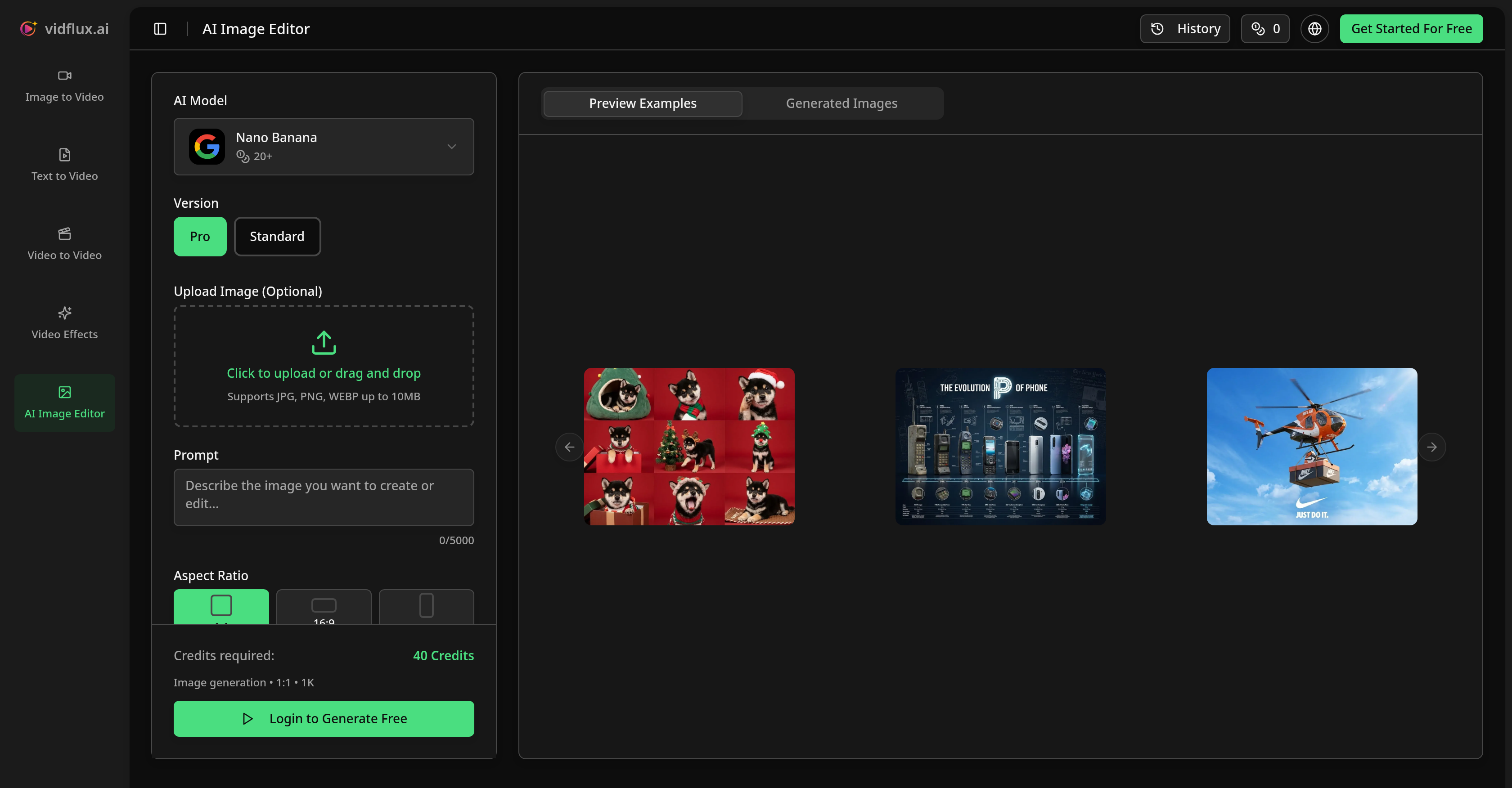
- Transform simple product shots into professional studio photography without a physical shoot, using AI models that control lighting, backgrounds, and composition.
- Generate stunning promotional visuals with perfectly legible text and layout for ads and social media, powered by the Seedream 4.5 AI model for crisp typography.
- Reimagine any image in distinct artistic styles like cyberpunk or cinematic while preserving the original structure, using the Flux 2 model for photorealistic style transformation.
- Remove or modify specific objects with precision by reconstructing the surrounding area naturally, not just blurring, thanks to semantic understanding from the Nano Banana AI model.
- Create complete images from scratch using only a text prompt, with AI models that handle generation, styling, and rendering in one intuitive process.
- Maintain consistent lighting and perspective when adding new elements, as the AI engine seamlessly blends additions with the original image's mood and materials.
- Choose from multiple aspect ratios (1:1, 16:9) and resolutions up to 4K, providing flexible output for social media, print, or web without manual resizing.
Pros & Cons
Pros
- Semantic object understanding
- Advanced typography capabilities
- Photorealistic rendering
- Image reconstruction
- Recognizes and discerns objects
- Text addition respecting layout
- Supports image registration
- Preserves original image identity
- Precise object alterations
- Respects layout principles
- Allows prompt-driven editing
- Supports different aspect ratios
- Supports different resolutions
- Wide application range
- User-friendly interface
- Beginner-friendly platform
- Professional editing tool
- Image generation from scratch
- Creates promotional visuals
- Strong for e-commerce applications
- Strong for social media marketing
- Material re-rendering capability
- Additional final polish option
- Transforms rough sketches
- Maintains original lighting
- Suitable for concept art
- Handles image-to-image workflows
- Respects image structure
- Supports commercial use
- Doesn't require advanced skills
- Supports image animation
- Creates dynamic content
Cons
- Requires internet connection
- Not open-source
- Usage credits required
- No offline version
- Complex for novice users
- No video editing support
- No smartphone app
- Lacks advanced manual editing tools
- No raw image support
- Limited file size upload
Reviews
Rate this tool
Loading reviews...
❓ Frequently Asked Questions
VidFlux AI Image Editor is a superior tool that employs artificial intelligence to produce, adapt, and transform images. It leverages a constellation of AI models in concert to offer remarkable image editing abilities. Instead of only identifying pixels, as conventional editors do, VidFlux AI Image Editor actually comprehends and distinguishes objects, improving the precision of image alterations.
The 'tri-hybrid' approach of VidFlux AI Image Editor is a unique feature that combines three pioneering AI models, bestowing semantic understanding, superb typography, and photorealistic rendering. This integrated strategy allows VidFlux AI Image Editor to process, comprehend, and transform images more effectively and accurately, providing superior results to conventional image editing software.
VidFlux AI Image Editor doesn't just perceive pixels, it understands and distinguishes objects. It's powered by Nano Banana, an AI model that comprehends the structure and context of images. This level of perception allows for more precise and natural modifications.
When it comes to removing specific objects from an image, VidFlux AI Image Editor operates methodically. It correctly identifies the object to be removed and rather than just blurring or cloning the surrounding areas, it reconstructs the parts that would remain naturally.
Yes, VidFlux AI Image Editor offers a tool for the addition of text or design elements to an image. It powerfully combines text and design elements with Seedream 4.5 AI model, rendering crisp, legible text which respects design layout principles.
VidFlux AI Image Editor has wide-ranging applications. It's beneficial for e-commerce to improve product images, for preserving the identity of a photo while changing its feel, for creative projects to reimagine images in distinct artistic styles, and for marketing to generate impressive promotional visuals.
For marketing efforts, VidFlux AI Image Editor offers exemplary solutions. It enables rapid production of stunning promotional visuals with perfect typography and layout, ensuring any text is clearly legible and aesthetic design principles are followed. It's an effective tool for generating Instagram-worthy graphics, ads, and social content.
VidFlux AI Image Editor allows for an impressive level of precision when adding, removing, or modifying specific objects in images. It can alter colors, materials, and details without affecting the rest of the image, offering an unparalleled level of control over image manipulation.
Yes, VidFlux AI Image Editor is suitable for beginners. Its platform is intuitive, allowing users of all skill levels to create or transform images using a simple process. It doesn't necessitate any prior experience or technical expertise, making it user-friendly and accessible.
To create or transform images with VidFlux AI Image Editor, you simply upload your image, delineate your intended edit, and the AI engine will seamlessly blend new elements with the original, respecting the lighting and perspective. It provides a platform where users can either enhance an existing image or develop one from a text prompt.
Yes, with VidFlux AI Image Editor, it is possible to generate images from scratch. All that's required is a text prompt to get the process started. The application's AI models work jointly to design and render a completely new image based on your text input.
VidFlux AI Image Editor provides a range of styles and quality levels. The use of multiple AI models allows for vast flexibility in realizing your creative vision. Users have the liberty to choose and experiment with the styles and quality levels that best serve their creative or business needs.
When VidFlux AI Image Editor introduces new elements to an image, it incorporates original lighting and perspective aspects. The AI engine is designed to adeptly blend new elements while respecting existing components, ensuring the new elements harmonized with the original.
VidFlux AI Image Editor employs multiple AI models for image generation. Three of these include Nano Banana, which enables semantic object control, Seedream 4.5 for perfect typography and layout, and Flux 2 for photorealistic style transformation. These AI models collaborate to deliver unparalleled image editing abilities.
VidFlux AI Image Editor, equipped with the AI model Seedream 4.5, ensures the legibility of added text and respect for layout principles. It is able to render crisp, clear text and design elements that adhere to established design principles, making it ideal for tasks that require the incorporation of text into imagery.
Yes, VidFlux AI Image Editor represents a considerable resource for enhancing product shots in e-commerce. It can transform simple product images into professional studio-quality photography, providing precise control over lighting, backgrounds, and composition without the need for an actual photoshoot.
VidFlux AI Image Editor can alter the ambience of photos while preserving their identity owing to power of Flux 2, one of its AI models. It appreciates the structure of the image and renarrates materials, lighting and mood to generate a new feeling, providing a unique tool for visual storytelling.
Indeed, VidFlux AI Image Editor can be used in creative projects to reimagine images in diverse artistic styles. Whether you wish to apply a cyberpunk aesthetic, vintage, cinematic, or any other creative flair, VidFlux retains the original structure of the photo whilst delivering the desired artistic transformation.
Semantic understanding in VidFlux AI Image Editor refers to the application's ability to comprehend the underlying meaning or context of an image. This includes understanding the structure, relations between objects, and overall context of the image, which facilitates precise edits that align with the original context and meaning.
VidFlux AI Image Editor is beginner-friendly. It has been purposefully designed to be accessible for users of all skill levels, not just professional designers. Its intuitive platform takes you through a simple process to create or transform images, and does not require any advanced technical or graphic design skills to use it effectively.
VidFlux AI Image Editor is a superior artificial intelligence-based tool that generates, edits, and transforms images. What makes it special is its tri-hybrid approach that combines three advanced AI models offering semantic understanding, stellar typography, and photorealistic rendering. It extends beyond conventional image editors by recognizing objects in images instead of just pixels, allowing precise alterations and adding clear text or design elements. It's versatile and usable for e-commerce, marketing, and creative projects.
The 'tri-hybrid' approach of VidFlux AI Image Editor works by combining three cutting-edge AI models. The first delivers semantic understanding, allowing the AI to understand and discern objects within an image. The second model is responsible for perfect typography, facilitating the addition of text or design elements that are easily readable and adhering to layout principles. The third offers photorealistic rendering, providing restyling capacity while preserving the original image's structure.
VidFlux AI Image Editor recognizes and discerns objects in images through its AI model known as Nano Banana. This model allows VidFlux to understand the structure and context of images, differentiating objects rather than recognizing pixels only. For example, if you want to remove sunglasses from an image, the AI not only removes the sunglasses but also realistically reconstructs the remaining parts.
VidFlux helps in adding text or design elements to the images through an AI model known as Seedream 4.5. This model ensures the generation of crisp, legible text that complies with layout principles. This makes it perfect for applications where text or design elements need to be added, such as posters, ads, and social media covers.
VidFlux AI Image Editor can be used in a wide range of applications. These include e-commerce, where it can be used to enhance product shots, and marketing, where it is used to produce stunning promotional visuals. It can also be applied in creative projects to transform photos in different artistic styles. Furthermore, it's utilized in object modification within images.
VidFlux AI Image Editor having the ability to generate images from just a text prompt means it can take verbal instructions or descriptions and transform them into visual representations. For example, a user could input a prompt such as 'a serene beach at sunset', and the AI would autonomously generate an image based on that description.
VidFlux Image Editor offers multiple AI models to cater to different styles and quality levels. These models include Nano Banana, which helps in understanding the structure and context of images and Seedream 4.5, useful for rendering crisp, legible text that meet layout principles.
VidFlux AI Image Editor works with different styles and quality levels by leveraging its multiple AI models. Each model is designed to offer distinct capabilities and styles, offering users the flexibility to choose according to their creative vision. These models can generate specific aesthetics while also preserving the original structure of the image.
VidFlux AI Image Editor offers an impressive level of precision in image modification. It enables users to add, remove, or modify specific objects in images without affecting the rest of the image. It's precise enough to allow for alterations like the removal of sunglasses where it doesn't blur or clone areas but actually reconstructs the remaining parts naturally.
In e-commerce and marketing, VidFlux AI Image Editor assists by offering the ability to enhance product shots by transforming them into professional studio photography. It can also produce stunning promotional visuals for marketing purposes, generating Instagram-ready graphics, ads, and social content instantly.
VidFlux AI Image Editor understands and preserves the lighting and perspective of the original image by re-rendering materials and mood while keeping the structure intact for a desired aesthetic effect. It blends the new elements seamlessly with the original lighting and perspective, ensuring a natural and consistent result.
The differences between VidFlux AI Image Editor and a conventional image editor lie in their capabilities and approach. While conventional editors only recognize pixels, VidFlux goes a step further and recognizes objects within images. It's powered by AI models which provide semantic understanding, typography, and photorealistic rendering. Also, it has the ability to understand the context and structure of images, which allows for more precise and intricate editing.
VidFlux AI Image Editor caters to both beginners and professional designers with its intuitive platform that allows users to create or transform images using a simple process. Users can upload an image, describe the desired edit, and the AI will do the rest. It also allows for creation of images from scratch using only a text prompt, making it accessible for people with varying levels of design skills.
VidFlux AI Image Editor understands the semantic of an image through the AI model called Nano Banana. It doesn't just see pixels; it understands objects within an image, which allows it to discern the structure and context of the image. This semantic understanding is a fundamental part of its precise editing capabilities.
VidFlux can help in transforming the vibe of a photo while preserving its identity by re-rendering materials, lighting, and mood according to the desired aesthetic effect. It has an AI model, Flux 2, that is capable of preserving the structure while restyling the photo to change the vibe. Examples include reimagining a product photo with a 'cyberpunk style' or 'studio lighting', while maintaining the original structure.
Yes, it is possible to generate images from scratch using VidFlux AI Image Editor. In fact, one of the unique features of VidFlux is its ability to create imaginations from pure textual inputs. By providing it with a text prompt, the artificial intelligence can generate entirely new pieces of imagery.
Nano Banana and Seedream 4.5 are AI models used in VidFlux AI Image Editor. Nano Banana is used for semantic understanding, in which the AI recognizes and understands objects within an image, not just pixels. Seedream 4.5, on the other hand, is used for rendering crisp, legible text and respecting layout principles.
VidFlux AI Image Editor supports various aspect ratios and resolutions. The aspect ratios include 1:1, 16:9, 9:16, 4:3, and 3:4. As for resolution, users can choose between 1K, 2K, and 4K. These options provide flexibility according to the users' needs and preferred output format.
The process of uploading and editing an image with VidFlux involves a few intuitive steps. First, the user uploads their photo, sketch, or stock image. Next, the user defines the desired edit through a text prompt. The AI engine then generates the changes and blends the newly added elements with the original lighting and perspective. Multiple AI models are available for different styles and quality levels. Additionally, there's an optional final polish to take the imagery to the next level.
To produce promotional visuals for marketing purposes with VidFlux AI Image Editor, users can leverage its suite of AI models to create eye-catching graphics for posts, ads, and social media. It has an AI model specifically for perfect typography and layout, Seedream 4.5, which can produce clear, legible text ideal for promotional content. Moreover, the image generation quality ranges from 1K to 4K, providing high-resolution outputs for various marketing needs.
Pricing
Pricing model
Paid
Paid options from
$6.75/month
Billing frequency
Monthly