
Video Music-Score by Vidsembly
Overview
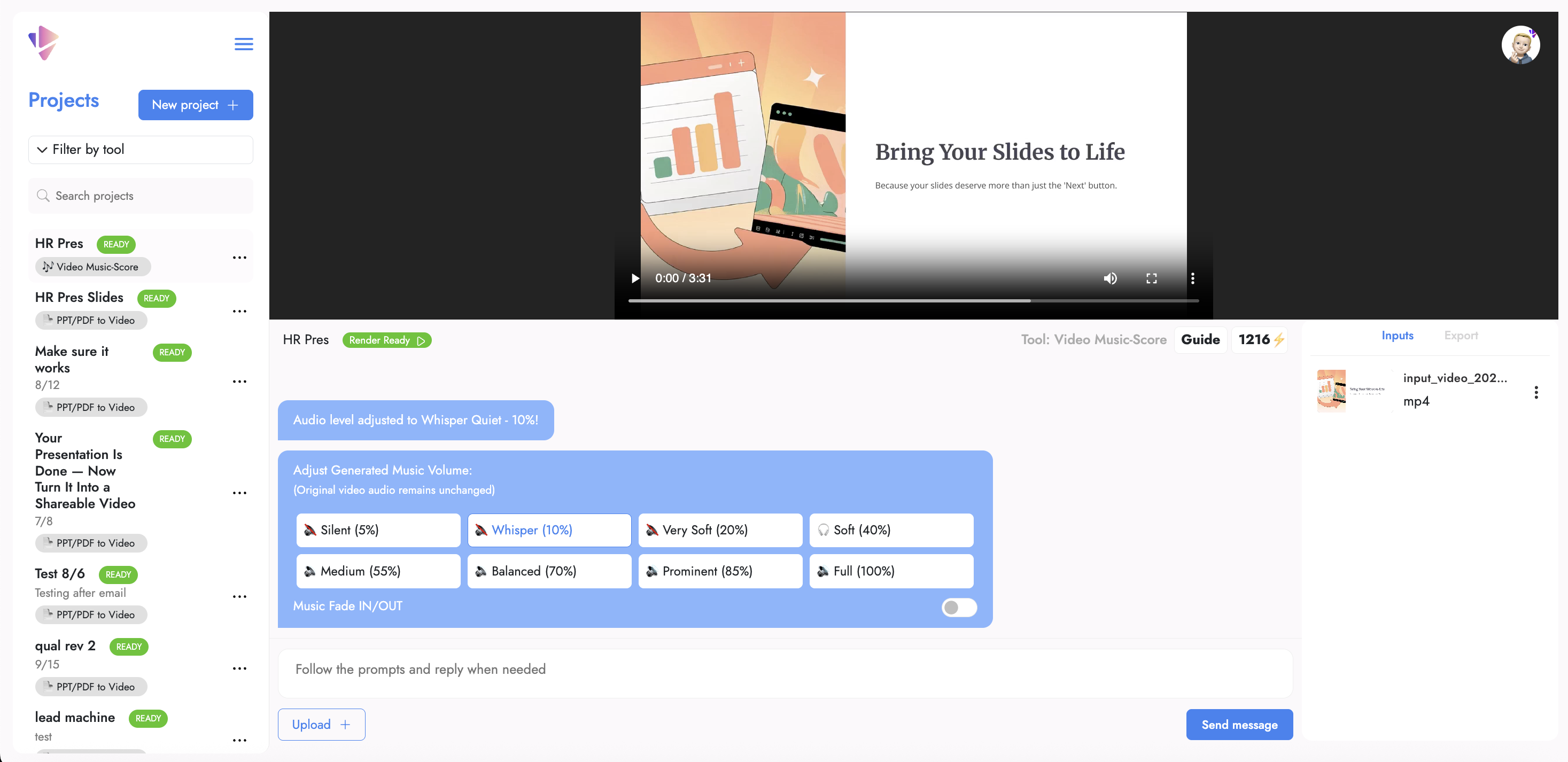
- Instantly generate custom background music that perfectly matches your video length with automatic music fitting to MP4 files
- Protect your content from copyright claims with royalty-free music cleared for any project including marketing and social media
- Preview exactly how music will sound with your video before finalizing to ensure perfect audio-visual synchronization
- Fine-tune audio levels with precise volume adjustments and professional fade effects for polished, studio-quality sound
- Easily restart projects without double charges by deleting and recreating when you need to make significant changes
- Create professional soundtracks for short videos under 30 seconds with optimal performance for social clips and product demos
Pros & Cons
Pros
- Generates custom music
- Copyright-free background tracks
- Automatically fits music to MP4
- Variety of music styles
- Preview of end result
- Adjustable volume control
- Music fade adjustments
- Exportable final results
- Suited for short videos
- Creates product clips
- Supports academic projects
- Applicable in marketing content
- Non-infringement soundtrack
- Supports MP4 format
- Handles video up to 500mb
- Royalty-free music
- Option to delete project
- No double charging
- Credit system for features
- Turns PowerPoint into narrated videos
- Automatic music generation
- Ideal for social media videos
- No editing required
- Supports team projects
- No card required to start
Cons
- Only supports MP4 format
- Optimal for videos under 30 seconds
- Limited to 5 minutes and 500MB
- Music creation and volume adjustment charged
- No support for longer videos
- Lack of advanced editing features
- Limited number of music styles
- Credit system for tool features
- No offline usage
- Project deletion required for troubleshooting
Reviews
Rate this tool
Loading reviews...
❓ Frequently Asked Questions
Video Music-Score by Vidsembly is a tool designed for the generation of custom, copyright-free background music tracks that can be automatically fitted to MP4 video files. The user can choose from a variety of music styles, have a preview of the end-result, adjust its volume and fit or fade the music, and proceed to export the final result when they're satisfied.
To generate custom music with Video Music-Score, you have to create a project and upload your desired MP4 video. After this, you can select a preferred style of music and adjust volume settings along with making any other final tweaks like adding a fade in or fade out to the music track, before you move on to exporting the final video.
Video Music-Score offers a variety of music styles however the exact categories are not specified on their website.
Video Music-Score provides a feature for users to preview the resultant video before finalizing. The exact process to do this is not specified on their website.
In Video Music-Score, volume of the music track can be adjusted using the selector message. The credits system on their website indicates that each series of three volume adjustments equates to one credit.
The steps involved in using Video Music-Score are: creating a project, uploading the MP4 video you want to add music to, choosing one of the provided music styles to generate a new copyright-free soundtrack, adjusting the volume of the added music track, adding final tweaks such as fade in and fade outs to the music track, and finally exporting your video when ready.
Video Music-Score is suitable for a wide range of projects including short social videos, product clips, intros, academic or team projects, and content intended for marketing.
Video Music-Score supports the MP4 video format.
Video Music-Score works optimally with videos under 30 seconds but it can support videos up to 5 minutes and 500mb.
Yes, the music generated by Video Music-Score is cleared of any copyright claims, making it royalty-free for any video projects.
Should you wish to start over your project in Video Music-Score, users are given the option to delete the original project and initiate a new one. This ensures that they are not charged a second time for the same project.
The credit system in Video Music-Score applies when generating new music and making volume adjustments. New music generated costs 5 credits for each 15 seconds of music and every three volume adjustments cost 1 credit.
Yes, in Video Music-Score, you can adjust the fades of the music. You have the option to add fade in and fade out to the music track as part of the final tweaks before exporting the video.
The final video in Video Music-Score can be exported once all the desired changes and adjustments have been implemented. The exact process to export the video is not specified on their website.
Yes, Video Music-Score can be used for academic projects, as it's ideal for creating custom, copyright-free music tracks that fit any type of presentation or video content.
To delete a project in Video Music-Score, users simply command the tool to delete the project. The exact process to do this is not specified on their website, but it’s mentioned that users won’t be charged twice if they hit a snag and need to start over by deleting a project.
Yes, the music created using Video Music-Score is copyright-free and can be used for creating marketing content without any legal limitations.
There is not enough information available to specify the kind of soundtrack you can transform your chosen music into with Video Music-Score.
Yes, the music created using Video Music-Score is suitable for product clip creation. It ensures that the music is tailor-made for your video content, while also being copyright-free.
Pricing
Pricing model
Freemium
Paid options from
$14.99/month
Billing frequency
Monthly
Refund policy
No Refunds