
AI Image Generator | Promptsref
Overview
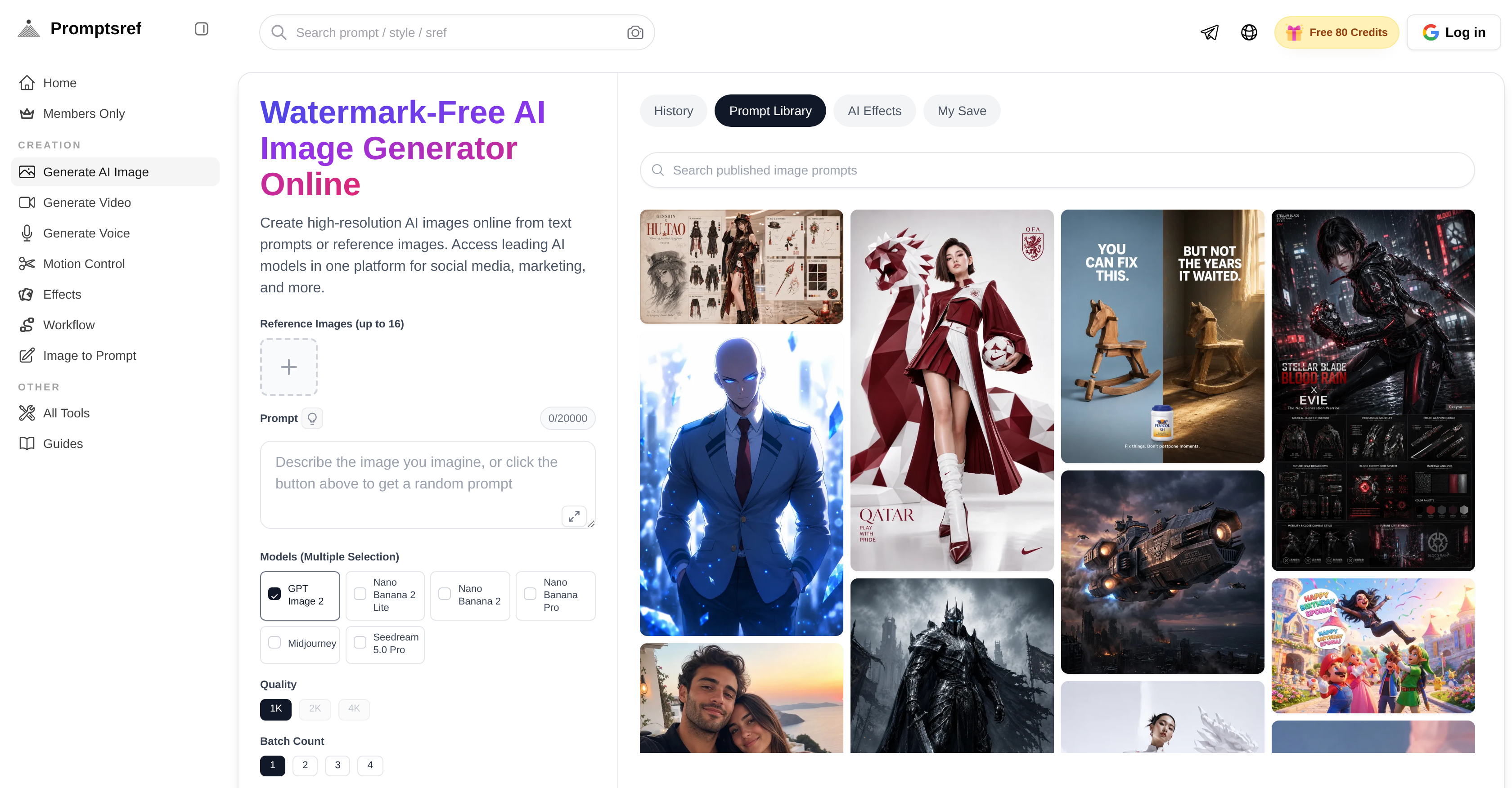
- Publish professional visuals instantly for social media and marketing campaigns with watermark-free, high-resolution AI images ready for direct use.
- Choose the perfect output every time by comparing leading AI models—GPT Image, Midjourney, Seedream 5.0 Pro—side by side for your specific prompt.
- Refine every detail of your generated image by editing backgrounds, angles, and other elements directly in the platform without switching tools.
- Deliver high-definition client previews and marketing page assets by upscaling images to maintain sharpness and texture at larger sizes.
- Transform text prompts into photos, concept art, product shots, posters, or thumbnails with a single input, eliminating the need for multiple design tools.
- Generate new visuals from reference images by uploading a photo and letting the AI interpret its features to create aligned, original output.
- Work seamlessly across desktop and mobile web browsers, picking up projects on any device without app installations or file transfers.
Pros & Cons
Pros
- Generates high-resolution images
- User-friendly model comparison
- Transforms prompts into visuals
- Supports variety of visuals
- Edits within platform
- Image upscaling feature
- Desktop and mobile web access
- No app installation
- Produces watermark-free images
- Versatile and comprehensive
- Supports GPT Image
- Supports Nano Banana Pro
- Supports Midjourney
- Supports Seedream 5.0 Pro
- Detail and angle adjustments
- Ideal for marketing pages
- Ideal for client previews
- Generates brand designs
- Produces direct-use images
- Simple to use interface
- Guides available for use
- Supports text prompts
- Supports reference images
- Rich lighting in images
- Stylized image creation
- Changing image backgrounds
- High-definition output
- Work continuity across devices
- Ready-to-use for social media
- Direct-use for marketing campaigns
- Helps in page creation
- Generates from prompts or images
- Useful in various applications
Cons
- No app version available
- Relies heavily on internet connection
- No offline functionality
- Limited image editing capabilities
- Potential high learning curve
- No multi-language support
- No collaborative features
Reviews
Rate this tool
Loading reviews...
❓ Frequently Asked Questions
The Watermark-Free AI Image Generator Online is a tool that produces high-resolution artificial intelligence-aided images based on textual prompts or reference images. It combines high-performing AI models into a unified interface and facilitates various applications, such as social media content creation and marketing initiatives.
The tool supports a collection of AI image models including GPT Image, Nano Banana Pro, Midjourney, and Seedream 5.0 Pro. These models have distinct strengths, catering to a variety of needs ranging from creating realistic AI photos to establishing rich lighting effects and stylized image creation.
The tool is accessible on both desktop and mobile web interfaces. It serves users the flexibility to work effectively across various devices, adding to its user convenience.
The AI generates images from text prompts using artificial intelligence models that understand the text inputs and accurately convert this information into visual content. This process involves sophisticated programmatic 'understanding' and imagination to accurately depict the described scenario in the text prompt.
Yes, the tool allows for image editing inside the platform. Users can make alterations to their images like modifying backgrounds, adjusting angles, and customizing other details, enhancing the overall image aesthetics and appropriateness.
The main applications of the generated images are varied and broad. They can be incorporated into social media posts, used for marketing campaigns, included in brand designs, used as concept art, product shots, posters, thumbnails, and for various other visual content-related needs in digital media and advertising.
No, there is no app installation needed to use the tool. This feature ensures a seamless user experience as they can continue their work from any device that has a web browser.
Yes, the images generated by the tool are watermark-free, ready to be used directly in social media posts, marketing campaigns, brand designs, and other applications without any additional editing or permissions.
Users can compare different AI models in the tool by testing them on their specific requirements or prompts. By observing the various output images of these models, users can determine which model fulfills their requirements optimally.
Yes, users have the freedom to switch between devices while using the tool. Because the tool doesn't require a dedicated application and operates on the web, users can continue their work on any device with internet access, providing flexibility and convenience.
Yes, with the tool's capability to generate high-resolution images and upscale images for high-definition output, it is well-suited for marketing page creation. The end results are sharp, professional visuals that can greatly enhance the aesthetic appeal of any marketing page.
The tool provides a straightforward method to upscale images for high-definition output. Using AI, the tool magnifies the size of the image while maintaining, and in some cases enhancing the image's sharpness, resolution and textural details.
Yes, the tool is highly beneficial for creating client previews. With high-resolution AI-supported image generation, clients can review high-quality previews of the desired visuals for their campaigns or projects.
The tool works by taking a prompt input, which could be a phrase or a description, and using the AI to generate a corresponding high-resolution image. This image can be a photo, concept art, a product shot, a poster or even a thumbnail, depending on the specificity of the prompt.
Indeed, users can change the background, angles, and a variety of other details in the generated image. By utilizing features within the platform, users can alter AI generated outputs to meet their exact preference and requirements for the visual.
To generate images from reference images, users upload the desired reference image, and the integrated AI model interprets the features in the image. The AI then uses these interpretations to render a new image that aligns with the elements detected in the original reference.
Absolutely, the tool can generate high-resolution AI images ready to be utilized in a wide array of applications including social media posts, marketing campaigns, brand designs, and any other need for digital imagery.
The images generated by the tool are high quality and suitable for direct usage in marketing campaigns and brand designs. The high-resolution and watermark-free images created by the tool ensure flawless and professional visuals every time.
Midjourney Prompts are a stream of textual inputs used in the tool to guide the AI in generating specific images. These prompts help establish the context and details for the AI image creation, contributing to a precise and accurate visual output.
The SREF codes library in the tool is a collection of unique codes used to influence the style of generated images. By exploring the SREF codes library, users can experiment with a multitude of art styles, thereby enhancing the aesthetic diversity and appeal of their AI-generated images.
Pricing
Pricing model
Free Trial
Paid options from
$8/month
Billing frequency
Monthly