
Overview
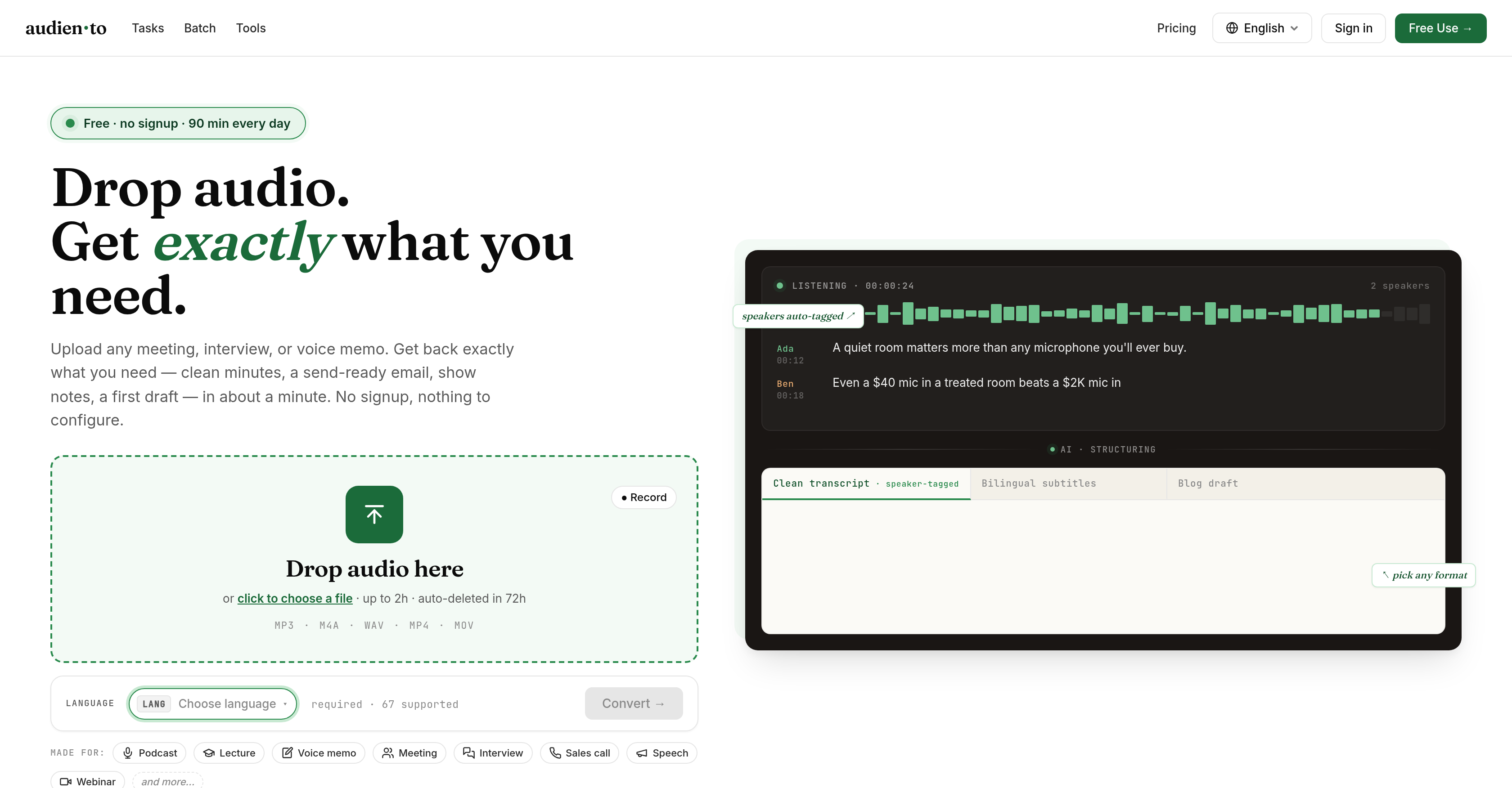
- Get a polished transcript, meeting minutes, or show notes directly from your audio file without any editing—Audiento automatically removes filler words, fixes punctuation, and spells names correctly.
- Capture every detail of a 2-hour lecture or interview with under 5% misheard words, thanks to advanced speech recognition that minimizes inaccuracies.
- Save hours of manual work by receiving a complete transcription in roughly one-fifth the audio runtime—a 10-minute file is ready in about 2 minutes.
- Instantly separate and tag each speaker in a multi-person conversation, so you never lose track of who said what during team meetings or panel discussions.
- Export your cleaned text in the format you need—TXT, SRT, VTT, DOCX, or MD—making it easy to publish subtitles, share notes, or integrate with your writing tools.
- Generate a TL;DR summary with 5–8 key points from any recording, perfect for quickly sharing insights with colleagues or filing for later reference.
- Describe your exact output requirement in a single sentence and receive a custom result—whether that’s a draft email, article, or structured study notes with key terms and example questions.
- Transcribe audio in any of 67 languages and even produce bilingual subtitles that preserve speaker tags and context, expanding your content’s reach without extra work.
- Start converting audio to text immediately with zero account setup or configuration—just upload your MP3, M4A, WAV, MP4, or MOV file and choose your output.
Pros & Cons
Pros
- Transcribes audio into structured outputs
- Supports various sources and file types
- Upload MP3, M4A, WAV, MP4, MOV
- Supports up to 67 languages
- Automatic speaker tagging
- Generates bilingual subtitles
- Provides cleaned and corrected transcripts
- Transforms audio into meeting minutes
- Creates send-ready emails
- Time-stamping feature
- Sorting speakers functionality
- No signup or configuration required
- Custom output with one-sentence requirement
- Advanced speech recognition and processing
- Optimization for speed and accuracy
- Generates brief summaries
- Detailed show notes creation
- Drafts for articles or study notes
- Supports 2 hours audio length
- Exports in .txt, .srt, .vtt, .docx, .md formats
- Removes fillers
- Corrects punctuation
- Spells names correctly
- Generates summaries with key points
- Free to use for up to 90 minutes daily
- Requires no account setup or learning curve
- Supports different audio formats including MP3, M4A, WAV, MP4, MOV
- Can handle various forms of audio content
- Built for simplicity
- Quick and efficient processing
- Processes lectures, voice memos, meetings, interviews, sales calls, and speeches
- Capable of transcribing webinars
- Multiple output types based on your requirements
- Speaker-tagged transcriptions
- Can easily drop audio files into the tool
- Ideal for sharing or filing summaries
- Removes irrelevant speech fillers
- Automatically corrects grammar
- Can handle a variety of content formats
- Transcribes audio content quickly
- Used by students, teams, podcasters
- Also suitable for anyone making notes from recordings
- Very user friendly
- In-built spell check function
- Transcribes in 67 languages
- Offers custom options by describing in one sentence
Cons
- Limited to 2-hour uploads
- 90 minutes free usage only
- No account setup might lack personalization
- Transcriptions can't exceed 10,000 minutes
- Extra cost for full service
- Potential language translation inaccuracies
- No offline support
- Text export formats limited
- Audio deleted in 72 hours
- Limited file size in Pro plan
Reviews
Rate this tool
Loading reviews...
❓ Frequently Asked Questions
Audiento is an AI-powered tool that transcribes audio into structured output formats. It's built for podcasters, students, teams or anyone who writes from recordings. It can take audio and convert it into clean transcripts, meeting minutes, study notes, send-ready emails and more. Audiento supports a variety of languages, allows users to describe custom output requirements, runs on advanced speech recognition and processing technology, and requires no signup or prior configuration.
You can upload a wide range of audio file types to Audiento, including MP3, M4A, WAV, MP4,and MOV.
Audiento supports transcriptions in up to 67 languages.
With Audiento, you can have your audio transcribed into clean transcripts, meeting minutes, study notes, and send-ready emails. It also has the ability to provide raw transcripts, outputs with cleaned and corrected grammar, brief summaries, detailed show notes, and drafts for articles or study notes.
Audiento handles speaker tagging automatically. Using its advanced AI, it can separate speakers in a recording and tag them accordingly in the final transcript.
Yes, Audiento can correct grammar in the transcriptions. It not only provides raw transcripts but also generates outputs where the grammar has been cleaned and corrected.
Audiento manages time-stamping and sorting speakers with inbuilt features. Using its advanced AI, it timestamps the audio and sorts speakers out automatically.
No, you don't need to signup or configure anything before using Audiento. The system is designed to be user-friendly and requires zero setup.
In order to make Audiento build a custom output for you, all you need to do is describe your requirements in a sentence. The tool is designed to understand and build a custom output based on your description.
Audiento utilizes advanced speech recognition and processing techniques. This technology aims to minimize inaccuracies and optimize speed in transcribing audio.
The maximum length of audio you can upload to Audiento is 2 hours per recording.
Audio files that you upload to Audiento are auto-deleted in 72 hours.
The purpose of the bilingual subtitles feature in Audiento is to provide translations in another language while maintaining the context and speaker tags of the original audio.
To use Audiento for generating meeting minutes, simply upload your audio recording of the meeting to the platform and choose 'meeting minutes' as your desired output format.
Yes, you can use Audiento for making your study notes. All you need to do is upload your lecture or study material in audio format and select 'study notes' as the output format.
Audiento aims to maintain a high level of accuracy in transcribing audio, with less than 5% misheard words on typical speech.
Yes, Audiento does offer batch processing for larger or longer recordings, but this feature is available in its Pro version only.
Audiento transcribes audio files at a rate that's approximately 5 times faster than playback. For instance, a 10-minute audio file would take about 2 minutes to be transcribed.
Yes, there are limitations to using Audiento for free. You can use it free daily for 90 minutes. Your files are auto-deleted in 72 hours and you can't batch-process your files.
If you choose the Audiento Pro version, you get a plethora of extra benefits such as up to 10,000 minutes per month of transcription, file sizes up to 512 MB, batch processing, priority processing, and the ability to process audio files of up to 5 hours in length.
Audiento functions using advanced speech recognition which allows it to accurately transcribe user-uploaded audio files into a variety of pre-selected formats. The user simply uploads their audio file, then chooses the type of output they need; from clean transcripts, meeting minutes, or study notes, to send-ready emails and more. The system automatically generates the chosen output from the audio quickly and efficiently.
Audiento has been primarily designed for a wide range of users. This includes podcasters, students, professionals working in teams, and anyone who writes from audio recordings, such as journalists or authors.
Audiento can transcribe a variety of audio file formats including MP3, M4A, WAV, MP4, and MOV.
Yes, Audiento can transcribe audio in multiple languages. It supports up to 67 different languages for accurate transcription.
Key features of Audiento include automatic speaker tagging, the ability to transcribe bilingual subtitles, and a range of output formats such as cleaned transcripts, meeting minutes, and study notes. The tool also works with a wide range of audio file formats and supports up to 67 languages.
Audiento produces a variety of user-selectable outputs. These include but are not limited to transcripts, show notes, study notes, meeting minutes, and email drafts. The outputs of the transcription can be modified and corrected to provide clean and structured text.
Using Audiento is quite straightforward. First, you upload the audio file that you want transcribed. After that, you select the type of output text you need. Audiento then proceeds to transcribe your chosen audio file into the selected format and delivers the result.
Audiento can be used for free for up to 90 minutes per day. For users who require more than this, they offer a Pro subscription at $20/month, or $120/year ($10/month). This subscription offers 10,000 minutes and 10-hour, 512 MB files with batch processing.
Audiento automatically establishes speaker tags within the transcription through its automatic speaker tagging feature. It uses AI to ascertain different speakers within the audio and assigns tags accordingly.
Yes, Audiento can correct grammar and punctuation in transcriptions. One of its features is the ability to produce 'cleaned and corrected' output which involves fixing punctuation, removing filler words, and spelling names correctly.
Yes, Audiento can generate summaries from the transcribed audio. The tool produces a TL;DR (Too Long; Didn't Read) paragraph along with 5–8 key points from the audio, which is ideal for sharing or filing.
The maximum audio file length that Audiento can process is 2 hours.
No, signup is not required to use Audiento. It's built for simplicity, requiring no account setup or learning curve.
Yes, Audiento is capable of transcribing bilingual subtitles. It is one of the features of the AI tool that caters to a multilingual audience.
Yes, Audiento can handle multiple speakers in the same audio file. It uses automatic speaker tagging to distinguish between different speakers and cleanly separate their dialogues in the final transcript.
For study tools, Audiento allows you to transcribe lectures and talks into study notes complete with key terms and example questions. As a sales tool, sales calls can be uploaded and transcribed into a structured format, aiding in review and follow-ups.
What distinguishes Audiento from other transcription services is its wide array of features including the ability to 'clean up' transcripts by removing filler words, fixing punctuation, and spelling names right. It can handle various file types, supports up to 67 languages, and can structure the output in a way that's most useful to the user.
Yes, Audiento does offer document conversion facilities. Users have the ability to export their transcriptions in several formats such as .txt, .srt, .vtt, .docx, and .md.
Yes, the transcripts produced by Audiento can be exported in several formats including .txt, .srt, .vtt, .docx, and .md so users can utilize the transcripts in a format that suits their needs best.
Pricing
Pricing model
Freemium
Paid options from
$10/month
Billing frequency
Monthly