
Overview
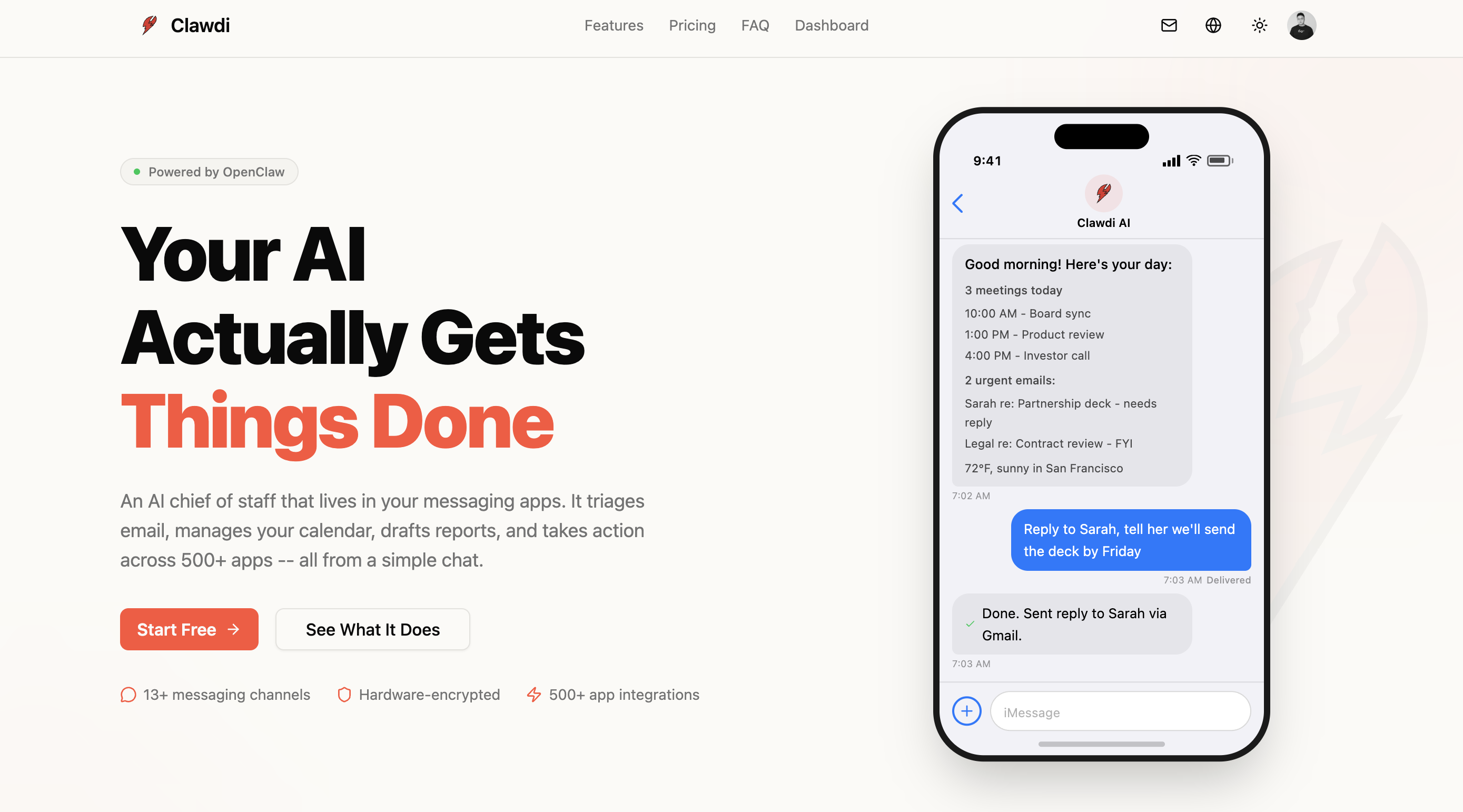
- Automate your entire workflow from chat by having your AI triage email, manage calendars, draft reports, and take action across 500+ apps through a simple message
- Deploy a fully private AI assistant in under 3 minutes with one-click setup on a TEE-secured cloud, requiring no server management or Docker knowledge
- Keep conversations and API keys encrypted with Intel TDX hardware security, where data is isolated and automatically purged, preventing even Clawdi from accessing it
- Interact with a context-aware AI on Telegram that remembers preferences across sessions and learns over time for personalized assistance
- Execute commands, manage files, browse the web, and run code directly through chat, moving beyond basic chatbot functions to a true power tool
- Monitor your AI's real-time status, resource usage, and TEE trust verification through a comprehensive dashboard for complete control
- Host your autonomous AI agent on your own infrastructure for ultimate data control and operational sovereignty
- Extract and structure data from web sources using advanced AI algorithms, converting unstructured information for easy analysis
Pros & Cons
Pros
- One-click deployment
- Self-hosting with full control
- Connect apps in one-click
- Easy integration of tools
- No complex setup
- Secure chat assistant
- Versatile data extraction
- Robust data management
- Easy capture, store and manipulate data
- Seamless user experience
- Simplicity in complex extraction
- Converts unstructured data to structured
- Data analysis facilitation
- High degree of accuracy
- High efficiency in data extraction
- User customizable
- Broad applicability across industries
- User-friendly interface
- Streamlines web-based data handling
- Boosts productivity
- Ensures reliability in handling
- Quick deployment to TEE-secured cloud
- Integrates with Discord and Slack
- Real-time status and resource tracking
- TEE trust verification
- Persistent Memory feature
- Self-learning assistant
- Ability to manage files
- Executes code
- Manages System Access
- Secure encrypted API keys
- Up and running quickly
- No Docker knowledge needed
- Transparent pricing
- Freemium option available
Cons
- Limited messenger integrations
- Dependent on OpenClaw
- Web-based only
- Requires API keys
- Telegram bot focused
- Exclusively uses Phala Cloud
- Limited customizability
- Telegram first deployment
- Pricing tied to vCPU/RAM
- No Docker support
Reviews
Rate this tool
Loading reviews...
❓ Frequently Asked Questions
Clawdi is a web-based AI platform that's designed to facilitate private chat experiences using OpenClaw. It provides secure and encrypted conversations and API keys through a TEE-secured cloud system.
Clawdi utilizes OpenClaw to facilitate private chat experiences by providing users with secure AI assistant deployment. This deployment is achieved with a one-click process, enabling users to interact with the AI assistant on secure chat platforms such as Telegram, with plans to expand to Discord and Slack. OpenClaw instances can be easily monitored and controlled through Clawdi's real-time status, resource tracking, and TEE trust verification components.
Clawdi's cloud system is TEE-secured, implying that it utilizes Trusted Execution Environment technology. This is a security measure that ensures your conversations and API keys are encrypted and protected to the highest level. It establishes isolated zones in the main processor for secure data processing, providing a safeguard against tampering or unauthorized access.
Yes, your conversation and API keys with Clawdi are absolutely secure. Clawdi uses a TEE-secured cloud and encryption process to ensure that data is safe. It's designed in a way that prevents even Clawdi from having direct access to these encrypted conversations and keys, for utmost security.
You can interact with the AI deployed via Clawdi primarily through Telegram. Although Discord and Slack integrations are being planned for the near future, currently, interaction and communication are predominantly executed through the Telegram interface.
According to Clawdi's plans, the integrations for Discord and Slack will be available soon. However, an exact timeline for these integrations has not been specified.
Clawdi provides comprehensive monitoring for OpenClaw instances. Users are given complete control to deploy, monitor, and manage their instances. The monitoring system includes real-time status, resource tracking, and TEE trust verification, offering an expansive overview of activity and reliability.
'Context-aware' assistance in Clawdi refers to the assistant's ability to remember the context across different sessions. The assistant is designed with the capacity to learn user preferences over time which allows it to understand the context of conversations and provide appropriate responses.
Yes, Clawdi's AI is designed to remember user preferences over different sessions. It learns these preferences over time, making the assistance provided more personalized and relevant to each individual user.
Clawdi's AI possesses advanced file management abilities. Its system access capability allows users to run commands and manage files. This positions Clawdi's AI as a power tool, making it quite practical and advanced compared to basic chatbots.
Clawdi's AI system can browse the web and execute code. The 'system access' feature allows it to run commands, browse the web, and execute code empowered by the OpenClaw platform. However, the specific functioning and mechanisms of these features remain undisclosed.
Clawdi offers more than just chatbot functions. Apart from providing private chat experiences, it also allows system access for managing files, web browsing, and code execution. It's capable of remembering context across sessions and learning user preferences over time, positioning it as a powerful tool beyond a basic chatbot.
Clawdi offers transparent pricing plans. The plans include a Freemium option at $0 per month with $5 AI credits per month, a Popular Pro plan for $29 per month with $30 AI credits, and a Max plan at $99 per month with $120 AI credits. The specific services and benefits under each plan may vary.
No, you don't need to manage your server for deploying Clawdi. Clawdi simplifies the user experience by requiring no server management or specific knowledge for its deployment.
Clawdi's interface is designed to be extremely user-friendly. Deployment of your AI assistant is simplified to just a one-click process. Also, users can easily launch these assistants on chat platforms and start chatting instantly, showcasing the streamlined, intuitive design of the interface.
Telegram is the primary interface for Clawdi because it's a secure encrypted messaging platform that aligns with Clawdi's mission of providing private chat experiences. Clawdi's focus on privacy and security makes Telegram a fitting choice for its primary interface.
Yes, Clawdi provides real-time status and resource tracking for deployed AI assistants. This is part of its expansive monitoring system where you can supervise and manage your OpenClaw instances, with all the information updated in real-time.
Clawdi differs from other typical chatbots in multiple ways. Apart from usual conversation functionalities, it offers advanced features like system access capability, permitting users to run commands, manage files, browse the web, and execute code. The context-aware functionality enables Clawdi to remember context across different conversation sessions. Additionally, Clawdi prioritizes user privacy and data protection with its TEE-secured cloud and encryption measures.
Yes, Clawdi can execute commands and manage files. It comes with a system access capability that allows the AI to run commands, manage files, and even browse the web and execute code. This distinguishes it ifrom standard chatbots by offering multipurpose usage, helping it serve as a practical power tool.
There is no specific technical knowledge required for the deployment of Clawdi on your preferred platform. Clawdi is designed to simplify user experience by omitting any necessity for server management or specialized knowledge for deployment. Users can deploy their AI assistant with just a single click, making it a user-friendly solution.
To deploy Clawdi on OpenClaw in a single click, users simply need to use the one-click deploy feature available within the Clawdi platform. This allows the deployment of OpenClaw to a TEE-secured cloud.
Yes, Clawdi provides the option for users to host their own autonomous AI agents on their own infrastructure. This empowers users to control their own data and operations.
Yes, Clawdi is designed to integrate with a wide array of applications. It's built for fast tool integration, allowing users to connect their apps seamlessly for enhanced productivity.
Clawdi provides a user-friendly interface to automate real workflows without complex setup. Users can deploy AI agents to handle repetitive tasks, thus facilitating more efficient workflows.
Clawdi is leveraged for effective data extraction and management by using advanced AI algorithms to capture, store, and manipulate data from various web sources. It converts unstructured data into more organized, structured formats for easier analysis and interpretation.
Yes, Clawdi is designed to handle unstructured data. It is engineered to capture and convert unstructured data from various sources into structured formats thereby providing easy-to-analyze and interpret data.
Clawdi uses advanced AI algorithms to ensure accuracy in its operations. These AI algorithms enhance the efficiency of data extraction, processing, and interpretation, leading to reliable results and decision-making.
Yes, Clawdi is designed to be highly customizable to fit the users' specific needs. Users can tailor their data extraction process according to their requirements, thus broadening its applicability across different use-cases and industries.
Clawdi is very user-friendly. It has a seamless and intuitive interface that simplifies complex data extraction processes, aiming to enhance users' experience and productivity.
Clawdi is equipped to extract data from a wide array of web sources. These sources include standard web pages among others. Its versatility in source selection bolsters its effectiveness in sourcing and handling data.
Yes, Clawdi can convert unstructured data into structured data. It's one of its core functionalities. This capability facilitates easy data analysis and interpretation.
Yes, Clawdi offers integration with Telegram. Once your OpenClaw instance is deployed on a TEE-secured cloud, you can start chatting with your AI on Telegram.
In addition to Telegram, Clawdi has planned integration with other messenger apps like Discord and Slack as specified on the future rollouts.
When using Clawdi on a TEE-secured cloud, your data is highly secure. Clawdi employs Intel TDX for TEE security and encryption, ensuring that your conversations and API keys stay encrypted. Even Clawdi's own systems can't access them.
Clawdi has the feature to remember context across conversations. It learns user preferences and can recall context, making it more helpful and personalized over time.
Yes, Clawdi has the capability to perform tasks like managing files, browsing the web, and executing code. This makes Clawdi far more than just a chatbot, it's a real power tool for users.
To get Clawdi up and running, you would need to create an account, sign up and add your API keys. Then deploy OpenClaw on the Phala Cloud with a single click. Finally, connect through Telegram and start chatting with your AI.
Clawdi offers three different pricing plans: Freemium, where you pay $0 per month for 2 vCPU, 4GB RAM, and 20GB Disk; Pro, where you pay $29 per month for 2 vCPU, 4GB RAM, and 20GB Disk; and Max, where you pay $99 per month for 4 vCPU, 8GB RAM, and 40GB Disk.
Clawdi encrypts the API keys before they are sent out of your browser. This encryption ensures the utmost protection of your API keys during the data transmission process.
While Clawdi does currently support integration with Telegram, integrations with Discord and Slack are planned for future rollouts. This allows users to extend their use of Clawdi across a range of popular messenger applications.
Pricing
Pricing model
Freemium
Paid options from
$29/month
Billing frequency
Monthly