EditPix AI
Overview
- Get professional edits instantly by describing what you want, using natural language commands to remove objects, swap scenes, or touch up photos without learning complex tools.
- Download watermark-free images for any project, with all edited photos delivered without branding or restrictions, perfect for content creators and professional use.
- Transform or restore any image with advanced AI, performing complex image-to-image edits and old photo restoration through simple text prompts.
- Maintain complete privacy with automatic deletion of your uploaded originals immediately after processing, ensuring your files are never stored.
- Work with any common image format, uploading JPEG, PNG, or WebP files and choosing your preferred output format for maximum flexibility.
Pros & Cons
Pros
- Free online tool
- Full suite photo editing
- Background removal
- Object erasure capabilities
- Scene swapping feature
- Text editing within images
- Old image restoration
- Image-to-image transformations
- Natural language processing
- Beginner-friendly, no complex tools
- JPEG, PNG, and WebP compatibility
- User-selected output format
- Watermark-free images
- Immediate discard of uploaded images
- Subscription-based or credit packs
- No content restrictions
- Immediate photo editing results
- Trusted by global users
- Supports creative image-to-image projects
- Free credits upon sign up
- Prompt-based editing
- Accurate results
- Fair credit system
- Annual subscription offers value
- Simple and honest pricing
- Suitable for casual users
- No content filtering or blocking
- Zero data storage policy
- Supports varied range of tasks
- Images devoid of branding
- Automatic file deletion after processing
- No penalties for cancellation
- Never-expiring one-time credit packs
- Offers unrestricted editing capabilities
- Functional without credit card requirement
Cons
- No offline version
- Limited to certain formats
- Uses credit system
- No batch processing
- Dependent on accurate prompts
- Limited user interface options
- Limited language support
- Subscription required for additional credits
- Operation speed can vary
- Requires Internet connection
Reviews
Rate this tool
Loading reviews...
❓ Frequently Asked Questions
EditPix AI is a free online tool that leverages artificial intelligence to execute various photo editing tasks without any restrictions.
EditPix AI operates through user-provided text instructions, understanding and executing specific commands such as 'remove the person on the left' or 'add a cat on the chair' and accomplishing intricate image-to-image transformations or scene replacements. Uploaded images get immediately discarded post-processing, ensuring user privacy.
EditPix AI can perform tasks like background removal, object erasure, scene swapping, in-image text editing, and restoring old images. It also enables more advanced tasks like image-to-image transformations.
Users interface with EditPix AI through text commands. No understanding of photo-editing layers or complex tools is necessary, simply type your instructions such as 'remove the person on the left' or 'make the sky a sunset', and EditPix AI will execute.
EditPix AI is versatile, handling JPEG, PNG, and WebP image formats. After editing, it outputs images in a user-selected format.
No, EditPix AI does not apply a watermark to edited images. Every photo output, whether edited under free or paid service, comes completely devoid of watermarks or branding.
To maintain user privacy, EditPix AI discards all uploaded images immediately after processing, ensuring no traces of your original files remain stored on their servers.
EditPix AI is designed with simplicity and user-friendliness in mind. Photo editing tasks can be initiated with clear, direct text instructions instead of wrestling with intricate layers or specialized editing tools.
EditPix AI is equipped with advanced AI capabilities that can perform a broad array of tasks, from simple photo touch-ups to complex image-to-image transformations, based on user prompts.
What sets EditPix AI apart from other AI photo editors is the offer of unlimited freedom with no content restrictions, ability to understand and execute user text prompts, support for a variety of formats (JPEG, PNG, and WebP), and straightforward usability. Moreover, it does not store user data past processing and never applies watermarks to the edited images.
Yes, EditPix AI supports image-to-image transformations. This ability enables it to perform creative tasks beyond simple photo edits.
Absolutely yes. EditPix AI is designed to fully comprehend natural language prompts for photo editing, from simple commands like 'remove the background' to more complex instructions involving scenography and object manipulation.
EditPix AI supports content creation needs by delivering precise and sophisticated edits based on user commands. From removing unwanted elements to full-scale scene transformations, EditPix caters to a broad range of content creation requirements.
The information on their website does not imply any limitations to using EditPix AI. Every new user receives free credits for immediate use, and the tool supports a wide array of image editing tasks, file formats, and does not apply watermarks to edited images.
Using EditPix AI, old images can be restored simply by using a relevant command. For example, typing a prompt such as 'restore this old photo' would trigger the AI to rejuvenate faded or damaged parts of an old image.
Yes, indeed. EditPix AI supports image uploads in WebP format, along with JPEG and PNG formats.
Yes, object manipulation is one of the features of EditPix AI. Objects in a photo can be added, removed, or modified through a simple text command.
Photo touch-ups in EditPix AI are accomplished through prompt-based instructions. For example, a user could instruct 'brighten the image', 'enhance the colors' or 'remove the red-eye effect', and the AI would carry out the requested touch-up.
Yes, EditPix AI can swap scenes in an image based on user commands. For instance, a user could command 'replace the beach background with a city skyline', and the AI will perform the requested scene replacement.
The format of the output image in EditPix AI can be chosen by the user. The end-user has the freedom to select the desired output format post the editing process to be either PNG or JPEG.
EditPix AI allows you to perform a variety of tasks such as removing backgrounds, erasing unwanted objects, swapping scenes, editing text within images, restoring old images, and making image-to-image transformations.
Yes, EditPix AI has a unique feature that enables users to provide instructions in natural language. For instance, users can simply type 'remove the person on the left' or 'make the sky a sunset' to perform specific photo editing tasks.
EditPix AI upholds high standards of user privacy. Uploaded images are immediately discarded after processing, ensuring that no user files are stored on their servers.
No, EditPix AI does not add any watermarks to the edited images. All images, regardless of the chosen plan, are downloaded in full quality and watermark-free.
EditPix AI has a straightforward, user-friendly interface that does not require a complex understanding of photo-editing layers or tools. Therefore, it benefits beginners by providing a hassle-free and simple approach to high-quality photo editing.
EditPix AI supports JPEG, PNG, and WebP image formats for input. Users can also choose the format they want to output their edited images in.
EditPix AI operates on a credit-based system. Users are given a certain number of free credits upon signing up. Additional credits can be purchased via a subscription plan or through one-off credit packs.
EditPix AI has been highly valued by content creators around the world for its advanced AI capabilities and flexible photo editing options. Given the absence of watermarks, and the wide range of editing tasks that can be performed simply using natural language prompts, this tool is particularly useful for content creators.
Yes, EditPix AI offers a subscription service. Users can purchase incremental credits via a monthly or yearly subscription. This flexibility allows users to select the credit amount that suits their usage best.
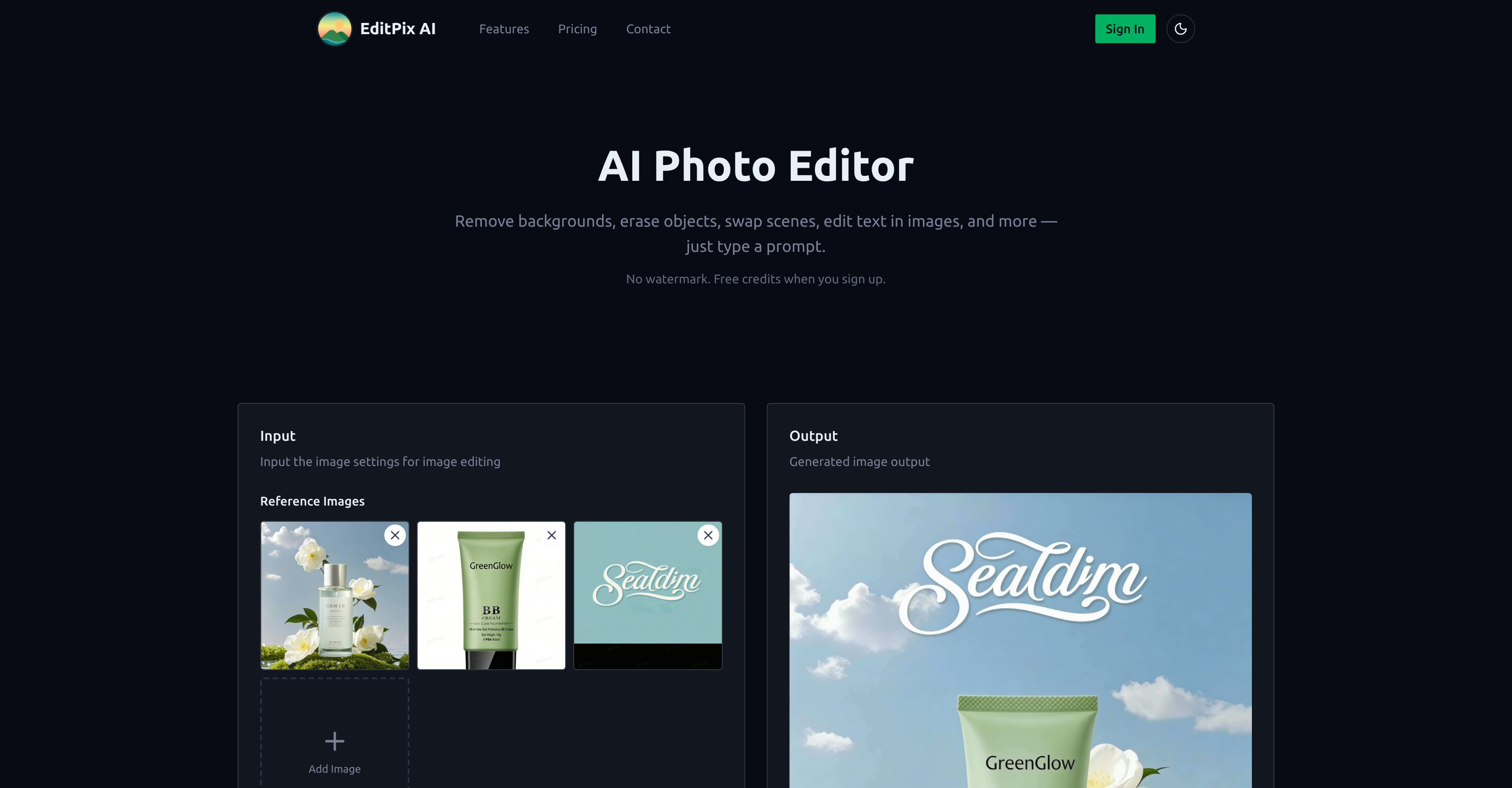
EditPix AI expertly handles image-to-image transformations guided by user's text prompts. This could range from simple tasks like 'replace the product in Figure 1 with that in Figure 2' to complex image alterations.
Yes, EditPix AI is capable of restoring old photos. Users can input instructions such as 'restore the old photo' to improve the quality and bring old photos back to life.
There are no explicit content restrictions in place for EditPix AI. It allows for all kinds of edits and transformations, giving complete creative freedom to the users.
EditPix AI stands out from other AI photo editors due to its advanced AI capabilities, zero restrictions on content editing, and offering features like restoration of old photos and image-to-image transformations. Unlike many free services, it ensures user privacy and offers watermark-free images, which are crucial aspects for many users.
No, EditPix AI doesn't require users to have complex understanding of photo-editing layers or tools. The platform is designed to make professional photo editing tasks accessible and simple for all users.
Yes, EditPix AI allows for text editing within images. Users can input prompts such as 'add text to the image' or 'change text color to blue' and the AI will execute it.
EditPix AI can efficiently handle tasks of unwanted object removal. This can be achieved by simply supplying a command such as 'erase the lamp in the corner' or 'remove the bird from the sky' and the AI will take care of it.
EditPix AI is proficient in swapping scenes within a photo. By using natural language commands such as 'change the beach background to a cityscape', users can easily change the look and feel of their images.
Yes, EditPix AI is designed to understand and execute instructions provided in natural language. This allows users to express their photo editing needs plainly, such as 'brighten the colors' or 'soften the shadows', and have EditPix AI carry those out effectively.
EditPix AI is highly user-friendly for beginners. The use of natural language prompts makes it very accessible and simple to use, even for people who have no prior experience with professional photo editing tools.
EditPix AI is suitable for professional use. It allows for advanced transformations, object removal, scene swapping, text editing in photos, and other edits using just simple text commands, making it a powerful tool for entrepreneurs, designers, or anyone who frequently requires professional photo editing.
Pricing
Pricing model
Free Trial
Paid options from
$4.99/unit
Billing frequency
Pay-as-you-go
Refund policy
No Refunds