
Overview
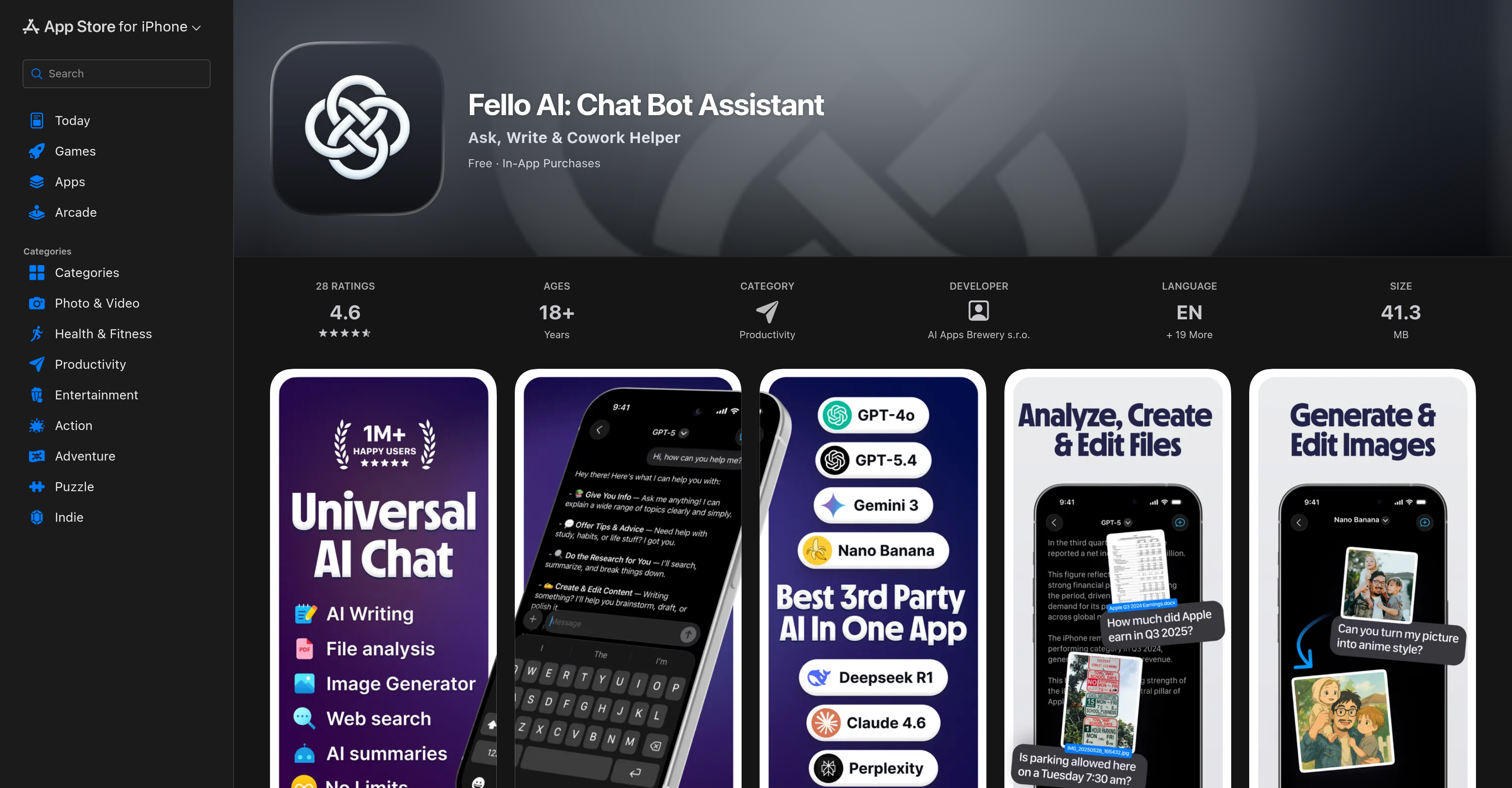
- Generate ready-to-use PowerPoint, Excel, Word, and PDF files in seconds by simply describing what you need, eliminating manual formatting and saving hours on document creation.
- Summarize and extract key points from uploaded PDFs, images, Excel sheets, and slide decks to quickly understand complex documents and accelerate decision-making.
- Get accurate, up-to-date answers with cited sources from integrated web searches, ensuring information reliability without leaving the platform.
- Switch between and compare outputs from top AI models like GPT-5.4, Claude 4.6, and Gemini to find the best result for each specific task.
- Create and edit images, graphics, and product concepts for social media or presentations using AI-powered generation and style editing tools.
- Keep your work organized and instantly retrievable with pin, bookmark, and full-text search features across all your chats and generated documents.
- Pick up work seamlessly across Mac, iPhone, and iPad with automatic sync, allowing you to start on one device and finish on another.
Pros & Cons
Pros
- Switch between models
- Creates real files
- Generates documents from description
- Converts queries into files
- Formats documents with headings, tables
- Provides cited sources
- Generates and edits images
- Upload and interpret various files
- Direct web search from platform
- Accurate information from web search
- Operates on Mac, iPhone, iPad
- Seamless synchronization
- Pin, bookmark, full-text search
- Subscription for unlimited messaging
- Ad-free experience
- Regular updates based on feedback
- Multiple platform compatibility
- Multi-tiered pricing
- Creates PowerPoint, Excel, Word files
- Exports workable document files
- Generates image outputs
- Supports pins, bookmarks
- Assists in various tasks
- Subscription with free trial
- Transparent pricing
- Assistance with academic subjects
- Clean Apple design
- Capable of creating presentations
- Capable of creating spreadsheets
- Can write and format documents
- Summarizes and explains uploaded files
- Generates and edits imagery
- Solves complex academic problems
- Continual development based on feedback
Cons
- No Android support
- Limited daily messages in free version
- No comfortable multi-device experience
- Syncing issues across devices
- In-app purchases present
- Doesn't support multi-device chats
- Requires subscription for full access
- Limited language support
Reviews
Rate this tool
Loading reviews...
❓ Frequently Asked Questions
Fello AI is a productivity boosting AI chatbot assistant primarily designed to assist small and minority businesses. It allows users to make use of several AI models, such as GPT, Claude, and Gemini, within a single application. This AI can create real PowerPoint, Excel, Word, and PDF files from user descriptions and answer user queries by converting them into formatted documents with headings, tables, and images. PDFs, images, Excel sheets, slide decks, or documents can be uploaded to Fello AI for summation and clarification. It supports conducting web searches right from the platform and provides results with cited sources. It works seamlessly across Mac, iPhone, and iPad platforms with synchronization features and facilitates organization via pin, bookmark, and full-text search features. Finally, though it has a limited free version, a subscription is available to access more AI models and skills without a daily message limit.
Fello AI comes to the aid of small and minority businesses by automating numerous routine tasks, enabling these businesses to operate more efficiently and grow. The feature of transforming user instructions into actual PowerPoint, Word, Excel, and PDF files can help businesses create presentations, draft documents, and generate reports quickly and accurately. The ability to summarize, explain and retrieve key points from uploaded documents also saves time and hastens decision-making. In addition, businesses can leverage different AI models to get the most suitable answers or results for their tasks. This can be a game-changer, especially for businesses with limited resources.
Fello AI incorporates several major AI models in its one-stop-service, including GPT-5.4, Claude 4.6, and Gemini 3. These models vary in their capabilities and users can switch between them for different tasks. Apart from text-based models, Fello AI also uses AI models for image tasks, such as Nano Banana and GPT-Image.
Fello AI's document creation feature works by converting user queries into real formatted documents complete with headings, tables, and images. These documents can be in the form of PowerPoint presentations, Excel sheets, Word files, or PDFs. All a user needs to do is simply describe what the document should contain and the AI will generate a detailed, organized, and ready-to-use document from that description. These documents can range from proposals and reports to meeting summaries and essays.
In Fello AI, switching between different models is as easy as subscribing to the service that includes them. Users have the flexibility to shift between major AI models like GPT-5.4, Claude 4.6, and Gemini 3 according to their needs per task. This seamless transition allows users to compare answers from different models and pick the most suitable outcome for their specific tasks.
Yes, Fello AI can generate PowerPoint, Excel, and Word documents from verbal descriptions furnished by the user. The artificial intelligence interprets the instructions and generates formatted files in seconds, which the users can download immediately and use.
Yes, Fello AI sports features that assist with both the generation and editing of images. Users can create photos, illustrations, social media graphics, and product concepts. In addition, they can also conduct quick edits and style changes by uploading a specific picture onto the platform.
Fello AI allows upload of documents in a variety of formats for summarization, explanation, and for providing clear answers. This includes PDFs, images, Excel sheets, slide decks and word documents.
Yes, Fello AI has the ability to conduct web searches directly from the platform. Users can input queries, and Fello AI returns accurate and up-to-date information with cited sources.
Yes, Fello AI cites the sources for the information it provides during web searches. This is especially applicable when the AI fetches information from the web, ensuring that there's clarity about the origin of the information.
Fello AI operates on the Mac, iPhone, and iPad platforms. Its offerings can be accessed seamlessly across these devices, making it convenient for users to use the service on the go.
The synchronization feature of Fello AI facilitates a seamless user experience across devices operating on different platforms like Mac, iPhone, and iPad. This feature allows users to continue their work without interruption when switching devices, as their data and progress are automatically updated and made accessible.
The pin and bookmark features in Fello AI assist with organizing and retrieving information effectively. Users can pin or bookmark important queries or documents. This enables them to quickly find and refer back to specific pieces of information without having to search through the entire chat history or document library.
Full-text search in Fello AI improves the user experience by making information retrieval fast and efficient. By performing a full-text search, users can quickly find specific information, answers, files, or previous interactions within the AI chat or among the documents. This feature is particularly valuable for large-scale information management and prompt retrieval of previous queries and solutions.
Fello AI offers a free tier as well as a subscription model. The free tier, although complete in terms of features, gives users limited daily messages. This means there is a cap on the number of requests or queries that can be processed in a day. Beyond this, users would need to wait to get their subsequent queries answered.
Users subscribing to Fello AI get unlimited messaging allowing unlimited queries every day. They also get full, unrestricted access to all the AI models and skills that Fello AI has to offer. This means that they can use the various AI models, like GPT models, Claude and Gemini without restrictions, and switch between these models as needed per task. This subscription supports ongoing development of the AI tool.
Yes, in the free tier of Fello AI, there is a limit on the number of messages that can be sent every day. Beyond this daily message limit, users would need to wait for a certain period before they can send more messages or queries to the AI.
Fello AI enhances work efficiency in several ways. It can create real PowerPoint, Word and Excel files from user instructions, saving time in file creation. It can also format those documents with headings, tables and images, saving even more time in document formatting. Users can upload their files, photos and even PDFs for the AI to explain, summarize or provide clear answers, and save effort on analyzing complex documents. With the ability to conduct web searches right from the platform to provide accurate information with cited sources, users also save time spent on searching the web.
Yes, Fello AI has a document summarization feature that allows users to upload documents for summation. Users can upload PDFs, images, Excel sheets, slide decks, or documents, and Fello AI can provide clear summaries, explanations, and answers. This feature helps in understanding the essence of lengthy and complex documents quickly.
Fello AI uses its AI processing capabilities to convert user queries into formatted documents. After the user describes what they need in a document, Fello AI takes this input and crafts a formatted document with encompassing headings, tables, and images. The documents can range from proposals and reports to meeting summaries and essays, making this a versatile tool for document creation.
Fello AI is an AI chatbot assistant designed to boost productivity, making it particularly suitable for small and minority businesses. It's also a productivity tool aimed at simplifying tasks and enhancing workflows through the power of artificial intelligence. Fello AI is developed by AI Apps Brewery s.r.o and is available on Mac, iPhone, and iPad platforms.
Yes, Fello AI allows users to switch between various AI models effortlessly. Users can compare the outputs of various models and decide on the most suitable one for each specific task.
Fello AI generates PowerPoint, Excel, Word, and PDF files based on user instructions. The user simply describes what they need, and the AI extracts the details to generate these files in a matter of seconds.
Yes, Fello AI is fully equipped to convert user queries into formatted documents complete with headings, tables, and images. The documents can range from proposals and reports to meeting summaries and essays.
Fello AI not only generates images but also has the capability to edit images. This makes it an effective tool for creating application-specific graphics or enhancing existing ones.
Fello AI provides a web search functionality directly from its platform. It returns accurate information, complete with cited sources, ensuring up-to-date and credible answers to users' queries.
Fello AI allows users to upload various types of documents such as PDFs, images, Excel sheets, slide decks, or documents to be summarized. This provides clear explanations and answers regarding the content of loaded files.
Fello AI operates on Mac, iPhone, and iPad platforms, offering seamless synchronization among all these devices.
Fello AI's pin, bookmark, and full-text search features are designed to improve organization. They aid in quick navigation, easy referencing, and efficient retrieval of information from within the platform.
The free tier of Fello AI offers limited daily messages. This means users might be restricted in the number of requests they can make to the AI on a daily basis without subscribing to the full version.
Fello AI's subscription service provides unlimited access to all AI models and skills, allowing unrestricted messaging. The subscription revenue supports the ongoing development of Fello AI and helps keep it ad-free with no hidden costs.
Fello AI provides academic assistance by solving homework and study problems. It gives step-by-step answers with clear explanations across subjects like math, science, writing, and more.
Fello AI is proficient in drafting and formatting documents. Just by describing what they need, users can let the AI build a comprehensive document that can be anything from a proposal or report to a meeting summary or essay.
In the case of web searching, Fello AI provides accurate, up-to-date answers accompanied by cited sources. This enhances the reliability of the information provided.
Fello AI operates on Mac, iPhone, and iPad seamlessly, and offers all-data syncing for better compatibility and consistent experience across these devices.
Indeed, not only can Fello AI generate images, but it also comes with image editing capabilities, providing users with flexibility to create or alter images as required.
Yes, Fello AI can be used to create presentations and build spreadsheets. Users can describe their pitch deck, training material, or lecture slides and Fello AI will download a complete .pptx file with charts and images. Similarly, it can turn PDF reports into Excel sheets, create budget trackers, or build financial models.
Fello AI is an effective tool for solving homework and study problems. It offers clear, step-by-step answers with explanations across various subjects including math, science, writing, and more.
Users seeking help or wanting to provide feedback can reach out directly to the Fello AI team via email at [email protected]. This ensures a direct line for users to air their concerns or offer suggestions for improvements.
Pricing
Pricing model
Free Trial
Paid options from
$11.99/month
Billing frequency
Monthly