Overview
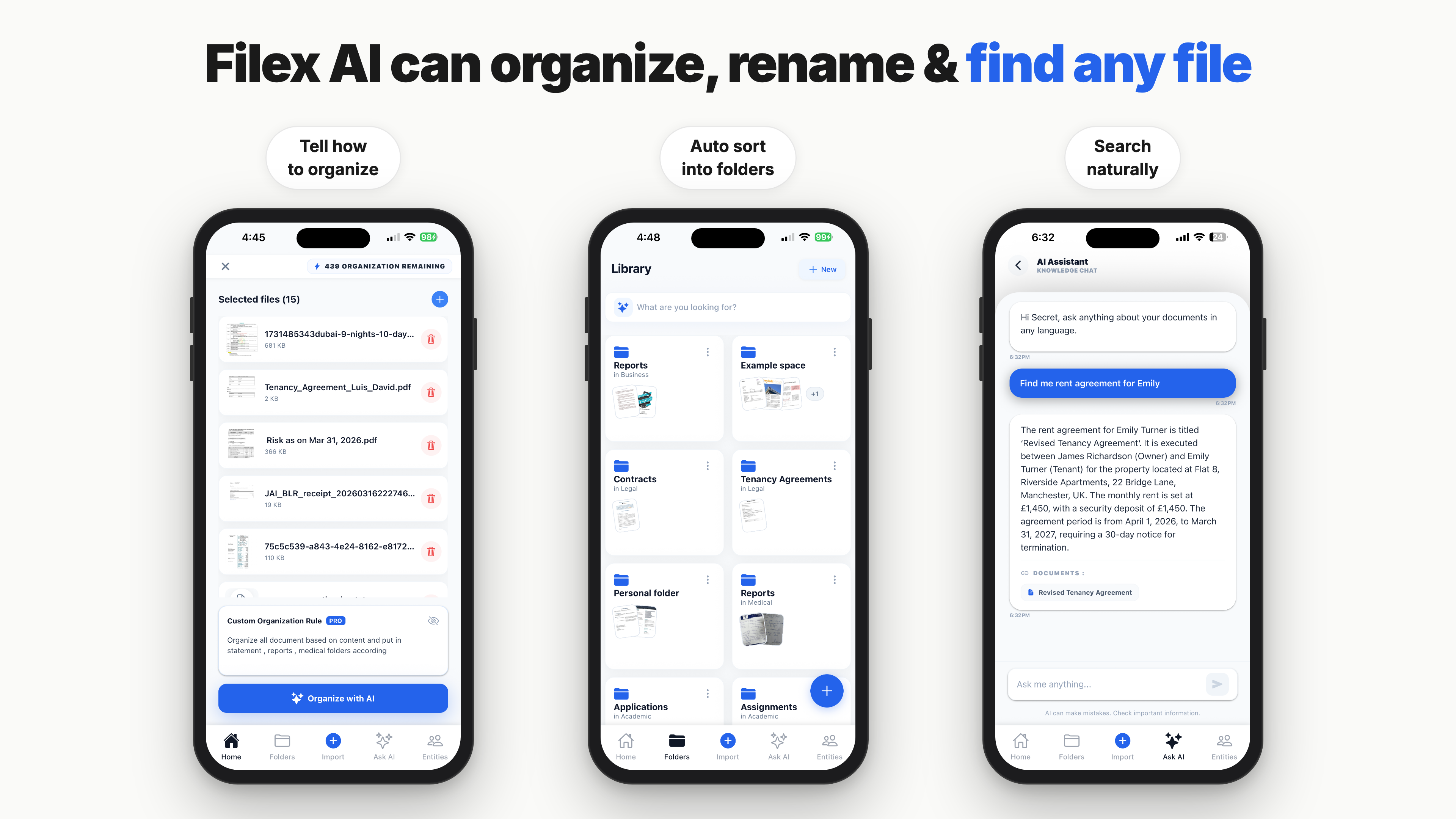
- Find any document in seconds by describing it naturally—no need to remember filenames or folder names—thanks to natural language file search that understands "contract from last quarter" or "March invoices."
- Eliminate manual file sorting as AI automatically renames, tags, and categorizes PDFs, Word docs, invoices, contracts, receipts, images, and scans into smart folders.
- Stop missing deadlines with smart alerts that automatically extract and flag payment due dates, renewal dates, and contract expiry dates from your documents.
- Access all files related to a client, project, or company instantly as the AI detects people, businesses, and organizations across documents and links related files together.
- Keep your storage clean and efficient with automatic duplicate file detection and smart cleanup that removes redundant copies without losing important data.
- Turn physical papers into searchable digital files using the built-in AI document scanner that instantly enhances and OCR-processes scans, receipts, and screenshots.
- Automate file organization by client, vendor, project, month, or document type with custom AI automation rules that run without manual intervention.
- Process thousands of files in seconds with optimized AI that handles bulk organization, renaming, and categorization at high speed.
- Protect sensitive business data with bank-level encryption for all files and metadata, both in transit and at rest, meeting GDPR, SOC 2, and HIPAA compliance standards.
Pros & Cons
Pros
- Auto-renames files
- Cross-platform compatibility
- OCR for images
- Natural language search
- Smart auto-folders
- Customized organization rules
- Industry-specific organization
- Smart invoice filing
- Automated contract categorizing
- Alerts for deadlines
- Extracts data from files
- Rapid file processing
- Bank-level encryption
- GDPR, SOC 2, HIPAA compliance
- Metadata encryption
- Secure cloud storage
- Renames files for usability
- Optimized productivity tool
- Document-specific management
- Intelligent folder structuring
- Smart entity extraction
- Mobile app tailored integration
- Built for Android's file system
- Extracts text from images
- User-controlled access
- Proactive risk mitigation
- Cloud syncing across devices
- Handwritten notes analysis
- Share-to-organize feature
- User only data access
- Automated data entry
- Payment dues flagging
Cons
- No offline mode
- Possibly overwhelming alerts
- Potential for incorrect autocategorization
- Doesn't extract non-Latin scripts
- Cloud-only file processing
Reviews
Rate this tool
Loading reviews...
❓ Frequently Asked Questions
Filex is best suited for a wide range of industries including business, healthcare, legal, and education.
Filex adapts to individual workflows by allowing users to customize rules and intelligent filing methods tailored to their specific needs.
Filex handles business documents like contracts and invoices by automatically organizing them using suitable naming conventions and custom organization rules. It auto-categorizes contracts and proposals and performs smart invoice filing by vendor.
Yes, Filex can handle different types of files, including images and screenshots. It uses OCR techniques to convert images and screenshots into searchable files.
Filex can extract critical data such as names, dates, amounts, and clauses from your files, making them searchable and actionable.
Filex is highly secure as it uses bank-level encryption to protect your data. It follows GDPR, SOC 2, and HIPAA standards, ensuring the privacy and protection of your data to the highest degree.
Filex offers smart alerts to help users not miss any important deadlines by flagging expiry dates and payment dues.
Filex's natural language search allows users to find files by simply describing the documents they need. This feature makes search more intuitive and user-friendly.
Filex organizes files into specific folders through an AI-powered system that comprehends files and automatically sorts them into the respective folder structures.
Filex can manage thousands of files in seconds thanks to its fast processing abilities powered by optimized AI implementation.
Filex handles metadata by encrypting all related files and metadata, both in transit and at rest, to ensure data privacy and protection.
Yes, Filex can recognize, categorize, and organize files based on OCR, making images and screenshots searchable.
Yes, Filex works across multiple devices, and is available for iPhone, Android, and Web platforms, enabling seamless accessibility.
Yes, Filex complies with GDPR, SOC 2, and HIPAA standards, ensuring the safety and privacy of users' data to high international standards.
The data and files stored on Filex are kept on secure cloud infrastructure, with strict access controls, auditing, and continuous monitoring.
Yes, Filex can auto-categorize your contracts and proposals, helping you maintain an organized and easily accessible system of files.
Filex's smart invoice filing by vendor works by automatically scanning your invoices, identifying the vendor, and then filing the invoice in the corresponding vendor's folder.
Yes, Filex can help you meet your deadlines by flagging expiry dates and dues automatically. This feature ensures that you never miss a deadline.
Yes, the data stored in Filex is continuously monitored and audited to maintain high levels of security and data protection.
Filex handles the encryption of files and metadata during both transit and rest by using industry-standard encryption methods, ensuring the maximum privacy and safety of your data.
Pricing
Pricing model
Free Trial
Paid options from
$2.99/month
Billing frequency
Monthly
Related Videos
Filex AI Review: Is It The Ultimate Productivity Hack? #productivity
Chintan•1.4K views•Jan 6, 2026