Overview
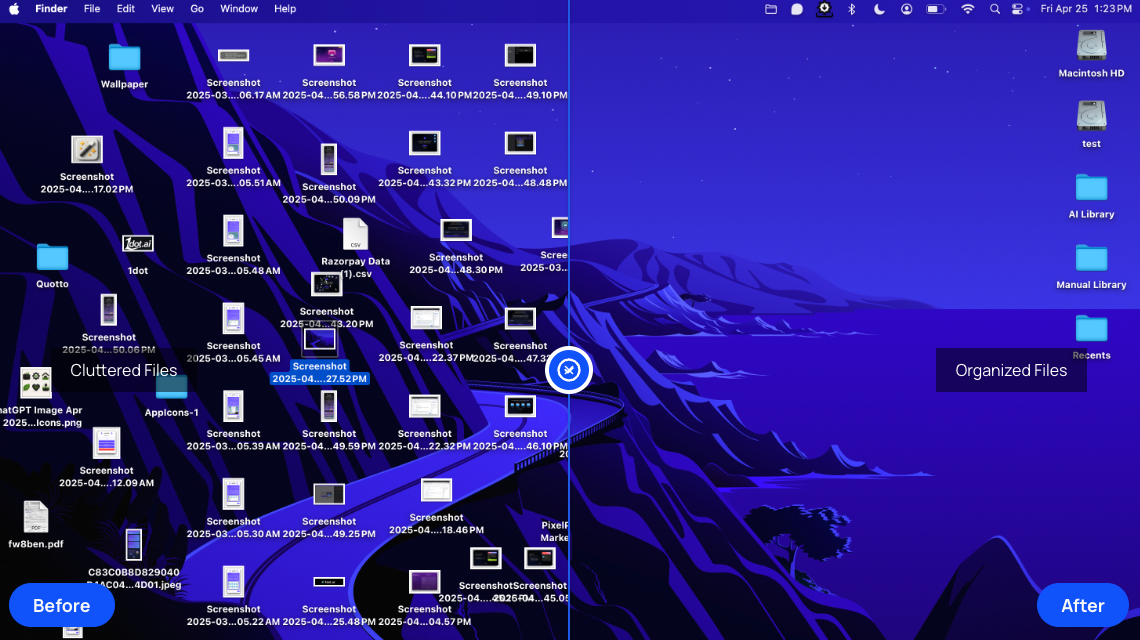
- Instantly transform cluttered folders into a structured system with AI that sorts and categorizes files based on their names
- Maintain complete control over your file organization with a one-click restore feature that instantly returns files to their original locations
- Keep important project structures intact by excluding specific files or entire folders from the automatic organization process
- Organize files consistently across your entire workflow with seamless integration for Google Drive, Dropbox, and OneDrive
- Locate any file in seconds using the built-in search functionality that works across your newly organized system
- Protect sensitive file contents with privacy-first local processing that never uploads or reads your actual files, using only filenames and metadata
Pros & Cons
Pros
- Instant file organization
- One-click restore feature
- Provides smart exclusions
- Cloud services integration
- Google Drive compatible
- Dropbox compatible
- OneDrive compatible
- No user data distribution
- In-app search function
- Organization based on names
- Selective folder organization
- Visual clutter transformation
- Integrated with macOS
- No credit card required
- Complete feature access in trial
- Automatic file sorting
Cons
- No content of your files are access to respect your privacy
- No subscription plans , online lifetime plan for now
- Requires local device storage
- No cross-platform compatibility
- No API integration
Reviews
Rate this tool
Loading reviews...
❓ Frequently Asked Questions
Files Magic AI is an automatic file organization system powered by artificial intelligence. It organizes and manages files by sorting and categorizing them based on their names, which helps declutter and streamline digital workspace.
The one-click restore feature in Files Magic AI is a safety mechanism that allows users to revert any changes and return files to their original locations, providing an option to undo the file organization process if necessary.
Yes, Files Magic AI is fully compatible with cloud services such as Google Drive, Dropbox, and OneDrive. This ensures that your files are organized consistently across multiple platforms.
Files Magic AI places high-value on privacy. It operates locally on your device, instead of uploading your files to a remote server. The application does not access, read, or upload files. In addition, user data is not shared, sold or distributed to third parties. All stored file name metadata is automatically discarded after 30 days.
No, Files Magic AI does not access, read, or upload your files. The AI organizes and manages your files strictly on your device and only uses the filenames for the organization process.
Files Magic AI keeps the stored file name metadata for a period of 30 days. After this duration, the metadata is automatically deleted.
The search functionality in Files Magic AI allows users to quickly locate their files using the file names. This makes it easier to find specific files amidst the organized system.
Yes, Files Magic AI has the capability to organize files across multiple platforms. This is made possible by its seamless integration with various cloud services like Google Drive, Dropbox, and OneDrive.
User data protection in Files Magic AI is guaranteed by its local operation. The AI never accesses, reads, or uploads your files. It does not share, sell or distribute your data to any third parties. Furthermore, any stored file name metadata is automatically deleted after 30 days.
The exclusions feature in Files Magic AI is a functionality that allows users to exclude certain files or entire folders from the organization process. This feature ensures that important files or project structures remain untouched and organized according to user preference.
Yes, you can revert changes made by Files Magic AI. Thanks to the one-click restore feature, users can undo file organization and return their files to their original locations.
Files Magic AI declutters digital workspaces by automatically sorting and categorizing files based on their names. This process results in a well-organized and streamlined digital workspace.
No, Files Magic AI does not share, sell, or distribute user data to third parties. All processes are kept within the user's device and any stored file name metadata is deleted after 30 days.
Files Magic AI operates locally on the user's device. It is not cloud-based, meaning it does not upload or store any of your files on a remote server.
Files Magic AI organizes and categorizes files based on their names. There is no clear mention of a specific type of files on their website, indicating that it possibly handles all common types of files.
Anybody dealing with a large number of files could benefit from Files Magic AI. For instance, graphic designers, software developers, researchers, students, or any professionals or individuals dealing with lots of paperwork or digital files would find this tool valuable.
Files Magic AI previously offered a 15-day free trial. However, according to the details on their website, they have stopped providing a free trial.
Files Magic AI is a tool powered by artificial intelligence that organizes, manages, and compares files. It's designed to help declutter digital workspaces by categorizing and sorting files based on their names.
Files Magic AI works by automatically categorizing and sorting files based on their names. It uses AI to analyze filenames and sorts them into folders based on your organization habits, without reading file contents.
Yes, Files Magic AI does have a restore feature. This feature enables you to revert any changes you've made, allowing you to instantly restore all files to their original locations with a single click.
Files Magic AI's smart exclusions functionality allows you to exclude specific files or entire folders from being organized. This helps to maintain important project structures untouched.
Yes, Files Magic AI can integrate with cloud services like Google Drive, Dropbox, and OneDrive. This integration ensures that your files are organized across all platforms.
Files Magic AI ensures the privacy and security of your files by never accessing, reading, or uploading your files. The application operates locally on your device, uses only file names to organize your folders, and does not share, sell, or distribute your data to third parties.
Files Magic AI stores filename metadata for 30 days. After that, all stored filename metadata is automatically deleted.
No, Files Magic AI does not share, sell, or distribute your data with third parties. Your information is solely used to enhance your experience with Files Magic AI.
Yes, Files Magic AI includes a search functionality within the app. This feature allows you to quickly locate files using their names.
Yes, Files Magic AI can organize files according to your daily habits. The automatic organization of files takes into account a user's daily habits as well as filenames.
Yes, Files Magic AI operates only on your local device. All file organization processes occur directly on your device, and Files Magic AI does not store or send files to external servers.
Yes, based on their website, Files Magic AI is compatible with macOS.
Files Magic AI transforms your cluttered folders into a structured system by applying AI to analyze filenames and sort them into folders based on your organization habits—without reading the content of your files. This results in an immediate visual transformation from cluttered to organized.
Yes, you can exclude specific files from being organized by Files Magic AI. The smart exclusions feature allows you to exclude specific files or entire folders from the organization process.
Yes, Files Magic AI uses only filenames for the organization. It never reads file contents.
No, currently there is no free trial available for Files Magic AI as per the website.
The 'One-Click Restore' in Files Magic AI allows you to instantly restore all files to their original locations with a single click, in case you need to revert any changes you made. Your peace of mind is guaranteed with this safety net.
To get started with Files Magic AI, you need to download and install the application on your device, select the folder you wish to organize, and let the app handle the rest.
Pricing
Pricing model
Free Trial
Paid options from
$49.99
Billing frequency
One-time