
Overview
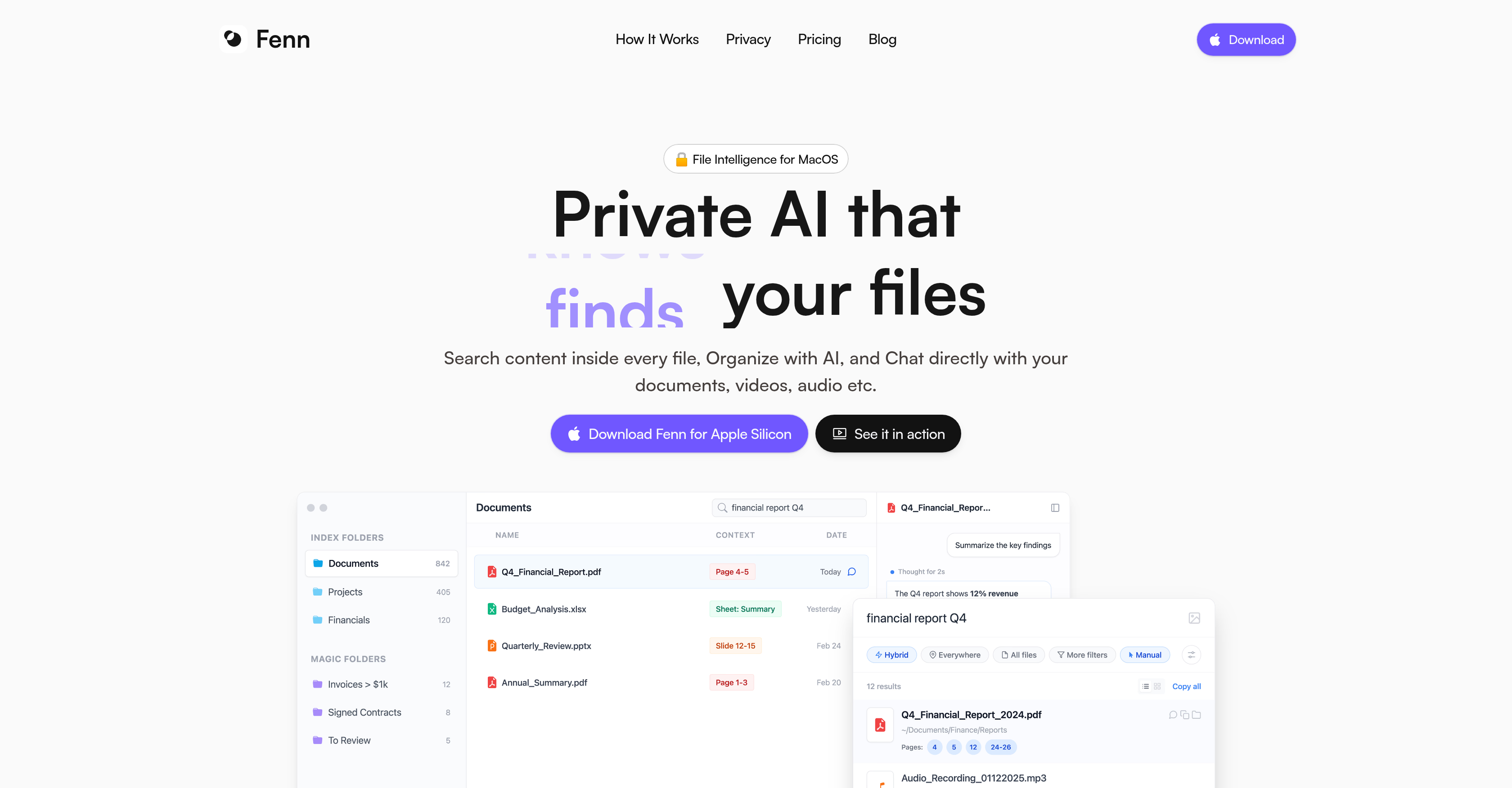
- Instantly locate any file on your Mac by searching inside documents, audio, video, and code with semantic and keyword search across 50+ file types.
- Automatically rename files based on their actual content—no more vague filenames—using on-device AI that understands what’s inside.
- Auto-organizing folders that gather and update files matching your criteria, so you never manually sort or search for related items again.
- Chat privately with your files to get summaries, compare versions, and extract data with citations back to the source—all without uploading anything.
- Extract any file data to CSV in seconds, turning scattered information into structured, actionable reports.
- Transcribe audio and video files locally, making spoken content instantly searchable and quotable.
- Find people in your photo library using face recognition search, without sending facial data to the cloud.
- Work entirely offline with complete privacy—all file processing stays on your Mac, no internet connection required.
Pros & Cons
Pros
- Designed for macOS
- Content-specific search within files
- Automated file renaming
- Creates 'Magic Folders'
- Private interaction with files
- Handles exhaustive file types
- Works on Adobe files
- Works on coding files
- Totally private processing
- Offline capable
- No upload needed
- Chat feature for summarising
- Can compare versions
- Extracts information with citations
- Efficient file-seeking
- Autonomous function
- Handles audio and video files
- In-app search for content
- User-defined criteria for folders
- Rapid indexing of files
- Supports developer file formats
- Local processing of files
- Caters to Adobe creative files
- Handles varied document types
Cons
- Only for macOS
- No multi-device synchronization
- No freemium
- Limited to one Mac/device
- Updates limited after 1 year for the Lifetime license
Reviews
Rate this tool
Loading reviews...
❓ Frequently Asked Questions
Fenn is a private file management system specifically designed for macOS. It utilizes AI to understand, organize, and interact with your files at a local level with a suite of intelligent features such as content-specific searches, file renaming based on content, creation of intelligent folders updated to match your criteria, and a private chat for summarising, comparing versions, and extracting information.
Fenn works by operating at a local level on your Mac. It uses artificial intelligence to understand, organize, and interact with your files. It offers a content-specific search within every file, uses AI to rename files according to their content, creates 'Magic Folders' with files matching your criteria, and offers a private chat option with your files for tasks such as summarizing, comparing versions, and extracting information with reference back to the source. Moreover, it works offline and processes your files without uploading them anywhere, thus ensuring complete privacy.
Fenn is exclusively designed for macOS and does not work with Windows.
No, Fenn is not a cloud-based file management system. It operates locally on your Mac.
Fenn ensures 100% privacy by keeping all file processing local to your Mac. Files are not uploaded anywhere, and the tool works completely offline, preventing any exposure of your files over the internet.
Yes, Fenn has the capability to search within the content of every file. This includes a range of file types, from standard document formats to audio and video files and more specific file types oriented towards developers.
Fenn's AI studies the content inside your files and utilizes that understanding to rename your files. This feature works on various file types, extending from images, audio, and video to PDFs and more.
'Magic Folders' in Fenn are created using the AI that always contain up-to-date files fitting your criteria. These folders automatically gather and update files based on the criteria you set.
The private chat feature of Fenn allows users to interact 100% privately with their files. Tasks such as summarizing content, comparing different versions, and extracting information with a citation back to the source can be carried out directly in this chat.
Fenn can handle a comprehensive array of file types, from standard documents like PDF, Word, Excel, Powerpoint to Adobe creative files, audio and video in various formats, as well as file types specific to developers.
Yes, Fenn can handle Adobe creative files including InDesign, Illustrator, Photoshop, and Images.
Yes, Fenn can function offline. All processing is conducted locally on your Mac, with no file uploads necessary.
Yes, Fenn supports searching within the content of audio and video files. It can handle various formats such as MP3, OGG, WAV, MP4, MOV, AVI, MKV, and more.
Fenn assists developers in managing their files by supporting developer-specific file types. It can handle file types such as .MD, Python, Typescript, HTML, TXT, and more, making file management more efficient for developers.
Fenn can handle and effectively manage document files including PDF, Word, Excel, and Powerpoint. It uses its AI capability to conduct content-specific searches within these files, and can also rename files based on their content.
Fenn's 'rename with AI' feature works on different file types by studying the content inside each file and using that understanding to appropriately rename the file. This functionality works across various formats, including images, audio, video, PDFs, and many more.
Fenn offers several pricing options: the Flex package is priced at $9/month, the Lifetime package is available for a one-time fee of $199, and there is a Teams package for $699 which is billed one time.
Yes, Fenn offers a Team license, which is available for a one-time fee of $699. This package includes usage on 5 Macs and a year of updates.
Yes, Fenn provides continuous updates with the Flex license.
Fenn users are provided with direct founder support as part of the service.
Key features of Fenn include advanced file search allowing users to precisely locate content within any file type. It uses AI technology to automatically rename files based on their content and create 'Magic Folders' which automatically update to contain files fitting specific criteria. Fenn also allows users to chat privately with their files to extract crucial information, compare versions, and get summaries - all with citations connecting back to the original source file.
Fenn's artificial intelligence capabilities are primarily used in file management, information retrieval, and search functionality. It can determine the content of each file, enabling precise content-specific searches, and also comprehends users' criteria for 'Magic Folders'. Furthermore, Fenn's AI can comprehend the content of a file-based chat, allowing it to summarize, compare versions, and extract necessary information.
Fenn can handle a exhaustive range of file types, from common document types such as PDF, Word, Excel and Powerpoint, to Adobe Suite creative files, and various audio and video formats. It also works with developer-specific file types such as .MD, Python, Typescript, and HTML.
Yes, Fenn is currently exclusively compatible with macOS. It has been specifically designed to cater to the needs of macOS users.
Fenn ensures complete privacy of your files by processing all files locally on your Mac rather than in the cloud. This means your files never leave your device at any point, ensuring 100% privacy.
The 'Private Chat' feature of Fenn allows you to interact with your files in a completely private manner. Through this feature, users can ask questions, summarize documents, compare versions, and extract necessary information from files, complete with citations back to the source.
Yes, Fenn offers the feature to search for precise content within any file, regardless of file type. This includes documents, audio files, video files, and more.
Yes, Fenn enables file renaming based on content. It employs AI to determine the content of each file, which can subsequently be used to automatically rename files.
Fenn's local processing allows files to be managed and searched without needing to upload them to an external server. This not only ensures the privacy of the user's files but also allows the functionality of Fenn to be accessed offline.
Yes, Fenn can efficiently work with Adobe files. It specifically mentions compatibility with file types such as InDesign, Illustrator, and Photoshop.
Fenn can manage several developer-specific file types, including Markdown (.MD), Python, Typescript, and HTML files.
No, Fenn does not require a connection to an external AI model provider. It is autonomous in its functioning, performing all file management, search, and interactions locally on your Mac.
The criteria for files to be included in 'Magic Folders' can be defined by users. Based on these criteria, Fenn's AI will analyze and add files that fit the user-defined characteristics into the particular 'Magic Folder'.
Fenn enables file version comparisons through its 'Private Chat' feature. By interacting privately with your files, you can compare different versions and understand differences or changes.
Yes, Fenn can extract information from your files with references back to the original source. This feature is part of the 'Private Chat' with files, where users can ask questions, request summaries, and extract needed information.
Fenn supports an exhaustive list of file formats, including document types like PDF, Word, Powerpoint, Excel, image files, audio formats like MP3, OGG, WAV, video formats like MP4, MOV, AVI, Adobe creative suite files such as InDesign, Illustrator, Photoshop, and developer file types such as .MD, Python, Typescript, HTML.
Fenn's autonomy lies in its ability to provide full file management, search, and interaction functionality without needing any external AI model provider or server-based cloud storage. All operations are performed locally on the user's Mac - from indexing to answering complex queries.
Pricing
Pricing model
Paid
Paid options from
$9/month
Billing frequency
Monthly
Refund policy
30 Days Money Back Guarantee
Related Videos
Fenn — Find anything inside Videos, PDFs, Words, Audio instantly on your Mac
Fenn•310 views•Mar 20, 2025