
Overview
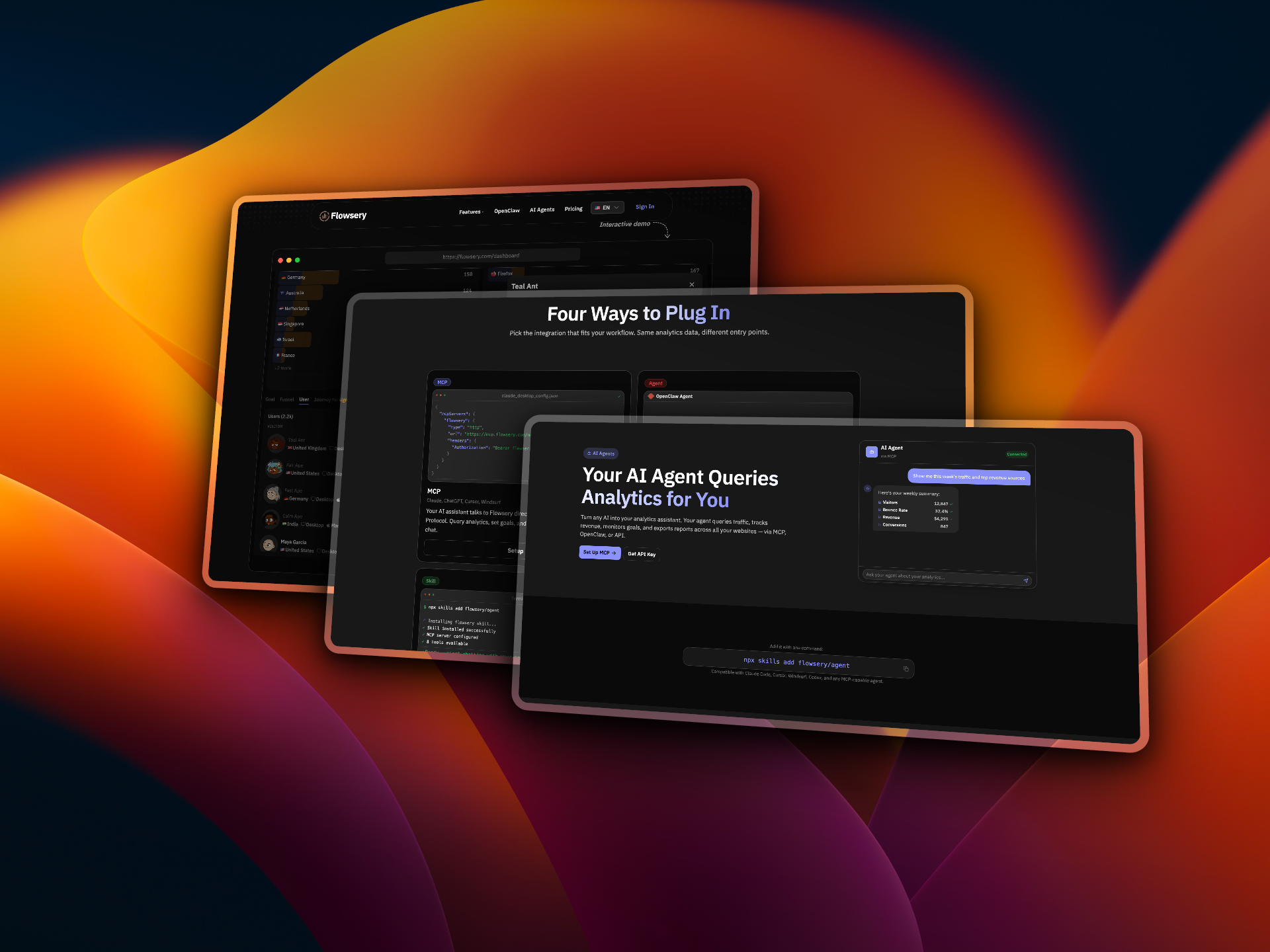
- Query real-time traffic, revenue, and goal data instantly through your AI agent using natural language, eliminating manual dashboard checks
- Monitor revenue trends without cookies and compare performance across multiple websites from a single chat interface, unifying insights across all your properties
- Identify exactly where visitors abandon your flow by having your AI agent build and analyze multi-step funnels on demand, revealing conversion optimization opportunities
- Automate weekly report exports in CSV or JSON for any date range, letting your AI agent gather and deliver data directly to your dashboards without manual effort
- Track custom events like button clicks, form submissions, and file downloads through your AI agent, getting full breakdowns of user behavior and conversion paths
- Set and monitor conversion goals such as sign-ups or purchases from within your chat, with your AI agent tracking progress in real time and alerting you to changes
- Compare top traffic sources and payment provider contributions across all tracked sites simultaneously, using your AI agent to surface trends and anomalies
- Retrieve visitor details, pageviews, sources, and geographic data in real time through your AI agent, getting immediate answers without switching contexts
Pros & Cons
Pros
- Queries analytics in real time
- Tracks custom events
- Manages analytics across multiple websites
- Analyzes visitor behavior through funnels
- Exports reports in CSV or JSON
- Flexible integration options (MCP, OpenClaw, REST API)
- Quick setup in under a minute
- Capability to compare website performances
- Provides unified insights across sites
- Tracks conversion rates and revenue trends
- Offers cookie-free analytics
- Ability to query using natural language
- Revenue tracking without using cookies
- Enables conversational data retrieval
- Tracks monthly revenue trending
- Option to set up and monitor goals
- Facilitates Funnel drop-off rate analysis
- Supports custom agents and automations
- Real-time traffic and geographic data querying
- Allows tracking of signups, purchases or any custom events
- Quick export of reports on demand
- Supports managing multiple sites
- Monitor custom events like button clicks, form submissions, file downloads
Cons
- Limited device compatibility
- Needs multiple integrations
- Dependent on external platforms
- No desktop app
- Reports only in CSV/JSON
- No visual data representation
- Requires coding knowledge
- No in-built revenue tracking
Reviews
Rate this tool
Loading reviews...
❓ Frequently Asked Questions
Flowsery is a web analytics service that aids AI agents in querying, monitoring, and reporting analytics data across multiple websites. It facilitates integration through MCP, OpenClaw, or REST API, turning any AI into an analytics assistant capable of handling tasks such as real-time traffic querying, revenue tracking, goal setting, and report exporting.
Flowsery enhances an AI's analytics capabilities by providing full analytics control. This allows an AI agent to query any data you might manually check, like traffic, revenue, and goals. The AI agent can track custom events, manage multiple sites, and build and analyze funnels to understand visitor behavior.
Yes, Flowsery can manage analytics across multiple websites. Its AI agents are capable of managing analytics data from multiple sites and providing a unified insights view.
Reports can be exported from Flowsery on demand in either CSV or JSON formats for any date range. These reports can be automated, making it easier for users to gather data for weekly reports or integrate data into their personal dashboards.
Yes, your AI can query traffic in real time using Flowsery. It is equipped with the capabilities to instantly fetch visitors' data, pageviews, sources, and geographical info.
Flowsery tracks custom events by providing your AI agent with the capability to monitor events such as button clicks, form submissions, and file downloads. It offers full breakdowns of these events to give you nuanced information and insights.
In Flowsery, goal setting and tracking is handled by the AI agent. The agent has the capability to create conversion goals and monitor their progress. The AI can track events such as sign-ups, purchases, or any custom event set by the user.
MCP, or Model Context Protocol, is a tool used in Flowsery for integration. It helps AI agents — like Claude Code, Cursor, Windsurf, Codex, or any other MCP-capable agents — to directly interact with Flowsery. They can query analytics, set goals, and export reports right from the chat interface.
Flowsery is compatible with various AI platforms, including Claude Code, Cursor, Windsurf, Codex, and any other MCP-capable agent. This compatibility provides users with flexibility in their choice of AI platforms.
Yes, REST API integration is possible with Flowsery. It offers simple endpoints for querying analytics, managing goals, and exporting data, allowing users to use any language to interact with the platform.
Yes, you can automate weekly reports in Flowsery. The application has a feature that allows on-demand exporting of reports, which can be set to automate weekly reports, easing the task of data collection.
The benefits of combining web analytics with AI through Flowsery include real-time traffic monitoring, revenue tracking, goal setting, and report exporting. The AI can manage multiple sites, track custom events and create and analyze visitor behaviors via funnels. Furthermore, combining web analytics with AI can also aid in automating analytics tasks and interpreting complex data effectively.
Yes, Flowsery is an excellent tool for real-time traffic tracking. It is equipped with an API for real-time data querying, which fetches visitors, pageviews, sources, and geographical data. This provides users with immediate access to their website’s traffic info at any given moment.
Setting up Flowsery is prompt and easy. It can be set up in under a minute and can be implemented and used immediately afterward. All you have to do is drop the provided configuration into your MCP settings, and your AI agent is ready to query analytics.
Flowsery assists in managing revenue tracking by providing the AI agent with the capability to track revenue over time. It allows the agent to monitor how revenue is trending compared to previous periods. It also identifies the top payment providers contributing to the revenue.
Yes, Flowsery can provide a behavioral analysis of website visitors by enabling the AI agent to build and analyze funnels. This helps in understanding visitor behavior and identifying where visitors abandon your flow, which can be critical in improving user engagement and conversion rates.
Flowsery adapts to fit a user's workflow by offering different integration options. Depending on your workflow, you have the option to use MCP, OpenClaw, or REST API integration. This gives you the flexibility to pick the integration that most suits your workflow.
Flowsery offers two formats for exporting reports: CSV and JSON. These reports can be generated on demand for any date range and can be used to automate regular reports or integrate data into other dashboards.
Yes, Flowsery does allow the use of natural language commands. It permits AIs to take queries in natural language, streamlining interactions and making it easier to retrieve necessary information without the need for complex commands or manual checks.
Yes, Flowsery can be integrated with Codex AI. Codex is one of the AI platforms that are compatible with Flowsery, and it can be connected via MCP, enabling Codex to become your analytics assistant.
Flowsery integrates with AI agents via MCP (Model Context Protocol), OpenClaw, or a REST API. These integrations allow the AI agents to directly query data, set and monitor goals, track custom events, manage multiple websites, and export reports on-demand. Agents can query any data a user would manually check, making it an effective tool for fully automating website analytics.
Flowsery can generate reports that include details about traffic, revenue, goals, funnels, and custom events. It gives the AI agents capability of exporting these reports on demand in either CSV or JSON formats for any specified date range. Moreover, it can automate the generation of weekly reports or pulling data into users' own dashboards.
Flowsery is compatible with AI platforms such as Claude Code, Cursor, Windsurf, Codex, and any other MCP-capable agent. This extends its usability across multiple platforms and allows a wide variety of AI assistants to connect with and leverage its capabilities.
AI agents can query for website traffic through Flowsery in real time. They do this by connecting via either MCP (Model Context Protocol), OpenClaw, or a REST API. This allows them to directly access and query traffic data including visitor details, pageviews, sources and geographic data.
Flowsery is capable of tracking revenue by providing detailed analytics on traffic sources, conversion rates, monthly revenue trends, and other crucial factors that affect revenue generation. It pays special focus on revenue tracking and handles the task in a non-traditional way that does not rely on cookies.
Flowsery sets and monitors goals by allowing AI agents to create conversion goals and keep track of their progress. The process involves defining specific objectives such as signups, purchases, or any custom event and following their advancement towards these goals in real time.
Reports from Flowsery can be easily exported by the AI agents on demand in CSV or JSON formats for any date range. This feature allows users to automate weekly report generation or pull data into their own dashboards easily.
MCP, or Model Context Protocol, is a methodology that allows AI agents to communicate with Flowsery directly to query analytics, set goals, and export reports right from the chat. It's one of the entry points for AI assistants into Flowsery’s analytics data and operates in a chat-based environment. The aim is for a more intuitive, conversational data retrieval.
OpenClaw is a form of integration that allows autonomous AI agents to handle all tasks associated with querying traffic data, setting up goals, monitoring funnels, and reporting back. These tasks are all handled from a single message sent via the OpenClaw platform.
A REST API is another entry point into Flowsery. It provides simple endpoints for querying analytics, managing goals, and exporting data that custom AI agents and automations can use. The REST API allows integration in any language, extending its flexibility and utility.
Flowsery handles funnel analysis by allowing AI agents to define multi-step funnels and obtain instantaneous drop-off analysis. This enables users to find exactly where visitors abandon the flow and thus provides critical insights for conversion optimization.
In Flowsery, custom events are tracked by AI agents who monitor actions such as button clicks, form submissions, file downloads with a full breakdown. This facilitates a better understanding of the user behavior and conversion paths.
Yes, Flowsery can manage analytics from multiple websites at the same time. It is equipped to handle the querying of analytics data across all the user-tracked websites, thereby enabling performance comparison, context switching, and obtaining unified insights.
To compare multiple websites' performance, Flowsery provides AI agents with capabilities to manage multiple sites simultaneously and query analytics data across them. This makes possible the comparison of website performance, delivering a unified view of insights and helping to highlight unique trends or issues across different sites.
Flowsery offers two formats for exporting data: CSV and JSON. These formats can be used for any date range and enable users to automate weekly reports or pull data into their own dashboards on demand.
Flowsery can be set up and used in under a minute, allowing for quick implementation and use. This is made possible by the intuitive setup process and the ease with which it can be integrated with various AI platforms.
Flowsery provides full analytics control by allowing AI agents to query any data that a user might manually check, including traffic sources, site goals, revenue trends, and more. This is made possible through integrations like MCP, OpenClaw, and REST APIs which offer direct access to Flowsery’s analytics data.
Flowsery aims to make data retrieval more conversational and intuitive by leveraging the capabilities of various AI platforms. As the AI assistants can query analytics data directly through natural language processing techniques, it transforms the experience of analytics interrogation into a chat-based one, making it more intuitive.
Flowsery tracks revenue without using cookies by focusing on visitor sources, trends, conversion rates and other critical areas that impact revenue. This approach allows it to provide a comprehensive view of a site's revenue while also positioning it as a viable alternative to conventional, cookie-based analytics platforms.
Pricing
Pricing model
Freemium
Paid options from
$19.99/month
Billing frequency
Monthly
Related Videos
did everyone just agree to ignore privacy laws or what #Shorts
Flowsery•1.7K views•Apr 20, 2026