Overview
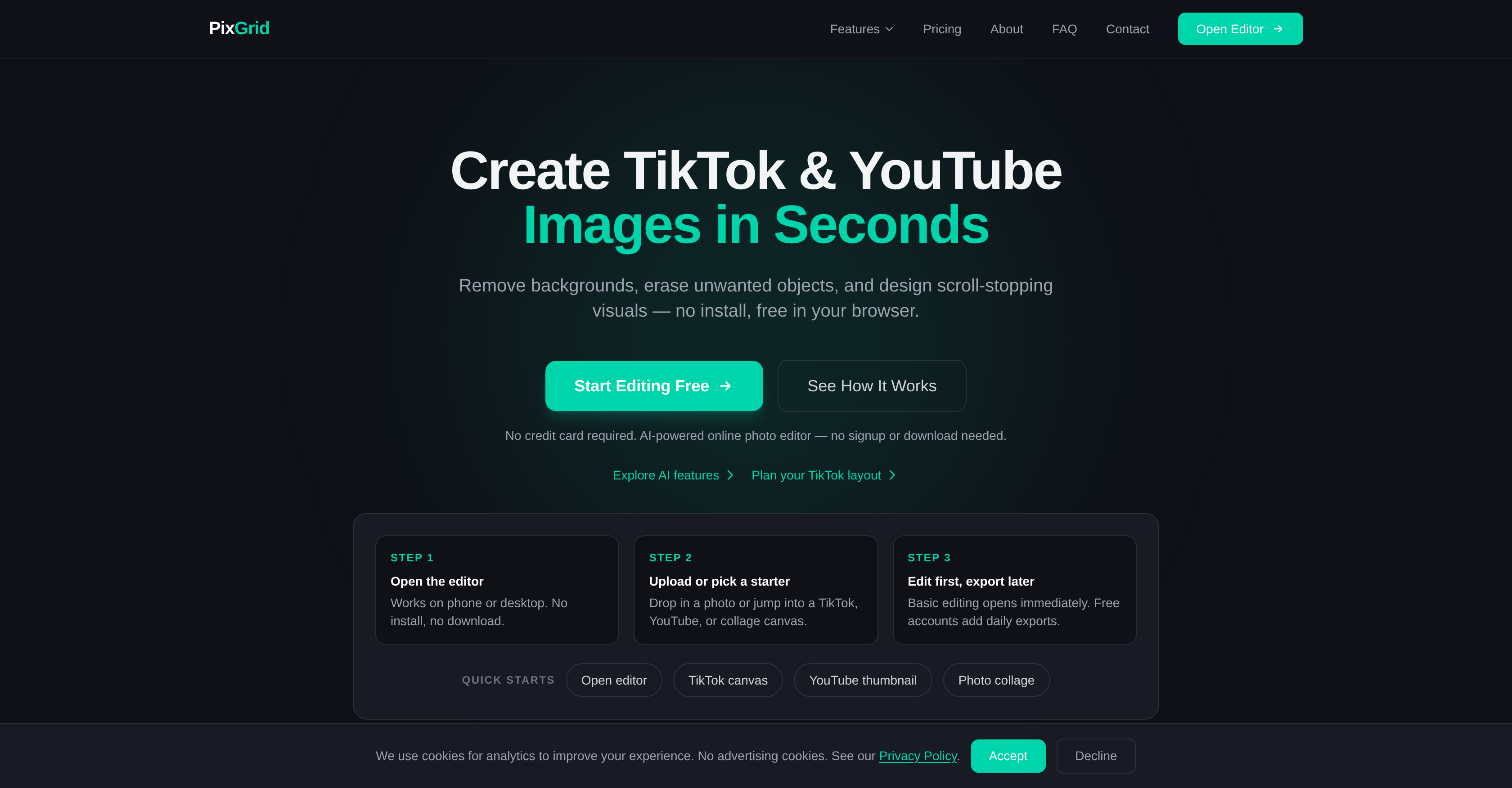
- Create scroll-stopping TikTok and YouTube thumbnails in seconds using the AI Image Generator that turns text prompts into Cinematic, Anime, or 3D Render visuals.
- Remove distracting backgrounds or unwanted objects from product photos instantly, with AI that fills gaps naturally for a seamless, professional finish.
- Repair damaged photos or extend backgrounds effortlessly through Smart Inpainting that generates realistic content blending perfectly into the original image.
- Design professional social media graphics with over 100 fonts, per-letter coloring, warping, and shadow controls in the Text Editor.
- Build complex layered compositions with full control over blending modes, opacity, and layer ordering for precise, creative edits.
- Export final visuals in PNG, SVG, or PDF formats, ensuring your work is ready for digital display or print without quality loss.
- Keep every image private—your photos are deleted from servers immediately after processing and never used to train AI models.
- Access professional AI features only when needed with a pay-as-you-go pricing model that has no automatic renewals or hidden fees.
Pros & Cons
Pros
- Browser-based
- Generates images from text
- Styles include Cinematic, Anime, 3D
- Quick background and object removal
- Smart Inpainting feature
- Professional typography text editor
- Structured editing tools
- Supports PNG, SVG, PDF exports
- Removes photos from server post-processing
- No auto-renewal pricing model
- Creates visuals for TikTok, YouTube
- Removes background from images
- Erases unwanted objects
- Smart inpainting fills missing areas
- Features a layer system
- Advanced text editor with fonts
- Export options for different formats
- Flexible pay-as-you-go pricing
- No credit card required
- Multiple use cases targeted
- Wide scope of exporting formats
- Has a drawing tools feature
- Confidentiality focused privacy policy
- Has a photo collage feature
- Crops & resizes photos
- Enhances images with outlines & glow
- Photo editing for social media
- No installations or downloads
- Designs scroll-stopping visuals
- Includes 72 ready-made templates
- Facilitates image layering
- Professional layering with blending modes
- Full opacity control
- Has an outline & glow feature
- Operates in browser
- No signup required
- Crafts visuals in seconds
- Enhances images with shadows
- Instant background removal
- Unlimited exports with paid plans
- Available for desktop and phone
- Comes with diverse canvas sizes
- Creates photo grids and collages
- Text editing with 100+ fonts
- Per-letter color customization
- High-resolution PNG export
- Scalable SVG export
- Print-ready PDF export
Cons
- No offline version
- Subscription for premium features
- Slow performance for complex edits
- Limited text editor tools
- Constrained image generator styles
- No direct social media sharing
- Lack of video editing features
- No advanced color grading tools
- Limited layer blending modes
- Not optimized for mobile devices
Reviews
Rate this tool
Loading reviews...
❓ Frequently Asked Questions
PixGrid is an AI-powered photo editing tool that allows you to edit photos right from your browser without any installation required. It offers a wide range of features, including an AI Image Generator, background and object removal, Smart Inpainting, a Text Editor, and several AI Filters. Additionally, PixGrid has tools for structured editing such as layering and creating photo collages. It also supports exporting work in various formats like PNG, SVG, and PDF. PixGrid is suited for creators, online sellers, or designers looking to improve their images.
PixGrid's AI Image Generator works by generating images from text prompts. The user can input specific text prompts and the AI will interpret these prompts to generate images in various styles, such as Cinematic, Anime, and 3D Render.
Yes, PixGrid does support both background and object removal. Using AI technology, it allows for quick and accurate removal of backgrounds and objects from images. The gaps left after removal are filled naturally by the AI, leading to seamless and high-quality results.
Smart Inpainting is a feature in PixGrid that extends backgrounds and repairs photos. It uses AI technology to generate realistic content that fits naturally into the picture. This tool is particularly useful in repairing damaged areas of photos or removing unwanted elements and filling in the gaps.
The Text Editor feature in PixGrid supports over 100 different fonts. It allows you to enhance your designs by adding professional typography, making your visuals more captivating.
PixGrid offers a variety of AI Filters that allow users to grade and stylize their photos. The tool contains AI-powered features that can transform your photos' color grading or render them in an anime style with one click.
PixGrid enables photo layering through a structured editing tool that includes a full-featured layer system. With this system, you can control blending modes, adjust opacity, and reorder your layers, facilitating complex edits with ease.
Yes, you can create a photo collage with PixGrid. It has a collection of tools aimed at structured editing, including the creation of photo collages. It provides various layouts, allowing you to adjust spacing, add frames, and prepare the collage for social media or print.
PixGrid supports exporting your creations in different formats, including PNG, SVG, and PDF. This ensures that your work can be appropriately sized and formatted for a variety of uses, whether it be digital display or print.
Absolutely, PixGrid is ideal for creators, online sellers, or designers. With its AI capabilities, any can use PixGrid to generate attention-grabbing visuals and enhance their images. The AI technology in PixGrid allows for features such as background removal, object removal, and various other editing tools, making it a valuable asset for people in these fields.
PixGrid has a privacy policy that ensures user's photos are deleted from the server memory after processing. This policy guarantees that user photos are never shared with third parties or used to train AI models. All image processing occurs on PixGrid's private servers and is removed immediately following processing.
PixGrid follows a simple and flexible pricing model with no automatic renewals. It offers a free account option with certain limits and premium options that offer more extensive features. These premium options are pay-as-you-go, allowing users to pay for only what they need and when they need it.
Yes, with PixGrid, you can quickly generate visuals and images suitable for TikTok and YouTube content. By using various features like the AI-powered Image Generator, Text Editor, and AI Filters, users can design captivating images for these platforms in a matter of seconds.
No installation is required to use PixGrid. The tool can be used straight from your browser, making it easily accessible and convenient for users.
PixGrid's Smart Inpainting feature aids in photo repair. It can extend backgrounds, fill in missing areas and repair any kind of photographic damage. The AI generates realistic content that blends seamlessly into the rest of the photo, creating an undetectable repair job.
The AI Filters in PixGrid allow users to enhance and stylize their photos. These filters can transform the look and feel of your images, providing color grading and even artistic effects like transforming photos into an anime-style illustration with just one click.
Yes, PixGrid's AI Image Generator can generate images in various styles including Cinematic, Anime, and 3D Render based on text prompts.
Yes, according to PixGrid's privacy policy, your photos are deleted from server memory immediately after processing, ensuring the privacy of your content.
No, PixGrid does not have automatic renewals in their pricing model. It follows a pay-as-you-use policy making it a more flexible option for users.
Yes, PixGrid is very useful for online sellers as it provides a suite of photo editing tools powered by AI. These features such as background removal, object removal, and Smart Inpainting can be used to enhance product images to look professional and appealing to customers.
PixGrid being AI-powered means that it uses artificial intelligence techniques to perform a variety of sophisticated editing tasks. These tasks include generating images from text prompts in various styles such as Cinematic, Anime, and 3D Render; removing background and objects from images skillfully; smart inpainting to extend backgrounds and repair photos; and applying AI Filters to grade and stylize photos.
PixGrid offers a suite of tools designed to create captivating visuals for social platforms like TikTok and YouTube. It has an AI Image Generator feature capable of creating images based on user-provided text prompts. You can enhance your photos using AI Filters, background and object removal, as well as Smart Inpainting. It includes a Text Editor to help you integrate professional typography into your designs. Further, PixGrid has a collection of structured editing tools, such as layering and photo collage creation systems.
The AI Image Generator feature in PixGrid is designed to generate images from text prompts provided by users. This unique feature can turn naturally spoken or written instructions into visually appealing images in a variety of styles, such as Cinematic, Anime, or 3D Render. Depending on the text input, the AI Image Generator can create intricate and detailed visuals that align closely with the prompt}
PixGrid's background and object removal feature uses AI-powered algorithms to efficiently and accurately remove backgrounds and unwanted objects from your images. This tool not only removes these elements but also uses AI to fill in the resulting gaps naturally, creating seamless and professional-looking images. This can be particularly useful when you want to focus on certain elements within your photos without any distracting backgrounds or objects.
Yes, PixGrid supports exporting your work in several different formats. This allows for flexibility in how you share or use your edited images. The supported export formats include PNG for lossless compression and high quality, SVG for scalable vector graphics that can be resized without loss of quality, and PDF for versatile use in various applications while retaining the original layout and quality.
Absolutely, PixGrid is suitable for a range of users, including designers and online sellers. Its functionalities include generating images from text prompts, enhancing photos using AI Filters, and advanced editing tools such as layering and collage creation. Furthermore, its precise background and object removal tools can help users create clean product photos, while its easy export options ensure that the edited images can be readily used for various purposes.
PixGrid places a high priority on privacy. They ensure that all processed photos are never shared with third parties and are not used for training AI models. After processing, your images are immediately deleted from server memory. This rigorous approach to privacy helps ensure that no unauthorized access to your images occurs during or after the editing process.
PixGrid is an online tool that operates through a web browser, enabling users to create and edit images designed for social platforms. You start by opening the editor on your desktop or phone. Then either upload a photo or select a TikTok, YouTube, or collage canvas for editing. After making the desired changes using AI-powered features like background removal, smart inpainting, or text-to-image generation, you can export your edited visuals in various formats like PNG, PDF, or SVG for use on social platforms.
PixGrid's Smart Inpainting feature uses artificial intelligence to extend backgrounds and repair images naturally. It is capable of generating realistic content, filling in missing areas in photos or extending backgrounds in a way that seamlessly integrates with the rest of the image. This allows for impressive corrections and enhancements that can significantly improve the overall quality of your visuals.
Yes, PixGrid indeed has photo filters. These AI Filters are designed to grade and stylize your photos. They can transform photos with various styles and effects, adding unique and artistic touches. Whether you're aiming for precision color grading or looking to transform a photo into a more stylized aesthetic, PixGrid's AI Filters bring a powerful set of capabilities to help achieve your desired effect.
PixGrid provides a suite of tools for structured editing. At the heart is a full-featured layer system that allows for complex editing, arrangement, and composition of photos. The Text Editor offers professional-grade typography enhancement options. PixGrid also has provisions for the creation of photo collages, making it easy to assemble multiple images into a cohesive whole. Other tools include the crop, resize, outline & glow features, and drawing utilities.
The Text Editor in PixGrid provides a variety of options to enhance your visual designs with professional typography. It offers over 100+ fonts for a wide array of stylizations. You can manipulate text features such as warping, per-letter coloring, as well as adding shadows and outlines. This gives a rich set of capabilities to accentuate your designs and add emphatic messages to your visuals.
Yes, you can use PixGrid without having to download any software or application. PixGrid operates entirely through a web browser. This means you can instantly start creating and editing visuals without any installation or download required, making it an efficient and convenient tool for a wide range of users.
PixGrid's layer system is a fully-featured tool that provides substantial control over the editing process. It allows for blending modes, opacity control, and reordering of layers. You can compose complex edits with ease, making adjustments on individual layers without affecting the entire image. This feature supports high precision and creativity in your visual crafting process.
Yes, PixGrid has a feature for creating photo collages. Users can create visually appealing grids and collages effortlessly by selecting layouts, adjusting spacing, and adding frames. The collage maker provides an intuitive interface for combining multiple images into one cohesive and well-arranged visual.
PixGrid follows a strict policy regarding image privacy post-processing. All photos processed on the platform are immediately erased from server memory upon completion of the editing process. PixGrid ensures your images are never used to train AI models and are never shared with any third parties. This thorough approach provides peace of mind about the privacy and security of your images.
PixGrid's pricing model does not include an automatic renewal feature. This means that users are not tied into a continuous payment cycle. They only pay when required to access PixGrid's professional AI features. This policy offers users greater flexibility and control over their usage and financial commitments with the platform.
The advantages of PixGrid's web-based platform are numerous. It provides users with a flexible, accessible, and powerful tool for creating and editing visuals without the need to download any software. It incorporates a suite of features powered by artificial intelligence that allow for intricate and impressive enhancements, like background and object removal, photo filters, and smart inpainting. Besides, operating entirely in a web browser allows PixGrid to offer a uniform experience across devices and operating systems.
PixGrid's AI Image Generator can create images in various styles based on text prompts. The styles can range from Cinematic, Anime to 3D Renderings, and more. The AI interprets the prompt and generates unique visuals that closely align with the written instruction, providing users a simplified yet powerful means to produce distinct images.
Pricing
Pricing model
Freemium
Paid options from
$2.99/unit
Billing frequency
Pay-as-you-go
Refund policy
Refunds may be issued at our sole discretion in cases of verified technical failures that made the service unusable. Refund requests must be submitted within 7 days of purchase.
Related Videos
Pix Grid | Apresentação
Pix Grid•86 views•Mar 18, 2021