Overview
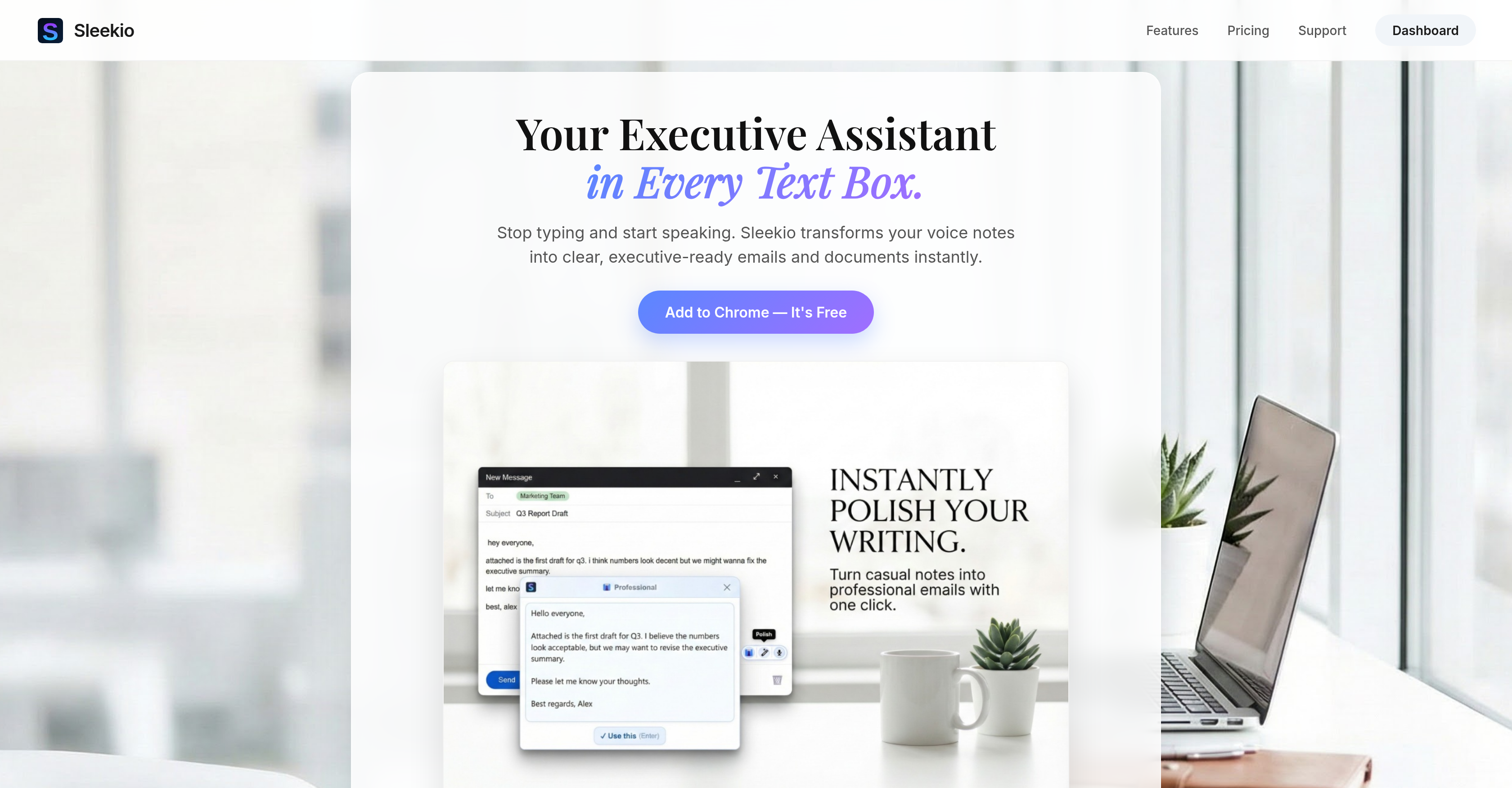
- Transform spoken ideas into clear, ready-to-send text instantly by speaking into any text box, with filler words and pauses automatically removed
- Polish rough drafts into professional content with a single click using the 'Instant Polish' magic wand tool
- Break language barriers with swift, in-place translation of any selected text for seamless multilingual team communication
- Maintain workflow focus with automatic text insertion into Gmail, Slack, Docs, or LinkedIn, eliminating manual copying and tab switching
- Draft documents and emails faster by voicing thoughts instead of typing, with real-time transcription and formatting
Pros & Cons
Pros
- Instant spoken language transcription
- Text refinement
- Filler words removal
- Smooth platform integration
- Gmail, Docs, LinkedIn, Slack compatible
- Initiation via floating mic
- Keyboard shortcut initiation
- Automatic enhanced text insertion
- In-place translation feature
- Supports any language
- Minimizes tab switching
- Streamlines text creation
- Maintains high professional standard
- Free Chrome extension
- Voice transcription tool
- Digital dictation
- Automatic text cleanup
- Professional writing aid
- Translation for multilingual teams
- Streamlined workflow tool
- Automatic content insertion
- Handles 'umms' and 'ahhs'
- Instant Polish feature
- Professional tone/style rewrite
- No need for text-box tab switching
- Easy operation procedure
- Offers free credits upon installation
- No credit card required for installation
- Supports rapid dictation
- Delivers clear text instantly
- Turns rough drafts into gold
- Perfect for quick replies
- No tab switching required for operation
- Transforming spoken notes into emails
- Suitable for professionals
- Virtual executive assistant functionality
Cons
- Only available for Chrome
- Limited free credits
- No explicit offline functionality
- No support for other browsers
- Limited platform integrations
- Unclear data privacy measures
- Potential language refinement limitations
- Dependent on internet connectivity
- No voice recognition improvement
- Lacks advanced editing features
Reviews
Rate this tool
Loading reviews...
❓ Frequently Asked Questions
Sleekio is an AI-powered writing assistant tool designed to facilitate and improve the quality of written communication for professionals. It is capable of instantly turning spoken language into text, polishing the transcribed text by discarding filler words, and integrating with various platforms. Sleekio acts as a virtual personal assistant in every text box, thereby eliminating the need to switch between tabs and enhancing productivity.
Sleekio transforms spoken language into text by the initiation of its record feature by the user, either through a floating mic or a keyboard shortcut. Once the user voices their thoughts, Sleekio swiftly works to transcribe, enhance, and format the spoken text.
Apart from transcription, Sleekio offers several services including text clean-up, removal of filler words like 'umms' and 'ahh', refining the language to professional standards, formatting the text, and providing immediate translations into any desired language.
Sleekio improves written communication by not only transcribing spoken words into text but also discarding filler words, refining transcribed text to sound professional, and formatting the text. It also includes an 'Instant Polish' feature capable of transforming rough drafts into professionally written text.
Sleekio integrates with platforms like Gmail, Docs, LinkedIn, and Slack by living where you write. Users open any text box on these platforms, hit the record using the floating mic or keyboard shortcut, and Sleekio transcribes, cleans up, and formats the communicated thoughts instantly. The final text is automatically inserted into the relevant text box, ready to be sent.
Yes, Sleekio can replace your manual drafting of emails. It not only transcribes your spoken language into text but also hones the transcribed text by removing extraneous elements and refining the language to make it sound professional.
Sleekio can translate your text into any desired language instantly, making it a useful tool for quick responses in various languages.
Yes, Sleekio is suitable for multilingual teams. With its swift translation functionality, it is capable of transforming text into any language, thereby facilitating smooth communication regardless of language barriers.
Sleekio improves productivity by allowing users to voice their thoughts while it transcribes, cleans up, and formats the text swiftly. This process eliminates the need to type manually and switch between tabs, thereby creating a streamlined workflow and significantly saving time.
Currently, Sleekio is available exclusively as a Chrome extension.
The Sleekio voice transcription works through a user-initiated record feature that can be activated via a floating mic or a keyboard shortcut. Sleekio then transforms the voiced thoughts into text with astounding swiftness.
Yes, Sleekio is proficient at eliminating filler words like 'umms' and 'ahh' and awkward pauses from the transcribed text to deliver clean and clear text instantly.
The 'Instant Polish' feature of Sleekio works by transforming a user's rough drafts into professionally written content. Users simply need to select the text and click on the magic wand tool, and Sleekio takes it from there to rewrite the text professionally.
Yes, Sleekio can transform your rough drafts into professionally written content. The 'Instant Polish' feature of Sleekio is designed to do exactly that, turning even the most basic drafts into polished, executive-ready texts.
To use Sleekio's translation feature, you simply need to select the text that requires translation. Sleekio will then transform the text into your desired language swiftly and correctly.
To start using Sleekio, you need to install it as a Chrome extension. Once installed, it lives in every text box where you write, ready to transform your spoken thoughts into written text at a moment's notice.
Sleekio offers a certain number of free credits upon installation without the requirement of a credit card. However, it is not explicit whether it remains free after those credits are exhausted.
Sleekio can help you write documents faster by transcribing your spoken language into text, refining and formatting the content, and inserting the final text into the designated text box. All of these features function to eliminate manual typing and ensure quick creation of professional, streamlined content.
Although explicit information on support service isn't available, the company does have a 'Support' tab on their website, insinuating that they provide assistance in case users encounter problems with the AI.
Sleekio ensures the quality of the written content it generates through a number of mechanisms. It transcribes spoken language into text, discards filler words, refines and formats the text to sound professional, removes unnecessary pauses, and also has a feature called 'Instant Polish' which aids in transforming rough drafts into professionally written content.
Pricing
Pricing model
Freemium
Paid options from
$4/month
Billing frequency
Monthly