
Sprite Fusion
Skip manual asset conversion and drop pixel art straight into your game engine, using one-click export for Unity, Godot, GameMaker, and more.
Listing not yet reviewed by our editors · How we check
Overview
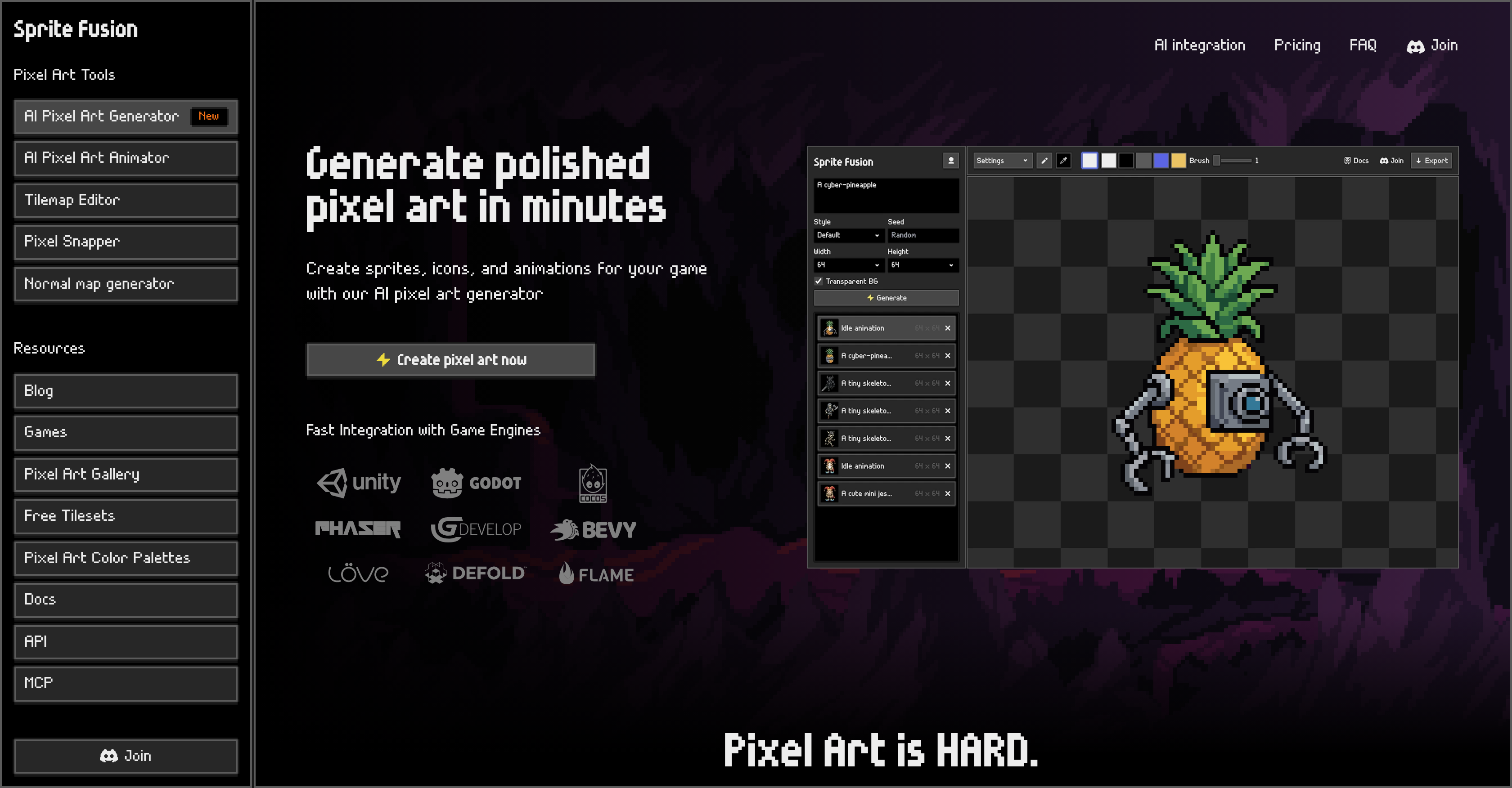
- Skip manual asset conversion and drop pixel art straight into your game engine, using one-click export for Unity, Godot, GameMaker, and more.
- Animate characters without drawing each frame by hand, by generating game-ready sprite sheets with pixel art characters in multiple poses and states of motion.
- Keep every new game asset visually unified with your existing art, using sprite references that lock in your palette, proportions, and rendering style.
- Revise sprites without redrawing pixels, by describing the change in text and choosing from multiple edited variations that preserve the original pixel art style.
- Get sprites that fit your game's grid without resizing or cleanup, through exact size control with 16x16, 32x32, and 64x64 presets.
- Cover every facing angle for top-down and side-scrolling characters, using directionality generation that produces multi-direction pixel art from your directional input.
- Build 2D game environments and levels faster, with tilemap creation that delivers pixel art tiles ready for world-building.
Pros & Cons
From the listing; not yet checked by our editors.
Pros
- Generates pixel art animations
- Supports pre-set sizes
- Includes directionality generation
- Tilemaps creating function
- One-click export function
- Compatible with multiple game engines
- Generates game-ready sprite sheets
- Offers size control
- Maintains consistent style
- Allows sprite references
- Palette, proportions and rendering style
- Text-based pixel art editing
- Generates edited variations
- Designed for easy access
- Codex and Claude code support
- Provides 8-direction sprites
- Supports Sprite Animation
- Includes tiled map editor
- Animation of own pixel art
- Built-in pixel art editor
- Assets in different poses
- Proportional sprite generation
- Fast integration with game engines
- Export to Unity, Godot, GameMaker
- Size control for custom sizes
- Generate and edit in consistent style
- Walk cycle and attack animation generation
- Single sprite to 8-direction conversion
- Generates unique sprites matching palette
- Easy-to-use pixel art editor included
- Supports sprite and animation exports
- Animations from imported sprites
- Native Unity and Godot integrations
- Export to any game engine
- No code or terminal commands required
- Integrated sprite and tilemap editors
- Quick generation of professional pixel art
- Generates pixel art in minutes
- Provides exact output sizes
- Creates digital assets for game development
- Automatic generation of sprite sheets
- Implements user's style instructions
- Sprite customization based on simple prompts
- Automated animation with a single prompt
- Allows import of external pixel art
- Generates unique assets capturing every detail
Cons
- Pre-set sizes limitation
- Text-based interface complexity
- No free version
- No offline functionality
- Limited game engine compatibility
- No multi-user support
- No user customization in UI
- No non-square sprite sizes
- No pixel-level editing
Alternatives to Sprite Fusion
Tools that share the most tags with Sprite Fusion.
- Pixelicious
Instantly generate game-ready pixel art assets by converting any uploaded image with automatic processing
Paid · from $36
$36
Not yet checked
- PixelLab
Generate complete character animations from a single text prompt or skeleton controls, eliminating manual frame-by-frame drawing
Free trial · from $12/month
$12/month
Not yet checked
- AniPixel AI
Convert any clear image into downloadable pixel art using AI image-to-pixel-art generation that outputs a ready PNG.
Free trial · from $4.99/month
$4.99/month
Not yet checked
- AYAYA - AI Collage Generator
Create professional cartoon avatars from any photo instantly using AI photo transformation
Freemium · from $7.99/month
$7.99/month
Not yet checked
- Colorcinch
Instantly create unique cartoon avatars for your social media profiles with the one-click photo conversion feature
Freemium · from $8.99/month
$8.99/month
Not yet checked
- SVG AI
Generate unique SVG logos and icons instantly from text descriptions without design software using AI-powered text-to-SVG conversion
Paid · from $3.99
$3.99
Not yet checked
Reviews
Rate this tool
Loading reviews...
Frequently asked questions
What is Sprite Fusion?
Sprite Fusion is a cutting-edge AI-powered tool that specializes in generating and editing pixel art for game assets. Users can utilize this tool to create pixel art sprites and animations in various pre-set sizes such as 16x16, 32x32, and 64x64. Beyond pixel art generation, it also offers robust functional components for matching styles, generating directionality, and creating tilemaps.
What are the key features of Sprite Fusion?
Sprite Fusion boasts a variety of key features designed to facilitate pixel art generation and editing. Users can generate sprite sheets featuring game-ready pixel art characters, control the size of their pixel art, and produce pixel art in a consistent style using sprite references. A unique feature of Sprite Fusion is its text-based interface that allows users to describe changes to a sprite, which the tool then uses to create multiple edited variations. Also, it offers a one-click export function that supports various game engines.
What game engines does Sprite Fusion support?
Sprite Fusion's one-click export function is compatible with a variety of game engines. These include (but are not limited to) Unity, Godot, and GameMaker, thereby providing wide-ranging flexibility in game development and design workflows.
How does the one-click export function of Sprite Fusion work?
The one-click export function of Sprite Fusion allows users to quickly and easily export their creations to various game engines. With just one click, users can export their pixel art sprites, animations, and game-ready sprite sheets which can be directly imported into their selected game engine for further use.
Can you control the size of pixel art generated by Sprite Fusion?
Yes, Sprite Fusion offers size control, enabling users to produce pixel art at exact sizes that are required for their projects. It provides pre-set sizes such as 16x16, 32x32, and 64x64 for users to create pixel art sprites and animations.
How does Sprite Fusion ensure a consistent pixel art style?
Sprite Fusion provides an advanced feature that allows users to generate and edit pixel art in a consistent style. Users can utilize sprite references to abide by a certain palette, proportions, and rendering style, ensuring that the output maintains a consistent look and feel.
Can I edit my pixel art with Sprite Fusion?
Yes, with Sprite Fusion, users can select a sprite and make adjustments or edits by describing the change. The tool then generates multiple edited variations while maintaining the original pixel art style.
Can Sprite Fusion generate sprite sheets?
Yes, Sprite Fusion can generate game-ready sprite sheets. These sprite sheets feature pixel art characters in various poses and states of motion, making them ideal for immediate use in game development projects.