Overview
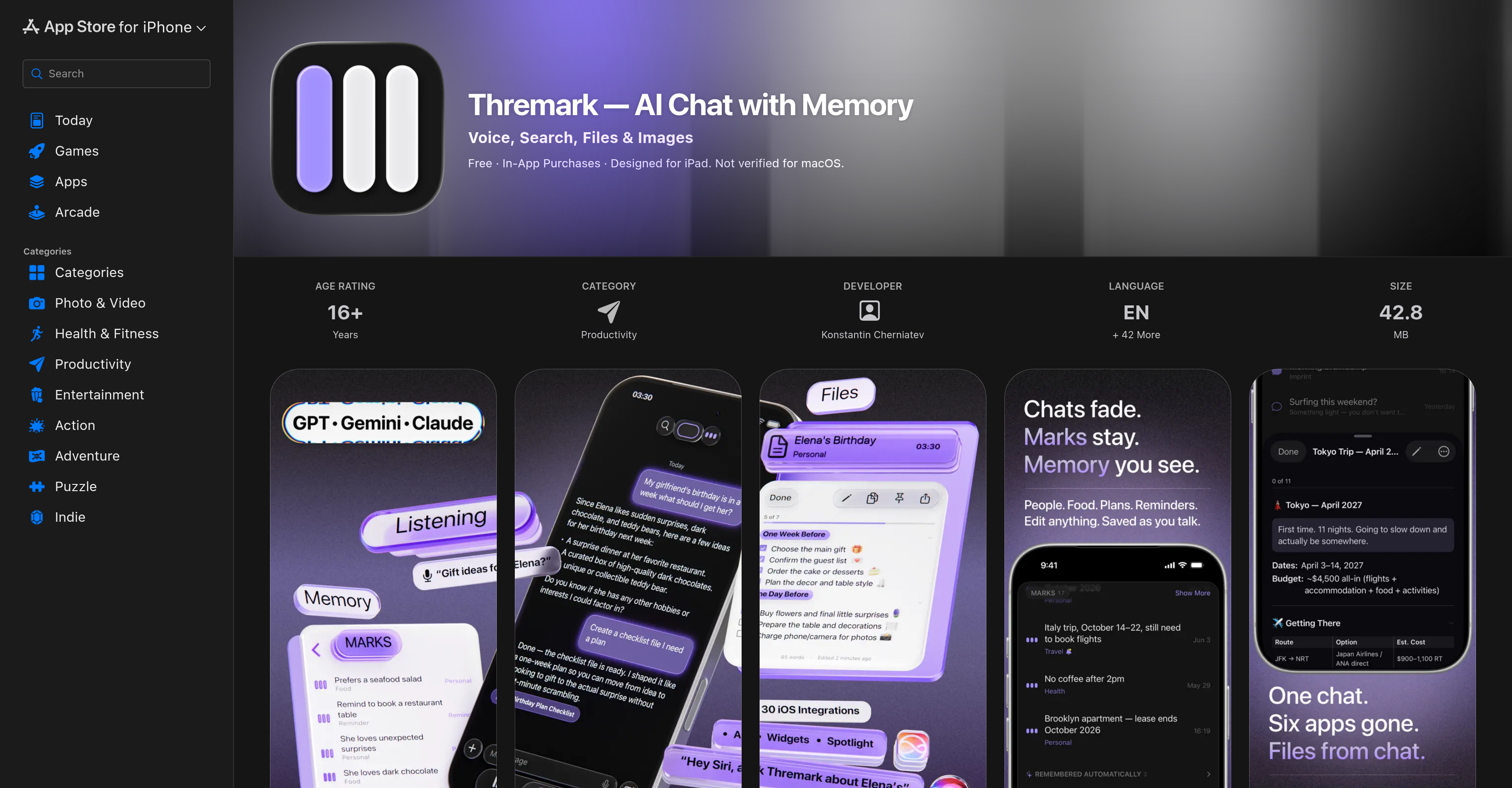
- Never repeat yourself again by storing every preference, fact, and command as editable Marks that give you full control over the AI's knowledge.
- Create packing lists, meal plans, or structured documents instantly by speaking or typing a single directive, then edit them hands-free with real-time voice AI.
- Get accurate answers to simple daily questions or complex research queries because the app automatically selects the best AI engine for each type of question.
- Generate custom images on the fly by describing what you want, turning your spoken ideas into visual content without leaving the conversation.
- Search the web, get concise summaries, and have key points automatically saved as searchable Marks for future reference.
- Keep all your data private and secure with no account required, anonymous device IDs, and zero data sold—your personal AI portrait never leaves your device.
- Access the app instantly from any screen using Siri Shortcuts, Widgets, Control Center, or Spotlight for frictionless productivity across iPhone, iPad, and Mac.
Pros & Cons
Pros
- Remembers past interactions
- Editable memory cards
- Document creation from commands
- Fast and smart modes
- Generates images from descriptions
- Deep iOS integration
- High privacy standard
- No account registration needed
- Searchable 'Marks'
- User-customizable knowledge cards
- Facilitates document creation
- Context-aware answering system
- Web search capability
- Supports an array of devices
- Siri shortcuts
- Spotlight and Control Center
- Selectable operational modes
- Privacy-focused functionality
- Anonymous device IDs
- No additional web connectivity needed
- Conversational document creation
- Hands-free interaction support
- Personal assistant functionalities
- Data management features
- Advanced user customization
- In-app purchases for added capabilities
- User interest analysis
- Private and secure
- Interacts in multiple languages
- Designed with Pure Swift
- In-built web search functionality
- Supports Apple ecosystem
- Adapts to user preferences
- Creates structured files
- Editable and updateable files
- Summarizes web search results
- Supports voice inputs
- Allows real-time interactions
- Generates images from user instructions
- Standby mode
Cons
- iOS exclusive
- Costly in-app purchases
- No account creation
- Lack of accessibility features
- Unclear privacy practices
- No reviews or ratings
- Requires latest iOS updates
- Targeted at Apple ecosystem
- Unverifiable developer information
- Not fully optimized for macOS
Reviews
Rate this tool
Loading reviews...
❓ Frequently Asked Questions
The main purpose of Thremark is to serve as an artificial intelligence powered productivity chat application. It has been designed with a memory function which means it remembers past interactions or commands and can reference this information at any time. This can range from daily tasks to more complex queries and commands.
Thremark has been developed by Konstantin Cherniatev.
In Thremark, 'Marks' refer to past interactions or commands that the AI remembers and stores. These Marks can then be referenced at a later time. Marks essentially serve as editable and deletable cards that grant users full control of the AI's knowledge.
Yes, Thremark is designed with a feature that allows it to create documents from the given commands. This can be applied to generate, for instance, packing lists or structured files with checklists.
Thremark operates on both fast and smart modes. The fast mode is designed to provide quick responses for everyday queries while the smart mode is enabled for dealing with more complex, deeper questions.
Yes, Thremark has a built-in voice AI system which functions in real time, thereby allowing hands-free interactions with the application.
In Thremark, image generation is based on user descriptions. The AI can draw or generate images as described by the user.
Thremark extensively integrates with various features of iOS. This includes Siri Shortcuts, Widgets, Spotlight, Share from any app, Focus Filters, and Control Center, along with other Apple technologies.
In Thremark, privacy and user data security are paramount. User information never leaves the device and anonymous device IDs are used. Moreover, there are no ads and user data is never sold.
Thremark has been designed to be compatible with a wide range of devices. This includes iPhone, iPad, Mac, Apple Vision, Watch, and TV.
No, users do not need to create an account or register to use Thremark.
A knowledge-driven chatting AI is an AI system that uses existing, stored knowledge to answer or interact with users. It can remember past interactions and use this information in future conversations. Thremark is an example of a knowledge-driven chatting AI.
Yes, the AI in Thremark can remember past interactions. These interactions, referred to as 'Marks,' allow the user to reference previous commands or information at any point.
Yes, 'Marks' in Thremark can be both edited and deleted. Users have full control over these information cards.
Yes, Thremark has a feature that allows users to create documents from commands. This feature can be used to create packing lists or structured files with checklists.
Thremark offers a significant degree of hands-free interaction, thanks to its real-time functioning voice AI. Users can converse with the AI, give commands, and receive results or responses using voice commands.
Yes, Thremark has an image generation feature that can create images based on the descriptions provided by users.
Thremark has an extensive integration with various iOS features including, but not limited to, Siri Shortcuts, Widgets, Spotlight, Share from any app, Focus Filters, and Control Center. It deeply integrates with 30 Apple technologies, allowing for greater, easier usability.
Yes, Thremark uses anonymous device IDs. This feature, in combination with server-side sync, helps ensure user data privacy and security.
Thremark is personalized to the user's interactions through the use of 'Marks', which remember past interactions and can be referenced later. Over time, Thremark is able to learn from these interactions and become more intelligent. This creates an AI portrait built from users' conversations, capturing their interests, work, people and more. This personalized information is private and never leaves the device.
Thremark remembers past interactions through a feature known as 'Marks'. The AI stores each interaction as a visible card that outlives the conversation, enhancing the AI's intelligence each time the user interacts with it.
Yes, it is possible to edit or delete Marks in Thremark. Users have full authority over these fact cards, ensuring there are no hidden memories or unmanageable data pools.
In Thremark, documents are created from commands through a feature that structures files based on user directives. For instance, if a user requests the creation of a packing list for a particular destination, they receive a structured file with checklists, tables, and sections. This file can then be edited or updated via voice control or text.
Indeed, Thremark's AI functions in real time. With its built-in voice AI, it listens, responds, saves facts and builds files, all happening instantaneously.
Thremark supports a broad spectrum of devices that includes iPhone, iPad, and Mac. The specific iOS version requirements vary as per the developer's updates.
No, you do not need an account or registration to use Thremark. The developers have designed it for instantaneous use.
Thremark secures user data through several privacy policies. User information never leaves the device and anonymous device IDs are used. Data is not sold and the device ID is anonymous with server-side sync.
Yes, Thremark extensively integrates with various features of iOS. This includes Siri shortcuts, widgets, Control Center, and Spotlight.
Fast and smart modes in Thremark are features designed to suit different types of user queries. Fast mode is designed for everyday quick queries, while smart mode is utilized for complex questions. The appropriate AI engine is automatically selected based on the complexity of the question asked.
Yes, Thremark can suggest meal plans based on user preferences. For example, if a user informs Thremark that they are vegetarian, the AI will remember this preference and suggest meal plans accordingly.
Voice control in Thremark is offered through its built-in Voice AI feature. Users can tap the mic and begin speaking; the app listens, responds, saves facts, and builds files all in real time.
Yes, Thremark is capable of answering both simple and complex questions. The application uses the most suitable AI engine for the type of query posed by the user.
Yes, Thremark offers web search capabilities. Users can ask anything, and Thremark will find it, summarize it, and remember the key points.
Thremark offers in-app purchases for added capabilities. The specific options available are Thremark Plus and Thremark Pro, each having different benefit sets and pricing.
Yes, Thremark supports Siri shortcuts and widgets, along with various other features woven into iOS such as the Control Center and Spotlight.
Yes, Thremark can be used on both iPhone and iPad. It is designed to function optimally across these devices.
Yes, Thremark does offer image generation features. Users can describe what they want and the AI will draw it, providing visual representation of user's descriptions.
Pricing
Pricing model
Freemium
Paid options from
$19.99/month
Billing frequency
Monthly