
Overview
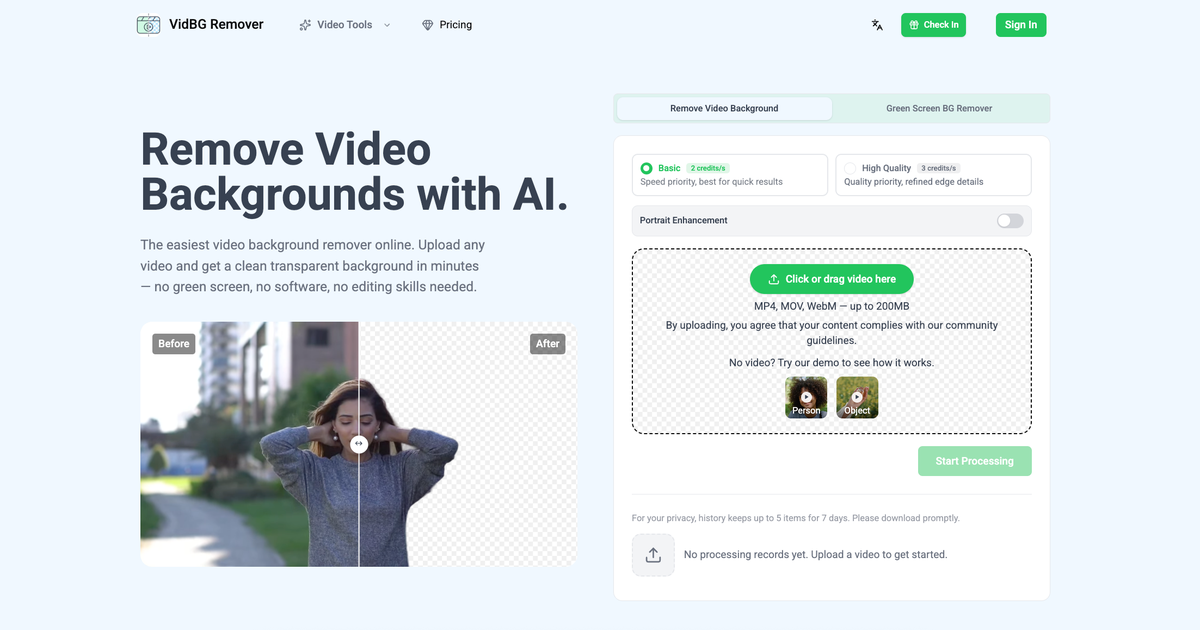
- Deliver professional talking head videos and e-commerce ads instantly by removing backgrounds without a green screen, using an AI algorithm that preserves natural edges on hair, fingers, and shoulders.
- Reuse any video across unlimited backgrounds and scenes by exporting with a true alpha channel in WebM (VP9) or MOV (ProRes 4444) format, ready for direct import into Premiere, DaVinci Resolve, After Effects, or CapCut.
- Cut production time for online course videos and action shots by uploading MP4, MOV, or WebM files up to 200MB to secure cloud storage, with no local processing or installations needed.
- Preview the final look before downloading with a before-and-after slider, ensuring the background removal meets your standards for animal memes, car effect videos, or any content type.
- Process shaky footage and videos with objects passing in front of the subject without edge degradation, maintaining clean and stable transparency throughout the entire clip.
- Scale your content creation affordably with pay-as-you-go pricing and credits that never expire, choosing from plans that fit occasional use or agency-level output.
Pros & Cons
Pros
- Cloud-based
- Supports MP4, MOV, WebM
- Handles up to 200MB
- Maintains clean edges
- Before and after preview
- Exports WebM, MOV with alpha
- Useful for different scenarios
- No green screen required
- Stability in complex motion
- Handles shaky footage
- Capability to reuse content
- Compatible with Premiere, DaVinci, AfterEffects, CapCut
- Secure cloud storage
- Temporary history storage
- Upload videos directly
- Automatic rendering
- Genuine transparency in outputs
- Maintains natural edges
- Crisp edges for composite
- Swift option for developers
- Privacy-focused processing
- Processes most clips in minutes
- Maintains stable edges frame by frame
- No flickering in output
- Good for quick results
- Works with various content types
- Provides refined edge details
- Does not require local processing
- Person segmentation capability
- Pay-as-you-go pricing
- No subscription trap
- Fast processing speed
- Real transparent export
- Simple, transparent pricing
- Credits never expire
- Can handle max 60 seconds duration
- Good handling of shaky footage
- Excellent edge stability
- Effective for heavy video processing
- No software installation required
- Handles natural and studio lighting
- No space required for physical green screen
Cons
- Limited to 200MB files
- Only WebM, MOV export
- Lacks local processing
- No multi-video batch processing
- No green screen option
- Limited temporary history storage
- Specific compatible software
- Requires internet connection
- Lacks real-time processing
- Per-use pricing system
Reviews
Rate this tool
Loading reviews...
❓ Frequently Asked Questions
VidBG Remover is a cloud-based artificial intelligence tool designed to remove backgrounds from videos effortlessly. It supports multiple video formats and can handle files up to 200MB. With VidBG Remover, users can preview the differential effects of the original and processed footage and carry out various background removal scenarios like talking heads, e-commerce ads, online courses, and more.
VidBG Remover works through an AI algorithm that maintains clean and stable edges throughout the video's duration. Users upload their video, the tool automatically removes the background while preserving the quality of the subject matter, and finally, users can download the processed video with a transparent background.
VidBG Remover supports multiple video formats including MP4, MOV, and WebM.
VidBG Remover can handle video files of a maximum size of up to 200MB.
The purpose of VidBG Remover's AI algorithm is to maintain clean and stable edges in the video for the entire duration of the clip. This ensures high quality and professional results, particularly important for creators, educators, and digital marketers.
VidBG Remover supports a broad range of scenarios for background removal such as talking heads, e-commerce ads, online courses, action shots, animal memes, and car effect videos.
Users can preview the difference between original and processed footage in VidBG Remover using a provided before and after slider.
Yes, VidBG Remover can export processed videos with a true alpha channel. This is available in WebM (VP9) or MOV (ProRes 4444) formats.
VidBG Remover's alpha channel feature allows users to reuse video content across different backgrounds and scenes. This increases efficiency and offers a greater variety in content creation.
Yes, VidBG Remover is entirely cloud-based, negating the need for local processing power and installations.
Yes, VidBG Remover can work effectively with e-commerce ads, allowing for the removal of backgrounds and the situating of subjects against conceivably countless advertisement scenarios thereby enhancing quality and versatility.
Indeed, VidBG Remover does support video background removal for online courses. It can effectively layer presenters cleanly over slides or courseware without the need for a physical green screen.
VidBG Remover offers several benefits to digital marketers including easy and efficient background removal, a quality end product that enhances viewer experience, and the ability to easily reuse video content across various backgrounds and scenes for greater content diversity and efficiency.
Yes, VidBG Remover serves as a practical and powerful green screen alternative. It provides users with an easy way to remove backgrounds from their videos without needing a physical green screen or specific video editing skills.
Users need to first upload their video files in MP4, MOV, or WebM format to the VidBG Remover. The files are then sent straight to secure cloud storage with no local processing required.
During the AI video background removal process in VidBG Remover, the tool automatically removes the background while ensuring the edges around the subject matter stay clean and stable. The exact time for this process depends on the video's length.
Users can download their processed video from VidBG Remover with a removed background in either WebM (VP9) or MOV (ProRes 4444) format, both of which include a true alpha channel.
VidBG Remover can handle a variety of scenarios for video background removal like talking heads, e-commerce ads, online courses, action shots, animal memes, car effect videos and more. This provides a wide range of applications suited to many different types of users and needs.
VidBG Remover is indeed suitable for professional creators and educators, as well as digital marketers, due to its focus on quality, stability during video creation, the broad range of scenarios it supports, and its efficient background removal process.
VidBG Remover utilizes a pay-as-you-go pricing model. This can be more cost-effective compared to other tools that require monthly subscriptions, and offers the freedom to use the service whenever required without being tied to a continual payment plan. The exact price depends on the selected package, with values providing for increased economic efficiency as the package size grows.
VidBG Remover can handle video files of up to 200MB.
Yes, VidBG Remover is particularly adept at managing complex motion scenarios, including shaky footage and subjects passing objects. It maintains natural edges on areas such as hair, fingers, and shoulders, no matter how fast the subject moves.
With VidBG Remover, you can create a diverse range of content like talking head videos, e-commerce ads, online course videos, action shots, animal memes, and car effect videos. It also allows your content to be easily superimposed on other backgrounds, aiding in content variation.
Yes, VidBG Remover provides users with a before and after slider, allowing them to compare the original footage with the processed, transparent result.
Yes, VidBG Remover allows processed videos to be exported in both WebM (VP9) and MOV (ProRes 4444) formats.
Indeed, VidBG Remover processed videos can be directly imported into video editing software such as Premiere, DaVinci Resolve, After Effects, or CapCut without the need for further processing.
VidBG Remover is committed to privacy preservation. It uses secure cloud storage to host user files and does not indulge in any local processing, thus safeguarding user data. Moreover, it maintains a temporary history, storing only the last five items for a period of no more than seven days.
VidBG Remover allows users to maintain a history of up to five items for a period of seven days.
You can upload your videos to VidBG Remover by using their online platform. The video formats it supports include MP4, MOV, and WebM.
Absolutely, VidBG Remover is capable of effectively managing shaky footage while maintaining clean and natural video edges.
Both WebM (VP9) and MOV (ProRes 4444) file formats, which VidBG Remover supports for exporting processed videos, are equipped with a true alpha channel for genuine transparency.
Having a true alpha channel in your processed video enables genuine transparency. This feature makes your video compatible with various backgrounds and scenes, eliminating the constraint of a fixed backdrop and offering greater flexibility and variety in content development.
VidBG Remover stores uploaded video files in secure cloud storage, ensuring maximum privacy for the user.
Yes, VidBG Remover can handle videos where people or objects pass in front of the subject. Despite the complexity, it ensures the natural edges on hair, fingers, and shoulders are preserved.
VidBG Remover processes a video by using its AI algorithm to automatically remove the video background. It ensures the edges remain clean, stable and natural, even while dealing with complex motion.
The time VidBG Remover takes to process videos can depend on the length of the video. However, most clips are typically ready within minutes.
VidBG Remover supports background removal for various content scenarios such as talking heads, e-commerce ads, online courses, action shots, animal memes, and car effect videos.
VidBG Remover operates on a pay-as-you-go pricing model, offering four pricing tiers. The Starter plan costs $9.9 and offers ~120s of basic video background removal. The Creator plan is best for regular needs, costing $29.9 and offering ~480s of basic video background removal. For heavier needs, the Pro plan offers ~1,500s of basic video background removal for $79.9. And the Max plan, ideal for agencies and power users, offers ~6,000s of basic video background removal for $199.9. All plans involve a one-time payment and their credits never expire.
Pricing
Pricing model
Freemium
Paid options from
$9.90/unit
Billing frequency
Pay-as-you-go
Refund policy
No Refunds