
Freesubtitles
Overview
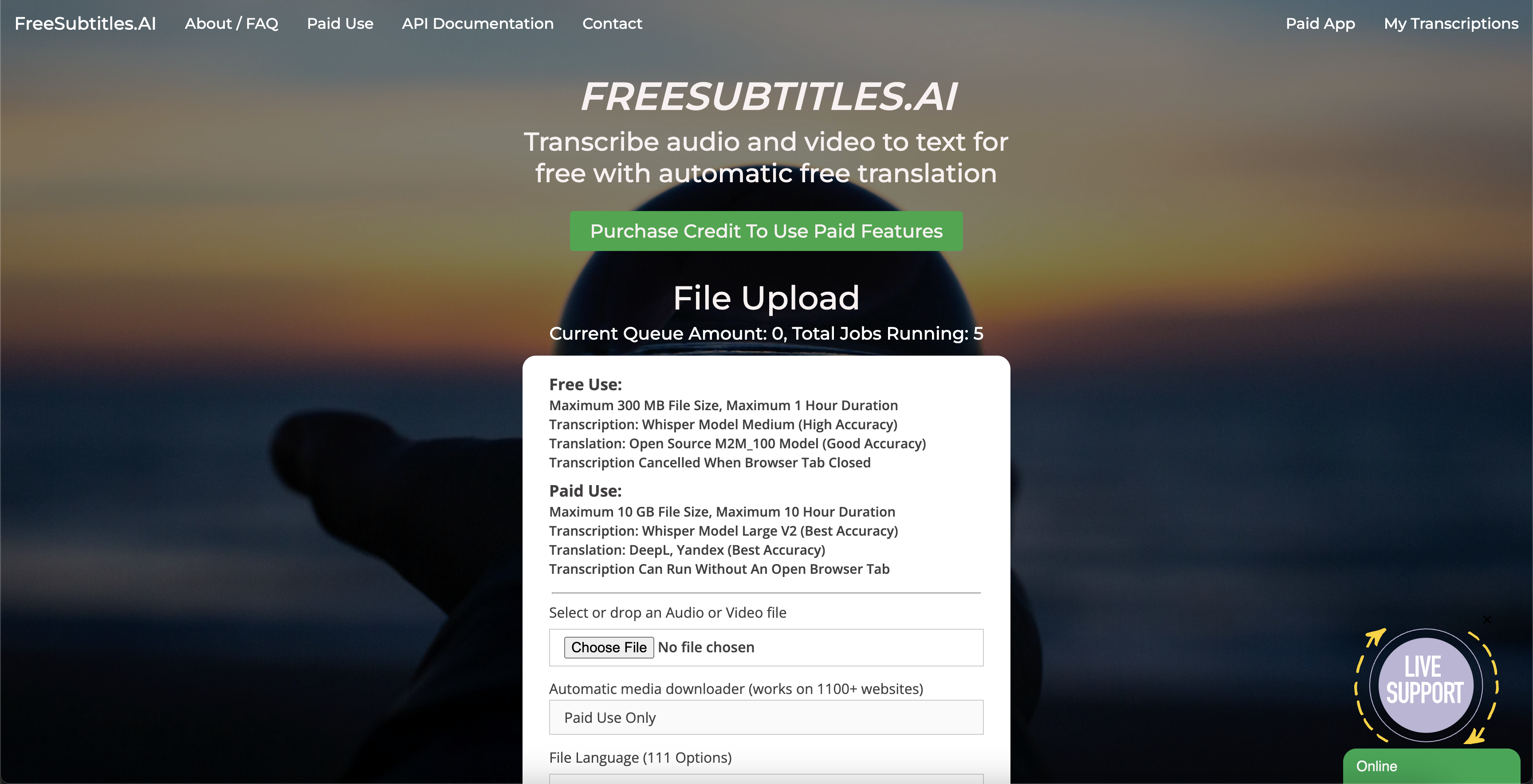
- Create professional subtitles instantly without cost using free AI transcription for files up to 300 MB and one hour duration
- Reach global audiences by translating subtitles into multiple languages with 111 language options including auto-detection
- Balance speed and precision by selecting from nine AI models, with larger models delivering higher transcription accuracy
- Process files directly from download links without manual uploading for faster workflow automation
- Handle multiple transcription jobs simultaneously with real-time queue status visibility
- Access expanded capabilities for larger projects with 10 GB file support and 10-hour duration through paid upgrades
- Skip processing delays with priority queue access for paid users ensuring faster subtitle generation
Pros & Cons
Pros
- Free for up to 300MB
- GitHub availability
- Automatic download link input
- Language selection
- Model selection for accuracy
- Translate into different languages
- Files up to 10GB
- Duration up to 10 hours
- Paid features for priority
- 111 language options
- Autodetect language feature
- Nine models of various sizes
- Longer processing for greater accuracy
- Suitable for international audiences
- Simple user interface
- Direct file upload
- Supports both audio and video
Cons
- Maximum file size 300MB
- Longer models take longer
- Limited to four jobs
- Paid features for flexibility
- Max 1 hour duration
- Queue system for jobs
- No auto-save feature
- Requires manual option selection
- Paid users have priority
- No bulk upload feature
Reviews
Rate this tool
Loading reviews...
❓ Frequently Asked Questions
Transcribe File is an AI tool designed for the automated generation of subtitles for video and audio content.
For free users, Transcribe File can handle a maximum file size of 300 MB. For paid users, the maximum permissible file size expands to 10 GB.
Transcribe File's language selection feature offers 111 different language options. Users have the flexibility to select their preferred language, or they can let the tool auto-detect the language for more efficiency.
Yes, Transcribe File includes the ability to translate the created subtitles into several different languages, offering a highly versatile solution for users with international audiences.
Yes, Transcribe File is free to use for files up to a size of 300 MB and duration of one hour.
Transcribe File can be downloaded from GitHub.
Paid features in Transcribe File enhance the user experience by enabling larger file handling - up to 10 GB as opposed to 300 MB for free users. They also allow for extended content duration up to 10 hours, versus one hour for free users. Moreover, paid users get priority in the job queue.
Yes, Transcribe File does offer an auto-detection functionality for language selection, facilitating optimum efficiency in the transcription process.
The accuracy of subtitles generated by Transcribe File can vary based on the chosen model. Larger models result in greater accuracy but also demand more time for processing.
The maximum duration of an uploadable file on Transcribe File is one hour for free users, while for paid users, it extends to 10 hours.
Transcribe File provides nine models of varying size and accuracy. Users can select from 'Tiny', 'Base', 'Small', 'Medium', and 'Large', with each choice offering varying levels of accuracy and processing time requirements.
Yes, in Transcribe File, users can directly input a download link for automatic downloading of the file to be transcribed.
Yes, multiple transcription jobs can be running simultaneously in Transcribe File. The current queue status is promptly displayed on the site.
Yes, Transcribe File offers varying models for achieving different levels of accuracy. The larger the model, the more accurate the generated subtitles, although larger models also require a longer processing time.
The queue system in Transcribe File allows multiple transcription jobs to be processed in a sequence. Paid users have the advantage of jumping to the front of the queue, thereby ensuring quicker processing of their files.
The translation feature in Transcribe File translates the generated subtitles into the user-selected language. This functionality offers an approachable solution to users needing to target international audiences.
To start a new transcription in Transcribe File, one needs to select or drop the relevant audio or video file, choose the necessary options such as language, model and translation, and then initiate the transcription process.
Transcribe File is accessible and downloadable on GitHub, making it widely available on platforms that can access this popular developer platform.
Yes, Transcribe File can manage both audio and video files, offering versatile functionality lucidly described on their website.
Transcribe File allows free users to work with files of a maximum size of 300 MB and a duration of one hour. Similarly, free users are subjected to queue policy without priority access. These limitations are lifted for paid users.
Pricing
Pricing model
Freemium
Paid options from
$10/unit
Billing frequency
Pay-as-you-go
Related Videos
Artificial Intelligence : Freesubtitles.ai
AI News & Tools Artificial Intelligence News&Tools•38 views•Jun 6, 2023