
Overview
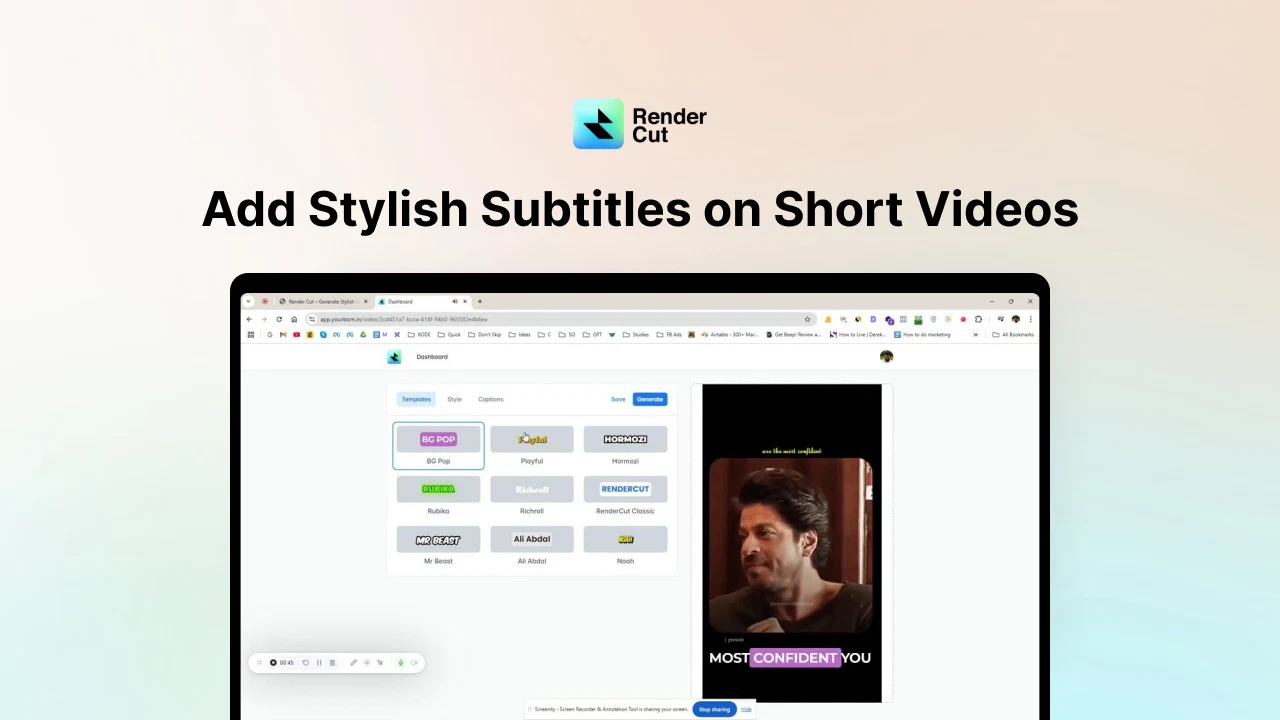
- Generate perfectly-timed subtitles automatically in seconds instead of hours with AI transcription
- Customize subtitle styles, animations, and colors to match your brand identity and visual appeal
- Expand your global audience with multilingual support for 117 languages and diverse accents
- Ensure subtitle accuracy and perfect timing with manual editing capabilities after auto-generation
- Maintain creative control while saving time with automated captioning that eliminates manual input
- Access your subtitle projects anywhere through any web browser without software installation
Pros & Cons
Pros
- Accurate subtitle generation
- Advanced customization options
- Multilingual support
- Font control
- Size control
- Color control
- Background control
- No manual input needed
- Mac and PC compatible
- Web browser access
- Manual edits allowed
- Perfect timing adjustments
- Easy to use
- Generates stylish subtitles
- Increases video engagement
- Enhances video accessibility
- Supports any language
- Supports any accent
- Efficient work
- Focus on content creation
- Trustworthy by many users
- Smart animations
- Easy to use
- Perfect for teams
- Advanced styling
- Fast subtitle generation
- Automatic captioning
- Subtitles add engagement
- Supports various languages
- Option for manual editing
- Customizable styling
- Accessible through web browser
Cons
- No offline function
- Doesn't support long videos
- Doesn't mention accessibility features
- Not supported on mobile devices
- No API access
- No advanced editing options
- Complex vocabulary issues
- Difficulties with accents
- Background noise affects accuracy
Reviews
Rate this tool
Loading reviews...
❓ Frequently Asked Questions
RenderCut is an AI-powered solution focused on creating and customizing subtitles for videos. It aims to make videos more engaging and accessible by generating stylish and accurate subtitles. This tool targets content creators, video editors, marketers, and businesses, enhancing the engagement and accessibility of their video content.
The key features of RenderCut include accurate subtitle generation for any language or accent, advanced customization options for subtitles like controlling the fonts, sizes, colors and backgrounds, and multilingual support. Additionally, users can manually edit the subtitles to ensure precision and perfect timing.
RenderCut employs AI-powered technology to generate subtitles automatically. It aims to eradicate the need for manual input, thereby facilitating quick and efficient work.
RenderCut is capable of generating subtitles for any language or accent, as implied by their website, supporting a wide range of language accessibility in subtitles.
RenderCut offers several subtitles customization options. Users can take full control of the subtitle's fonts, sizes, colors, and backgrounds, creating a visual appeal that matches the vibe of their content.
Yes, RenderCut allows users to customize and control the font, size, color, and background of subtitles, offering a personalized look that contrasts or blends well with their content based on their preference.
Yes, RenderCut can significantly save time for its users in creating subtitles. Through its AI-powered technology, it automates the subtitle generation process while maintaining high accuracy and eliminating the need for manual input.
Yes, RenderCut supports both Mac and PC, ensuring it can be utilized in various operating environments.
Yes, RenderCut can be accessed and used on any web browser, expanding its accessibility and usability across different platforms.
Yes, despite RenderCut's automated subtitle generation, it still provides an option for users to manually edit and adjust the subtitles to ensure precision and perfect timing.
RenderCut claims to offer highly accurate subtitles. However, occasional errors may occur due to factors like accents, background noise, or complex vocabulary.
RenderCut provides an option for users to manually edit and adjust the subtitles. This feature aids in ensuring the precise synchronization of the subtitles with the video, achieving perfect timing.
Yes, RenderCut can be used to create a variety of subtitle styles. It offers advanced customization options, ranging from the control of fonts, sizes, colors, and backgrounds of the subtitles.
Yes, RenderCut offers multilingual support, facilitating the addition of captions in multiple languages and broadening the global reach of the video content.
Yes, RenderCut enables users to easily edit and adjust the subtitles manually. This feature ensures the subtitles' accuracy and perfectly timed placement with the video.
Yes, RenderCut supports adding stylish and accurate subtitles to short videos, thereby boosting their engagement.
RenderCut is a highly trusted solution for over 10,000 content creators and video editors. It provides features that facilitate making videos better and more accessible, indicating a high level of reliability.
Yes, RenderCut provides an automatic captioning feature. Its AI technology enables it to generate subtitles swiftly, eliminating the need for manual input.
Yes, RenderCut does accommodate foreign language videos with its multilingual support. It can generate subtitles applicable to any language, hence suitable for foreign language videos.
Yes, RenderCut is a cross-platform tool. It can support both Mac and PC and is accessible via any web browser, advocating for wide-ranging compatibility and convenience.
Pricing
Pricing model
Free Trial
Paid options from
$15/month
Billing frequency
Monthly
Related Videos
RenderCut Review: Best AI Subtitle Tool for Content Creators
SoftwareMania•265 views•Feb 20, 2025