
AI Background Remover - Picsman
Overview
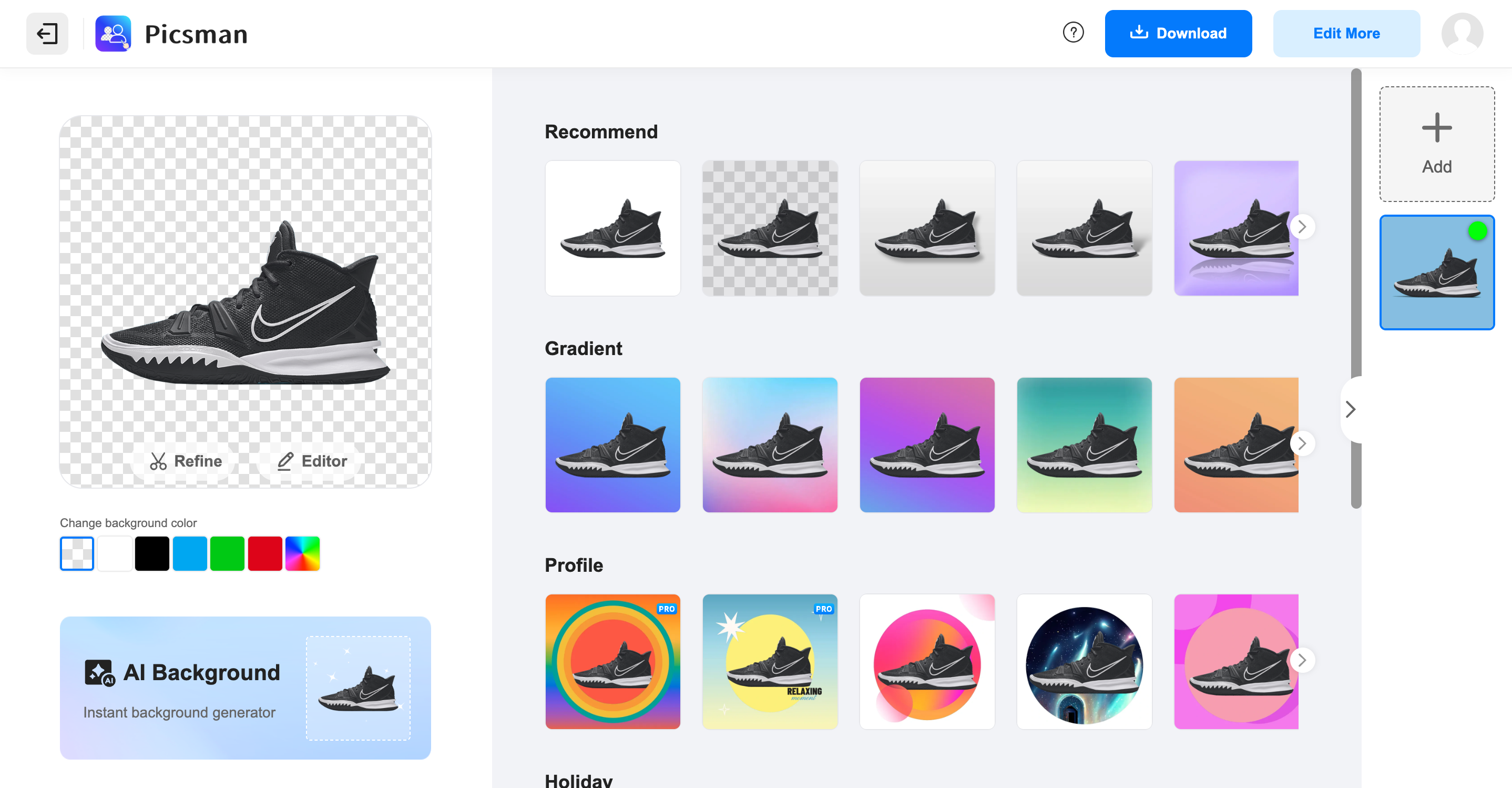
- Get perfectly transparent PNGs in one click with automatic background removal that handles complex edges like hair and fur
- Erase unwanted objects and watermarks completely using the Magic Eraser tool for clean, professional-looking images
- Process dozens of images simultaneously with batch editing to maintain consistent quality across all your photos
- Generate custom backgrounds instantly with AI to create perfect settings for product shots or portraits
- Extend image boundaries seamlessly using AI Image Extender to add space without distorting your original composition
- Replace removed backgrounds with solid colors, gradients, or your own images for complete creative control
- Enhance blurry photos and improve image quality automatically without manual editing skills
- Create custom artwork from text descriptions using the AI image generator for unique visual content
- Remove or add text to images with precision tools for complete control over textual elements
Pros & Cons
Pros
- Single click operation
- Creates PNG with transparency
- Erases objects from images
- Enhances photos
- Generates images from text
- Instantly generates backgrounds
- Batch image processing
- Edits background after removal
- Options for solid or gradient color backgrounds
- Handles complex images with intricate edges
- Allows adding and removing text
- Watermark removal
- Enables background replacement
- Optimized for a range of objects: people, animals, products, graphics
- Passport photo maker
- Cleanup pictures tool
- Removes people from photos
- Transforms text into art
- Add filters to images
- Generates realistic, high-quality backgrounds
- Large number of design templates
- Processes images in batches
- Adds shadow to images
- Batch removes backgrounds
- Applicable to product photography
- Doesn't require design skills
- Streamlines workflow
- Creates soft, hard, floating, and 3D shadows
- Automatic removal of image background
- Option to change background color after removal
- Removes background for transparent images output
- Swap backgrounds for customization
- Image enlarger tool
Cons
- Lacks offline functionality
- No support for vectors
- Accuracy may vary
- Limited editing tools
- Requires internet connection
- No mentioned integration capabilities
- Dependent on photo quality
- Limited file format support
- Specific genre of application
Reviews
Rate this tool
Loading reviews...
❓ Frequently Asked Questions
Picsman is a sophisticated AI-powered tool designed for photo editing. Its prime functionality is automatic and efficient removal of image backgrounds, creating transparent backgrounds for images with just a single click. The tool offers numerous capabilities including options to create a PNG with transparency, erase objects from images, enhance photos, generate images from text, generate backgrounds instantly, and process images in batches. Picsman can also extend images using its AI technology, and allows its users to edit or replace the image background after its removal.
Yes, Picsman is adept at managing complex images with intricate edges. Its advanced algorithm can handle a variety of objects, including people, animals, products, and graphics, ensuring efficient and accurate background removal.
Yes, Picsman is quite effective in removing backgrounds from photos of people and animals. Its AI technology can seamlessly handle intricate edges, like hair and fur, offering a smooth and clear cutout.
Picsman allows users to create a PNG with transparency with ease. After removing the background of the image, users can simply select the option to create a transparent PNG, providing them with an image that can be superimposed over varied backgrounds.
Picsman provides several tools for photo enhancement. These include an option to fix blurry images, a magic eraser to remove objects from images, an AI image generator that turns text into art, and a photo enhancer that improves the overall quality of your images.
The AI Image Generator tool in Picsman enables users to generate images from text. With it, you can create unique, art-style images just by providing corresponding text.
Picsman supports batch processing of images which streamlines your workflow by enabling you to edit multiple images at once. Instead of removing backgrounds from photos one by one, batch edit functionality permits removal of backgrounds from several images simultaneously. You can also download high-quality transparent PNGs or swap in new backgrounds and templates in batches.
Yes, Picsman provides a specific tool for image extension called the AI Image Extender. This tool uses AI technology to efficiently expand your images, adding content where needed and preserving the overall integrity of the original image.
Yes, post background removal, Picsman offers functionalities to edit or replace the background of the image. Users can choose from solid or gradient color backgrounds, instantly generate new backgrounds, or even use their own images as backgrounds, offering a variety of customization possibilities for the final appearance of the image.
Picsman includes a watermark removal tool. This feature allows you to remove any unwanted logos, copyrights, or other watermarks from your images, enhancing their aesthetic appeal and usability.
Picsman offers specific tools to add or remove text from images. You can use it to input custom text into your photos or to seamlessly remove any pre-existing text, giving you complete control over the textual content in your images.
Yes, Picsman supports object erasure for image editing. Using the Magic Eraser tool, you can remove unwanted elements from your images, improving the overall composition and focus.
Yes, Picsman offers thorough transformation capabilities for your images. Its diverse toolset enables users to modify, enhance, and customize their images to a great degree, changing backgrounds, adding or removing text, using AI filters, and more.
After removing the original background using Picsman, users can opt for a variety of new backgrounds. They can choose from solid or gradient color backgrounds for a simple yet distinct look, or use instant background generation for diverse and appealing backdrops.
Picsman allows users to manage the transparency of an image through its powerful tools. Users can make an image transparent by removing its background and save the result as a transparent PNG, thereby allowing the resulting image to blend seamlessly with various different backgrounds.
Yes, Picsman does offer instant background generation for images. This feature, powered by AI, allows users to produce multiple realistic, high-quality backgrounds tailored to individual needs. Whether users prefer a sleek studio setting, a vibrant outdoor scene, or a trendy modern backdrop, Picsman makes it happen.
Picsman integrates a plethora of AI tools into its platform. These tools lend support for various photo editing tasks such as background removal and replacement, object erasure, photo enhancement, watermark removal, image extension, image transformation and generation of images from text.
To remove image backgrounds with Picsman, users need to upload their images to the platform. The AI-powered tool immediately detects the subject, meticulously deletes the background, and provides a clean and professional result. No manual work or advanced skills are required. The transparent image can then be downloaded with one click.
In Picsman, multiple images can be processed at once using the Batch Edit function. This feature allows the user to remove backgrounds from several images at the same time, swap in new backgrounds or templates in batches, and download the edited images in high-quality transparent PNG format. It increases efficiency and consistency while reducing the time spent on individual image editing.
Picsman provides extensive options for photo enhancement. These include sharpening blurry images, erasing unwanted objects from images, enhancing photo quality, adding or removing text, and applying AI filters. Additionally, with Picsman's AI-powered toolset, users can instantly generate backgrounds, extend images, create transparent PNGs, and replace backgrounds, all contributing to the overall enhancement of the image.
Pricing
Pricing model
Free Trial
Paid options from
$4.99/month
Billing frequency
Monthly
Refund policy
No Refunds
Related Videos
BEST FREE AI Tool for Content Creators | Picsman
Portal Seven•4.2K views•Mar 31, 2025