
Nutrition MCP
Overview
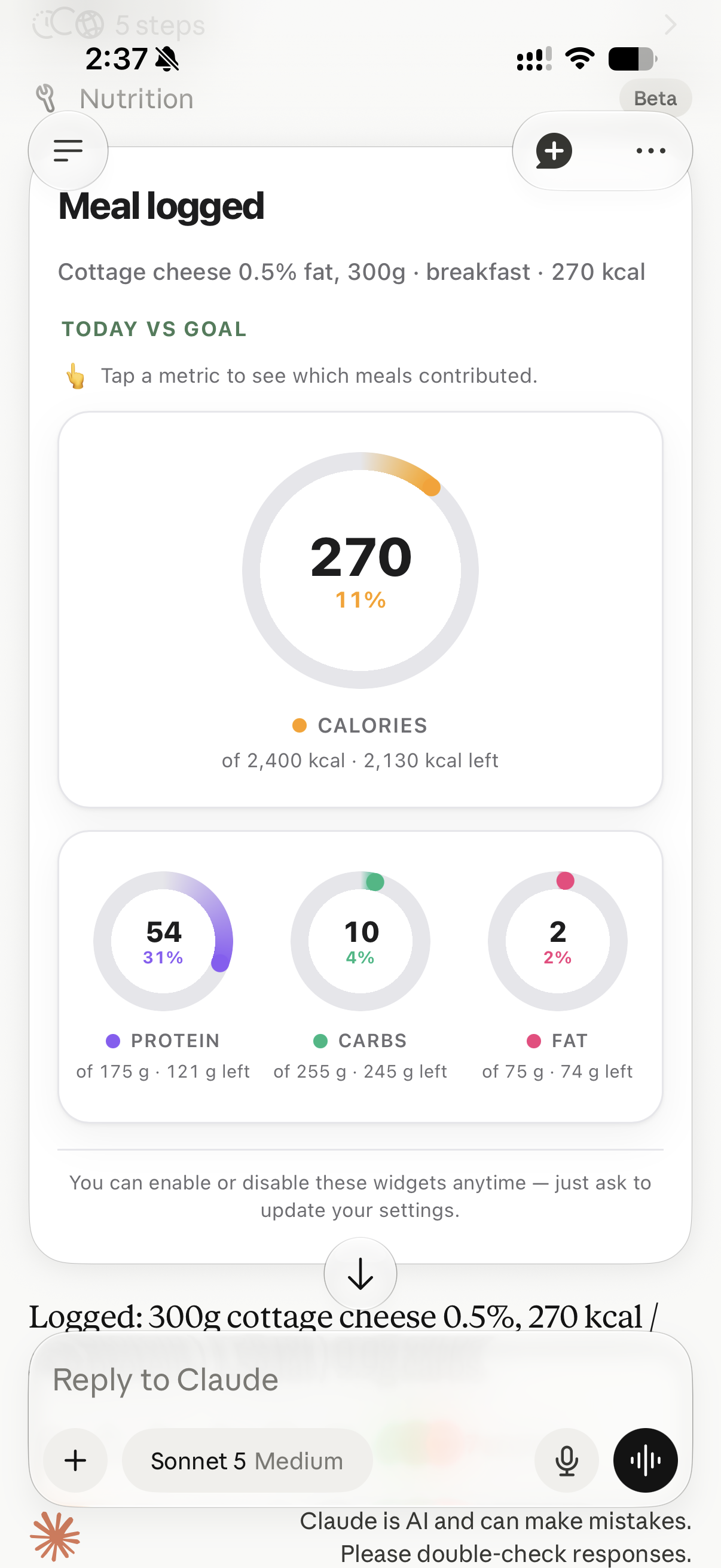
- Log any meal instantly by describing it in plain language, sending a photo, or scanning a barcode—no manual entry needed.
- Track daily calorie, macro, and water intake against your own personalized targets to stay on top of your diet.
- Monitor weight changes over time by logging body weight and comparing it to your target weight for real progress tracking.
- Receive comprehensive daily and weekly nutrition reports that reveal trends in your eating habits and goal adherence.
- Sync all your nutrition data seamlessly across iOS, Android, and the Web so your tracking history is always up to date.
- Log meals hands-free using voice commands through your AI assistant for effortless tracking on the go.
- Start tracking immediately after connecting your AI assistant with zero technical setup required.
- Identify food from delivery app screenshots or product barcodes to capture nutrition data from any source.
- Track hydration levels by logging water intake in milliliters alongside your meals for complete wellness monitoring.
- Access the platform for free with no ads or hidden costs, backed by an open-source codebase for transparency.
Pros & Cons
Pros
- Voice-activated meal logging
- Barcode scanning for logging
- Automatic calorie and macronutrient counting
- Weight and diet tracking
- Plain language meal descriptions
- Meal photo logging
- Screenshot logging from delivery apps
- Comprehensive nutrition reports
- Tracks daily and weekly nutrition
- Monitors goal progress
- Easy onboarding process
- User-customizable nutrition targets
- Open-source tool
- Free to use
- Compatible with numerous platforms
- Seamless cross-platform nutrition tracking
- Personal health monitoring capability
- Cross-platform compatibility
- OAuth 2.0 with PKCE security
- Meal logging via conversation
- Option to set weight targets
- Digitized food recognition from photos
- Operable on iOS, Android, Web
- Supports remote MCP servers
- Plain language support
- Conversational user experience
- Compatible with Claude and ChatGPT
- Integration with delivery app screenshots
- Export to CSV functionality
- Daily hydration target setting
- Enables dietary goal setting
- Instant meal logging
- Easy weight trend review
- Supports any MCP client
- Optional target parameters set
- User preference weight unit (kg/lb)
- Live progress checking
- Water consumption logging
- Record body weight in kg/lb
- Timezone-aware for users worldwide
- Export all data to CSV
- Full data ownership
- User data privacy
- Works without installation
- Allows account & data deletion
- Free and ad-free service
Cons
- Requires OAuth 2.0 with PKCE
- Limited meal description accuracy
- Requires MCP server support
- Only Claude, ChatGPT integration
- Limited barcode database
- Might Misinterpret spoken commands
Reviews
Rate this tool
Loading reviews...
❓ Frequently Asked Questions
Nutrition MCP is an AI-powered tool that enables meal and nutrition tracking. It is designed to collaborate with AI assistants such as Claude or ChatGPT, allowing users to log their meals, macros, weight, and nutrition history. The tracking can be accomplished by simple conversation, description of the meal, sending a photo of the meal, a screenshot from a delivery app or even a product barcode.
Nutrition MCP operates by connecting with AI assistants like Claude or ChatGPT. Once connected, users can begin tracking their meals and nutrition through simple conversation. They can describe their meal in plain language, send a photo, a delivery app screenshot or even scan the barcode on the product. This input is then processed by the AI to log the nutritional value, weight, macros and history.
To connect Nutrition MCP with ChatGPT for instance, you'd go to the ChatGPT settings, then 'Apps', and eventually you would create a new app. Here, you would give it a name and paste the URL https://nutrition-mcp.com/mcp into the 'Connection' field. Authentication would be set to OAuth. Signing in with Nutrition via Google or an email and password completes the connection.
Yes, you can definitely log your meals in Nutrition MCP by voice. This functionality is made possible by connecting the platform with an AI that supports voice commands, like ChatGPT or Claude. Once this is done, you can simply converse with your AI assistant to log meals, nutrition details, and more.
Yes, Nutrition MCP does offer the functionality of barcode scanning for meal tracking. You can use this feature to quickly and accurately log nutritional information just by scanning the product barcode.
Nutrition MCP is compatible with various platforms including iOS, Android, and the Web. This cross-platform compatibility allows users to keep track of their nutrition seamlessly across different devices.
Yes, you can definitely use Nutrition MCP for weight and diet tracking. The platform allows you to log your body weight, set target weights, and track your progress. As far as diet tracking goes, you can set daily goals for calorie and macro intake, and monitor your adherence to these goals over time.
Yes, Nutrition MCP offers the flexibility of setting your own targets for daily calories, macros, and weight. You can define these targets according your personal diet and fitness goals, and track your progress over time.
When you send a photo of your meal to Nutrition MCP, the platform uses AI technology to identify the food items present in the image. Based on this identification, it logs the estimated nutritional value of the meal including the calories, protein, carbs, and fat content.
No, you don't need any technical knowledge to use Nutrition MCP. The platform is designed for easy onboarding with a quick setup process, letting you start tracking as soon as your AI assistant is connected.
Yes, Nutrition MCP is compatible with any AI client that supports remote MCP servers and OAuth 2.0 with PKCE. As such, it works with a range of AI clients, opening up the possibility of conversational nutrition tracking across various platforms.
Yes, Nutrition MCP offers comprehensive reports on daily and weekly nutrition trends along with goal progress. The platform keeps track of the nutritional value of your meals and provides insightful reports that can help you understand your eating habits and maintain a balanced diet.
Yes, Nutrition MCP is a free-to-use platform. It doesn't have ads or hidden costs. The platform operates on a patronage system through Patreon to cover server and database costs, but usage itself is free of charge.
Yes, with Nutrition MCP, you can sync your data across different devices. Whether you're using iOS, Android, or the Web, your tracking information will be consistently available across all your devices.
Nutrition MCP facilitates macro tracking by allowing you to set daily target values for protein, carbohydrates, and fats. Every time you log a meal, the estimated macro content is calculated and logged. The tool compares these logs to your daily targets, helping you track and manage your macronutrient intake.
Yes, Nutrition MCP can log your meals based on a screenshot from a delivery app. You can simply upload the screenshot and the system will automatically parse the meal details from it and log the respective nutritional data.
You can start tracking with Nutrition MCP the instant you connect it to your AI assistant. The platform has been designed for quick onboarding, facilitating immediate use upon connection. You can log your meals, set targets, or track weights and diets as soon as your AI assistant is connected.
Once Nutrition MCP is connected to your AI assistant, you can begin logging meals just by describing what you ate. Alternatively, you can also send a photo of your meal, a screenshot from a delivery app, or a barcode. The tool uses AI technology to interpret your input and automatically log the estimated nutritional value of your meal.
Yes, Nutrition MCP does allow users to track their hydration. It supports water logging in milliliters which allows you to monitor your hydration levels, alongside your meal tracking.
Yes, Nutrition MCP is an open-source platform. This means that anyone can freely use, modify, and distribute the project source code. Transparency and the ability to self-host are among the benefits that come with the platform being open source.
Pricing
Pricing model
Free
Paid options from
Free