
Overview
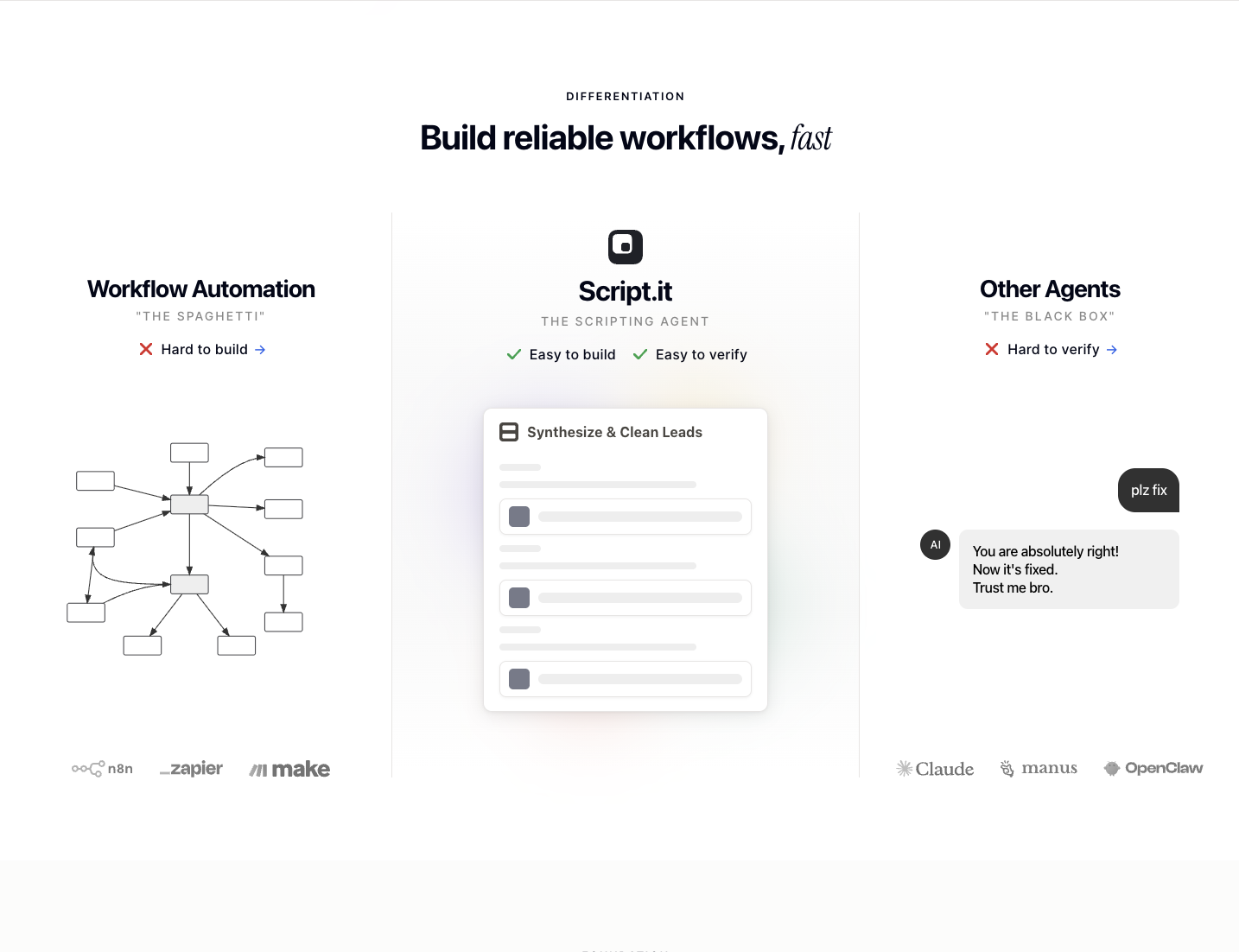
- Turn routine knowledge work into dependable automation by simply describing your task in plain English — the AI agent builds the entire workflow without node editors or code.
- Get live in seconds using pre-built templates for common use cases like lead enrichment, content drafting, and reporting.
- Automate across your entire tech stack with 600+ direct integrations including Slack, Gmail, Notion, HubSpot, and Salesforce.
- Run workflows on your schedule or triggered by events in any app using custom triggers, webhooks, and time-based automation.
- Reach your automation agent directly via its own email address for external messaging and task submission from anywhere.
- Keep full control and transparency by inspecting, editing, and adjusting any workflow the AI creates for you.
- Eliminate lock-in with portable workflow files that export cleanly, so your automations move with you between platforms.
- Manage and trigger automations on the go with a strong mobile experience designed for field work and fast responses.
- Start building immediately with 50 free credits each month and no credit card required.
Pros & Cons
Pros
- Reusable workflows
- 600+ integrations
- Plain English instructions
- Workflow transparency
- Automated reporting
- Automated content drafting
- Data cleanup
- Inspectable workflows
- Editable workflows
- SaaS tools integration
- Non-coders friendly
- User control
- Task simplification
- Reusable, editable templates
- Inspection of outputs
- Slack, Gmail, Notion integration
- Salesforce, Airtable, Google Workspace integration
- Skills export for agents
- Easy mobile experience
- Custom triggers
- Provider-independent cloud computer
- External messaging (Slack, WhatsApp, Telegram)
- Workflow sharing and collaboration
- 600+ including custom integrations
- Several ready-made workflow templates
- SEO blog post template
- Weekly report template
- Competitor research template
- Slide generator template
- Campaign data analysis template
- Transparent usage model
- Free tier availability
- Automatic workspace back-up
- Encrypted connections and credentials
- Google Cloud infrastructure
- SOC 2 certification
- Prompt and custom support
- Low entry friction
- Skills-superset transferability
- Custom triggers creation
- Automation runs review
- Designed around powerful agent
- Workflow creation from conversation
- Supports multiple SaaS tools
- Chat-based iteration
- Workflows for various teams
- Non-opaque workflow transcripts
- Runs workflows on trigger
- Great for GTM, ops, marketing
Cons
- Requires external tools for integration
- No support for millisecond-latency real-time pipelines
- No in-built messaging service
- Requires sign-up for usage
Reviews
Rate this tool
Loading reviews...
❓ Frequently Asked Questions
The AI chat agent of Script.it can handle a wide range of tasks such as research, writing, data transformation, and completion of tasks.
In Script.it, the reusable workflow feature allows users to structure their work as automations, effectively turning routine tasks into repeatable processes. Users can create these workflows based on their needs for efficient task management and they can be used again in the future, contributing to overall work simplification.
Script.it provides a range of templates that can be quickly adapted to common use cases, allowing users to build effective workflows on the platform without starting from scratch.
Script.it is well-suited for non-coders because it allows users to create workflows and automations using plain English instructions, eliminating the need for coding knowledge. Furthermore, the platform supports over 600 integrations, reusable workflows, templates and an AI agent chat to help non-technical users automate tasks with ease.
In Script.it, users can turn repeatable tasks into automations by providing instructions to the AI agent in plain English. Upon receipt of these instructions, the agent then proceeds to create a structured workflow, effectively automating the repeatable task.
Script.it supports integration with various SaaS tools such as Slack, Gmail, Notion, HubSpot, Salesforce, Airtable, and Google Workspace, among others.
Yes, workflows created by Script.it can be edited by users. This allows for inspection and adjustments of the automation processes, maintaining transparency and allowing individuals to maintain control over the entire process.
Yes there are several other tools that offer similar functions to Script.it, however distinctions lie in their approach to workflow creation and editing. For example, platforms like n8n, Zapier, and Make are powerful but can be difficult to iterate on, while Script.it offers an easy to build, verify and rerun process.
Script.it is distinguished from other workflow automation tools by its ease of use, conversation-based workflow iteration, and ability to support 600+ integrations. It also offers a unique chatbot agent that performs tasks based on instructions given in plain English.
Yes, Script.it can be integrated with Google Workspace, which enables efficient connectivity and data sharing between workflows and Google's suite of productivity tools.
Content drafting can be automated with Script.it by providing the AI agent with instructions or requests to draft specific content. The AI agent then uses these instructions to create the required content.
Script.it can automate a wide range of knowledge-work tasks such as reporting, research, lead enrichment, briefings, data cleanup, content drafting and more. It can also connect multiple SaaS tools in one workflow for more complex automations.
Yes, Script.it can be used to automate the process of data cleanup, making this typically time-consuming task more efficient and reliable.
In the context of Script.it, AI-powered automation refers to the use of artificial intelligence to automatically carry out tasks. This involves an AI agent which can interpret plain English instructions to perform various tasks such as research, writing and data transformation, among others.
Script.it supports over 600 integrations, providing a direct connection between workflows and multiple external tools and Applications Programming Interfaces (APIs).
Yes, users can utilise Script.it to create automated reports. By defining the parameters of the report as plain English instructions for the AI, it generates a workflow to create and deliver those reports, transforming a manual process into an automated one.
Script.it simplifies tasks by automating them. With its AI agent, users can provide instructions in plain English to create workflows that automate their repeatable, routine tasks. Additionally, the platform offers reusable workflows and templates that allow users to quickly and easily set up new automations.
The powerful agent in Script.it serves as the core mechanism for building and running workflows. Users provide tasks to this agent in the form of plain English instructions, and the agent then creates and executes the workflow, effectively automating the given tasks.
Yes, users can build workflows in Script.it using plain English. This unique feature enables non-technical users to create complex workflows by simply providing plain English instructions to the platform's AI.
A workflow in Script.it refers to an automated process or series of tasks designed to achieve a certain goal based on plain English instructions given by the user. It can include research, data transformation, writing tasks, or other repeatable knowledge-work tasks.
Pricing
Pricing model
Freemium
Paid options from
$30/month
Billing frequency
Monthly