Vdoo AI | Image to Image Generator
Overview
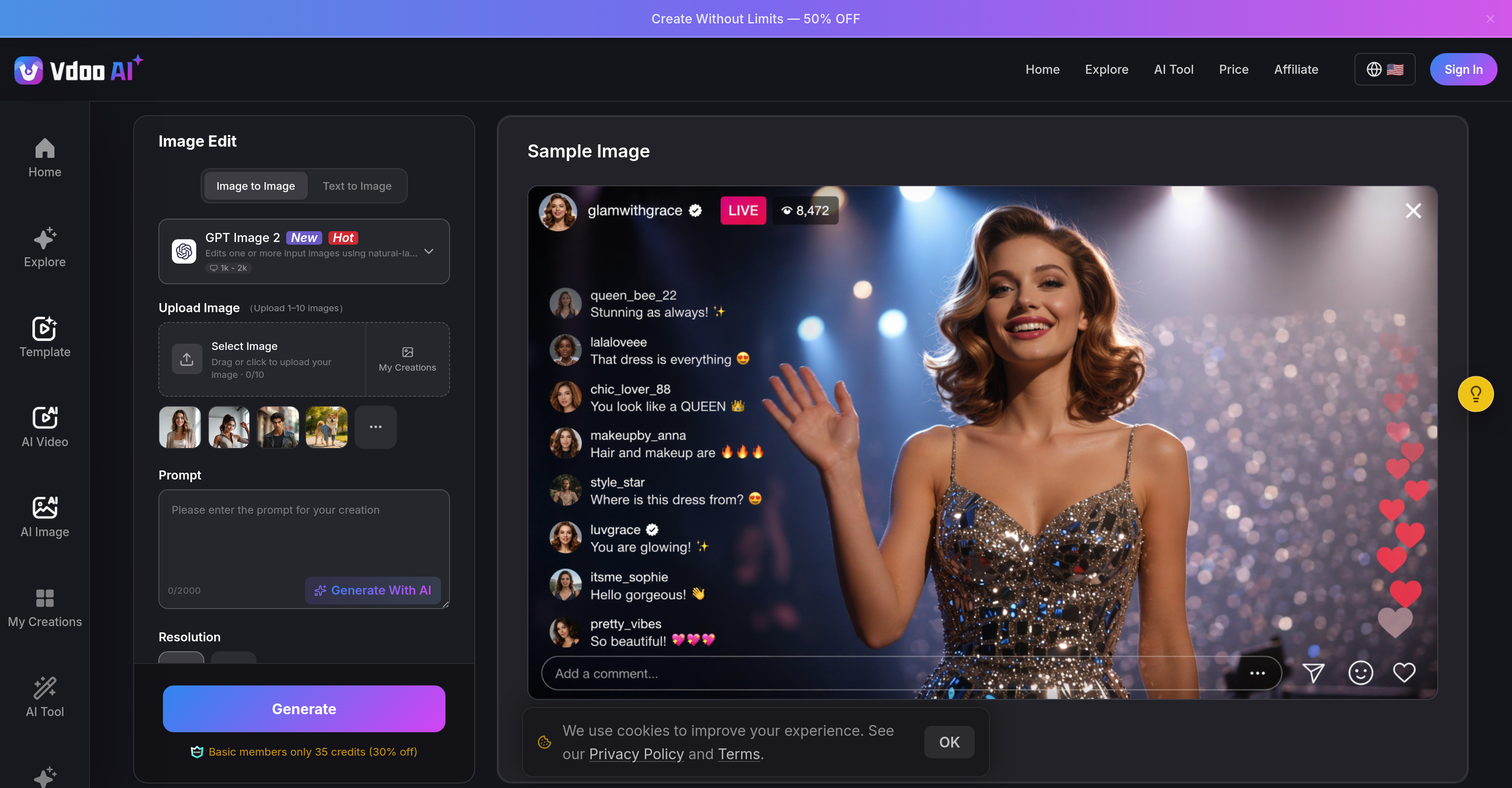
- Create professional-grade visuals in seconds by uploading a photo and selecting from hundreds of filters or entering a text prompt, powered by advanced AI image to image generation.
- Achieve consistent, production-ready results every time through AI algorithms that retain original image composition while enhancing details and adding creative dynamics.
- Produce bulk assets without quality loss using fast rendering at scale, ideal for handling multiple concurrent image transformations in professional workflows.
- Access every image modification need from a single platform—text-to-image, inpainting, style transfer, and image-to-image—eliminating the need for separate tools.
- Pick up any project exactly where you left off on any device, as all work syncs seamlessly through the cloud-based web interface without software downloads.
- Generate instant visual transformations across art, realism, anime, and sketch styles without prior design experience, guided by an intuitive three-step process.
Pros & Cons
Pros
- Instant image-to-image generation
- User-friendly interface
- Adaptive to image composition
- Variety of styles and filters
- Text-to-image capabilities
- Inpainting functionality
- Style transfer capabilities
- Single platform for modifications
- Maintains output quality
- Fast rendering at scale
- Cross-platform use
- Seamless syncing across devices
- No design experience required
- Subtle to total restyles
- Shared project history
- Realism, anime, and sketch styles
- Web based tool
- In-built project management
- Multimode image generation
- Generates production-ready visuals
- Offers subtle enhancements
- Upload, choose style, generate workflow
- Ideal for professional use
Cons
- Unable to edit videos
- Image quality not specified
- No standalone desktop application
- No explicit security policies
- No details on supported formats
- Possible saturation of images
- No built-in collaborative features
- Limited style and filter options
Reviews
Rate this tool
Loading reviews...
❓ Frequently Asked Questions
The key features of Vdoo AI Image Editor include image-to-image generation, image enhancement, AI style transfer, cross-platform functionality, inpainting, text-to-image functionality, fast rendering, AI assisted art creation, and creative transformation. These features are designed to provide users with a comprehensive tool for all image modification needs.
The image-to-image generation process in Vdoo AI Image Editor involves three simple steps. Users first upload an image, then they choose a style or enter a prompt, after which they generate and download the modified image.
Vdoo AI Image Editor offers a variety of styles and filters. These range from art and realism, to anime and sketches, thus allowing users to apply various visual transformations to their images.
Yes, Vdoo AI Image Editor supports text-to-image functionality. This feature is part of the comprehensive toolset that Vdoo packages into its platform for a consolidated image modification solution.
Yes, Vdoo AI Image Editor is capable of handling multiple assets at a time. It offers fast rendering at scale, thus making it ideal for professional use, particularly where multiple assets need to be managed.
Yes, Vdoo AI Image Editor is compatible with different platforms. The tool is accessible on the web, enabling users to work seamlessly across different devices where their projects are synced.
The basic process of transforming images in Vdoo AI Image Editor encompasses uploading an image, choosing a style or entering a prompt, and finally generating and downloading the transformed image. This simplifies the creative image transformation process and makes it user-friendly.
Yes, Vdoo AI Image Editor can accommodate professional use. It supports fast rendering at scale which enables handling of multiple assets concurrently. This functionality makes it a valuable tool for professional image editing.
Vdoo AI Image Editor maintains image composition by understanding and enhancing the details in an image. This feature ensures the transformed image retains the elements of composition while incorporating the selected style or filter.
The key advantage of using Vdoo AI Image Editor is the combination of multiple functionalities in one tool. Beyond simple image-to-image generation, it also includes text-to-image, inpainting, and style transfer functionalities. This all-in-one feature simplifies the image modification process for the users.
Yes, Vdoo AI Image Editor offers inpainting features. This is one of the many features that are packaged into its platform, providing a single, consolidated solution for all image modification needs.
Vdoo AI Image Editor can render images quickly. It supports fast rendering at scale, which is pivotal in handling multiple assets concurrently, making it an ideal tool for professional use.
Vdoo AI Image Editor provides enhancements while maintaining the composition of the image. Users can opt for subtle enhancements or go for a total artistic transformation. These include but are not limited to application of various styles, filters, and realistic or artistic modifications.
Yes, Vdoo AI Image Editor is a cloud-based tool. It is accessible on the web, allowing for cross-platform usage and seamless synchronization of projects across different devices.
Yes, Vdoo AI Image Editor can perform style transfer. This feature is part of its key functions which also include image-to-image generation, inpainting, and text-to-image functionality.
In Vdoo AI Image Editor, projects are seamlessly synced across devices because of its cloud-based nature. This functionality is available as the tool is accessible on the web, enabling usage anytime, anywhere.
To generate and download a new image in Vdoo AI Image Editor users follow three simple steps: first upload an image, then choose a style or enter a prompt, and finally generate and download the newly created image.
Vdoo AI Image Editor can transform photos in various ways. Users can choose from a multitude of styles and filters, ranging from artistic to realistic, anime, sketches, and more. It allows for subtle enhancements or complete artistic restyles, thus offering a broad scope for image transformation.
To choose a style or enter a prompt in Vdoo AI Image Editor, users go through the second step of the image-to-image generation process where they can pick from hundreds of filters or guide the AI with a simple text prompt, allowing for customized outputs.
In addition to the core image-to-image creation, Vdoo AI Image Editor packs in other features into its platform like text-to-image, inpainting, and style transfer functionalities. These elements combine to provide a comprehensive, single tool for all image modification needs.
The image-to-image generation feature of Vdoo AI Image Editor is a powerful function that allows users to upload a photo and generate an altered variant of it almost instantly. The functionality simplifies the process of transforming any image into stunning AI-enhanced visuals. The tool uses state-of-the-art AI models to turn generic images into polished, creative graphics.
Vdoo AI Image Editor comes packed with a plethora of styles and filters that users can apply to their images. These range from art and realism to anime and sketches. This diversity enables users to instantly transform images into various forms, amplifying their creative potential.
Vdoo AI Image Editor enables artistic restyles of photos via a feature-rich interface where users can select from a vast collection of styles and filters. Based on the chosen style, the AI-powered tool transforms the uploaded picture, creating a unique, artistic version. Users also have the option of subtle enhancements or complete restyles, according to their preference.
Beyond the image-to-image generation feature, Vdoo AI Image Editor incorporates various other functionalities. These include text-to-image, AI-assisted inpainting, style transfer, and an All-in-One Creative Hub AI Image Generator. These put together into a single platform eliminating the need for separate tools for each task.
Vdoo AI Image Editor includes functionalities like text-to-image that allow users to guide the AI with a simple text prompt to generate images. It also has an inpainting function which can digitally restore lost or corrupted parts of images, and a style transfer feature that applies the aesthetics of one picture to another, turning the platform into a comprehensive image modification solution.
The rendering scale of Vdoo AI Image Editor is rapid. Despite the intricate processing of AI-powered image editing, the tool ensures quick batch result generation. It's tailored to deliver high performance, making it suitable for professional use or handling multiple assets.
Yes, Vdoo AI Image Editor is well-equipped to support multiple assets. Its fast rendering at scale allows for handling and processing a bulk of images simultaneously without compromising the quality of the output.
Vdoo AI Image Editor is accessible on the web, making it ideal for cross-platform use. Users can access and use the editor from various devices, be it desktops, laptops, or mobile devices without any installation requirements.
An inherent feature of Vdoo AI Image Editor is its seamless synchronization across devices. This means that regardless of the device being used to access the platform, all the projects are up to date and visible instantly. So, whether a user shifts from mobile to desktop or vice versa, the project data remains intact and synchronized.
No, it is not required to have design experience to use Vdoo AI Image Editor. The platform has an intuitive and user-friendly interface that allows even a novice to operate and generate professional-quality results easily.
Transforming an image in Vdoo AI Image Editor is a three-step process. First, users upload an image that they wish to transform. They are then prompted to choose a style or enter a text prompt guiding the AI. In the final step, the AI generates the new image based on the user's selection or prompt, ready for download.
Vdoo AI Image Editor has an extensive range of filters at the user's disposal. These filters are capable of transforming images into diverse forms from art and realism to anime and sketches, offering limitless possibilities for creative expression.
The All-in-One Creative Hub AI Image Generator in the Vdoo AI Image Editor is a consolidated platform that merges multiple AI image-generation modes - text-to-image, image-to-image, inpainting, and style transfer into a single dashboard. This innovative feature dispenses the need for separate tools for different tasks.
The shared project history feature provided by Vdoo AI Image Editor allows users to keep track of all the changes and transformations made during the project. It ensures consistent operations, facilitating easy access to all edits and modifications, thereby boosting productivity.
Vdoo AI Image Editor uses advanced AI algorithms to ensure a high and consistent output quality. Regardless of the complexity or volume of the assets being processed, the Editor is designed to maintain a uniform level of professional-grade output quality.
Yes, Vdoo AI Image Editor can be used without downloading any software. The tool is entirely web-based, offering users the convenience to access and work on their projects from any device by simply using the browser.
With Vdoo AI Image Editor, even users without design experience can achieve professional, creative results. The intuitive interface, variety of styles/filters, and AI-assisted functionalities enable even beginners to generate and enhance images, pushing the boundaries of their creative expression.
Vdoo AI Image Editor utilizes user-uploaded reference images to guide the AI in generating new, enhanced versions of the image. The AI analyses key aspects of the uploaded image and employs it as a reference to understand the desired output style.
Pricing
Pricing model
Free Trial
Paid options from
$6.67/month
Billing frequency
Monthly
Refund policy
View Policy