
Overview
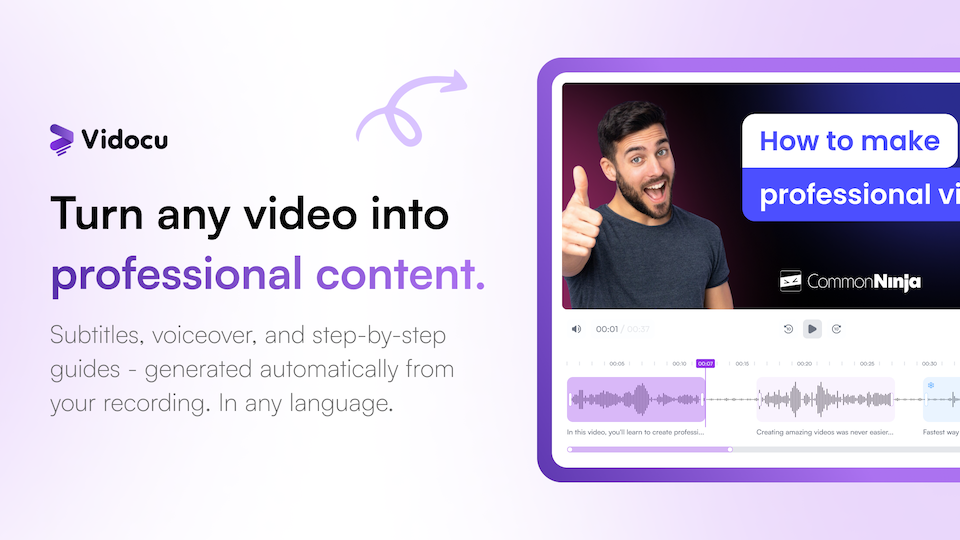
- Turn screen recordings into ready-to-publish tutorials and help articles instantly with AI that auto-generates step-by-step guides, scripts, and captured screenshots.
- Reach a global audience without re-recording by translating subtitles and generating natural voiceovers in 65+ languages for seamless video localization.
- Create branded, professional training videos faster using AI-powered trimming for intelligent cuts, auto highlights, and a built-in library of royalty-free background music.
- Generate SEO-optimized documentation and standard operating procedures (SOPs) from videos, exporting as PDF, HTML, or Markdown with auto-extracted FAQs and summaries.
- Maintain full creative control with advanced video editing features like zoom, pan, annotations, callouts, and custom watermarks for brand consistency.
Pros & Cons
Pros
- Transforms screen recordings into tutorials
- Auto-generates subtitles, voiceovers, guides
- Video translation in multiple languages
- Converts videos into documents/SOPs
- Video editing features: trim, cut, arrange
- Zoom, pan, add elements & annotations
- Built-in music library
- Insert callouts, highlights, slides
- Branding videos with watermark
- Developer API for custom solutions
- Format converter for videos
- Generates video summaries & FAQs
- Subtitles in any language
- Multiple natural voice options
- Auto-generated script from video
- Converts video content into FAQs
- Video to document conversion
- Brands videos with watermark
- Video trimming, elements & annotation
- Background music from built-in library
- Video arrangement & highlights capabilities
- Callouts insertion in videos
- Standard Operating Procedures documentation
- Global audience reach capability
- Automatically generates video tutorials
- Automatically creates help articles & docs
- Auto highlight features in Trimmer
- Screen recording transformation into tutorial
- Automated zoom & pan effects
- Enables addition of presentation slides
- Integration with multiple languages
- Generates step-by-step guides
- Supports any language for translations
- Localizes voiceovers for global reach
- Eliminates manual work
- Saves time and reduces cost
- Video to document workflow automation
- Generates voiceover in multiple languages
- Developers can extend it with API
- Transforms video formats
- Can generate FAQs from videos
- Offers video arrangement tools
- Highlights key parts of the video
- Zoom & Pan editing tools
- Callouts can be inserted to videos
- Allows adding audio from music library
- Can generate video summaries
- Subtitles generated in any language
Cons
- Lacks live voice-over feature
- No specified video resolution options
- Inadequate tutorial generation customization
- Loom and webinar conversions not mentioned
- Unspecified video format support
- No collaborative editing features
- Unspecified content importing options
- Limited styling and branding controls
- No mentioned support for other media types
Reviews
Rate this tool
Loading reviews...
❓ Frequently Asked Questions
Vidocu is an AI-powered tool that transforms screen recordings and videos into professional tutorials, help articles, and documentation. It provides a multitude of features such as automatic generation of subtitles, voiceovers, step-by-step guides, and translation in multiple languages. Vidocu comes with robust video editing features and AI technology that speeds up the video conversion process to suit various needs.
Vidocu utilizes AI technology to convert videos into professional tutorials. It automatically generates tutorials which include auto-generated subtitles, voiceovers, and step-by-step guides. It can capture screenshots at key moments and prepare clear instructions. It also provides impressive video editing features such as trimming, cutting, arranging, zooming and panning.
Vidocu uses powerful AI technology for automatic generation of subtitles. It is capable of generating accurate, time-synced subtitles instantly in any desired language. These subtitles can be edited in real-time, translated to 65+ languages and exported as SRT or VTT.
Yes, Vidocu provides multiple natural voice options for voiceover. It auto-generates a script from your video content and allows for the generation of voiceover in multiple languages. The voices offered are designed to sound natural rather than robotic, enhancing the quality of your output.
Vidocu is capable of translating subtitles and generating voiceover in any language, thus enabling users to reach global audiences without the need for re-recording. It supports translation in 65+ languages, allowing for easy localization of content.
Vidocu offers a wide array of video editing features. These include AI-Powered Trimming for intelligent cuts and auto highlights, the ability to trim, cut and arrange scenes, the function to zoom and pan for focus effects, and the feature of adding elements & annotations. It also allows the addition of callouts, highlights, and presentation slides.
Vidocu's developer API lets developers build on top of the solution, integrating Vidocu's features and capabilities into their own applications, websites, or platforms. This can enhance the functionality of their services by leveraging Vidocu's AI capabilities for video editing.
Vidocu's AI-Powered Trimmer provides intelligent cuts and auto highlights. The tool uses AI to detect important parts of the video and can trim and highlight these sections automatically, making the editing process easier and more efficient.
Vidocu's Format Converter can transform video formats. Although the specific video formats handled by the converter aren't specified, it most likely supports common video formats such as MP4, MOV, AVI, etc.
Vidocu's video summaries are powered by AI to provide key takeaways from a video. These summaries help users gain a quick understanding of the video's main points without having to watch the full content, making them efficient for time-conscious users.
Vidocu uses AI to extract FAQs from video contents. It identifies common questions and their corresponding answers within a video, then compiles them into a FAQ section. This provides viewers with readily available answers to potential queries without the need for manual intervention.
Vidocu allows users to brand their videos by providing the ability to insert a watermark. This helps to maintain brand identity and consistency, while also protecting the video content from unauthorized use.
Vidocu offers AI Documentation which enables the conversion of videos into documents and standard operating procedures. It generates a step-by-step guide with auto-captured screenshots and clear instructions from the video content. The generated documents are SEO-optimized and can be exported in various formats such as HTML, Markdown, or PDF.
Vidocu allows users to reach a global audience by offering video translation in multiple languages. It can translate subtitles and generate voiceovers in any language, thus enabling the easy localization of content and appealing to a broad user base worldwide.
Yes, Vidocu specializes in transforming screen recordings into professional tutorials and documentation. Its AI capabilities generate subtitles, voiceovers, and step-by-step guides, thereby smoothening the conversion process.
Yes, Vidocu provides you with the ability to add elements and annotations to your videos. This enhances the video's interactive aspect and serves to emphasize key points or guide the viewer's attention to certain parts of the video.
Yes, Vidocu provides a built-in music library which users can leverage for video backgrounds. The library is royalty-free, meaning users can add music to any video without worrying about licensing issues.
Vidocu assists in the arrangement and trimming of videos through its AI-Powered Trimmer. The tool allows for intelligent cuts and auto highlights, which help in adjusting video lengths and highlighting important parts of the video. It reduces the manual effort involved in trimming and arranging videos.
Vidocu uses AI to convert videos into text for documentation. It auto-generates a script from your video content and generates a step-by-step guide with auto-captured screenshots and clear instructions. It is able to transform video tutorials into help articles, blog posts, and documentation.
Vidocu offers tools to convert videos into standard operating procedures (SOPs). Video content is processed by the AI to generate step-by-step instructions. These are then transformed into documents for SOPs, offering a streamlined way to generate and share best practices and procedures.
Pricing
Pricing model
Freemium
Paid options from
$31/month
Billing frequency
Monthly
Refund policy
No Refunds