Viyou AI Motion Control
Overview
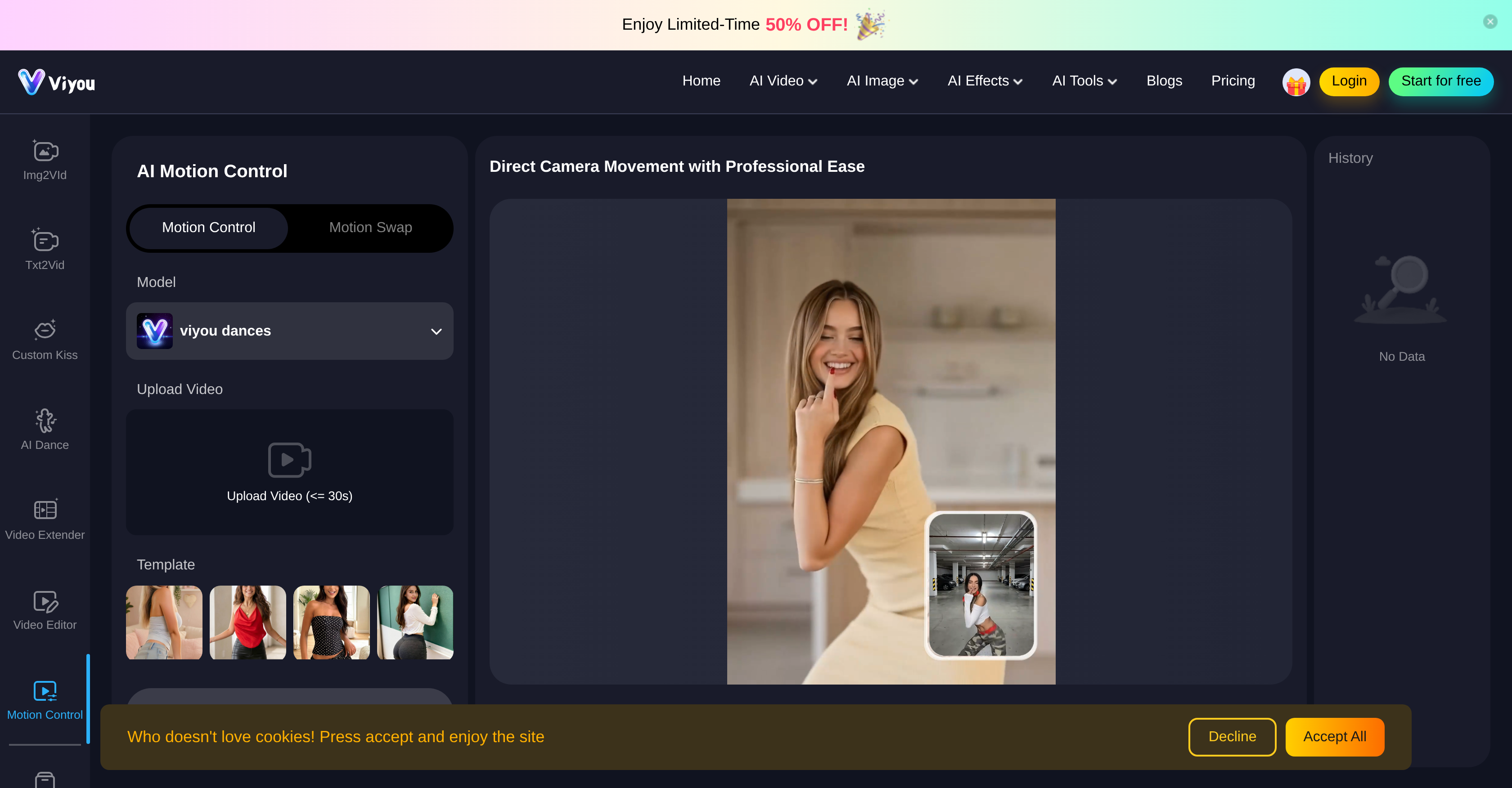
- Bring still images to life as dynamic, animated videos using the AI Image to Video generator for engaging visual storytelling.
- Transform simple text prompts into captivating cinematic videos with the AI Text to Video feature for effortless content creation.
- Edit and artistically transform any image or extend video length seamlessly with AI-powered tools that maintain original quality.
- Isolate subjects perfectly for clean compositing or backdrop swaps using the one-click AI Background Remover.
- Generate unique, stylized outfits for characters within your scenes using the AI Outfit Generator for enhanced visual design.
- Create expressive dance animations and guide precise subject motion for complex, fluid interactions in high-fidelity scenes.
Pros & Cons
Pros
- Animate still images
- Text-to-video conversion
- Guides subject behavior
- High fidelity interactions
- Unique cinematic motion
- Transform text into images
- Generate dynamic video pieces
- Artistic image transformation
- Huge range of models
- Multi-language support
- Image-to-image editing
- Video effects generator
- Supports complex embraces
- Creates lifelike moving visuals
- Turns text into story
- Image effects and editors
- Engaging storytelling
- Stunning visual design
- Unique artistic transformations
- Custom Kiss Generator
- Fluid interactions in video
- Turns prompts into videos
- Transform Text to Image
- Supports multiple image models
- Realistic video from image
- Turns simple text into video
- Broad toolset for creativity
- Detail-oriented motion control
- Tailored for artistic transformations
- Multi-regional usability
- Versatile image and video support
- Generates engaging visual stories
- Tailored fitness video templates
- Offers diverse storyboarding capabilities
- Transforms images into lifelike videos
- Community template offerings
- One-click video and image generation
Cons
- No offline version
- Limited video length
- Might necessitate powerful hardware
- Lacks advanced editing features
- Language support inconsistencies
- May be complex for beginners
- Possible result inaccuracy
- Subscription-only access
- Not suited for larger projects
- No listed customer support
Reviews
Rate this tool
Loading reviews...
❓ Frequently Asked Questions
Viyou AI Motion Control is a multifaceted tool that enhances the process of creating and editing videos and images. This tool provides a unique set of features that give users control over their subjects' behavior, and generates fluid interactions in high fidelity environments. Viyou AI Motion Control extends its functionality to include an AI Video Generator, AI Image Generator, along with other AI Video and Image Tools like the AI Dance Generator, AI Video Extender and Editor, AI Outfit Generator, and AI Background Remover.
The AI Video Generator within Viyou's tool works by transforming a simple image or text into dynamic video pieces. It creates engaging visual stories from text prompts and can animate static images into lifelike moving visuals.
Yes, you can edit videos with Viyou AI Motion Control. It comes equipped with an AI Video Editor which provides comprehensive video editing features.
The AI Image Generator in the Viyou toolkit offers significant features for artistic transformation of images. It can turn text into images, edit images to match an artistic vision, and comes with supportive tools such as the AI Outfit Generator and AI Background Remover.
The AI Dance Generator is a part of Viyou's AI tools. It is designed to produce expressive and stylized dance animations based on input parameters.
In Viyou, the AI Video Extender functionality allows for the extending of video length while maintaining the consistency and fluidity of the original content. It uses AI algorithms to generate additional frames and sequences, creating a seamless extension of the video.
Viyou AI Motion Control caters to a diverse array of content creation needs by providing a wide range of features and tools. These include AI Video and Image generation, video extension and editing, outfit generation, and background removal. It also supports text prompts conversion into engaging visual stories and animation of still images into moving visuals.
Yes, Viyou AI Motion Control is capable of animating still images into moving visuals. This transformation is achieved via powerful AI algorithms that generate dynamic representations from static images.
The text to image feature in Viyou AI Motion Control transforms textual content into illustrative images. It studies the input text and uses artificial intelligence to generate a corresponding visual representation.
The AI Outfit Generator within Viyou's toolkit works by creating virtual clothing for characters or subjects within the image or video. It uses AI models to generate professionally styled outfits based on the context and nature of the graphics.
The AI Background Remover offers the advantage of cleanly and seamlessly removing the background from any image. This feature is particularly useful for content creators who need to isolate subjects from their backgrounds, achieve clean compositing, or swap backdrops in images and videos.
Viyou AI Motion Control is set apart in the realm of AI content creation tools by its unique blend of features that cater to a wide variety of user needs. The ability to animate still images, turn text prompts into visual stories, and provide tools for creative video and image creation makes it a unique and powerful contender in the field of AI-powered content creation.
Using Viyou's AI Motion Control function involves uploading the desired video or image onto the platform. Then, users can apply the motion control function to dictate the movements and behavior of the subject within the provided content, generating high fidelity environments.
Yes, you can generate cinematic videos using Viyou's AI Video Generator. It's designed to transform simple text or images into dynamic and engaging video pieces, creating a cinematic experience.
Viyou supports a wide range of video and image models including, but not limited to Viyou 4.0, Viyou 3.0, Seedance 2.0, Grok Video, Sora2, Vidu Q3, Kling 3.0, Seedance Pro 1.5, Wan 2.6, Hailuo 02, Vidu Q2, Pika for video models, and Viyou 4.0, Viyou 3.0, Flux2, Klein, Grok-2-Image, Nano Banana, Seedream 4.5, Seedream 4.0, and GPT Image 1.5 for image models.
Viyou supports multiple languages including English, 日本語, 繁體中文, 한국어, Русский, Español, Português, Deutsch, Français, العربية, Türkçe, Bahasa Indonesia and ภาษาไทย.
The AI Video Extender and Editor within Viyou works by prolonging the duration of a video without losing the quality or the consistency of the original video. The editor tool offers comprehensive tools for editing and enhancing video content.
Yes, Viyou AI Motion Control is highly useful for artistic image transformations. The AI Image Generator within the toolkit is designed just for this, with abilities to transform text into an image or edit an image to match the desired artistic vision.
Yes, Viyou AI Motion Control works with both videos and images. The tool is equipped with an AI Video Generator, AI Image Generator, AI Video Extender and Editor, AI Outfit Generator, and AI Background Remover among other features for both video and image transformations.
Viyou AI's unique features include the AI Video Generator, AI Image Generator, AI Dance Generator, AI Video Extender and Editor, AI Outfit Generator, and AI Background Remover. These features permit the users to animate still images, transform text prompts into visually engaging stories, and carry out artistic image edits. The tool also allows manipulation of subject behavior, complex embraces, and fluid interactions within high-fidelity scene environments, paving the way for raw and unrestricted cinematic motion manipulation.
The main functions of Viyou AI Motion Control include an AI Video Generator that can create dynamic videos from a single image or text. The AI Image Generator is designed to convert text into images or modify an existing image to match artistic preferences. Other essential tools comprise the AI Dance Generator, AI Video Extender and Editor, AI Outfit Generator, and AI Background Remover. These support a variety of image and video models satisfying an extensive range of content creation requirements.
The AI Video Generator in Viyou AI Motion Control transforms simple images or text into dynamic and engaging video content. However, the specific processes or mechanisms behind this function have not been detailed on their website.
Yes, Viyou AI Motion Control can turn an image into a video. The AI Image to Video feature animates a still picture into a realistic, dynamic video, bringing the static image to life.
The AI Image Generator feature in Viyou AI Motion Control works by transforming text into images or editing existing images based on artistic preferences. This tool gives users the ability to create unique images from text prompts or carry out artistic modifications in existing pictures.
For video editing, Viyou AI Motion Control offers various tools beyond the basic ones, such as the AI Video Extender and Editor. These tools enable users to lengthen their videos and make editing changes. It also includes an AI Dance Generator and a feature for creating custom video effects.
The AI Dance Generator in Viyou AI Motion Control is part of the tool's offerings. It likely helps generate dance movements in the video, though the specific details about its functionality are not provided on their website.
Yes, Viyou AI Motion Control does offer multilanguage support. It supports several languages, including English, 日本語, 繁體中文, 한국어, Русский, Español, Português, Deutsch, Français, العربية, Türkçe, Bahasa Indonesia, and ภาษาไทย.
Yes, the AI Video Extender and Editor within Viyou AI Motion Control can be used to lengthen or edit your videos. These tools provide users with the ability to expand their video content and make necessary changes or edits.
Viyou AI Motion Control supports various models for video creation and editing. Some of these include Viyou 4.0, Viyou 3.0, Seedance 2.0, Grok Video, Sora2, Vidu Q3, Kling 3.0, Seedance Pro 1.5, Wan 2.6, New Hailuo 02, and Vidu Q2.
With Viyou AI Motion Control, you can create a variety of visual content like animated videos from still images, transforming text into captivating videos, and editing images for artistic transformations. It also supports creating content like unique outfits, removing backgrounds, and incorporating dance movements.
Viyou AI Motion Control can create artistic image transformations through its AI Image to Image Editing feature. This function allows for the editing of existing images to suit one's vision and design, stimulating creativity and individuality in image alterations.
To generate animated videos from still images with Viyou AI Motion Control, users can use the AI Image to Video feature. This tool animates still images into lifelike moving visuals, making them dynamic and engaging.
Yes, Viyou AI Motion Control can convert text prompts into visually engaging videos with its AI Text to Video feature. This functionality encourages impressive storytelling by turning simple text prompts into captivating videos.
Yes, with Viyou AI Motion Control, users can create unique images from text prompts using its AI Text to Image feature. This utility allows for the transformation of text into images for unique and customized creations.
The AI Background Remover in Viyou AI Motion Control is a tool that is designed to eliminate the background of an image. Unfortunately, more specific information about its functioning is not provided on their website.
The AI Outfit Generator in Viyou AI Motion Control works by presumably assisting users in creating unique outfits within their images and videos. However, the specific details about its functioning are not detailed on their website.
Viyou AI Motion Control provides unrestricted tools designed to guide subject behavior, complex embraces, and fluid interactions in high fidelity videos. This aids users in creating design art that explores raw cinematic motions and emotions for engaging visual storytelling and design.
The AI Video Tools in Viyou AI Motion Control can be used for various video editing tasks. Some uses include creating animated videos from still images, transforming text prompts into engaging videos, creating dancing animations, elongating videos, and optimizing them.
Pricing
Pricing model
Free Trial
Paid options from
$9.99/unit
Billing frequency
Pay-as-you-go