Viyou AI Video Editor
Overview
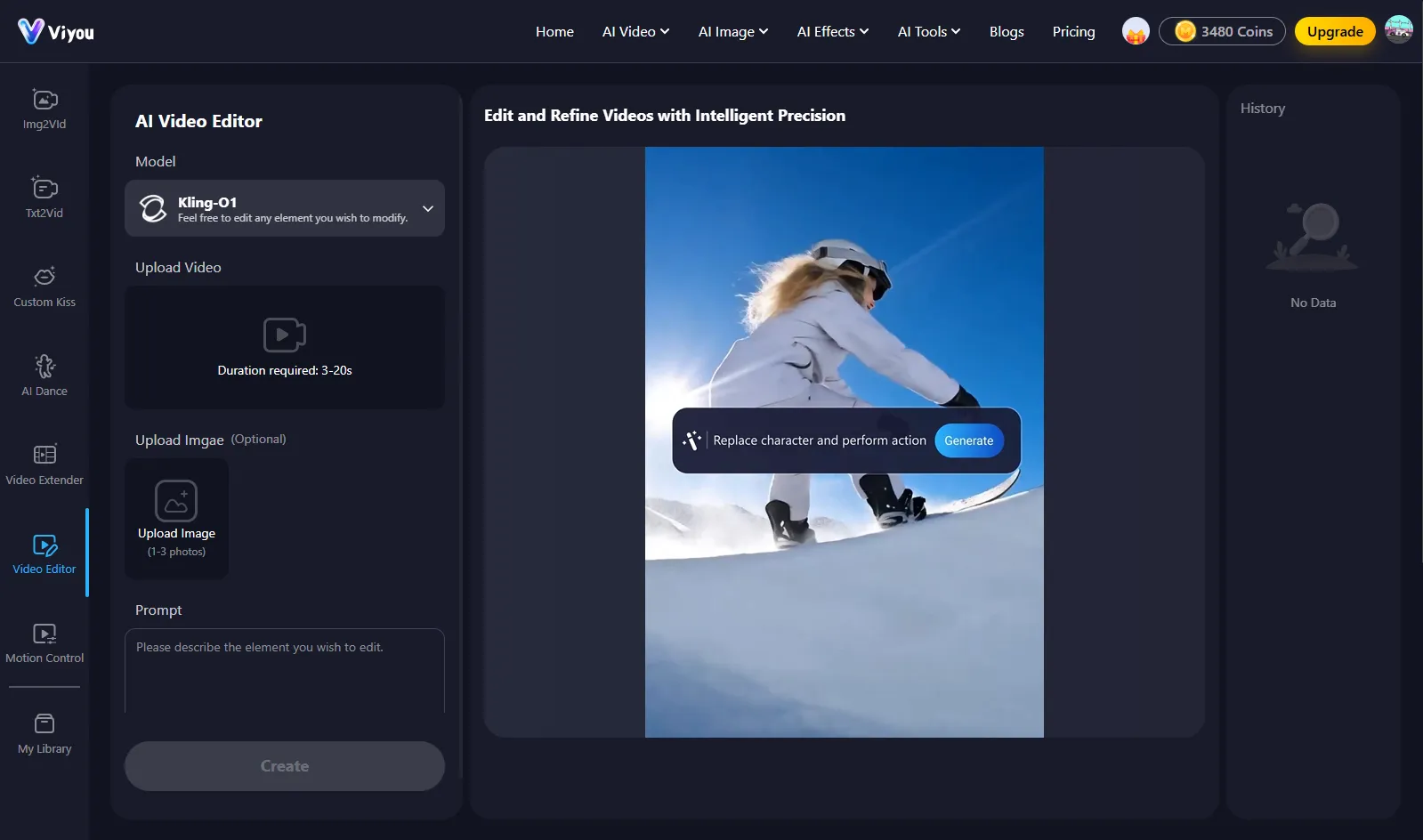
- Turn any text prompt or idea into a complete, engaging video narrative instantly using the AI Text to Video and AI Video Generator tools.
- Animate any still photo into a dynamic, realistic video scene with the AI Image to Video feature, bringing pictures to life.
- Apply complex visual effects and refined motion control without manual editing, using the suite of generative effects and raw VFX tools.
- Artistically transform any image into a new creative vision or generate unique images from text using the AI Image to Image and AI Text to Image tools.
- Instantly extend video length with seamless, AI-generated content that matches the original scene using the AI Video Extender.
- Experiment with virtual outfits on any uploaded photo or create custom dance animations from music using the AI Outfit Generator and AI Dance Generator.
- Remove image backgrounds with perfect accuracy in one click using the dedicated AI Background Remover tool.
- Start projects faster with pre-made community templates for various occasions, bypassing the blank canvas.
- Access a specialized suite of top AI models like Viyou 4.0, Kling 3.0, and Seedance Pro 1.5 for different creative styles and tasks in one platform.
Pros & Cons
Pros
- Unrestricted video editing
- Raw VFX application
- Generative tools inclusion
- Array of image models
- Customized tools available
- Intelligent precision
- Multilingual support
- Simple user interface
- Community templates
- Artistic transformations
- Storytelling capabilities
- Refined motion control
- Custom Kiss generator
- Large suite of effects
- Supports extensive languages
- Advanced platform
- Profound editing capabilities
- Creative visuals
- Text to image transformation
- Image to image editing
- Unique text input creations
- Viyou 4.0, Kling 3.0, Seedance Pro 1.5 models
- Censorship-free workspace
- Multiple video models
- Community effect templates
- Unrestricted image creation
- Realistic video animation
- Text to captivating video
- Video extend functions
- Clothes change template
- manage subscription feature
Cons
- Lack complex collaboration features
- No mobile version
- Lacks versioning and revisions
- Few supported video formats
- Limited multi-language content support
- No offline capabilities
- No direct social media integration
- Could be resource intensive
- Limited template variety
- Image limit for uploads
Reviews
Rate this tool
Loading reviews...
❓ Frequently Asked Questions
Viyou AI Video Editor is an unrestricted, AI-powered platform dedicated to video and image editing. It offers complex editing features, raw VFX effects application, and generative tools. It has a broad range of features including AI Video Generator, AI Image to Video, AI Text to Video, AI Image to Image, and AI Text to Image. The platform also provides unique video and image models, community templates for varying occasions and several customized tools like AI Dance Generator, AI Video Extender, AI Outfit Generator, and AI Background Remover.
Viyou's AI Video Generator works by creating engaging storytelling experiences. Using advanced artificial intelligence algorithms, it converts provided concepts or scripts into captivating video narratives, thereby automating the overall video creation process and reducing the workload of manual video editing.
The AI Image to Video feature in Viyou enables transformation of still images into dynamic videos. With the power of AI, it seamlessly animates static images creating a realistic and dynamic video output, presenting a whole new dimension in individual image perceptions.
Yes, Viyou has a unique feature called AI Text to Video that can transform textual prompts into captivating videos. This feature leverages AI to interpret the context and sentiments from the text and transforms this information into a visually engaging video.
Viyou offers a set of image manipulation tools that enable users to perform artistic transformations and create unique visuals. This includes the AI Image to Image feature that is designed for artistic transformations and the AI Text to Image feature that helps create unique image creations from text prompts.
Yes, Viyou offers an AI Image to Image feature. This tool leverages AI to make artistic transformations of an input image, turning it into a totally different but related image, allowing users to explore a wide range of creative possibilities.
Viyou's AI Text to Image feature works by processing textual prompts and converting them into unique image creations. The AI analyses the text and creates matching visual content, generating images that represent the context of the provided text.
Viyou supports a broad selection of Video and Image Models to cater to users' varied requirements. For videos, it supports Viyou 4.0, Viyou 3.0, seedance 2.0, Grok Video Sora2, Vidu Q3, Kling 3.0, Seedance Pro 1.5, Wan 2.6, Hailuo 02, and Vidu Q2. For Images, it supports Viyou 4.0, Viyou 3.0, Flux2, Klein, Grok-2-Image, Nano, Banana, Seedream 4.5, Seedream 4.0, and GPT Image 1.5.
Yes, Viyou does provide various community templates. These are customized templates suitable for a broad range of occasions that users can re-use or modify as per their needs. The aim is to enhance user experiences by enabling smooth and quick video/image editing and creation.
The AI Dance Generator in Viyou is a unique tool that employs AI algorithms to create lifelike dance animations. It can generate custom dance sequences based on user inputs such as selected music or dance style, producing engaging, fun video content.
The AI Video Extender in Viyou is a smart tool that employs artificial intelligence to extend the duration of a video. It analyzes the elements of the existing video, then generates and integrates additional visual content that is contextually relevant and seamless, therefore extending the video length.
Viyou's AI Outfit Generator allows users to experiment with various virtual attires on their images. Users can simply upload their image, and the AI will then generate various outfit options suitable for the uploaded image, thereby providing a virtual dressing room experience.
Viyou does house a tool for image background removal. Named AI Background Remover, this tool uses artificial intelligence to identify and segregate the foreground objects and remove the background swiftly and accurately.
Viyou's interface is engineered to be user-friendly and suitable for users with varying levels of experience. It is designed to provide a seamless user experience with its simple and intuitive functionality, allowing quick access to their advanced editing tools and techniques.
Viyou supports multiple languages for a diverse userbase. Users can access the platform in languages such as English, Japanese, Traditional Chinese, Korean, Russian, Spanish, Portuguese, German, French, Arabic, Turkish, Indonesian, Thai and more.
Viyou's AI functionalities greatly simplify and enhance the video editing process. They allow users to generate videos from storytelling experiences, transform text into videos, and animate still images into dynamic ones. Furthermore, Viyou's suite of AI tools such as Video Extender, Dance Generator, and Outfit Generator provide custom solutions to create meticulously refined video content.
Yes, Viyou allows users to apply raw VFX effects. Its sophisticated editing platform provides users the freedom to experiment and integrate visual effects thereby enhancing the quality and engagement level of the output video content.
Viyou offers a range of generative tools including the AI Video Generator, which creates engaging storytelling experiences, and the AI Image to Video feature, that animates still images. There’s also the AI Text to Video tool which transforms text into videos, and the AI Text to Image tool which converts text prompts into unique image creations.
Viyou allows for unique artistic transformations through its range of AI-powered tools. The AI Image to Image feature, for example, enables users to artistically transform one image into another. Additionally, tools such as AI Text to Image enable transformation of text input into visually creative images.
The AI Image to Image tool in Viyou is designed for making artistic transformations of a given image. With the help of advanced AI algorithms, it processes an input image to generate a completely different, yet contextually related, visually artistic image.
The Viyou AI Video Editor is an AI-powered workspace dedicated to unrestricted video and image editing. This advanced platform offers extensive features powered by AI, making complex video and image edits easy for users regardless of their experience level. It is equipped with a broad suite of generative effects, refined motion control, and models like Viyou 4.0 and Kling 3.0, enabling users to create captivating visuals based on their unique inputs.
Viyou provides several unique AI-driven features for enhancing video and image editing. Some of these features include AI Video Generator, AI Text to Video, and AI Image to Video, all designed to create engaging storytelling experiences. It also includes image manipulation tools like AI Image to Image and AI Text to Image, designed for artistic transformations and unique creations. Added tools like AI Dance Generator, AI Video Extender, AI Outfit Generator, and AI Background Remover further expand the creative possibilities.
Yes, Viyou does offer a feature that transforms text prompts into videos. The AI Text to Video tool is designed to convert textual inputs into engaging video content, enhancing the art of storytelling.
Yes, Viyou does include AI-driven image editing tools. These tools, such as AI Image Generator, AI Text to Image, and AI Image to Image, allow users to create unique transformations and creations from text or image inputs.
Yes, you can animate still images into dynamic videos with Viyou. This is made possible by the AI Image to Video feature, which can turn any static image into a realistic, dynamic video.
The AI Video Generator feature in Viyou works by combining advanced AI technology with user inputs to create highly engaging video content. User inputs can range from textual prompts to still images, which the AI Video Generator transforms into dynamic and captivating video stories.
Viyou supports a comprehensive list of languages to cater to users worldwide. These languages include English, Japanese, Traditional Chinese, Korean, Russian, Spanish, Portuguese, German, French, Arabic, Turkish, Indonesian, and Thai.
Yes, Viyou does have a feature to remove background images known as the AI Background Remover. This feature employs AI technology to accurately identify and remove the background from any given image.
Yes, Viyou is designed to be suitable for users with no prior experience in editing. Its simple, user-friendly interface combined with intelligent precision of its AI tools ensures that users of all levels of experience can effectively realize their creative vision.
Viyou includes a wide range of innovative AI models for enhancing the video and image editing process. These include Viyou 4.0, Kling 3.0, Seedance Pro 1.5, and several others, all designed to provide users with optimal results across diverse editing tasks.
By using Viyou's AI Text to Image feature, you can create unique creations. This feature allows you to input text and have the AI create an image that relates to, or is inspired by, your textual input. It brings a whole new dimension of artistic possibilities for users.
Yes, you can edit videos with motion control in Viyou. The platform includes an advanced video editing tool which supports refined motion control for a greater degree of creative freedom.
Viyou offers various community templates for different occasions. These templates help make the process of creating engaging videos and images quicker and easier, even for users with no creative or technical experience.
Yes, Viyou does have a feature to extend videos known as the AI Video Extender. This tool, powered by AI, allows users to extend the duration of their videos without compromising the quality.
Viyou is equipped with tools such as the AI Image to Image tool and AI Text to Image, that allow for artistic transformations of images. These tools enable users to transform images in creative ways or come up with unique creations based on text inputs.
Yes, there is a feature to generate a dance using AI in Viyou, known as the AI Dance Generator. This advanced tool uses AI technology to animate a dance sequence based on user inputs, adding unique and fun dynamics to video editing.
Yes, Viyou can animate a still image into a dynamic video. The AI Image to Video feature is designed precisely for this purpose, converting static images into vibrant, dynamic videos.
Viyou offers a unique set of image manipulation tools designed for artistic transformations and unique creations. These tools include the AI Image Generator, AI Text to Image, and AI Image to Image, allowing users to manipulate images in creative and innovative ways.
Yes, Viyou does have a Custom Kiss Generator. This application of AI technology allows for the creation of custom visuals and interaction, significantly extending the versatility and creative options of the platform.
Viyou supports various models for video editing. These include Viyou 4.0, Viyou 3.0, Seedance 2.0, Grok Video, Sora2, Vidu Q3, Kling 3.0, Seedance Pro 1.5, and others. These models, powered by AI, cater to users' varying needs for video editing.
Pricing
Pricing model
Free Trial
Paid options from
$9.99/unit
Billing frequency
Pay-as-you-go
Refund policy
No Refunds