Overview
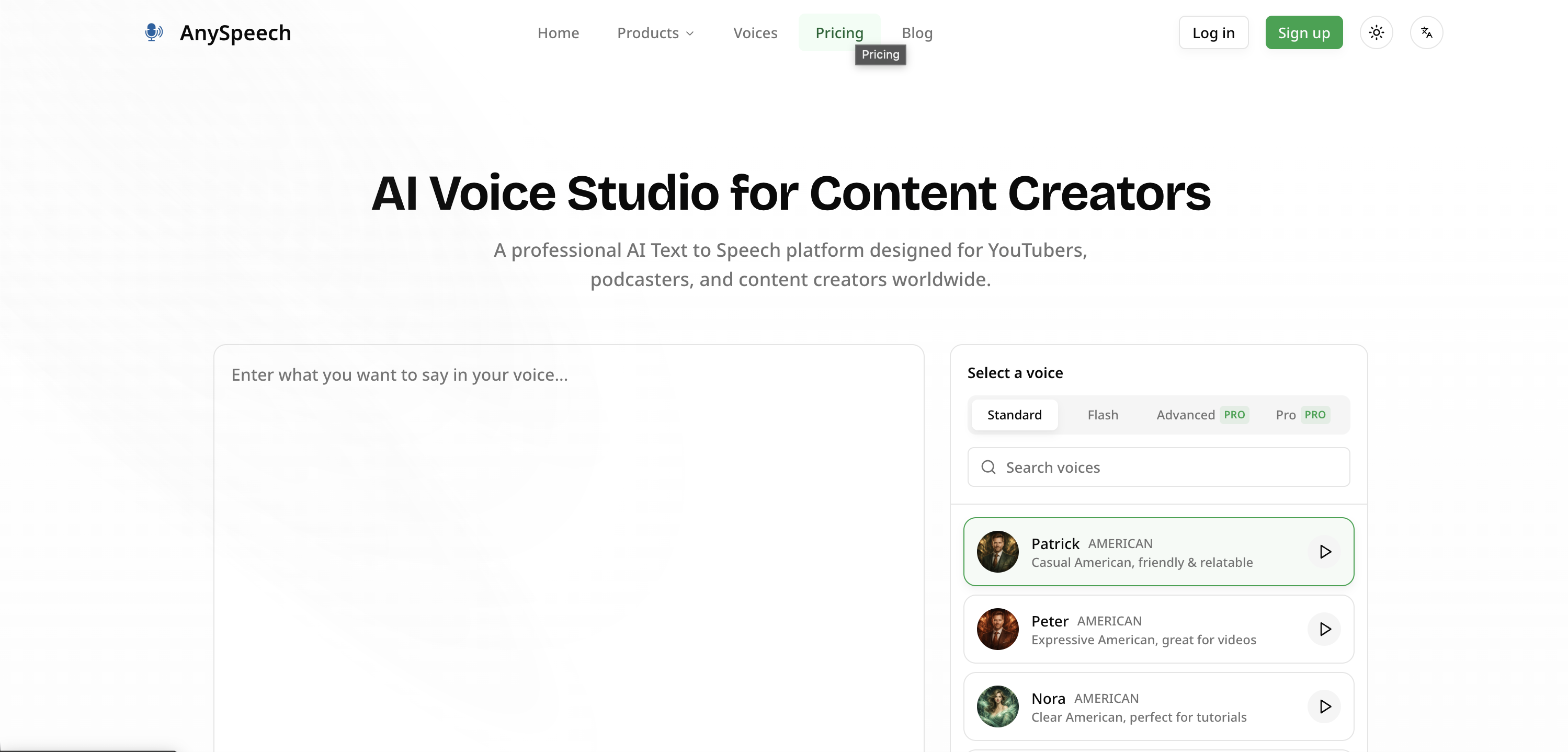
- Produce professional voiceovers without hiring actors using over 100 realistic AI voices across 50+ languages.
- Maintain a consistent brand or personal voice across all content by cloning any voice from a short 10-30 second audio sample.
- Scale audio production for global audiences by generating multilingual narration for e-learning, marketing, and videos in one platform.
- Integrate natural speech directly into your apps or games using the developer API for interactive voice features.
- Edit long-form content like audiobooks efficiently with chapter-based project editing for seamless narration management.
- Fine-tune audio delivery by adjusting speed, pitch, and emphasis controls for perfectly timed, natural-sounding speech.
- Make content accessible for visually impaired users by converting text to high-quality, audible speech instantly.
Pros & Cons
Pros
- Supports 50+ languages
- Used for different content types
- Transform scripts into audio content
- Voices integrated into various software
- API integration
- Voice cloning feature
- Speed, pitch, emphasis controls
- Caters long-form content creation
- Chapter-based project editing
- Simple pricing model
- Multilingual support
- Commercial use included
- Fine-tune voice output controls
- Voiceovers for marketing & advertisements
- Accessibility for visually impaired users
- Supports up to 50,000 characters
- Background music & sound mixing
- Long-form text support
- Lightning fast generation
- Studio-quality audio output
- Interface is easy to use
- Accommodates multi-voice narration
- Supports dialogues in audio content
- Storage and re-download option
- User-friendly for a wide audience
Cons
- No offline functionality
- No free unlimited plan
- Limited audio output formats
- No voice actors partnerships
- 5,000 character limit per generation
- Potential voice cloning ethical concerns
- Requires clear audio for voice cloning
- No transcription service
- No real-time adjustment
- No voice emotion customization
Reviews
Rate this tool
Loading reviews...
❓ Frequently Asked Questions
AnySpeech uses advanced AI voice technology to convert written text into natural, human-like speech.
In AnySpeech's context, voice cloning means creating a digital replica of any voice using an audio sample of 10 to 30 seconds. This feature allows users to maintain a consistent voice in their produced audio content.
In AnySpeech, users can choose from over 100 realistic AI voices.
AnySpeech supports over 50 languages, providing wide accessibility to various language speakers and international markets.
Yes, AnySpeech's AI-generated voices can be integrated into software applications, APIs, and games, extending the use-case possibilities beyond traditional media.
With AnySpeech, you can create a wide array of content, including scripts for videos, podcasts, audiobooks, e-learning and training materials, marketing and advertising scripts, and more. It's particularly useful for content for visually impaired users.
Yes, AnySpeech offers functionalities to make content accessible for visually impaired users by converting text to audible speech.
In AnySpeech, users have control over speed, pitch, and emphasis to fine-tune the output for a more customized and natural-sounding audio.
AnySpeech has been designed to cater to long-form content creation and includes features that allow chapter-based project editing for seamless long-form narration.
Yes, AnySpeech offers a simple and scalable pricing model catering to the needs of different types of users, including individual creators.
Yes, AnySpeech can be used to generate educational narration in multiple languages for e-learning and training materials, making the creation of multilingual courses effortless.
Yes, AnySpeech can convert scripts for YouTube videos into natural, human-like speech, providing professional AI voiceovers.
Yes, AnySpeech offers controls for speed, pitch, and emphasis that allow fine-tuning of the AI-generated voices for optimal results.
The chapter-based project editing feature in AnySpeech is designed to handle long-form content. It allows users to edit their projects on a chapter-by-chapter basis, supporting the creation of audiobooks, courses, and other longer content forms.
Yes, AnySpeech has a voice cloning feature that enables users to create digital replicas of any voice, which can be used consistently in their audio productions.
Yes, AnySpeech supports more than 50 languages, making it accessible to international markets.
AI plays a crucial role in AnySpeech's text to speech conversion. It uses advanced AI voice technology to analyze text input and convert it into realistic, natural-sounding speech.
Yes, AnySpeech can be integrated into software applications, APIs, and games. Its versatile feature set, including natural text to speech and voice cloning, can lend a voice to interactive gaming characters or software prompts.
Yes, AnySpeech can convert marketing and advertising scripts into natural, human-like speech, enabling businesses to produce compelling ad voiceovers without the need for expensive voice actors.
Yes, AnySpeech supports audio content creation. Its AI-driven text-to-speech tool allows users to convert text into natural-sounding speech, suitable for videos, podcasts, audiobooks, and more.
The exact processing time of converting text to speech on AnySpeech is not specified, however, based on the advanced AI technology it uses, the text conversion process tends to be fast and efficient, making it well-suited for both short and long-form content.
AnySpeech uses advanced Artificial Intelligence (AI) technology to generate speech that closely mirrors a human voice. The AI leverages vast data sets, training on various voice samples and languages to create over 100 realistic voices. These voices are adjustable by pitch, speed and emphasis controls, offering a unique, detailed, and lifelike experience to the resulting speech.
Yes, AnySpeech does support language variation/accent customization. It offers over 100+ AI voices in more than 50 languages, catering to diversities in language and accents. This significantly broadens the users' ability to create and deliver content that resonates with different linguistic groups.
To integrate AnySpeech into your software or game, you will need to make use of AnySpeech's API. This allows you to incorporate the AI voice generation capabilities directly into your software, enhancing the user experience with natural text-to-speech functionality.
The voice cloning feature on AnySpeech works by creating a digital replica of any voice from a short audio sample. Users upload a clear audio sample that is between 10-30 seconds long. The system processes this sample and creates a unique voice signature that can be named and used to generate speech.
Yes, AnySpeech is designed to handle long-form content conversion. It supports up to 50, 000 characters per request, making it an excellent choice for transforming lengthy scripts, articles, or books into audio. AnySpeech also offers a chapter-based editing feature for ease in managing large-scale projects.
The pitch control in AnySpeech allows you to manipulate the tonal quality of the generated speech. By adjusting the pitch, users can make the voice sound higher or lower, providing the flexibility to customize the audio output according to specific needs or preferences.
For consistent voice in audio production, AnySpeech offers a voice cloning feature. This feature allows users to create digital replicas of any voice from a short audio sample. It provides a way to retain a particular voice identity across all your audio content, thereby maintaining consistency.
Yes, AnySpeech is ideal for e-learning and training materials. It can convert text into natural-sounding speech, which can then be used to create educational narration in multiple languages. The seamless generation of hours of high-quality audio makes it a valuable resource for educators and trainers.
Yes, with the unique feature of 'voice cloning', AnySpeech can potentially convert text into any voice. Users are able to upload a short audio sample and create a digital signature of any voice, which can then be used to generate speech.
Yes, AnySpeech offers various subscription plans catered to different types of users, ranging from individual creators to professional businesses. Options include Free, Basic, Standard, Professional, Premium, and Max, each offering diverse features and varying levels of access to suit different needs and budgets.
Yes, AnySpeech can be used to generate speech for your podcast. Scripts can be transformed into engaging audio content with a choice of realistic AI voices. The voice cloning feature also provides a means to maintain a consistent 'host' voice across multiple podcasts.
The speed control feature in AnySpeech allows users to adjust the rate of speech in the generated audio. This is helpful in catering the voiceovers to suit different content needs, allowing for slower speech for explanatory or instructional content and faster speech for quick briefs or highlights.
AnySpeech can handle international market accessibility. With the provision of over 100 AI voices in more than 50 languages, AnySpeech supports both language accessibility and international market reach, making it ideal for businesses and individuals looking to scale their operations globally.
AnySpeech can prove beneficial for marketing or advertising purposes. Users can create compelling ad voiceovers without needing expensive voice actors. Furthermore, the provided ability to scale marketing efforts with AI text to speech technology can dramatically improve the effectiveness and reach of their campaigns.
AnySpeech can be used to create accessible content for visually impaired users. By converting text to speech, it enables visually impaired users to consume content through natural speech, thus increasing the accessibility of websites or other types of content.
Emphasis control in AnySpeech allows users to stress certain words or phrases in a sentence. This helps to add a personalized touch to the generated speech, improving the overall audio quality and resemblance to human-like speech patterns.
AnySpeech supports language generation in more than 50 languages. This wide range makes it adaptable and useful in a variety of international contexts.
Yes, AnySpeech can proficiently transform scripts into compelling audio content. By using advanced AI technology, it transforms input text to high-quality human-like speech. This can be used for video scripts, podcasts, e-books and more.
The chapter-based project editing feature in AnySpeech is designed to handle long-form content. It splits the project into chapters which can be individually edited and managed, making it easier to handle and organize large projects.
Pricing
Pricing model
Free Trial
Paid options from
$7.99/month
Billing frequency
Monthly