Canva AIv2
Overview
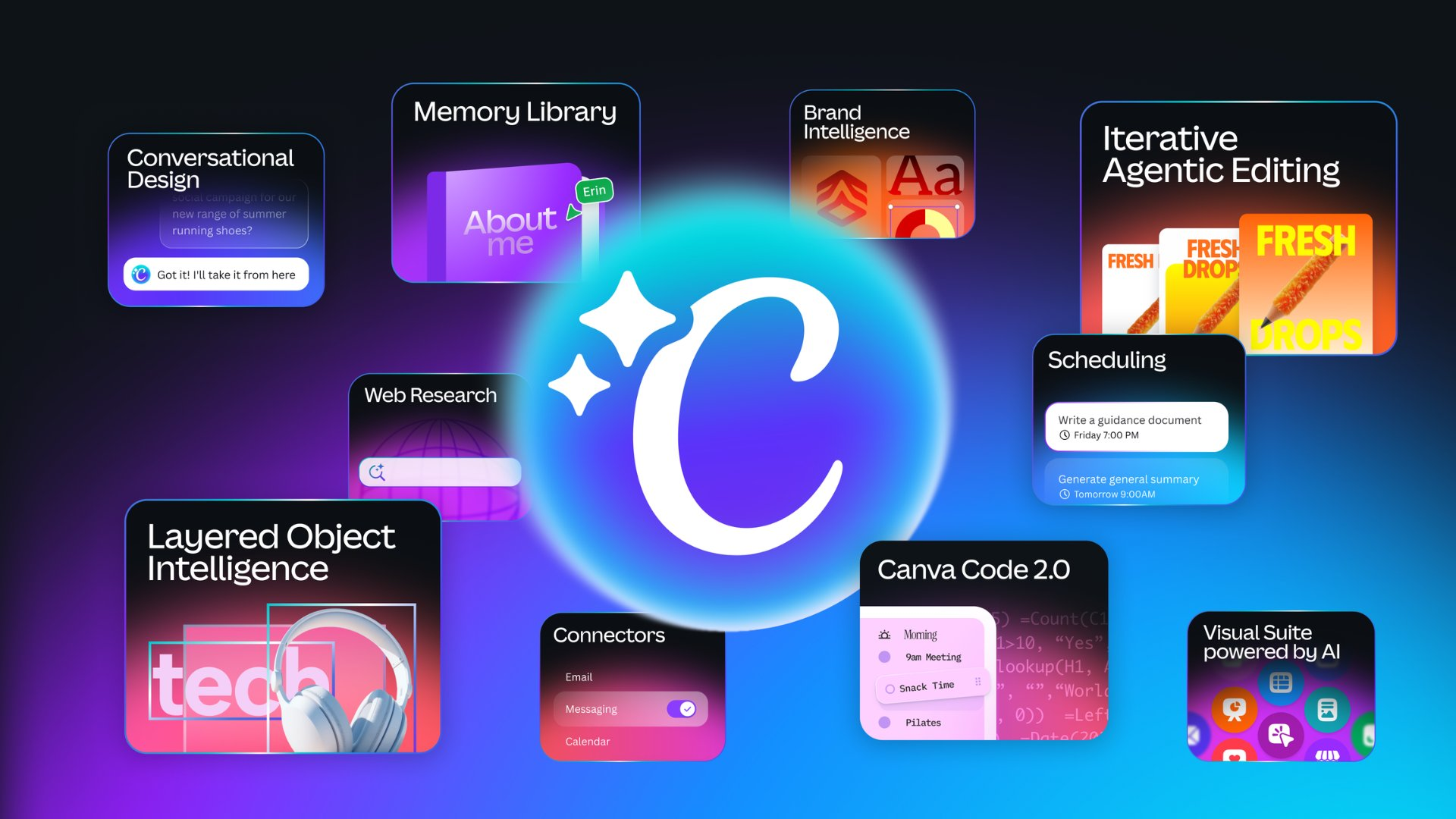
- Create professional visuals instantly by describing your vision through text or voice, as the AI interprets and generates designs from your instructions
- Maintain perfect brand consistency across every design as the AI learns your brand assets, fonts, colors, and design rules over time
- Generate complete visual elements like images, charts, and headlines on demand and integrate them directly into your layouts
- Produce 3D objects, animations, and video content from simple prompts without specialized skills or software
- Edit and enhance photos automatically by instructing the AI to crop, adjust brightness, apply filters, or remove backgrounds
- Schedule future or recurring design tasks to run automatically, ensuring your content calendar stays filled without manual effort
- Pull web research data, statistics, and imagery directly into your designs through built-in web search capabilities
- Refine any design through ongoing conversation or manual tweaks, keeping full creative control while accelerating the workflow
- Match your established aesthetic across new projects as the AI identifies your design style and applies it to every output
- Generate interactive visual content with coding elements as the AI translates coding instructions into visual form in real-time
Pros & Cons
Pros
- Conversation-based design generation
- Generates visual elements on request
- Brand asset learning for designs
- Incorporates web research into designs
- Learning user creative process
- Task scheduling for design requirements
- Creating with prompts feature
- Style matching capability
- 3D content generation
- Video generation feature
- Photo editing feature
- On-brand design generation
- Blends design, branding, coding tools
- Versatile tool for content creation
- Allows voice interaction
- Ensures interactive design process
- Provides personalized design output
- Ensures on-brand design consistency
- User always remains in control
- Incorporates unique design rules
- Generates images, charts, headlines
- Contextual design through connected tools
- Brand asset consistency in design
- Edits and refinements through conversation
- Future or recurring task scheduling
- Blend of writing and creativity tools
- Option for manual design alterations
- Pulls context from connected tools
- Understands and uses brand colors
- Transforms text to visual assets
- Interactive activities integration
- Enhances designs with style match
- Automatic resize function
- Custom shape generator
- Background remover with magic background
- Converts videos to MP4
- Magic Write for voiceover
- Integrates data with Canva Code
- Generates editable layouts with Magic Layers
- Ensures safe and private design
- Granular privacy settings
- Advanced security tools with Canva Shield
- Supports Design, coding, branding features
- Language conversion for designs
- Converts text to speech voiceover
- Online video recorder for use
Cons
- 3D content generation limitations
- Lack of advanced coding tools
- Limited voice interaction capabilities
- Requires frequent manual alterations
- Overreliance on branding rules
- Not fully compatible with all browsers
- Web research accuracy concerns
- Limited to on-brand design
- Inefficient task scheduling features
- Potential loss of design originality
Reviews
Rate this tool
Loading reviews...
❓ Frequently Asked Questions
Canva AI 2.0 is a versatile artificial intelligence tool tailored to generate designs. It is capable of creating visual assets based on user's creative ideas shared via voice or text. It intelligently pulls in insights from connected tools, allowing users to produce contextual visual designs. It's also capable of generating different visual elements such as images, charts, headlines, and integrating them into the design. The AI tool learns and adapts to the user's brand assets such as fonts, colors, and design rules to maintain brand consistency. Features also include scheduling design tasks, incorporating web research into designs, and learning user's creative processes to personalize outputs.
The conversation-based creation feature of Canva AI 2.0 is designed to let users express their vision and ideas either through text or voice. The AI then interprets these instructions and brings the concepts and ideas to life in a visual format. Any necessary edits or refinements to the design can also be made through subsequent conversation or manually, ultimately giving the users full control over their designs.
Canva AI 2.0 can generate visual elements like images, charts, or headlines based on a user's instructions. When a user puts forth these requests, the AI evaluates it and quickly generates appropriate visual assets that align with the user's design intentions. The generated visual elements can then be incorporated straight into the design.
Canva AI 2.0 pulls context from your connected tools to generate on-brand designs during a conversation with you. If your connected tools carry specific design aspects such as colors, fonts, design rules, etc., Canva AI 2.0 recognizes these and implements them in the generated designs, ensuring relevance and consistency.
In Canva AI 2.0, user control is maintained by allowing them to have dynamic interaction with the AI throughout the design process. Users have the ability to refine and edit their designs either through further conversation with AI or through manual alterations. This ensures that the user retains final say over all design elements and aspects.
Canva AI 2.0 adopts a learning-based approach towards understanding its users' brand assets. By studying the user's past designs and assets, it identifies the usage patterns of brand-related components such as fonts, colors, and design rules. Over time, the AI builds a library of the user's brand assets and applies it to future designs to maintain brand consistency.
Canva AI 2.0 allows you to run web research directly within the tool. The AI can search for anything and bring the insights or data straight into your design. This means you can access and use data from the web to support your design process, whether it's statistics for an infographic, imagery, quotes, or any other type of web content.
With Canva AI 2.0, you can schedule tasks for future or recurring design requirements. This implies that you can instruct the AI about a design you need in the future, or set up a recurring design task which Canva AI 2.0 will automatically execute at the scheduled time.
New capabilities of Canva AI 2.0 include an array of features such as creating designs based on prompts, style matching that aligns with your established aesthetic, generation of 3D content for enhanced visuality, photo editing capabilities, video generation, on-brand design generation which ensures brand consistency across all designs, and more.
Creating with prompts in Canva AI 2.0 allows users to design based on AI suggestions. When given a prompt, the AI generates a design or part of a design based on that cue. This feature supports the user in their design process, stimulating creativity and facilitating easier, faster design creation.
Style matching in Canva AI 2.0 utilises AI to identify your established design aesthetic and uses the insights to create new designs that align with that particular style. This ensures consistency across all your creative content, and reduces the time taken for manual matching of design styles.
The 3D content generation feature of Canva AI 2.0 allows you to create designs with a greater depth and perspective. The AI can generate 3D objects, animations and more, creating more visually immersive and interactive designs to catch the viewer's attention.
The photo editing feature of Canva AI 2.0 incorporates AI to help users enhance and rectify their photographs. It can automate numerous tasks such as cropping, brightness adjustment, application of filters, removal of image background, and more.
On-brand design generation in Canva AI 2.0 provides AI-driven design outputs that maintain brand integrity. The AI familiarizes itself with your brand's colors, fonts and design rules, and ensures every design output aligns perfectly with your brand's aesthetic.
The feature of creative process learning in Canva AI 2.0 refers to the AI's ability to understand and adapt to your unique style and process of creating designs. It learns your preferences and styles over time and personalizes the design outputs based on captured insights.
The video generation feature of Canva AI 2.0 assists users in creating compelling video content. Users can instruct the AI regarding their video creation requirements, upon which the AI creates and integrates video footage into the desired design or independently, if so desired.
Personalized output in Canva AI 2.0 indicates that the AI learns and adapts to your personal design preferences and creative process over time. It uses these insights to produce designs that are tailored specifically to your unique style, ensuring each output is distinct and personalized.
AI tools in Canva AI 2.0 help in design, writing and creativity by automating and enhancing various aspects of the creative process. The AI assists with generating design ideas, improving writing quality, and stimulating creativity by introducing novel design cues or ideas, creating efficient and innovative design outcomes.
Canva AI 2.0 helps in content creation by enabling users to easily generate visual elements, match design styles, create on-brand designs and much more. It simplifies the design process, making it easier and faster for users to create and share high-quality content.
In Canva AI 2.0, coding tools are seamlessly integrated into the design process. The AI can interpret user instructions related to coding tasks into visual form in real-time. These abilities provide users with a broader design scope, allowing them to create detailed and interactive visual content with coding elements.
Pricing
Pricing model
Freemium
Paid options from
$12/month
Billing frequency
Monthly
Related Videos
How we use Canva AI 2.0 | Canva Create
Canva•279.5K views•Apr 16, 2026