SnapSubtitles
Overview
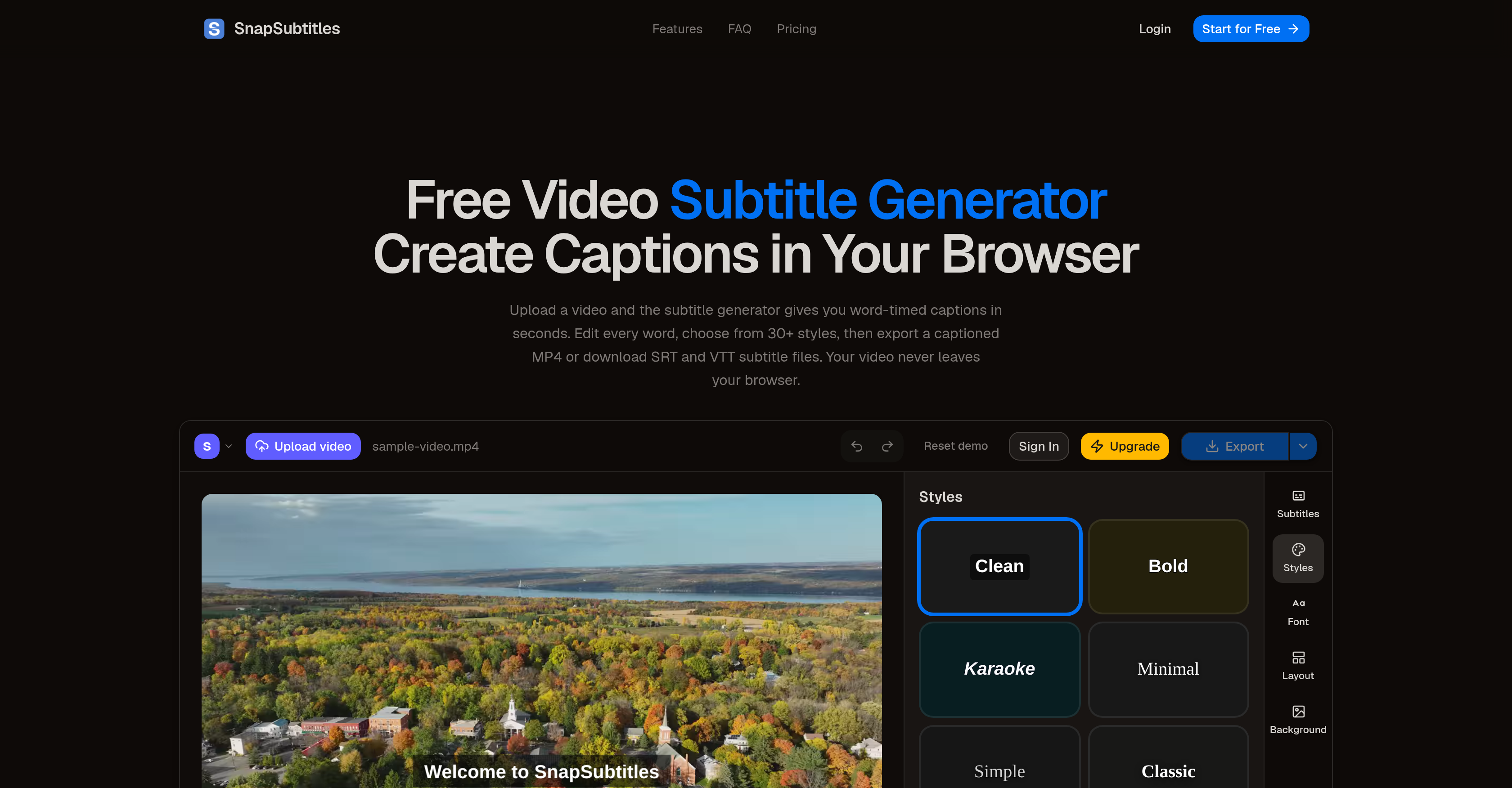
- Get broadcast-ready captions instantly with AI transcription that achieves word-level timing accuracy, rivaling manual work for clear audio.
- Protect sensitive content by keeping every video entirely in your browser—no data is ever uploaded to servers and all files are purged when you close the tab.
- Polish captions down to the millisecond using a precision timeline editor that lets you split or merge cues, with all changes reflected instantly on the video preview.
- Export finished videos with embedded captions as MP4 files locally via WebCodecs, or download SRT and VTT subtitle files for any platform.
- Reach a global audience effortlessly with auto language detection that supports dozens of languages, making your content accessible to viewers worldwide.
- Save editing time with undo/redo support and local auto-save, so you never lose progress while fine-tuning captions for YouTube, educational materials, or social media clips.
- Choose from over 30 animated caption styles to match your brand or creative vision, without needing design skills or external tools.
Pros & Cons
Pros
- Word-level timing accuracy
- Auto-detection for languages
- Every word stays editable
- Preview changes instantly
- Exports MP4, SRT, VTT files
- Operates entirely within browser
- No video data upload
- No server-side file storage
- Over 30 built-in styles
- Supports YouTube, schools, social media
- Client-side data wiping
- Supports video editing
- Allows for word adjustments
- Lets users split cues
- Permits merging caption cues
- Precise time adjustments
- Visual content stays private
- Captions saved locally
- Supports MP4, WebM, MOV
- Generates captions in seconds
- 30+ caption styles
- Full visual customization
- Used by YouTube creators
- Boosts watch time
- Expands reach to non-native speakers
- Facilitates educational accessibility
- Supports social media marketers
- Compatible with silent-autoplay feeds
- Supports educators
- Supports course creators
- Helps hearing-impaired students
- Assists non-native speakers
- Supports Journalists and Newsrooms
- For Freelance Video Editors
- Takes videos up to 1080p
- Supports videos up to 60 minutes
- H.264 rendering in Chrome/Edge
- Extends save up to 300 transcription minutes per day
- Free plan available
- Pro plan offers HD exports
- Max plan supports longer videos
- Provides local saved custom styles
Cons
- No mobile app
- Requires robust internet connection
- Limited video formats
- Requires Google Chrome or Edge
- Limited to 1080p videos
- Video length restrictions
- Free version includes watermark
- Possible language limitations
- Audio must be clear
Reviews
Rate this tool
Loading reviews...
❓ Frequently Asked Questions
SnapSubtitles supports several languages through its auto-detection feature.
Yes, SnapSubtitles can be used to generate subtitles for YouTube videos.
No, SnapSubtitles does not process videos on its servers. It operates entirely within the user's browser, ensuring user data and videos do not leave the device.
SnapSubtitles prioritizes user data and privacy by ensuring that all processing, from the speech-to-text transcription to subtitle rendering, occurs within the browser. No video data is uploaded to the servers. Also, there is no server-side file storage. All video data is purged from memory once the user closes their tab.
SnapSubtitles supports MP4 for exporting captioned videos and SRT and VTT for exporting subtitle files.
Yes, SnapSubtitles provides a real-time editing feature. Users can edit any words, adjust start and end times down to the millisecond, split or merge caption cues, and the changes are reflected instantly on the video preview.
SnapSubtitles offers over 30 built-in styles for captions. Users have the flexibility to choose among these styles to suit their particular needs.
Yes, in SnapSubtitles, users can adjust the start and end timing of each subtitle down to the millisecond.
Yes, SnapSubtitles can be used to generate captions for educational content, making lectures and tutorials accessible to a wider audience.
Yes, SnapSubtitles allows users to split or merge caption cues in the online editor.
SnapSubtitles full video export functionality works in Chrome and Edge version 120 or later. Other browsers can generate captions and download subtitle files but cannot render the final video.
The AI technology used by SnapSubtitles works with word-level timing for accuracy. While exact accuracy statistics are not mentioned, it is said that the AI's accuracy rivals manual work for clear audio.
Yes, SnapSubtitles allows every generated word to stay editable to ensure the quality of the subtitles.
Yes, SnapSubtitles supports multilingual videos through auto-detection of several languages.
SnapSubtitles does not have a desktop application. It operates entirely online within the users' browser.
The website does not mention specific file size limits for videos uploaded to SnapSubtitles.
Yes, SnapSubtitles can be used to generate subtitles for social media content, such as ads, Reels, and TikTok clips.
Yes, the captions generated by SnapSubtitles aid in making videos more accessible and inclusive for hearing-impaired individuals.
Yes, the video uploaded to SnapSubtitles never leaves the user’s browser and is not uploaded to its servers.
Yes, the free version of SnapSubtitles supports videos up to 10 minutes long.
Pricing
Pricing model
Freemium
Paid options from
$7.50/month
Billing frequency
Monthly