Overview
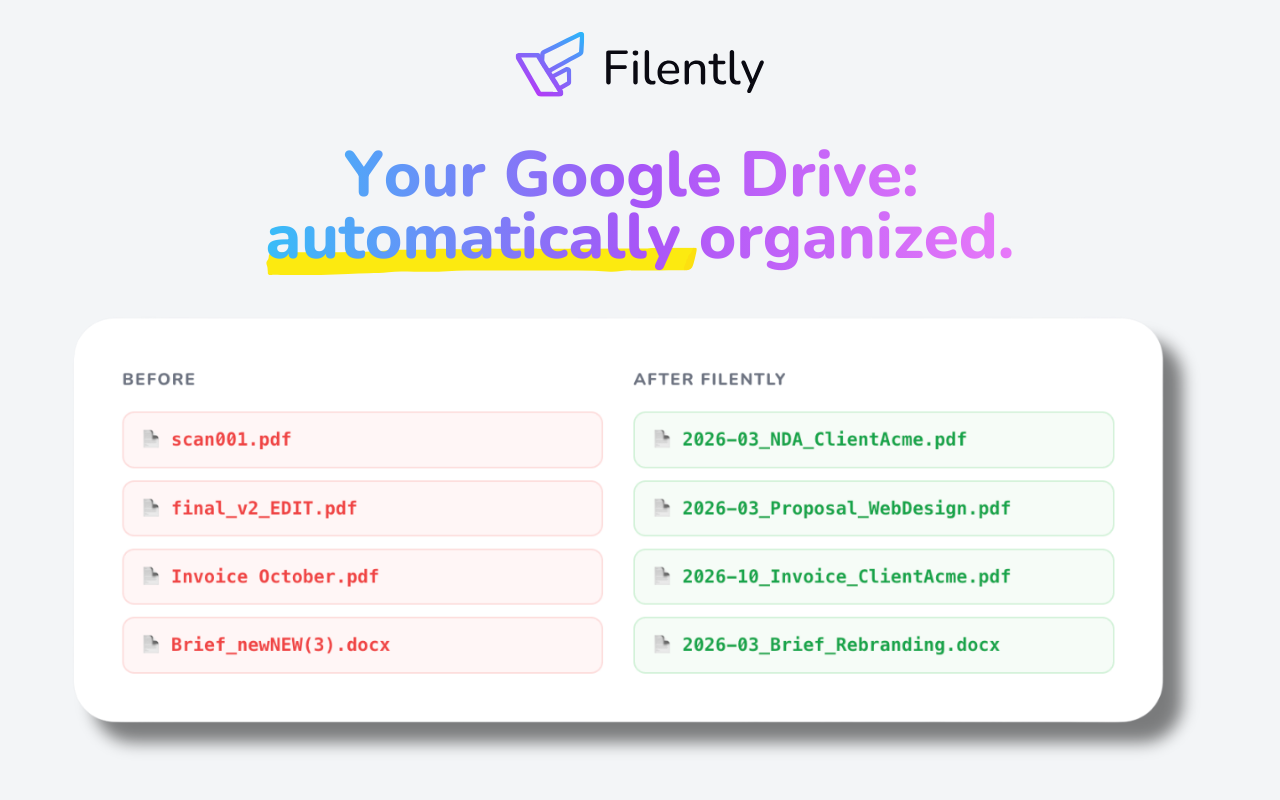
- Eliminate manual sorting and renaming—every document is automatically filed in the right folder with your naming convention the moment it arrives, using zero-touch AI processing.
- Achieve a clean, searchable Google Drive without configuring rules or prompts—the AI learns your existing naming patterns and folder logic from your current setup.
- Recover hours lost to file management—simply drag and drop documents, and the AI identifies document type, date, and vendor to rename and route files instantly.
- Maintain full control over your data with no vendor lock-in—files stay in Google Drive, no copies stored on external servers, and processing happens inside your existing infrastructure.
- Scale document organization across your team—works with Shared Drives and 'Shared with me' folders, plus supports documents forwarded from email for centralized filing.
- Ensure GDPR compliance and data privacy—documents are processed in your own Google Drive account, data never leaves EU infrastructure, and user data is never used for AI training.
- Bring order to a chaotic Google Drive in minutes—AI analyzes your existing files and proposes a logical folder structure, then learns from your corrections to improve future accuracy.
Pros & Cons
Pros
- Works inside Google Drive - no new app to learn
- No migration required
- Learns your existing folder structure automatically
- Files arrive automatically via Google Drive, email, or direct upload
- Free first 25 documents, no credit card required
- Cancel anytime, files stay organized
- Doesn't store document copies
- User data stays within Switzerland/ EU
- CASA Tier 2 certified & Google App Defense Alliance verified
- Advanced OCR technology
- 20+ languages supported
- Optional manual confirmation before filing
- Confidence-based auto-filing mode
Cons
- Currently Google Drive only
- Requires Google account
- No desktop or offline version
- Teams features coming soon
- Full support for design files and images without text coming soon
Reviews
Rate this tool
Loading reviews...
❓ Frequently Asked Questions
Filently automates document renaming by using its AI technology to identify elements like the document type, date, and vendor. It then renames files according to the user's conventions.
Filently supports the ability to identify document type, date, and vendor in more than 20 languages.
Yes, Filently analyzes documents and suggests a logical folder structure if the current one is unorganized.
'Zero-touch' processing in Filently means that users only have to drag and drop their documents. There's no need to select folders, type names, or configure rules.
Filently ensures GDPR compliance and data privacy by processing documents directly in the user's Google Drive account without creating permanent copies on its servers. Additionally, it is designed with CASA Tier 2 certification. The user data never leaves EU infrastructure.
Yes, Filently is fully integrated with Shared Drives and 'Shared with me' folders in Google Drive.
No, Filently doesn't store any copies of the documents. It only reads them to generate a name and file them.
With Filently, there is no need for any migration of existing data.
Yes, you can cancel the Filently service at any time. There is no impact on the already-organized files.
Yes, Filently reportedly has upcoming support for Dropbox, OneDrive, and other providers.
Filently organizes Google Drive documents by using AI to automatically read, rename, and file new documents. It picks up on the user's filing conventions and places the files in their appropriate folders.
Filently's AI technology is used for automatically reading, renaming, and filing documents in Google Drive. It identifies elements like the type of document, date, and vendor. The AI is also used to suggest a logical folder structure if the current one is unorganized.
Filently handles CASA Tier 2 certification for security by ensuring that the tool respects user data and follows strict data privacy guidelines. The certification verifies Filently's security measures across 14 areas, including access protection and data handling.
No, user data does not leave the EU infrastructure while using Filently.
Filently's AI technology reads and understands your documents, it learns your naming conventions and uses this information to rename your files accordingly.
Filently's full integration with Google Drive includes Shared Drives and 'Shared with me' folders. You can drag and drop files straight into Filently and it will take care of the filing automatically, reading the documents only to generate a name and file them.
With Filently, you don't need to manually select folders or type names. Filently's 'zero-touch' processing automatically handles these tasks.
Yes, Filently is capable of identifying document type, date, and vendor. This function supports over 20 different languages.
Yes, Filently is compatible with Google Drives' Shared Drives and 'Shared with me' folders.
When you cancel your Filently service, all your documents remain perfectly organized in your Google Drive. There's no need for any migration of existing data when the service is cancelled, and the files maintain their improved names and folder structure.
Filently is an AI-powered tool designed for document management on Google Drive. Filently specializes in identifying, renaming, and organizing incoming documents automatically. The AI tool works with your existing Google Drive and immediately understands and applies your naming convention. No new infrastructure or migration is required. Filently is built for freelancers, agencies, and small businesses dealing with a large number of documents in Google Drive.
Filently uses AI to read your Google Drive, learn your naming conventions and automatically file each new document. After identifying the document type, date, and vendor, it automatically files the document in the relevant Google Drive folder. Filently can handle documents sent via email, directly uploaded or placed in a Drive Inbox. Filently uses your existing folder structure for filing or helps you build a new one from scratch.
Filently supports a wide array of file types including PDF, Microsoft Office, OpenDocument formats, and images containing text. Besides those, any other file type can be organized by Filently based on their filename.
Filently sticks to stringent data privacy standards and is GDPR-compliant. Filently processes documents directly in the user's Google Drive, without storing copies on their servers. All data is hosted within the EU and Switzerland, ensuring the data never leaves the EU infrastructure. User data is purely used for generating a suitable name and filing the documents effectively, but never for AI training.
Currently, Filently works primarily with Google Drive but there are plans to expand compatibility to include other cloud storage services like Dropbox, OneDrive, and others in the near future.
Yes, Filently offers multi-language support. It has the capability to process documents and images with text in over 20 different languages.
Yes, documents sent via email can be managed using Filently. Users can forward email attachments to their personal Filently address for processing and automatic organization.
Unlike traditional document management systems, Filently works with your existing cloud storage and learns from your current organization patterns. It requires zero-touch processing which means you just drag and drop - no folders to select, no names to type, no rules to configure. The AI handles everything while continuously improving based on your feedback.
Filently uses a “Convention First” approach with continuous learning capabilities. The AI analyzes your existing folder structure and file naming patterns, then adapts to your organization style. Every time you make a correction or provide feedback through the optional review feature, Filently learns and improves its accuracy for future document processing.
Yes, Filently can bring order to a disorganized Google Drive by analyzing your documents and proposing a clean folder structure.
Yes, Filently can handle documents sent via email. You can simply forward any attachment to your personal Filently address for processing.
Filently provides multi-language support. It can effectively identify, rename, and file documents and images that contain text in more than 20 different languages.
Filently prioritizes data security by processing documents directly in your own Google Drive account. Copies of your files are never permanently stored on Filently servers. Files are temporarily held in encrypted memory during processing and immediately deleted after successful upload to your Drive. Furthermore, Filently is GDPR-compliant and offers full data export and deletion capabilities.
Filently boosts productivity by taking over the manual task of organizing incoming documents in Google Drive. It identifies, renames, and files each document according to user-established conventions. This immediate filing of documents the moment they arrive, saves time and keeps your Google Drive organized efficiently.
Filently not only renames files but also organizes your folder structure. Based on your existing patterns or by creating a logical structure from scratch, Filently ensures each document is stored in the right place.
Yes, Filently can handle documents that are either directly uploaded or placed in a special Drive Inbox designated for Filently to process.
Filently uses the 'Convention First' approach. This means it works with your existing folder structure and file naming patterns, adapting to your organization style. As you make corrections or provide feedback, Filently learns and improves its accuracy for future document processing.
Filently can operate with your existing Google Drive and simultaneously understands and builds upon your current folder structure. If you're setting up a new Google Drive, Filently can assist by establishing a sensible and clean folder structure from scratch.
Filently supports document processing in more than 20 major languages.
Yes, Filently includes a comprehensive activity timeline where you can review all processed documents. If a document is filed incorrectly, you can easily correct the filename or folder location. Each correction aids in training the AI to be more accurate in the future.
Pricing
Pricing model
Free Trial
Paid options from
$6/month
Billing frequency
Monthly