Overview
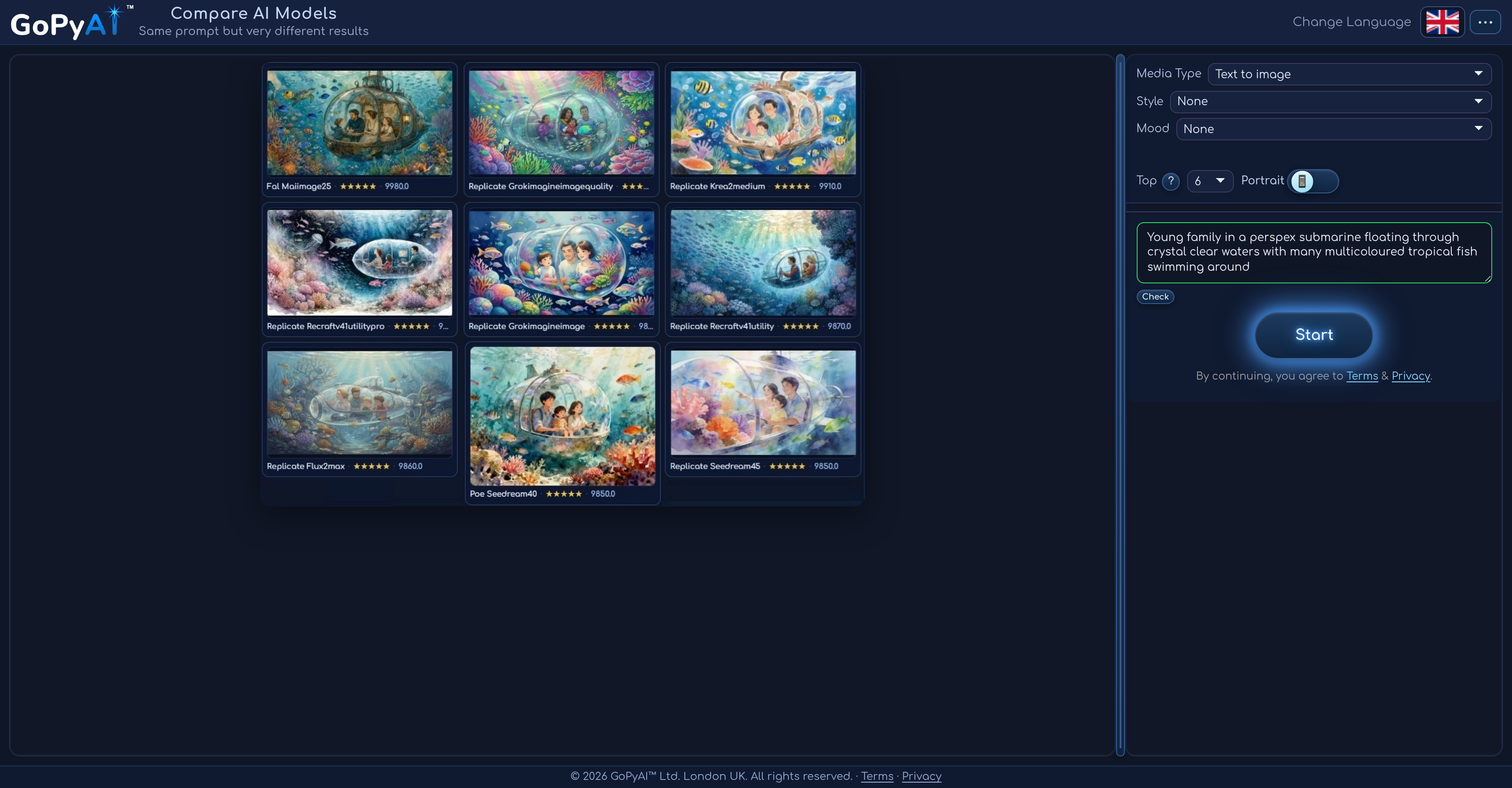
- Choose the best-performing AI model for your budget by running the same prompt across multiple providers simultaneously with GoPyAI Compare's parallel processing.
- Evaluate AI image and video models with diverse results displayed side-by-side, making quality and speed trade-offs immediately clear through ranking logs.
- Run image-to-image, image-to-video, text-to-image, text-to-video, and text-to-audio tasks on one platform, eliminating the need to switch between separate AI tools.
- Match your exact creative vision by selecting photorealistic, anime, or animated styles, plus adjustable aspect ratios and output resolutions for every comparison.
- Stay within budget effortlessly with real-time cost tracking during creation, giving you clear feedback to manage your wallet without unexpected expenses.
- Secure your wallet top-ups and withdrawals with email or SMS code verification, ensuring safe access to your funds and account.
- Start comparing AI models risk-free with a free trial, letting you test the platform before committing to a subscription.
Pros & Cons
Pros
- Side-by-side result comparison
- Supports diverse media conversion tasks
- Offers style adaptations
- Supports different aspect ratios
- Customizable output resolution
- Cost tracking facility
- Provides ranking logs
- Secure payment methods
- Supports sign in and sign up
- Email verification for security
- Same prompt, diverse results
- Wide range of style options
- Enhances decision making process
- Prepaid wallet feature
- Secure retrieval via email/SMS
- Flexible media preset options
- Sort by cost, quality, popularity
- Supports variety of output resolutions
- Quality and speed trade-off clarity
- Multiple providers comparison
- Easy interface for media type selection
- Visual comparison of outputs
- Wallet balance visibility
- Prompts to improve tasks
- Secure Stripe checkout integration
- Option to export CSV data
- Supports multiple languages
- Progress tracking
- Start free trial option
- Visual quality and style contrast
- Repeatable actions and logs
- Search options for model reason
- Image upload for comparison
- Provider details for transparency
- Balance top-up options
- Results filtering options
- Visible provider cost
- Check start and cancel options
- Real-time run status updates
- Facilitates direct sharing options
Cons
- No direct model upload
- Limited style adaptations
- Cost tracking not real-time
- Email or SMS retrieval only
- Prepaid wallet payment only
- No live customer support
- No batch comparison feature
- Limited run log details
- No multi-language support
- No automatic data backup
Reviews
Rate this tool
Loading reviews...
❓ Frequently Asked Questions
GoPyAI Compare is an advanced AI tool specifically designed to facilitate the comparison of AI models for image and video analysis.
GoPyAI Compare allows AI developers and users to run their tasks across multiple provider models using the same prompt. The platform presents diverse results side-by-side, helping users to decide on the best-performing model that fits their budget.
GoPyAI Compare builds on the principle of parallel processing. It accepts a task prompt and sends it to multiple AI provider models at once. The results from each model are then returned and displayed together, allowing users to compare efficiency, quality, and output side by side.
Yes, GoPyAI Compare supports various media types. Users can choose from image-to-image, image-to-video, text-to-image, text-to-video, and text-to-audio conversion tasks.
GoPyAI Compare offers a variety of style adaptations to users. These include photorealistic, anime, and animated styles.
Yes, the GoPyAI Compare system supports a variety of aspect ratios and customizable output resolutions, further catering to the specific requirements of the user's tasks.
The cost tracking feature in GoPyAI Compare provides clear feedback on costs during creation, enabling users to manage their budgets effectively and avoid unexpected expenses.
The ranking logs in GoPyAI Compare help users to understand the trade-offs between quality and speed for different AI models. This feature simplifies the decision-making process, particularly when users need to choose the best-performing model that fits their budget.
Yes, GoPyAI Compare provides secure access via both email and SMS. Users can top-up their wallet and obtain secure retrieval via an email or SMS code.
To sign up for GoPyAI Compare, users simply choose the sign up option and follow through the process, which includes email verification for secure access.
To top-up your wallet on GoPyAI Compare, you need to select the 'Top-up' or 'Wallet' option on the platform. This top-up process is tied to the user account and is secure.
Yes, GoPyAI Compare can help users decide on the best-performing model that fits their budget. This is achieved through advanced comparison of AI models and side-by-side presentation of results, backed with clear cost tracking and ranking logs to aid decision-making.
Running tasks across multiple provider models parallely using the same prompt in GoPyAI Compare means that when a task is started, it is sent to multiple AI models at the same time. These models process the task independently and return their results, allowing the user to compare a wide range of results from their identical prompt.
Some media conversion tasks you can run on GoPyAI Compare include image-to-image, image-to-video, text-to-image, text-to-video, and text-to-audio conversions.
Yes, GoPyAI Compare offers a free trial, as stated on their website. Users can start by testing the system before deciding on a subscription.
The secure retrieval feature on GoPyAI Compare ensures safety with withdrawal or retrieval transactions from your wallet. This is achieved using secure measures such as email or SMS code confirmations.
Yes, throughout the creation process in GoPyAI Compare, clear feedback is provided. This includes cost tracking feedback to help users manage their wallet effectively during task creation.
During the sign-up on GoPyAI Compare, email verification is employed as a primary security feature. After filling out your details and providing your email, a one-time code is sent to your email for verification. Inputting the correct code completes the sign-up process, ensuring that you have secure access.
To compare AI image and video models side by side using GoPyAI Compare, users need to select their desired task type and run it across multiple AI provider models using the same prompt. The platform then displays the results side-by-side facilitating comparison.
Search results from using GoPyAI Compare will be varied, depending on the diversity of AI provider models used. The same prompts will yield different results allowing a comprehensive comparison of AI model capabilities, cost-effectiveness and performance. This helps users in making an informed choice about the best fitting AI solution for their needs.
Pricing
Pricing model
Free Trial
Paid options from
$5/unit
Billing frequency
Pay-as-you-go
Related Videos
Compare AI Image & Video Models Side by Side — GoPyAI
GoPyAI•2 views•Jun 22, 2026