Auto Captioner
Overview
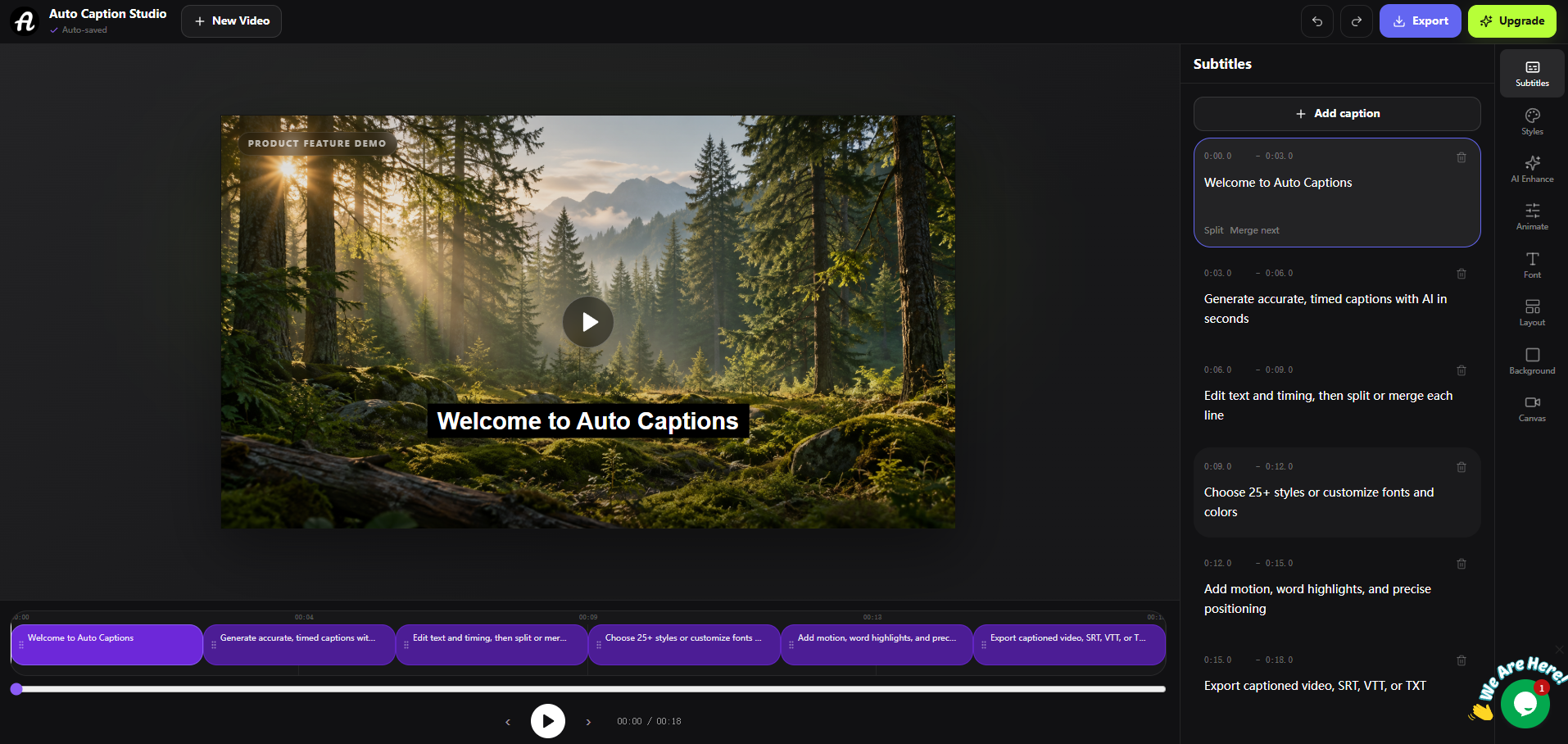
- Publish videos globally with accurate subtitles in over 20 languages, enabled by AI transcription that handles accents, background noise, and multiple speakers.
- Boost audience engagement and search rankings by adding SEO-friendly captions, using the tool's automatic subtitle generation that increases watch time.
- Create accessible content for diverse viewers, including those with hearing impairments, through precise multi-language subtitles generated in seconds.
- Save hours of manual editing by customizing captions with over 25 style presets, adjusting timing, and editing words directly in the interface.
- Post videos instantly across all social platforms by downloading them with burned-in subtitles, supported by compatibility with MP4, MOV, WebM, and any aspect ratio.
- Scale your content production affordably with a tiered pricing model, starting free for up to 10-minute videos and upgrading for watermark removal and high-resolution exports.
Pros & Cons
Pros
- Automated video captioning
- Transcribes multiple accents
- Background noise transcription
- Supports 20+ languages
- 25+ style presets
- Editable captions
- Adjustable caption timing
- Burned-in subtitle option
- Supports multiple video formats
- Removal of watermarks
- Offers high resolution exports
- Tiered pricing model
- Multiple-speaker transcription
- Subtitle exports in SRT, VTT, TXT
- Offers video editing features
- Automatic language detection
- Subtitle translator
- Supports animated captions
- Custom caption fonts option
- Caption style customization
- Competitive pricing options
- Supports drag-and-drop upload
- On browser operation
- 25+ style presets
Cons
- Free version includes watermark
- Limited video length
- Transcription errors possible
- Styling presets may limit customization
- Transcription dependent on audio quality
- No offline functionality
- Limited video export formats
- Localization may not be comprehensive
- Limited support channels
- Potential privacy issues with audio processing
Reviews
Rate this tool
Loading reviews...
❓ Frequently Asked Questions
Auto Caption works by allowing users to upload any video wherein it generates accurate subtitles in seconds through its AI-powered transcription feature. After the captions are generated, users can edit words, adjust the timing and choose from various caption styles. Users can then download their videos with burned-in subtitles, ready for posting on any platform. It supports most common video formats including MP4, MOV, WebM, and more.
Auto Caption supports more than 20 languages, efficiently acting for users worldwide. Some of these languages include English, Spanish, French, German, Portuguese, Japanese, and more.
The transcription feature of Auto Caption is designed to be highly accurate using state-of-the-art AI technologies. It can even handle accents, background noise, and conversations involving multiple speakers with impressive precision.
Yes, Auto Caption can indeed transcribe dialogue from multiple speakers at once, which makes it an ideal tool for multi-speaker videos, group discussions, conferences, and more.
Yes, Auto Caption provides users with the feature to edit captions after they are generated. Users can easily alter the words, adjust the timing and personalize the caption styles according to their preferences.
Yes, Auto Caption supports background noise transcription. It uses its AI capabilities to effectively decipher and transcribe audio from videos even with considerable background noise.
Auto Caption supports most common video formats. This includes MP4, MOV, WebM, and other prevalently used video formats. It caters to videos of any aspect ratio—whether landscape, portrait, or square.
Yes, Auto Caption can transcribe accents. It leverages advanced AI technology to effectively decipher a range of accents and transcribe them accurately into subtitles.
Yes, Auto Caption offers more than 25 styled presets for personalizing captions. These allow users to customize their captions to match their brand voice and aesthetic or their personal style preferences.
Yes, Auto Caption allows users to download their videos with burned-in subtitles making it ready to instantly post across different social platforms, enhancing the accessibility of their content.
Auto Caption has a tiered pricing model. It begins with a free version that offers AI subtitle generation and up to 720p exports for videos up to 10 minutes. For more features and advantages, users can upgrade to Pro or Max versions which are priced at $9.90 per month and $14.90 per month respectively.
Yes, an upgraded subscription to Auto Caption Pro or Max tier allows for the removal of the small AutoCaptioner.com watermark from the video exports.
Yes, Auto Caption does allow high-resolution video exports. With an upgraded subscription, users can enjoy quality video exports for a better viewing experience.
The target audience of Auto Caption includes creators, marketers, educators and anyone who publishes video content online. It's particularly useful for YouTube creators, educators & coaches, freelancers & agencies, podcasters, and social media managers.
Auto Caption supports e-learning requirements by enabling educators and coaches to make their lessons and course content more accessible. Accurate subtitles in multiple languages can be generated within seconds, making the learning material easy to comprehend for a wide range of audiences, including people with hearing impairments.
Auto Caption assists users with its multi-language support by not only transcribing but also generating accurate subtitles in over 20 languages. This feature can be invaluable for users looking to reach a global audience, as it allows the same content to be made accessible and comprehensible for viewers who speak different languages.
Auto Caption offers users over 25 style presets to customize their captions. These encompass a range of aesthetic options, allowing users to select and apply designs that best serve their individual brand or content style. The option to save and reuse custom styles is unlocked with a Pro subscription.
To help boost digital marketing efforts, Auto Caption allows marketers to make their video content more accessible and SEO friendly by adding accurate subtitles. It not only improves user engagement but also increases the watch time of the videos, allowing marketers to reach a larger audience and rank higher in search engine results.
For the free subscription of Auto Caption, the limit on video length is up to 10 minutes. If users need to work with longer videos, they can upgrade to Pro or Max versions, which extends the per-video length to 30 minutes and 1 hour respectively.
Yes, Auto Caption offers tiered subscription models designed to cater to various levels of professional use. The Pro tier, priced at $9.90 per month, is optimized for regular content creators and small business requirements, providing features such as removal of the watermark and AI subtitle translation. The Max tier, priced at $14.90 per month, primarily caters to power users or businesses with heavier usage, providing all Pro features plus the benefits of longer video length support.
Pricing
Pricing model
Freemium
Paid options from
$9.90/month
Billing frequency
Monthly
Refund policy
View Policy