Overview
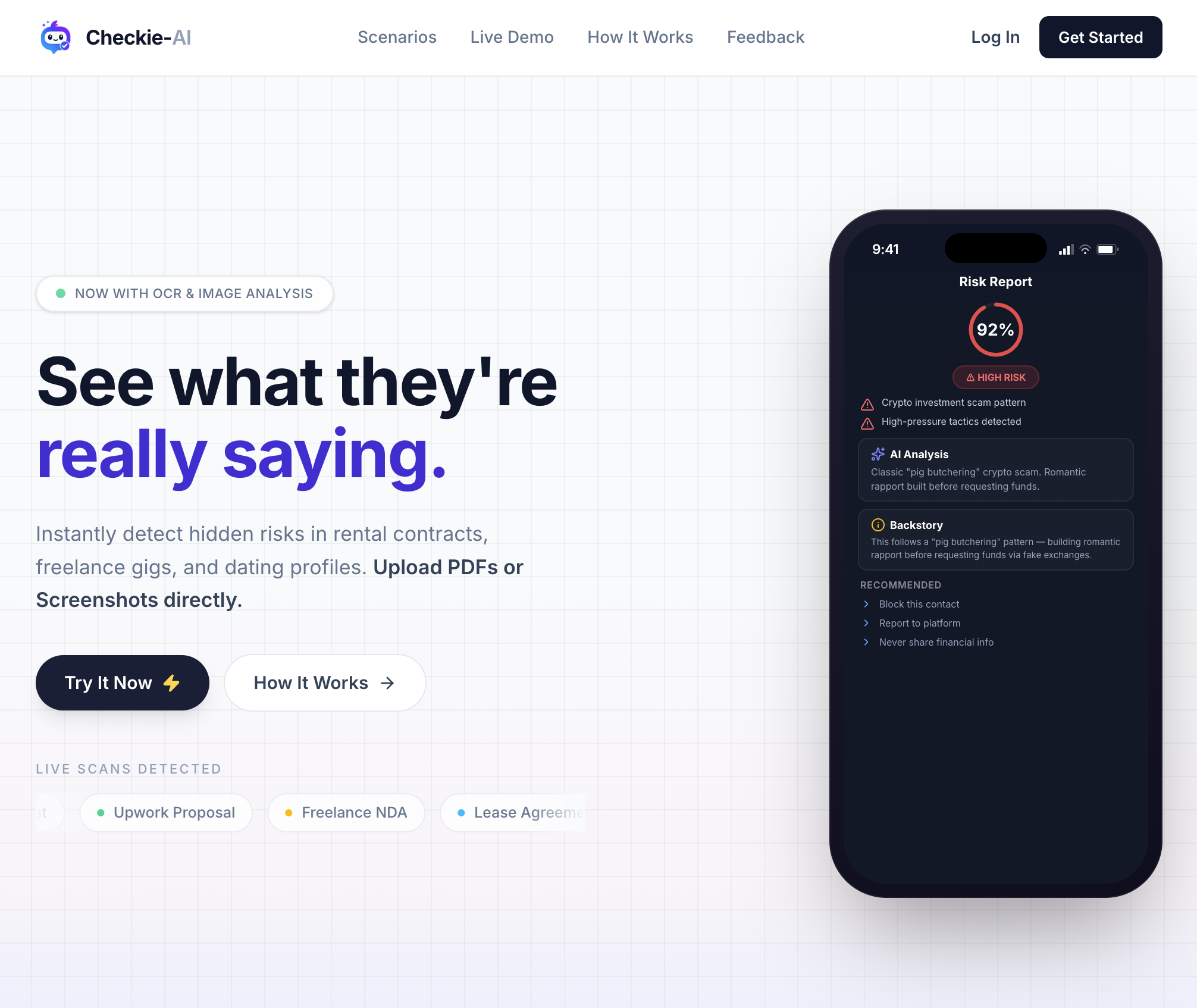
- Spot hidden rental contract risks before you sign—Checkie-AI scans PDFs and screenshots for illegal clauses, hidden expenses, and unfair terms.
- Avoid freelance scams and manipulative offers—language analysis flags suspicious patterns and red-flag conditions in job agreements.
- Catch AI-generated images and inconsistencies in dating profiles—image authenticity detection and micro-expression analysis reveal what photos hide.
- Understand documents in any language—OCR and translation across 90+ languages turn complex content into a clear, easy-to-read risk report.
- Get answers in seconds without waiting—instant analysis processes your uploads immediately and delivers a plain-language second opinion.
- Keep your personal data completely private—anonymous processing and instant deletion after analysis leave no trace of your information.
- Make everyday decisions with confidence—pattern recognition highlights manipulative language, scam indicators, and compatibility signals in one report.
Pros & Cons
Pros
- Analyzes various context risks
- Supports PDF, screenshots, text
- Identifies manipulative language
- Detects scam signals
- Highlights illegal clauses
- Uncovers unfair terms
- Incorporates OCR technology
- Accommodates image analysis
- Reads micro-expressions
- Assesses facial structures
- Offers language analysis
- Highlights scam conversation patterns
- Supports over 90 languages
- Highlights risks based on regulations
- Assures user privacy
- Allows instant deletion post-analysis
- Detects contract risks
- Identifies chat vulnerabilities
- Assesses profile risks
- Detects image deep pixels
- Sites user testimonials
- Translates legalese to English
- Detects PUA tactics
- Exposes cryptocurrency scams
- Identifies illegal rent clauses
- Spotlights hidden maintenance fees
- Protects freelancer IP rights
- Detects unlimited revisions traps
- Quick risk analysis
- Easy interpret traffic-light system
Cons
- No offline functionality
- Limited to text, image uploads
- Doesn't support direct URL input
- No built-in file scanner
- Involves language translation inaccuracies
- Potential over-reliance on patterns
- No API for integrations
- May misinterpret context
- Non-substitutable for legal advice
- Specialized OCR errors possible
Reviews
Rate this tool
Loading reviews...
❓ Frequently Asked Questions
Checkie is an AI-powered analysis tool designed to help users identify hidden risks across multiple contexts such as rental agreements, freelance jobs, and dating profiles. The tool empowers its users to upload PDFs, screenshots, or text and then analyzes this information to flag potential manipulative language, scam indicators, illegal terms, and unfair conditions.
Checkie carries out risk detection using OCR technology to read text from digital images, screenshots, or physical documents. It also analyzes images, identifies AI-generated images, and reads micro-expressions and facial structures in photos to gauge compatibility. Lastly, it offers a language analysis feature that identifies conversation patterns that could signify manipulation or scam attempts.
Yes, Checkie allows you to upload screenshots for analysis. It uses OCR technology to read the text and perform an analysis on it.
Checkie uses OCR (Optical Character Recognition) technology, a sought-after feature in AI for reading text from digital images. This includes screenshots and physical documents, greatly expanding the types of data Checkie can analyze.
Checkie uses its image analysis feature to not only read text but also interpret micro-expressions and facial structures in images. This helps gauge the compatibility of two parties in a dating context, for example. It's also capable of determining whether an image was AI-generated, offering another level of security.
Yes, Checkie can indeed detect AI-generated images. The tool examines images deeply to determine whether they were generated by AI rather than captured naturally.
Yes, Checkie does analyze language in conversations. It's capable of identifying patterns that might suggest manipulation or scam attempts. This allows users to stay vigilant and avoid falling for hidden scams or underhanded tactics.
Yes, Checkie can translate and analyze text in more than 90 languages. This means that not only can it handle texts from a diverse range of languages but it can also understand the context to accurately identify potential risks.
While Checkie can highlight potential risks based on common patterns and public regulations, it does not serve as a replacement for legal advice. So, while helpful in identifying issues, Checkie is not a source of legal counsel.
Checkie ensures user privacy by processing all text anonymously. Furthermore, all data is instantly deleted after analysis, leaving no trace of the user's information.
Yes, Checkie does indeed offer an instant analysis feature. Immediately after users upload their documents, screenshots, etc., Checkie works to detect hidden risks, making the process quick and efficient.
Yes, Checkie can analyze dating profiles. It reads the micro-expressions and facial structures in the photos as well as scans user-uploaded text or screenshots of conversations to identify potential threats or manipulative language.
Checkie uses its AI-powered features to detect potential scams. It can highlight common patterns or signals often used in scams, such as manipulative language, unusual agreement terms, or even analyzing AI-created images often used in scams.
Yes, Checkie can analyze rental contracts to detect hidden risks. It scrutinizes the terms in the contract to unveil any illegal clauses, hidden expenses, or other potentially hazardous elements within a rental agreement.
Checkie guarantees the anonymity of your data by keeping the entire process anonymous. The tool processes text securely without tying it back to the user, and any data processed through Checkie is discarded immediately after analysis, ensuring optimal privacy.
Yes, Checkie can detect both unfair terms and illegal clauses. Whether it's in a rental contract, work agreement, or other types of written documents, Checkie can highlight these problematic areas for the user.
Yes, Checkie does make use of pattern recognition for risk detection. It is designed to recognize common patterns in language and agreement terms that often signify risks, manipulation, or scam efforts.
Yes, Checkie can analyze facial expressions in photos. It reads the micro-expressions and facial structures to assess compatibility between two individuals, providing a unique layer of analysis.
Yes, Checkie is capable of identifying manipulative language. This is an integral part of how it finds potential risks or scam efforts in text conversations.
After the analysis, Checkie instantly deletes the user data. Its promise of privacy includes ensuring that none of the information processed through the tool is retained or stored.
Pricing
Pricing model
Free
Paid options from
Free