Everest | AI Scheduling Assistant
Overview
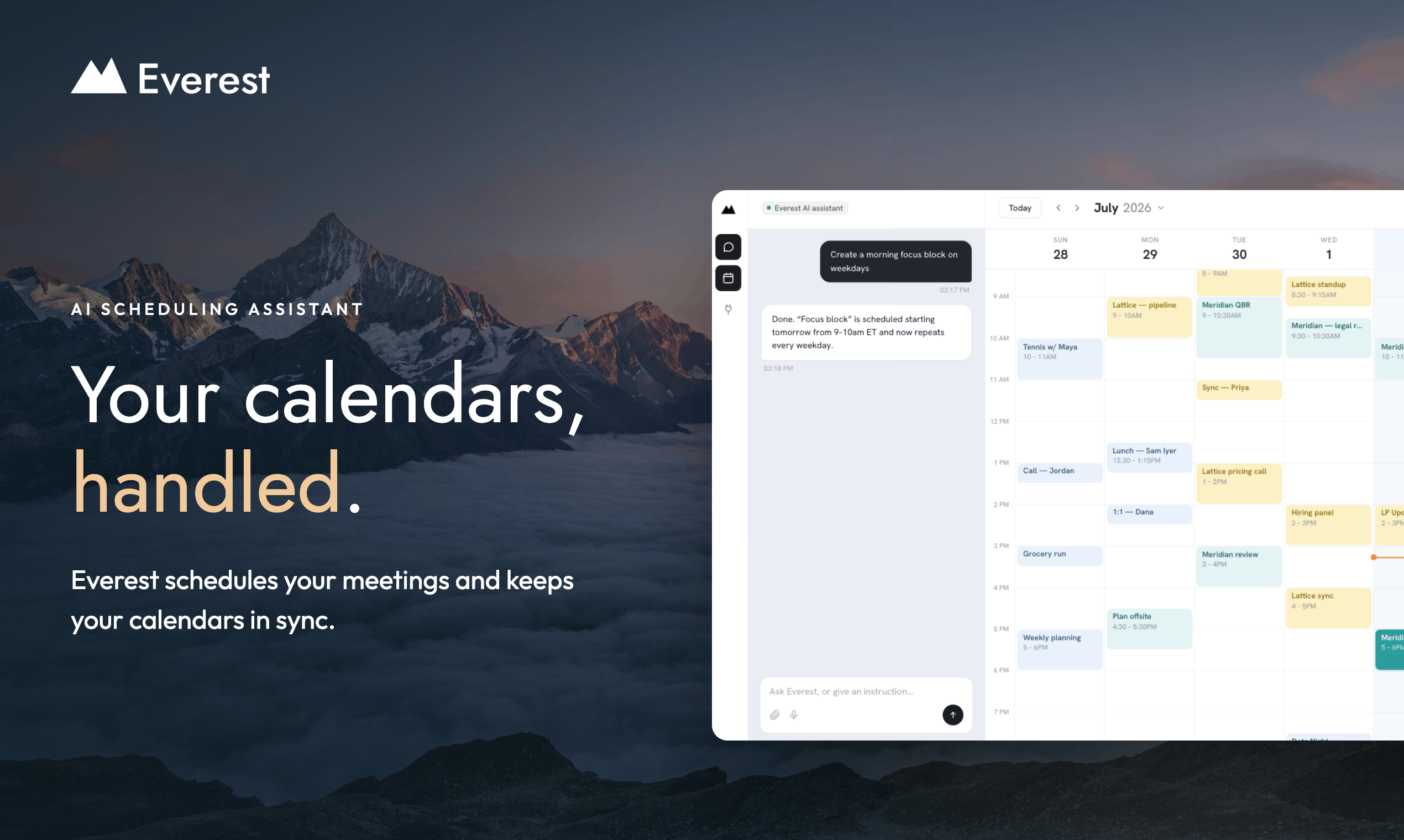
- Book meetings without leaving your inbox by CCing Everest on any email thread, where it proposes times, negotiates with every attendee, and confirms the slot
- Stop chasing silent replies with automatic follow-ups that nudge unresponsive contacts until a meeting time is locked in
- Never double-book again with cross-synced Google and Outlook calendars that mirror every commitment as a private busy block
- Schedule with international clients without timezone math, since Everest remembers each contact's timezone and only proposes working-hours slots
- Get repeat bookings done in seconds using contact memory that stores names, emails, and timezones of everyone you schedule
- Coordinate group meetings across multiple attendees on one thread, with Everest finding the single slot that fits everyone
- Set up recurring meetings like weekly standups and quarterly reviews that stay on the calendar without renegotiation
- Reschedule or cancel by replying in the thread, letting Everest find a new time and notify every invitee automatically
- Protect personal time by adding your private calendar, so client calls cannot land on the gym, school run, or a flight
- Keep your inbox private, because Everest only reads and acts on the threads you explicitly CC it on
- Start scheduling in two minutes by connecting a Google or Outlook calendar, with no app, plugin, or link for anyone to click
- Get Google Meet links added natively the moment a meeting is booked, so calls are ready without extra steps
Pros & Cons
Pros
- Manages multiple calendars
- Unified view of calendars
- Negotiates meeting times
- Automatic booking on calendar
- Handles scheduling conflicts
- Automates follow-ups
- Personalized scheduling
- Strict privacy measures
- No access to inbox
- Built for multi-client management
- Integrates with email
- Timezone management
- Unified calendar view
- Custom workspace for contacts
- Keeps calendars consistent on availability
- Automates rescheduling
- Allows direct messaging scheduling
- Operates on user command only
- Can handle group scheduling
Cons
- Integration limited to Google and Outlook
- No multi-user organization functionality
- Requires email thread initiation
- No customization of scheduling messages
- No mobile app available
- Reliance on email for scheduling
Reviews
Rate this tool
Loading reviews...
❓ Frequently Asked Questions
Charles Brun (Charles)
🛠️ 2 tools
🙏 73 karma
wrote:Everest is an AI scheduling assistant that runs the back-and-forth of booking meetings for you. Connect your Google and Outlook calendars and it keeps them all in one view, so your availability is always up to date and nothing double-books. It also remembers everyone you schedule with, so the next meeting takes less effort than the last.
Charles Brun (Charles)
🛠️ 2 tools
🙏 73 karma
wrote:CC Everest on any email thread where you are trying to find a time. From there it takes over: it proposes times that actually work, handles the back-and-forth with everyone on the thread, and books the meeting on the right calendar. If someone goes quiet, Everest follows up so you do not have to.
Charles Brun (Charles)
🛠️ 2 tools
🙏 73 karma
wrote:No app, no plugin, no link for anyone to click. Email is the whole interface: you CC Everest's address on the thread you are already writing, and it takes it from there in the same conversation.
Charles Brun (Charles)
🛠️ 2 tools
🙏 73 karma
wrote:No. They just reply to the email like they normally would. Everest reads the thread and handles the rest, so the other side never has to sign up, install anything or learn a new tool.
Charles Brun (Charles)
🛠️ 2 tools
🙏 73 karma
wrote:Takes 2 minutes. Connect your Google or Outlook calendar, and the next time you need a meeting, CC Everest. That's the whole setup.
Charles Brun (Charles)
🛠️ 2 tools
🙏 73 karma
wrote:Google Calendar and Outlook, including multiple accounts. Everest reads across all of them and gives you one combined view of your availability, so work, side projects and personal time are all accounted for before anything gets booked. You can mix them freely — a work Outlook account alongside a personal Google Calendar works fine.
Charles Brun (Charles)
🛠️ 2 tools
🙏 73 karma
wrote:Yes, and it is the main thing it does. CC Everest on the thread and it suggests times, reads the replies, adjusts when someone cannot make it, and keeps going until everyone lands on a slot. You stay on the thread and watch it happen without writing any of it.
Charles Brun (Charles)
🛠️ 2 tools
🙏 73 karma
wrote:Yes. Everest coordinates across everyone on the thread, not just one person, so a group meeting works exactly like a one-to-one — CC it and it finds the slot that fits all of them.
Charles Brun (Charles)
🛠️ 2 tools
🙏 73 karma
wrote:Yes. Weekly standups, monthly check-ins, quarterly reviews — whatever the cadence, Everest can set it up and keep it on the calendar.
Charles Brun (Charles)
🛠️ 2 tools
🙏 73 karma
wrote:Just say so. Reply in the email thread, or message Everest in the calendar app chat, and it handles the reschedule from there — finding a new time and notifying everyone on the invite automatically. You never have to write the awkward 'sorry, something came up' email.
Charles Brun (Charles)
🛠️ 2 tools
🙏 73 karma
wrote:If someone does not reply to a meeting proposal, Everest follows up for you. No sitting on a thread wondering whether to nudge, and no meetings quietly dying in someone's inbox. You hear about it when there is a time to confirm.
Charles Brun (Charles)
🛠️ 2 tools
🙏 73 karma
wrote:Google Meet links are added natively today, so the call is ready the moment the meeting is booked. Teams and Zoom support are coming soon.
Charles Brun (Charles)
🛠️ 2 tools
🙏 73 karma
wrote:Everest remembers the timezone of everyone you schedule with, so you never have to do the mental math or ask what time that is on their end. When it proposes times it is already picking slots inside working hours on both sides, whether your client is in London, New York or Singapore.
Charles Brun (Charles)
🛠️ 2 tools
🙏 73 karma
wrote:Everest keeps every connected calendar in sync. It reads your availability across all of them and mirrors each commitment onto the others as a private block, so a client call on your work calendar quietly blocks the same slot on your personal one. Nothing gets booked twice.
Charles Brun (Charles)
🛠️ 2 tools
🙏 73 karma
wrote:Yes. Everest is not only for work meetings. Add your personal calendar and it protects that time too, whether that is the gym, the school run or a flight, so a client call cannot land on top of your life. The details stay private, and other calendars only see that you are busy.
Charles Brun (Charles)
🛠️ 2 tools
🙏 73 karma
wrote:Not by default, but you can ask for it. Tell your assistant in chat to account for travel time on every meeting and it will factor that in from then on.
Charles Brun (Charles)
🛠️ 2 tools
🙏 73 karma
wrote:Yes. Meeting preferences live in your preference calendar settings, and things like buffers between calls or your working hours can be set just by telling the AI assistant in chat — no settings menu to dig through.
Charles Brun (Charles)
🛠️ 2 tools
🙏 73 karma
wrote:Overrule it at any point. Jump into the thread and suggest times yourself, or tell Everest in the calendar app chat to change them. It is your calendar — Everest just does the legwork until you say otherwise.
Charles Brun (Charles)
🛠️ 2 tools
🙏 73 karma
wrote:Just tell it to stop, either in the email thread or in the chat. Everest steps back and the thread is yours again.
Charles Brun (Charles)
🛠️ 2 tools
🙏 73 karma
wrote:Yes. Everest builds a memory of everyone you schedule with, including name, email and timezone, so booking with the same person a second time takes almost no effort. The more you use it, the less you have to explain.
Charles Brun (Charles)
🛠️ 2 tools
🙏 73 karma
wrote:Not a full CRM, no. But Everest remembers everyone you schedule with, including names, email addresses and timezones, so repeat bookings with the same client take seconds. Think of it as a contact memory built for scheduling rather than a sales pipeline.
Charles Brun (Charles)
🛠️ 2 tools
🙏 73 karma
wrote:No. Everest never touches your inbox. It only sees the threads you deliberately CC it on, and nothing else in your email is readable, searchable or stored. Every other message stays completely private.
Charles Brun (Charles)
🛠️ 2 tools
🙏 73 karma
wrote:Everest does not read your inbox. It only acts on threads you CC it on, so the rest of your email is invisible to it. When it mirrors commitments across your calendars it books private blocks, so other calendars show that you are busy, never who you are meeting or why.
Charles Brun (Charles)
🛠️ 2 tools
🙏 73 karma
wrote:No. Everest does not use your calendar data to train, fine-tune, or evaluate general-purpose AI models. Relevant calendar context is processed by an AI model when needed to answer or schedule for you. OpenAI is our primary provider, with Fireworks AI and Anthropic as fallbacks; their API terms exclude customer API data from model training. In short: the AI reads relevant data to perform your request, but does not learn from it.
Charles Brun (Charles)
🛠️ 2 tools
🙏 73 karma
wrote:If you are juggling several clients, calendars or side projects, Everest is what keeps them from colliding. One combined view of your availability, automatic follow-ups, private blocks that stop double bookings, and timezone handling so you are never proposing 6am to someone in another country.
Charles Brun (Charles)
🛠️ 2 tools
🙏 73 karma
wrote:Scheduling is death by small interruptions: proposing times, checking calendars, chasing replies, fixing clashes. Everest takes all of it. CC it once and the meeting lands on your calendar without you thinking about it again, which leaves your attention for the work the meeting is actually about.
Charles Brun (Charles)
🛠️ 2 tools
🙏 73 karma
wrote:Calendly hands people a link and asks them to pick from your open slots. Everest works the other way round: you stay in the email thread you are already in, and it does the choosing for you. Nothing to send, nothing for the other person to sign up for, and it works even when the other side never leaves their inbox.
Charles Brun (Charles)
🛠️ 2 tools
🙏 73 karma
wrote:Everest is built for individuals right now, and individual plans are all that is available. Team features are not there yet.
Charles Brun (Charles)
🛠️ 2 tools
🙏 73 karma
wrote:Everest is free while it is in Early Access. No credit card, no trial countdown, no feature gates. Sign up, connect your calendars, and start CCing it on threads.
Charles Brun (Charles)
🛠️ 2 tools
🙏 73 karma
wrote:There is no end date for Early Access yet, and Everest stays free for the whole period. When paid plans do arrive, early users get grandfathered pricing — you will not be repriced for having shown up first.
Pricing
Pricing model
No Pricing