Overview
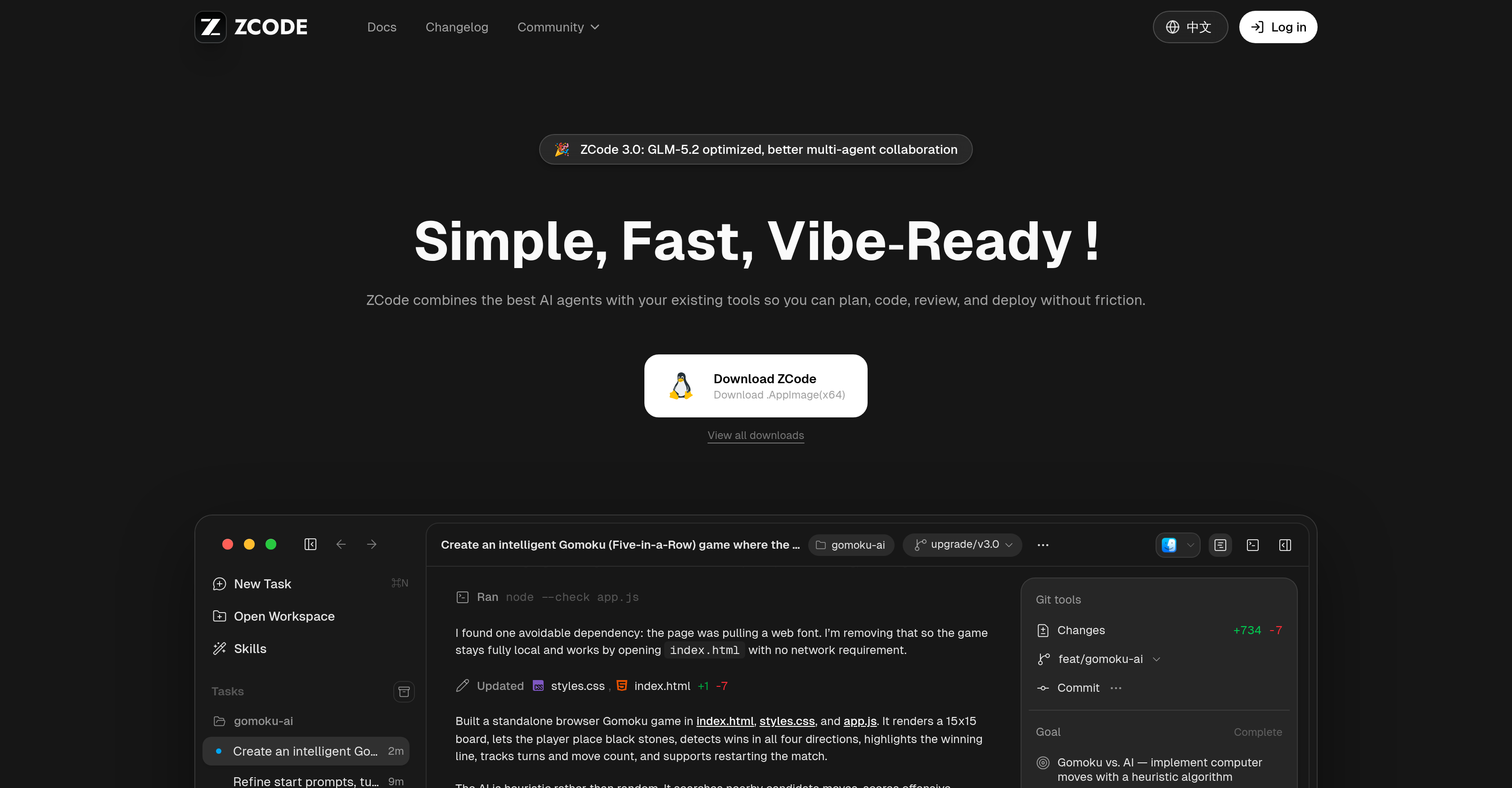
- Ship production-ready code faster with ZCode's GLM-5.2-optimized AI agents that integrate directly into your existing coding workflow.
- Debug with precision and eliminate guesswork by leveraging ZCode's AI features that identify, trace, and resolve errors in your codebase.
- Make informed decisions on every code change using the AI focus area overlay, which visualizes the strongest candidate points the AI evaluates for strategic moves.
- Accelerate your development cycle for real-time features and legacy monoliths through ZCode's steady agentic coding, optimized for GLM-5.2 reasoning and multi-agent collaboration.
- Coordinate complex tasks seamlessly—from task creation to execution—using ZCode's multi-agent collaboration that aligns and optimizes work across multiple AI agents.
- Enhance your web design and game development projects by applying ZCode's heuristic AI, which scores tactical patterns and defends against counter-moves for strategic outcomes.
- Manage your entire UI visual workspace with ZCode's tools that improve layout, organization, and navigation, making coding and debugging more intuitive.
- Locate any code snippet or document instantly with ZCode's enhanced document search, which streamlines information retrieval directly within your workflow.
- Reduce deployment friction and improve code quality using ZCode's streamlined review and deployment environment, designed for error-free releases.
- Scale your AI assistance with ZCode's flexible packages—from lightweight for small tasks to professional for mid-size repos—ensuring you have the right resources for your workload.
Pros & Cons
Pros
- Optimized for GLM-5.2
- Streamlines workflow
- Aids task creation
- Efficient multi-agent collaboration
- Game development capabilities
- Web design functionalities
- Advanced Gomoku game creation
- Aids in debugging
- Improves document search
- Manages UI visual workspace
- Package options for workloads
- Promotes efficient code reviewing
- Deployment made easy
- Evaluates candidate moves
- Scores tactical patterns
- Defends against player moves
- Determines advantageous moves
- Facilitates task planning and execution
- Can be integrated with existing tools
- Supports long-running tasks
- Enhances bot control
- Start and steer ZCode from WeChat, Feishu, or Telegram
- Specifically adapted for GLM-5.2 rule-based modeling
- Offers various installer options for every platform
Cons
- Optimized only for GLM-5.2
- Fails to support non-web design
- Relatively complex user interface
- Limited tool integration
- Requires multiple packages
Reviews
Rate this tool
Loading reviews...
❓ Frequently Asked Questions
ZCode is an AI-based tool optimized for GLM-5.2 that integrates advanced AI agents with existing tools. It is designed to improve workflow by aiding in task creation, planning, execution, and streamlining coding, reviewing, and deployment processes. ZCode 3.0 promotes efficient multi-agent collaboration and offers numerous features for diverse tasks.
ZCode is tuned for GLM-5.2, providing integration across reasoning, coding, and multi-agent collaboration. This allows for faster and steadier agentic coding, making it a suitable tool for tasks ranging from understanding legacy monoliths to shipping real-time features.
ZCode enhances the coding process by offering features like AI focus area overlay, which aids in visualizing the strongest candidate points considered by the AI. It also facilitates efficient multi-agent collaboration, which can enhance productivity and efficiency by coordinating and aligning tasks among multiple agents. ZCode also incorporates advanced AI agents that can integrate with existing tools, allowing for seamless transition and increased efficacy in programming tasks.
ZCode offers assistance with diverse tasks ranging from game development to web design. For instance, it facilitates the creation of an intelligent Gomoku game, debugs programs, and enhances document search. It's also efficient in managing UI visual workspace and in task creation, planning, and execution.
The Gomoku game feature in ZCode showcases the capabilities of its incorporated AI, which is heuristic rather than random. The AI competes against the player, making strategic moves and accurately detecting winning conditions. This feature highlights the AI's advanced algorithm, which scores tactical patterns, defends blocks, and determines the most advantageous move.
ZCode's heuristic AI evaluates nearby candidate moves, scores tactical patterns for itself, defends blocks against the player, exhibits center preference, and determines the most advantageous move. It operates based on evaluating and scoring rather than random selection, promoting strategic decision-making and creative problem-solving.
Yes, ZCode can be used for debugging. It is equipped with features that aid in identifying, tracing, and resolving bugs or errors in a program. This can lead to more efficient and error-free code, enhancing program functionality and user experience.
The AI focus area overlay in ZCode provides visualisation for the strongest candidate points that the AI is considering. This feature offers valuable insight into how the heuristic AI functions and makes strategic decisions, which can facilitate learning, troubleshooting, and optimization of programming tasks.
ZCode plays a vital role in UI management. It offers features that manage the UI visual workspace, enhancing the experience of coding and debugging. It improves the layout, organization, and navigation of the user interface, promoting efficient task execution and user productivity.
ZCode comes with a variety of packages suiting different workload needs. This includes a lightweight package for smaller tasks, a professional package for day-to-day workloads on mid-size repos, and a max usage package for advanced users working on mid-to-large repos. Each package offers a range of benefits, like access to the latest flagship models, faster generation speeds, and dedicated resources during peak times.
ZCode aids in document search by enhancing the process of locating, retrieving, and managing information in documents. Whether you're searching for a specific piece of code or a document related to a current task, ZCode can streamline the search process, saving time and improving productivity.
ZCode assists with task management by helping with task creation, planning, and execution. It promotes efficient multi-agent collaboration, allowing for coordination and alignment among multiple agents. Its functional and intuitive interface assists in organizing, tracking, and controlling tasks, thereby enhancing productivity and ensuring task completion in an efficient manner.
ZCode offers numerous benefits for workflow optimization. By integrating sophisticated AI agents with existing tools, it streamlines the entire workflow, reducing friction in task creation, planning, and execution. Multiple agent collaboration fostered by ZCode further enhances the efficiency and productivity of the workflow.
Yes, ZCode can be used for game development. It offers features like the creation of an intelligent Gomoku game, leveraging advanced algorithms for strategic decision making and accurate detection of winning conditions. By utilizing ZCode's AI capabilities, game developers can incorporate strategic features within games, enhancing player experience and interaction.
ZCode's features like efficient multi-agent collaboration, AI power for strategic decision making, and comprehensive UI visual workspace management can be extremely beneficial for web design. Additionally, ZCode's optimized workflow can enable more efficient design processes and faster deployment of web elements.
In the context of ZCode, 'efficient multi-agent collaboration' refers to the ability of the tool to streamline, coordinate, and optimize the work of multiple AI agents. It allows for seamless interaction among various agents working on a task, thereby enhancing productivity, reducing task completion time, and improving overall output quality.
What makes ZCode a versatile AI-based tool is its wide range of features including GLM-5.2 optimization and integration with existing tools. Its heuristic AI capabilities, enhancing coding processes, debugging, improving document search, and managing UI visual workspace make it adaptable to various tasks. Furthermore, it offers diverse packages to suit different workload needs.
ZCode interacts with existing tools by integrating sophisticated AI agents, optimizing them for GLM-5.2. Its design allows for seamless transition and increased efficiency, aiding you in various tasks from planning, coding, reviewing, to deployment without friction.
ZCode contributes to the deployment process by reducing friction and streamlining the workflow. It aids in code reviewing and offers an optimized environment for deploying finalized codes. This can enhance code quality, reduce errors, and foster a more efficient deployment process.
ZCode is designed to improve task creation and planning by incorporating sophisticated AI agents that integrate with existing tools. It aids in defining clear goals, planning routes to achieve them, and executing tasks in an orderly manner. Its task management feature facilitates efficient multi-agent collaboration, further enhancing the process of task creation and planning.
Pricing
Pricing model
Freemium
Paid options from
$18/month
Billing frequency
Monthly
Related Videos
GLM-5.2 + Z-Code (Ultra Mode - Free Tier): FABLE LEVEL PERFORMANCE!
AICodeKing•16.1K views•Jun 29, 2026