
Tracelight PPT Add-in
Overview
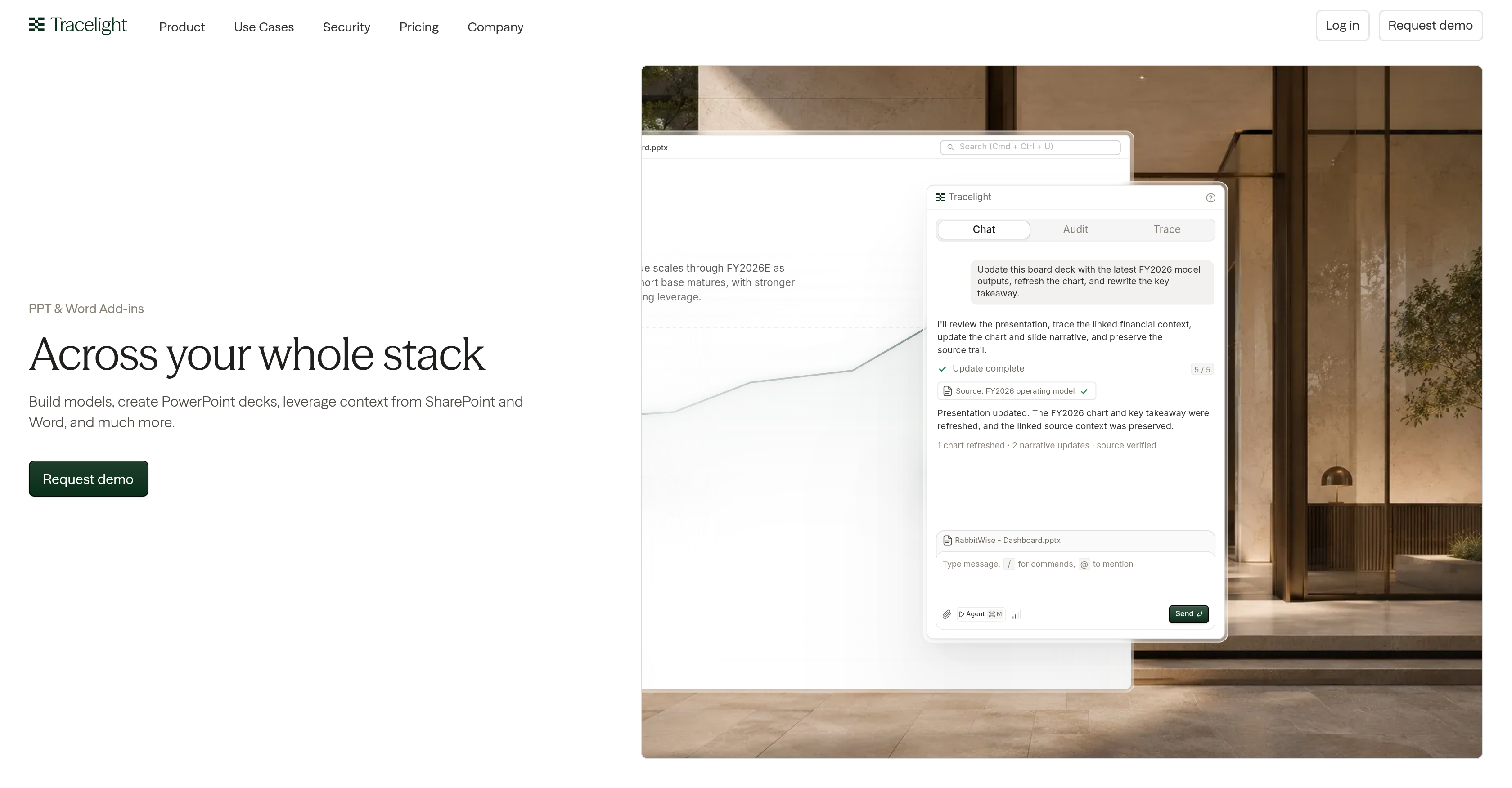
- Eliminate manual updates by refreshing board decks instantly with the latest model outputs using the interactive dashboard for real-time financial data updates
- Catch figure discrepancies across different versions before they reach stakeholders with the Deck to XLSX review feature that keeps presentations synchronized with source Excel models
- Maintain flawless data integrity and audit trails for financial context, ensuring every chart and narrative links back to its original source via the Audit Trace feature
- Ensure total brand consistency without manual formatting by automatically building slides based on your firm's specific template playbook and style guidelines
- Identify and fix cross-slide inconsistencies, broken formatting, and stray errors immediately with the deck review function that ensures all presentation values agree
- Improve presentation structure and clarity instantly with real-time guidance from the Chat Audit Trace feature that reviews content as you work
- Accelerate model creation and deck building by leveraging relevant context directly from SharePoint and Word documents for improved accuracy and efficiency
Pros & Cons
Pros
- Interactive dashboard
- Real-time presentation guidance
- Data integrity preservation
- Deck review function
- Error Checking
- Integration with SharePoint
- Integration with Word
- Excel Synchronization
- Auto-built slides
- Brand consistency
- Audit Trace feature
- Leverages context
- Automatic updates on board decks
- Cross-slide discrepancy detection
- Deck to XLSX review
- Customized to firm's template
- Catches figure discrepancies
- Designed for model creation
- Optimizes PowerPoint deck building
- Supports content optimization
Cons
- No MacOS support
- No standalone application
- Not compatible with Google Slides
- Limited to SharePoint and Word context
- No customization for template playbook
- Chat Audit Trace might seem overwhelming
- No API mentioned for integration
- Dependent on Excel for source data
- Inability to directly edit Excel source
- No clear customization options for interactive dashboard
Reviews
Rate this tool
Loading reviews...
❓ Frequently Asked Questions
Tracelight PPT & Word Add-ins primarily streamline and optimize the processes of creating models and building PowerPoint decks. They are built with features that utilize the context from SharePoint and Word for content optimization, presentation review, and much more.
Tracelight utilizes the contextual data from SharePoint and Word documents to augment the creation of models and PowerPoint presentations. By pulling in relevant information and assets from these platforms, there's improved accuracy, efficiency and consistency in the deck building process.
The interactive dashboard on Tracelight allows users to swiftly update board decks with the most recent outputs from models. Furthermore, it aids in revising key takeaways, thus enhancing the relevancy and accuracy of the board decks.
The Tracelight Chat Audit Trace feature provides real-time guidance designed to refine the content and structure of presentation decks. It offers instant feedback and offers suggestions for improvements, fostering user-friendly and effective PowerPoint presentations.
To preserve the source trail of the linked financial context, Tracelight maintains a clear audit trail when updating charts and slide narratives. This enables accurate tracking and referencing of the original data source, ensuring the integrity of the financial data in presentations.
The deck review function on Tracelight verifies your presentations for inconsistencies between slides. It ensures that all values agree and flags any broken formatting or errors, thereby ensuring the accuracy and consistency of data within a presentation.
The Deck to XLSX review on Tracelight ensures that your presentations remain synchronized with your source Excel model. It aims to catch any discrepancies in figures across different versions of the source model, maintaining the accuracy of data in your presentations.
Tracelight ensures brand consistency by automating the slide building process based on your firm's template playbook. This ensures that each slide is created according to the pre-defined standards and style guidelines, resulting in a consistent look and feel across presentations.
Tracelight's deck review feature handles cross-slide discrepancies, broken formatting, and stray errors in presentations. It checks your deck for values that disagree between slides and provides indications of any inconsistencies, ensuring high-quality and consistent presentations.
Tracelight assists with error checking in presentations through its deck review function and Deck to XLSX review feature. These features collectively ensure that there are no contradictory values between slides and catch any figure discrepancies across different versions.
Yes, Tracelight does have a feature that synchronizes presentations with source Excel data. By leveraging the Deck to XLSX review feature, the user can ensure that figures and data references remain accurate and consistent with the source model.
Tracelight assists with model creation on PowerPoint and Word by providing a set of tools designed to streamline and optimize this process. It leverages context from SharePoint, Word, and other trusted platforms to facilitate the creation of accurate, efficient models within presentations.
The Audit Trace feature in Tracelight provides clear visibility and control over the data sourcing and updating process, ensuring data integrity. It helps track and preserve the source trail of the linked financial context in a comprehensible and auditable manner.
Absolutely, Tracelight is designed to work seamlessly with SharePoint. Context from SharePoint is leveraged to provide relevant input during model creation and the deck building process, ensuring accuracy, compliance, and efficiency.
Tracelight provides real-time guidance through its Chat Audit Trace feature. This feature continuously reviews the presentation content and structure to provide immediate feedback and optimization suggestions, enhancing both the quality and clarity of the presentations.
Tracelight maintains data integrity in presentations by preserving the source trail of linked financial context. It also has a Deck to XLSX review feature which ensures that all data is up-to-date and consistently aligns with the source Excel model.
Yes, Tracelight does support synchronization of different versions of a model. Its Deck to XLSX review feature keeps presentations in sync with the source Excel model, catching any figure discrepancies that may have arisen across different versions.
Yes, Tracelight handles financial context in presentations. It preserves the source trail of the linked financial context in a comprehensive and auditable manner, enhances data integrity, and ensures the accuracy of financial details in the presentations.
Tracelight follows the firm's template playbook to ensure brand consistency. This could include the firm's specific layouts, master slides, components, fonts, colours, etc. This feature ensures every slide is uniform, helping to maintain the brand identity across presentations.
Tracelight optimizes the process of creating models by integrating with SharePoint and Word for context, presenting an interactive dashboard for real-time updates, maintaining a robust review system for error-checking, and synchronizing deck data with Excel models. Its error-checking and real-time guidance features ensure accurate, efficient, and high-quality model creation.
Pricing
Pricing model
Free Trial
Paid options from
$40/month
Billing frequency
Monthly