Overview
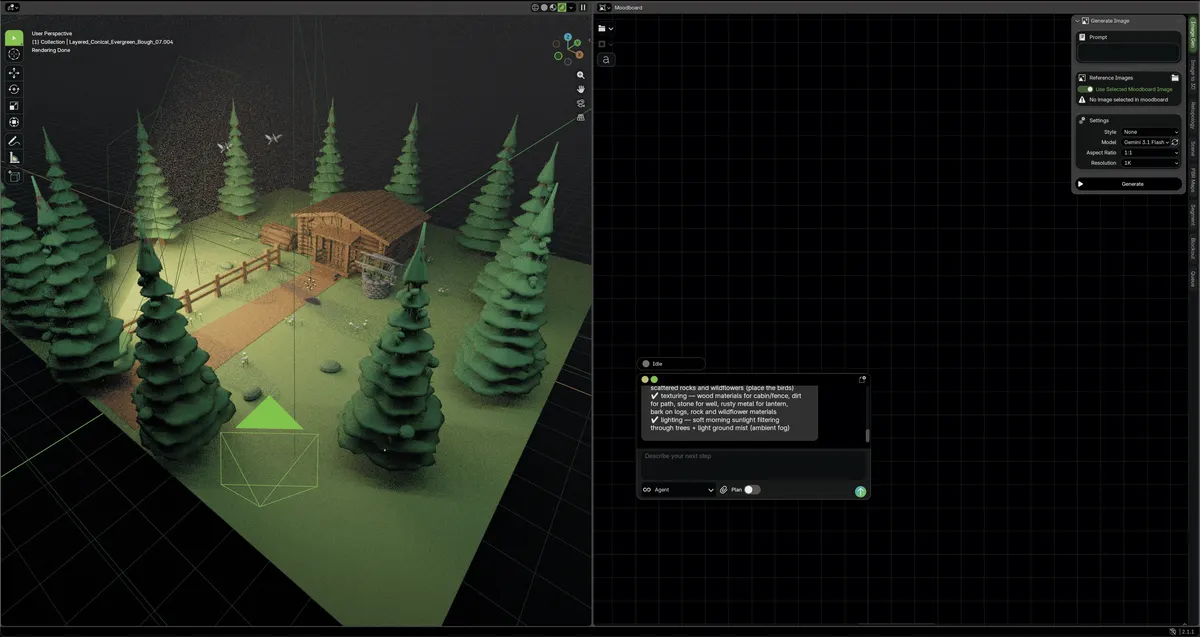
- Finish 3D scenes faster by offloading retopology, UV unwrapping, texture baking, and export prep to the background-running Mixie AI agent, keeping your viewport responsive.
- Build entire environments at once instead of object by object, as each object gets its own sub-agent for modeling or texturing that works in parallel and merges results into the same Blender scene.
- Achieve production-ready assets with dedicated workspaces for each stage—stencil painting in the texturing room, live island packing in the UV room, and retopology overlays in the modeling room.
- Create photorealistic materials with layer-based texturing that stacks PBR effects using masks, blend modes, and procedural inputs, while keeping every AI-painted layer fully hand-editable.
- Stay in creative flow with an in-canvas moodboard that generates references, pins style anchors, and prompts scene changes without leaving the editor.
- Keep full control over costs and data by running locally with an open-source codebase, and connect your own provider API key, OpenRouter, or Codex subscription for flexible billing.
- Scale production for indie game studios, architecture, and real estate concepting with automatic rigging and pose-by-prompt, plus engine-ready export for immediate use.
Pros & Cons
Pros
- Open source, inspect and run it yourself
- Built on the Blender platform
- AI agent handles retopology, UVs and bakes
- Parallel sub-agents work per object
- All results return to one Blender scene
- Background tasks never block the viewport
- Purpose-built modelling, UV and texturing rooms
- Layer-based PBR texturing stays hand-editable
- In-canvas moodboard for references and style
- Bring your own key or OpenRouter 400+ models
Cons
- Requires basic Blender familiarity
- Needs your own provider or OpenRouter key
- Heavy generation workloads consume paid credits
- Deep feature set takes time to learn
Reviews
Rate this tool
Loading reviews...
❓ Frequently Asked Questions
Mixar is a 3D editor that is built on the Blender platform and has an AI-assistant incorporated inside. Mixar specializes in handling tasks automatically including retopology, UV rebuilding, baking, and export preparations, allowing users to concentrate on their main tasks. It is designed to improve workflow and introduce a suite of features to streamline 3D editing.
In Mixar, AI is used to automatically handle several tasks that would otherwise be manually implemented by the user. These tasks include retopology, UV rebuilding, baking, and export preparations. The AI assists by running these processes in the background, allowing users to focus on their more complex, creative tasks.
In Mixar, automated task processing involves using the incorporated artificial intelligence to manage tasks like retopology, UV rebuilding, baking, and export preparations without user intervention. The AI system handles these tasks in the background, freeing up the user to concentrate on their primary objectives.
A sub-agent in Mixar is allocated to each object for modeling or texturing. These sub-agents work simultaneously and upon completion return every result to the same Blender scene. This method of usage significantly speeds up the overall process.
Mixar introduces a range of new features that enhance workflow. These include per-task workspaces, layer-based texturing, and an in-canvas mood board for generating references and making scene changes. It also enables the assignment of each object to a separate sub-agent for simultaneous modeling or texturing.
Yes, Mixar's source code is open-source. As such, developers, artists, and creators can inspect the code, run the program, and even build upon it. This openness allows for customization and extension according to individual needs.
Mixar is suitable for a broad set of users within the design sector. This includes creative teams, indie game studios, solo creators, and various others in the industry. It is particularly beneficial to sectors like architecture and real estate concepting, providing a range of tools and features for these fields.
Billing in Mixar can be controlled by using your provider key or an OpenRouter key. This flexibility allows you to manage the financial aspect to your liking and exchange providers whenever you want.
Yes, thanks to the AI assistance and the system of sub-agents, Mixar can work on multiple tasks simultaneously. Every given object is allocated to a separate sub-agent for modeling or texturing, letting each sub-agent work simultaneously, which significantly ramps up productivity.
Layer-based texturing in Mixar is a feature where users can stack PBR effects with masks, blend modes, and procedural inputs. It is akin to using Photoshop for materials and Mixie, the AI agent, can paint a layer that can still be edited manually.
An in-canvas mood board in Mixar serves as a tool for generating references, pinning style anchors, and prompting scene changes within the editor itself, right alongside the users' work. It eliminates the alternate need to switch to other platforms for reference generation, hence streamlining the creative process.
Mixar improves the workflow in Blender by incorporating AI assistance to automatically handle daunting tasks such as retopology, UV rebuilding, baking, and export preparations. Each object is assigned to a separate sub-agent for modeling or texturing, which works simultaneously, boosting overall speed and efficiency.
'Mixar accommodates multiple usages' means that it supports a wide range of applications and industries. Apart from general 3D editing, it provides tools and functionalities suited for creative teams, indie game studios, architecture, and real estate concepting. Thus, it's a versatile tool that caters to many different user needs.
Yes, Mixar can perform UV rebuilding and retopology. These operations are among the tasks that Mixar's AI assistance can handle automatically, contributing substantially towards streamlining the workflow.
Mixar helps in indie game development by automating certain processes such as retopology, UV rebuilding, and baking among others. This allows studios to focus more on design and conceptualization, thereby speeding up production cycles while ensuring attention to detail.
Mixar can be used in architecture and real estate concepting by providing a suite of 3D modelling and texturing tools. It allows users to visualize, plan, create virtual walk-throughs, and make rapid layout changes. Its automated features expedite the overall design process in these sectors.
In Mixar you can assign tasks to background agents by dispatching 'Mixie', the AI agent, to undertake tasks such as unwrapping, baking, retopologizing, or generating, while you focus on other tasks. As a result, you can manage multiple processes without interruption.
Yes, Mixar can handle tasks like baking and export preparations. These are part of the suite of tasks that the AI assistant in Mixar can automate and perform in the background, freeing up the user to focus on other parts of their work.
The purpose of per-task workspaces in Mixar is to provide a dedicated, purpose-built workbench for each specific task. This concept helps in better organization and a more streamlined workflow as it avoids clutter and confusion that can come from multiple tasks overlapping in the same workspace.
Mixar can be customized to aid creative design in several ways. For instance, its open-source nature allows modifications to its code, enabling users to adapt it to their needs. Furthermore, Mixar offers a range of features like layer-based texturing, in-canvas mood boards, and per-task workspaces which can be utilized as per the requirements of a project.
Pricing
Pricing model
Freemium
Paid options from
$29.99/month
Billing frequency
Monthly